1. Вступ
This manual provides detailed instructions for the safe and effective use of your Neewer NWHG-01 3-Axis Handheld Gimbal Stabilizer. This device is designed to capture smooth, stabilized video footage with compatible GoPro cameras and smartphones. Please read this manual thoroughly before operating the product and retain it for future reference.
The NWHG-01 gimbal features a 3-axis brushless motor system, providing stabilization across tilt, roll, and pan axes. It includes a comfortable silica gel handle grip and a removable lithium-ion battery. The kit also comes with a protective carrying case and cleaning accessories.
2. Вміст упаковки
Перевірте, чи всі перелічені нижче предмети присутні у вашій упаковці:
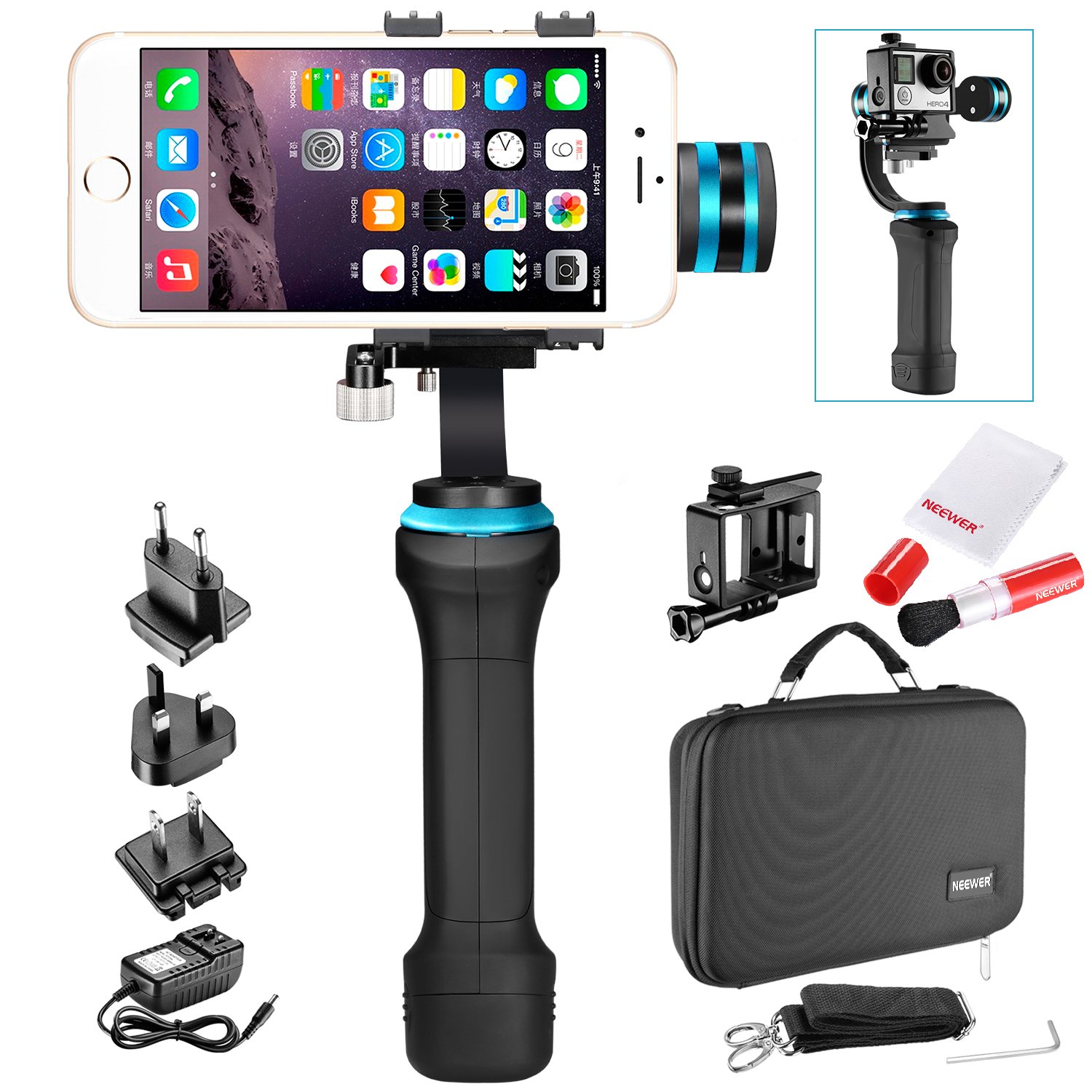
Image 2.1: All components of the Neewer NWHG-01 kit neatly organized within the protective carrying case.
- 1 x NWHG-01 Handheld Gimbal Stabilizer
- 1 x літій-іонний акумулятор
- 1 х Clamp for Regular-Sized Smartphones (width: 2.2-3.0 inches / 56-76 mm)
- 1 х Clamp for Large-Sized Smartphones (width: 2.5-3.6 inches / 64-92 mm)
- 1 х Clamp for GoPro Hero 3+/4
- 1 x захисний футляр для транспортування
- 1 x Battery Charger with US/UK/EU Plug Adapters
- 2 x Counterweights (for large-sized smartphones to balance pitch direction)
- 1 x Lens Brush
- 1 серветка для чищення з мікрофібри
3. Продукт закінчивсяview
Familiarize yourself with the main components of the gimbal stabilizer.
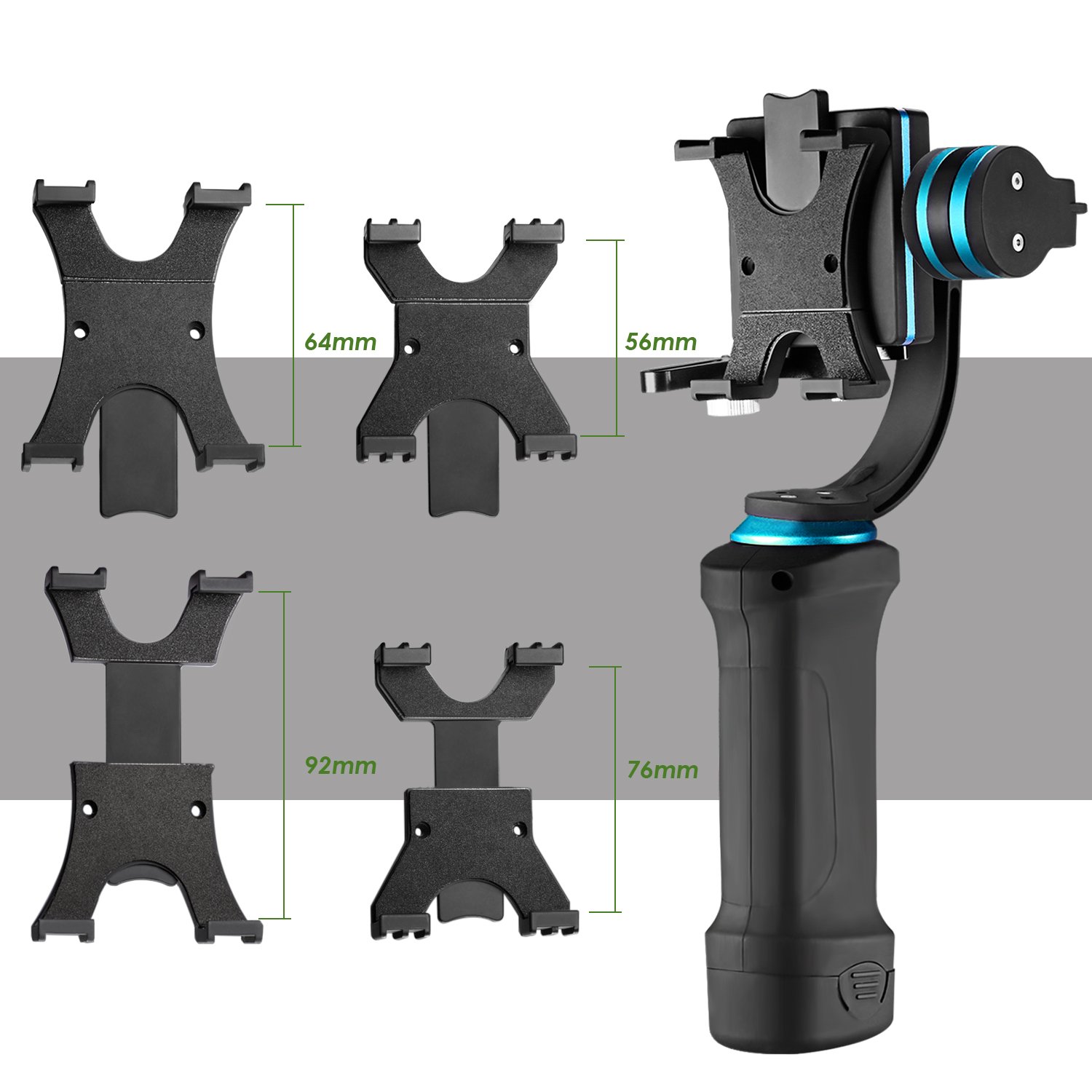
Image 3.1: The gimbal body shown with the three different clamps for smartphones and GoPro cameras, along with their respective width measurements.
- Ручка підвісу: Main body with control buttons and battery compartment.
- Motorized Head: Houses the brushless motors for 3-axis stabilization.
- Прилад Клamp: Interchangeable clamps to secure your smartphone or GoPro.
- Противаги: Used for balancing heavier devices.
- Батарея: Літій-іонний акумулятор.
- зарядний пристрій: Для підзарядки акумулятора.

Зображення 3.2: Крупний план view of the gimbal handle, showing the battery insertion point and the DC jack for charging. LED indicators for remaining power are also visible.
4. Налаштування
4.1. Зарядка батареї
- Insert the provided lithium-ion battery into the battery grip at the bottom of the gimbal handle. Ensure it is securely seated.
- Connect the charger to the DC jack located on the battery grip.
- Plug the charger into a suitable power outlet using the appropriate plug adapter (US/UK/EU).
- The LED indicator on the battery grip will show charging status. Charge until the battery is full.
4.2. Attaching Your Device (Smartphone or GoPro)
- Виберіть відповідний клamp для вашого пристрою:
- Regular-sized smartphone clamp (2.2-3.0 inches / 56-76 mm width)
- Large-sized smartphone clamp (2.5-3.6 inches / 64-92 mm width)
- GoPro clamp (compatible with Hero 3+/4)
- Attach the selected clamp to the gimbal's mounting plate. Ensure it is firmly secured.
- Carefully place your smartphone or GoPro into the clamp. Ensure the device is centered and securely held.
4.3. Балансування карданного підвісу
Proper balancing is crucial for optimal performance and to prevent motor strain. The gimbal must be balanced before powering it on.
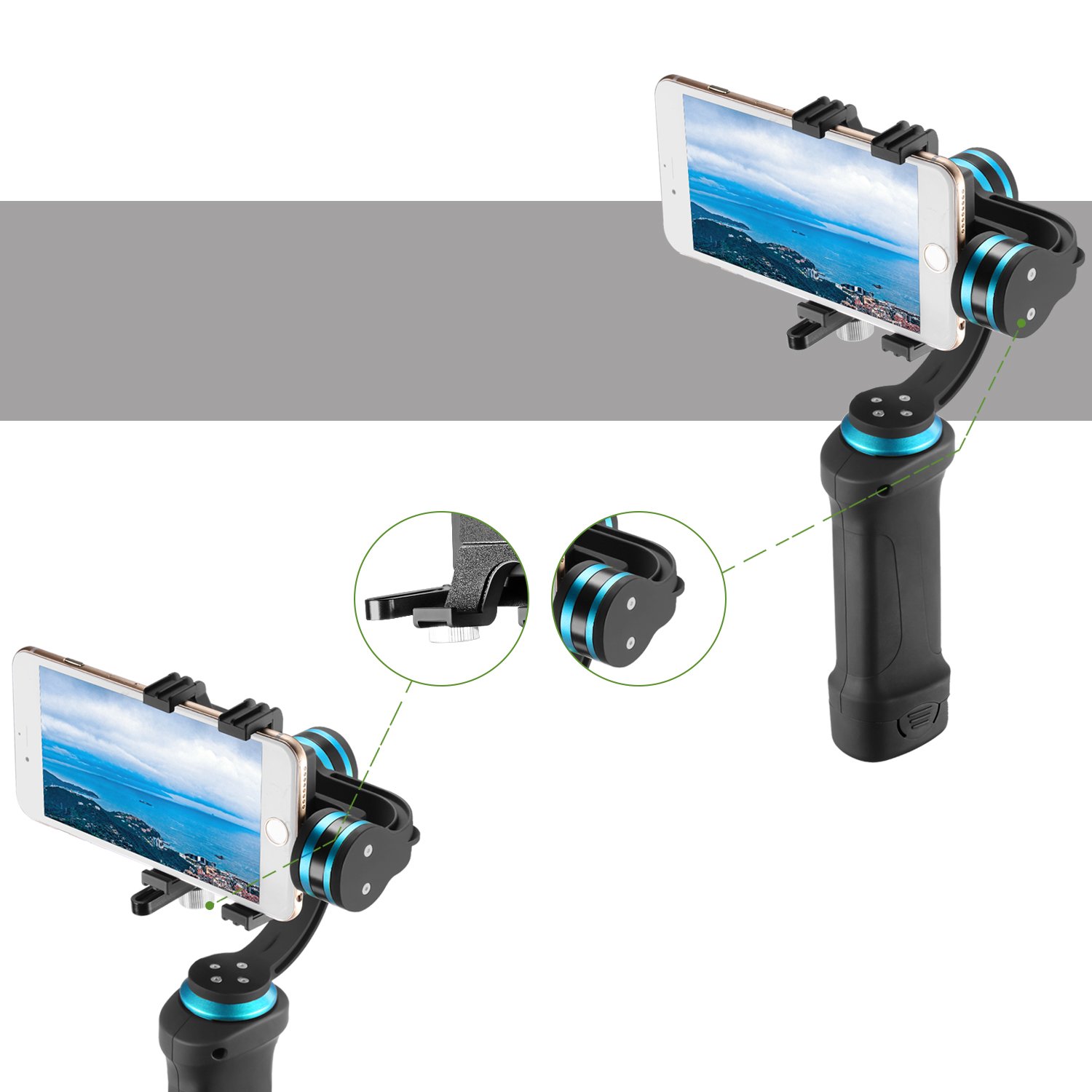
Image 4.1: The gimbal holding a smartphone, illustrating the balancing points and the use of counterweights for proper alignment.
- With your device mounted, hold the gimbal horizontally.
- Adjust the position of the device within the clamp until it remains level without assistance.
- If using a large or heavy smartphone, you may need to attach the provided counterweights to achieve proper balance. Experiment with the placement of the counterweights until the device is stable in all axes (tilt, roll, pan) when the gimbal is off.
- Once balanced, the device should not tilt or roll on its own.
5. Інструкція з експлуатації
5.1. Увімкнення/вимкнення живлення
- Щоб увімкнути: Press and hold the power button (usually located on the handle) for a few seconds until the indicator light illuminates and the motors activate.
- Щоб вимкнути: Press and hold the power button again until the indicator light turns off and the motors cease operation.
Важливо: Always ensure your device is properly mounted and balanced before powering on the gimbal.
5.2. Основна операція
Once powered on, the gimbal will automatically stabilize your device. The 3-axis stabilization system will keep your camera level and smooth out movements as you walk, run, or move.
- Pan Following Mode: The gimbal typically defaults to a pan-following mode, where the camera smoothly follows your horizontal (pan) movements while keeping the tilt and roll axes stable.
- Tilt and Roll: The gimbal's motors actively counteract unwanted tilt and roll movements, ensuring your footage remains level.
- Controlling Movement: Gently move the gimbal handle to control the direction of your camera. Avoid sudden, jerky movements.
Refer to the specific button layout on your gimbal for any additional modes or controls (e.g., joystick for manual pan/tilt, mode switch). These functions vary by specific model revisions.
6. Технічне обслуговування
6.1. прибирання
Regular cleaning helps maintain the performance and longevity of your gimbal and accessories.
- Корпус карданного підвісу: Wipe the gimbal body with a soft, dry cloth. Avoid using harsh chemicals or abrasive cleaners.
- Пензель для лінз: Use the provided static-free lens brush to gently remove dust and loose particles from camera lenses or smartphone screens. Do not use on wet surfaces.
- Серветка з мікрофібри: Use the microfiber cloth for streak-free cleaning of lenses, screens, and other delicate surfaces. It is gentle and leaves no scratches.
6.2. Зберігання
When not in use, store the gimbal in its protective carrying case to prevent damage from dust, impacts, and moisture. Store in a cool, dry place away from direct sunlight.

Image 6.1: The protective carrying case being held by hand and worn over the shoulder, demonstrating its portability and secure storage.
For long-term storage, ensure the battery is partially charged (around 50%) and remove it from the gimbal. Recharge the battery every few months to maintain its health.
7. Вирішення проблем
- Підвіс не вмикається:
- Переконайтеся, що акумулятор повністю заряджений та правильно вставлений.
- Check for any visible damage to the battery or gimbal.
- Gimbal motors vibrating or not stabilizing:
- Power off the gimbal immediately.
- Verify that your device (smartphone/GoPro) is properly mounted and balanced. Re-balance if necessary.
- Ensure no obstructions are interfering with the gimbal's movement.
- Restart the gimbal after re-balancing.
- Device not fitting in clamp:
- Ensure you are using the correct clamp for your device size. Refer to Section 4.2.
- The gimbal supports smartphones with widths between 2.2-3.6 inches (56-92 mm) and GoPro Hero 3+/4. Devices outside this range are not compatible.
- Невідповідні елементи керування:
- Power cycle the gimbal (turn off, then turn on).
- Переконайтеся, що акумулятор має достатній заряд.
If problems persist, contact Neewer customer support for assistance.
8. Технічні характеристики
| Особливість | Деталь |
|---|---|
| Модель | NWHG-01 |
| Стабілізація | 3-Axis (Tilt, Roll, Pan) |
| Тип двигуна | Безщітковий |
| Сумісні пристрої | GoPro Hero 3+/4, Smartphones (width 2.2-3.6 inches / 56-92 mm) |
| Dimensions (Gimbal) | Height: 332mm, Width: 230mm, Depth: 84mm (approximate, as per product description) |
| Розміри виробу (в упаковці) | 34.04 х 24.89 х 9.4 см |
| Вага товару | 1.59 кг (3.5 фунта) |
| Матеріал ручки | Силікагель |
| Матеріал футляра для перенесення | Балістичний нейлон |
| UPC | 191073020856 |
9. Гарантія та підтримка
Specific warranty information for the Neewer NWHG-01 Gimbal Stabilizer is not provided in the product details. Please refer to the warranty card included with your purchase or visit the official Neewer webсайт для отримання детальних гарантійних умов.
For technical support, troubleshooting assistance, or inquiries regarding your product, please contact Neewer customer service through their official webсайт або контактну інформацію, зазначену на упаковці вашого продукту.