1. Продукт закінчивсяview
The Teltonika RUT240 is an industrial 4G LTE Wi-Fi router designed for reliable cellular communication in various environments. This manual provides essential information for its proper installation, configuration, and use.
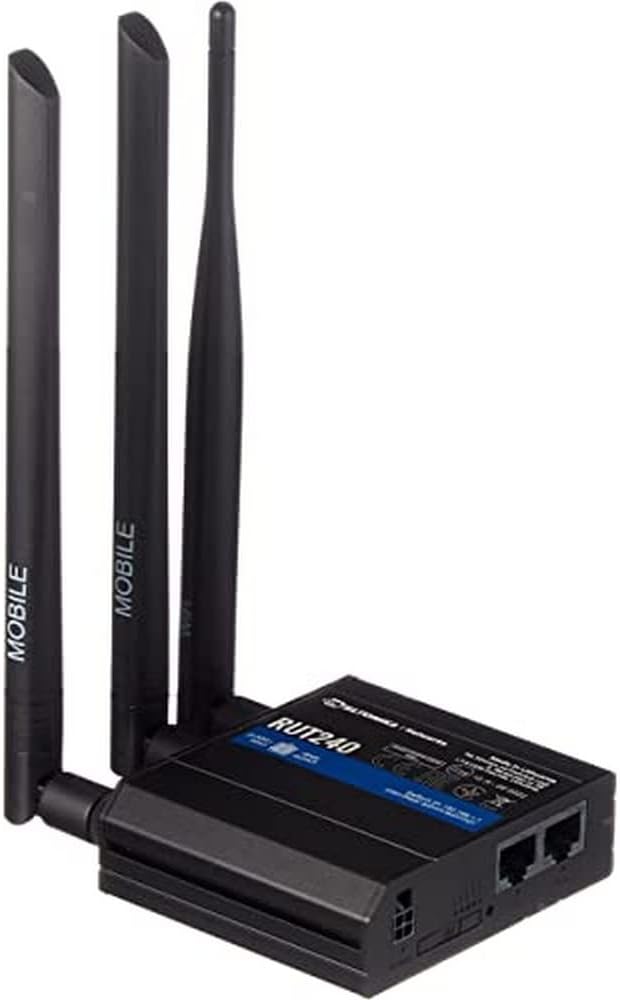
малюнок 1: Фронт view of the Teltonika RUT240 LTE Router with its three attached antennas, illustrating its compact design.
2. Вміст упаковки
Before proceeding with installation, verify that all items are present in the package:
- LTE-маршрутизатор Teltonika RUT240
- Адаптер живлення
- Кабель Ethernet
- Two LTE Antennas (magnetic mount, SMA male)
- One Wi-Fi Antenna (magnetic mount, RP-SMA male)
- Короткий посібник

малюнок 2: The Teltonika RUT240 router displayed with its standard accessories, including the power adapter and an Ethernet cable.
3. Налаштування
3.1 Встановлення обладнання
- Вставте SIM-карту: Locate the SIM card slot on the side of the router. Insert your activated Mini-SIM card into the slot until it clicks into place. Ensure the SIM card is correctly oriented as indicated on the device.
- Приєднайте антени: Screw the two LTE antennas onto the SMA connectors labeled "MOBILE" and the Wi-Fi antenna onto the RP-SMA connector labeled "WLAN" on the router. Ensure they are securely tightened.
- Підключіть живлення: Connect the power adapter to the power socket on the router and then plug the adapter into a power outlet. The router will begin to power on.
- Додатково: Підключення Ethernet: For initial configuration or wired network access, connect one end of the Ethernet cable to the LAN port on the router and the other end to your computer's Ethernet port.

малюнок 3: сторона view of the Teltonika RUT240, highlighting the SIM card slot and the antenna connection points for mobile and Wi-Fi signals.

малюнок 4: Задня view of the Teltonika RUT240, showing the power input, SIM card slot, and the LAN/WAN Ethernet ports.
3.2 Початкова конфігурація
- Доступ Web Інтерфейс: Відкрийте a web browser on your connected computer and navigate to http://192.168.1.1.
- Логін: Enter the default username "admin" and the password found on the device label or packaging. You will be prompted to change the password for security.
- Quick Setup Wizard: Follow the on-screen Quick Setup Wizard to configure basic settings such as mobile data connection (APN settings), Wi-Fi network name (SSID), and password.
4. Інструкція з експлуатації
4.1 світлодіодні індикатори
The RUT240 features several LED indicators to provide status information:
- Світлодіод живлення: Показує стан живлення. Світиться зеленим світлом, коли живлення увімкнено.
- Mobile Signal Strength LEDs: Multiple LEDs indicate the strength of the cellular signal. More illuminated LEDs mean stronger signal.
- Network Type LEDs: Indicate the active cellular network type (e.g., 2G, 3G, 4G/LTE).
- Світлодіод Wi-Fi: Показує стан модуля Wi-Fi.
- Світлодіоди локальної/глобальної мережі: Вказує на активність на відповідних портах Ethernet.
4.2 Підключення до Wi-Fi
- На своєму пристрої (смартфоні, ноутбуці) знайдіть доступні мережі Wi-Fi.
- Select the network name (SSID) configured during the initial setup.
- Enter the Wi-Fi password (WPA2 key) when prompted.
- Once connected, your device should have internet access via the RUT240.
4.3 Розширена конфігурація
Маршрутизатора web interface (RutOS) offers extensive configuration options for advanced users, including VPN, firewall rules, SMS utilities, and more. Refer to the official Teltonika documentation for detailed guides on advanced features.
5. Технічне обслуговування
- Оновлення прошивки: Regularly check for and install firmware updates from the official Teltonika website to ensure optimal performance, security, and access to new features. This can typically be done via the router's web інтерфейс.
- Прибирання: Тримайте маршрутизатор чистим і без пилу. Використовуйте м’яку суху тканину. Не використовуйте рідкі засоби для чищення.
- Умови навколишнього середовища: Ensure the router is operated within its specified temperature and humidity ranges to prevent damage. Avoid direct sunlight and excessive heat.
- Безпечні паролі: Periodically change your router's login password and Wi-Fi password to maintain network security.
6. Вирішення проблем
| проблема | Можлива причина | Рішення |
|---|---|---|
| Немає доступу до Інтернету |
|
|
| Немає доступу Web Інтерфейс |
|
|
| Wi-Fi не видно або не вдається підключитися |
|
|
6.1 Скидання до заводських налаштувань
If you encounter persistent issues, a factory reset may resolve them. To perform a factory reset:
- Переконайтеся, що маршрутизатор увімкнено.
- Locate the reset button (often recessed) on the router.
- Use a thin object (e.g., a paperclip) to press and hold the reset button for approximately 10 seconds.
- Release the button when the LEDs indicate a reset (e.g., all LEDs flash). The router will reboot with factory default settings.
7. Технічні характеристики
| Особливість | Деталь |
|---|---|
| Назва моделі | Teltonika RUT240 |
| Номер моделі товару | RUT24006B000 |
| Розміри продукту | 2.91 x 3.27 x 0.98 дюймів |
| Вага товару | 4 міліграм |
| Операційна система | RutOS |
| Технологія підключення | LAN, Wi-Fi |
| Стандарт бездротового зв'язку | 802.11н |
| Клас діапазону частот | Чотиридіапазонний |
| Особливість | WPS |
| Сумісні пристрої | Персональний комп'ютер |
| Рекомендоване використання | Моніторинг |
| Виробник | JSC Teltonika |
8. Гарантія та підтримка
For detailed warranty information, please refer to the official Teltonika website or the warranty card included with your product. Technical support is available through Teltonika's official support channels, including their website and dedicated support portal.
Інтернет-ресурси:
- Teltonika RUT240 Wiki (for comprehensive documentation and guides)
- Teltonika Networks Support


