вступ
Thank you for choosing the Dörr 204473 8 MP Snapshot IR TFT Trail Camera. This camera is designed for versatile surveillance, offering high-quality images and videos both day and night. Its robust, weatherproof design makes it ideal for outdoor use, capturing wildlife or monitoring property with its motion detection capabilities. Please read this manual carefully before operating the camera to ensure proper use and to maximize its performance.
Інформація про безпеку
- Не піддавайте камеру впливу екстремальних температур або прямих сонячних променів протягом тривалого часу.
- Ensure the battery compartment is securely closed to maintain water resistance.
- Use only recommended battery types (AA batteries). Do not mix old and new batteries, or different types of batteries.
- Тримайте камеру подалі від сильних магнітних полів.
- Не намагайтеся розбирати або модифікувати камеру. Це призведе до анулювання гарантії.
- Утилізуйте батарейки та електронні компоненти відповідально згідно з місцевими правилами.
Продукт закінченийview
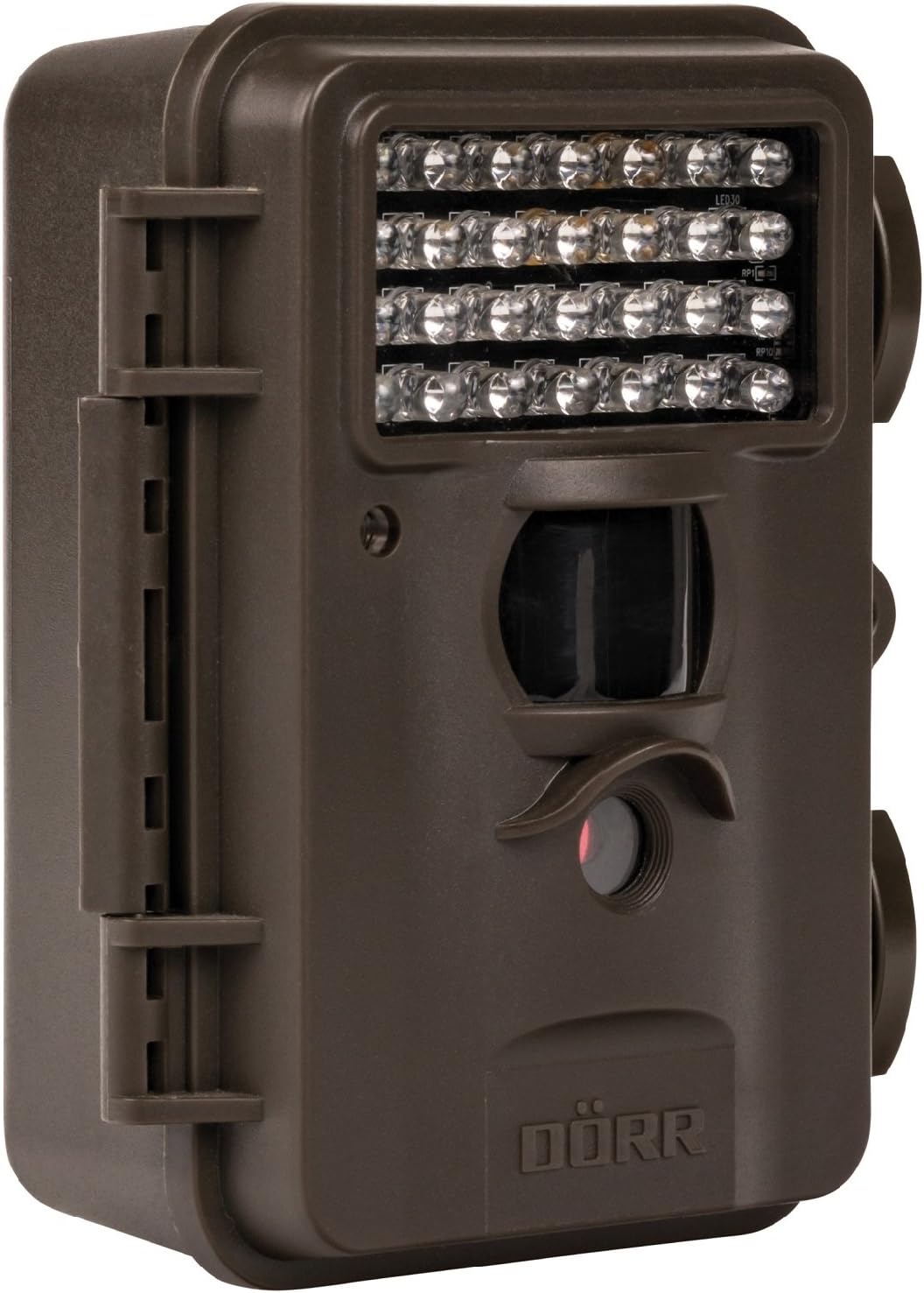
This image displays the front of the Dörr 204473 Trail Camera. Visible features include the array of 28 infrared LEDs at the top, the passive infrared (PIR) motion sensor below the LEDs, and the camera lens at the bottom. The camera has a rugged, dark brown, weatherproof casing with a latch on the left side.
The Dörr 204473 camera features a compact and durable design. Key components include:
- Інфрачервоні світлодіоди: 28 nearly invisible LEDs for night illumination up to 15 meters.
- Датчик руху PIR: Detects movement to trigger photo or video capture.
- Об'єктив камери: Captures 8MP still images and video.
- TFT дисплей: Для навігації по меню та viewing captured media (located inside the camera).
- Control Keypad: For setting up and operating the camera.
- Всепогодний корпус: Protects the camera from environmental elements.
Налаштування
1. Встановлення батареї
- Open the camera housing latch on the side.
- Знайдіть батарейний відсік.
- Вставте 4 або 8 батарейок типу АА, дотримуючись правильної полярності (+/-).
- Надійно закрийте кришку батарейного відсіку.
2. Встановлення SD-карти
- With the camera housing open, locate the SD/SDHC card slot.
- Insert an SD/SDHC memory card (up to 32 GB) into the slot until it clicks into place. Ensure the card is inserted in the correct orientation.
- Щоб вийняти, обережно натисніть на карту, доки вона не вискочить.
3. Монтаж камери
The camera can be mounted using a strap or a wall mount. Ensure the camera is positioned to capture the desired area without obstructions. The mounting type is wall mount.
- Кріплення ремінця: Thread the provided strap through the slots on the back of the camera and secure it around a tree or pole.
- Настінне кріплення: Use appropriate screws and anchors (not included) to secure the camera to a wall or flat surface.
Інструкція з експлуатації
1. Увімкнення/вимкнення живлення
- Щоб увімкнути живлення, пересуньте перемикач живлення в положення «УВІМК.».
- Щоб вимкнути живлення, пересуньте перемикач живлення у положення «ВИМК.».
2. Навігація по меню
Once powered on, the TFT display will activate. Use the keypad buttons (UP, DOWN, LEFT, RIGHT, OK, MENU) to navigate through the settings menu. The menu is available in English and German.
3. Налаштування дати та часу
- Enter the menu and navigate to 'Date/Time' settings.
- Use the navigation buttons to set the current date and time.
- Confirm with 'OK'. Each captured image will display the time, date, and temperature in °C.
4. Photo/Video Modes and Settings
The camera supports both still image and video capture. Adjust settings such as resolution, trigger interval, and burst mode via the menu.
- роздільна здатність: Set to 8MP for still images.
- Час спрацьовування: The camera has a fast trigger time of 1.3 seconds.
- Виявлення руху: Configure the sensitivity of the PIR sensor.
- Нічне бачення: The 28 IR LEDs automatically activate in low light conditions for night vision up to 15 meters.
5. Viewінж Files
Ви можете view captured photos and videos directly on the camera's TFT display or by connecting the camera to a computer via USB (cable not included) or by inserting the SD card into a card reader.
Технічне обслуговування
- Прибирання: Use a soft, dry cloth to clean the camera lens and housing. Do not use abrasive cleaners or solvents.
- Догляд за акумулятором: Вийміть батарейки, якщо камера не використовуватиметься протягом тривалого часу, щоб запобігти їх витіканню.
- Зберігання: Зберігайте камеру в прохолодному, сухому місці, захищеному від прямих сонячних променів, коли вона не використовується.
Усунення несправностей
| проблема | Можлива причина | Рішення |
|---|---|---|
| Камера не вмикається | Низький заряд або розряджені батареї; неправильна полярність батарей. | Замініть батарейки; переконайтеся в правильній полярності. |
| Немає зображень/відео, зроблених | SD card full or not inserted correctly; motion sensor blocked or sensitivity too low. | Insert/replace SD card; format SD card; clear sensor path; increase sensor sensitivity. |
| Погана якість зображення вночі | Subject too far from camera; IR LEDs obstructed. | Ensure subject is within 15m range; clear any obstructions from IR LEDs. |
| Камера не виявляє руху | PIR sensor sensitivity too low; camera positioned incorrectly. | Increase PIR sensitivity; reposition camera for optimal detection angle. |
Технічні характеристики
| Особливість | Деталь |
|---|---|
| Бренд | DÖRR |
| Номер моделі | 204473 |
| Ефективне вирішення проблеми | 8 Мп |
| Ефективна роздільна здатність відео | 8 Мп |
| Діапазон нічного бачення | 15 метрів |
| Кількість ІЧ світлодіодів | 28 |
| Тригер Час | 1.3 секунди |
| Зберігання | SD/SDHC Memory Card (up to 32 GB) |
| Джерело живлення | 4x or 8x AA Batteries |
| Колір | чорний |
| матеріал | метал |
| Розміри предмета (Д x Ш x В) | 10 х 7 х 12.2 см |
| Рівень водонепроникності | Водостійкий |
| Тип монтажу | Настінне кріплення |
| Рекомендовані програми | Виявлення руху, нічне бачення |
Гарантія та підтримка
For warranty information and technical support, please refer to the documentation provided with your purchase or visit the official Dörr webсайт. Зберігайте чек про покупку для будь-яких гарантійних претензій.


