1. Вступ і даліview
The Ewent EW7012 USB 3.1 Gen1 Docking Station provides a convenient and efficient solution for connecting 2.5-inch and 3.5-inch SATA hard disk drives (HDDs) or solid-state drives (SSDs) to your computer via a USB port. This docking station is ideal for quick data transfers, backups, and accessing data from multiple drives without needing to install them internally. It supports SuperSpeed USB 3.1 Gen1 (USB 3.0) for high-speed data transfer and is backward compatible with USB 2.0.

Малюнок 1: Спереду view of the Ewent EW7012 USB 3.1 Gen1 Docking Station with its blue LED indicator.
2. Що в коробці
Будь ласка, перевірте вміст упаковки, щоб переконатися, що всі елементи присутні:
- Ewent EW7012 USB 3.1 Gen1 Docking Station
- USB 3.1 Gen1 (USB 3.0) Cable
- Адаптер змінного струму
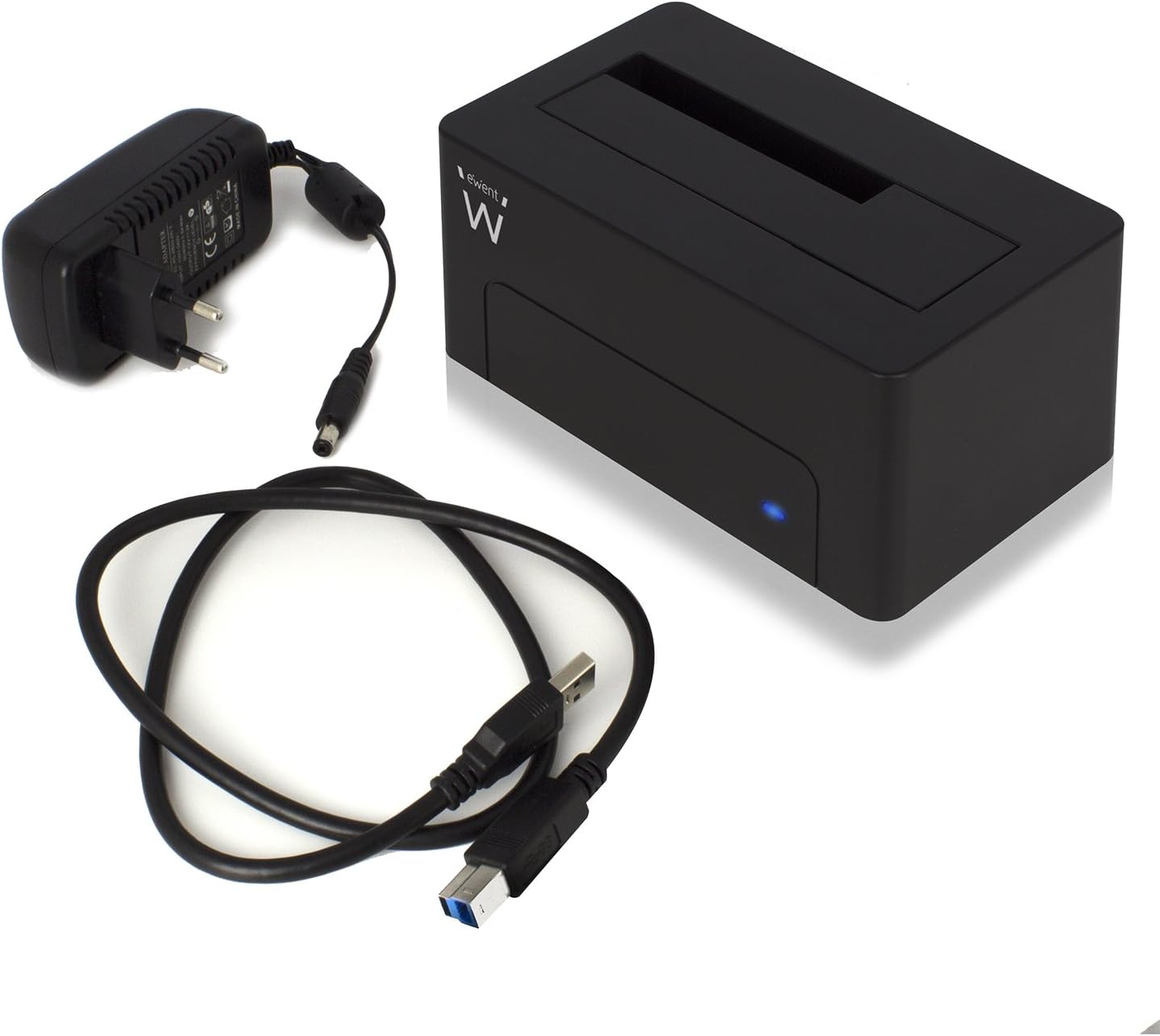
Figure 2: The Ewent EW7012 docking station, USB 3.1 Gen1 cable, and AC power adapter included in the package.
3. особливості
- Універсальна сумісність: Supports both 2.5-inch and 3.5-inch SATA I/II/III HDDs and SSDs.
- SuperSpeed Data Transfer: Equipped with USB 3.1 Gen1 (USB 3.0) interface, offering data transfer rates up to 5 Gbps.
- Зворотна сумісність: Fully compatible with USB 2.0 ports, though at USB 2.0 speeds.
- Plug & Play: Для більшості операційних систем встановлення драйверів не потрібне.
- Світлодіодний індикатор: A blue LED light indicates power status and data activity.
- Компактний дизайн: Space-saving and portable, with dimensions of approximately 4.92 x 2.91 x 2.24 inches.
- Зовнішнє джерело живлення: Includes an AC adapter for stable power delivery to the drive.
4. Посібник із налаштування
- Підключіть живлення: Plug the AC power adapter into the "POWER" port on the back of the docking station. Connect the other end of the adapter to a wall outlet.
- Підключення до комп'ютера: Connect one end of the supplied USB 3.1 Gen1 cable to the "USB 3.1" port on the back of the docking station. Connect the other end of the USB cable to an available USB port on your computer. For optimal performance, use a USB 3.0 or USB 3.1 port.
- Вставте жорсткий диск: Gently slide your 2.5-inch or 3.5-inch SATA HDD/SSD into the top slot of the docking station, ensuring the SATA connectors align properly. Apply gentle pressure until the drive is fully seated.
- Увімкнення: Flip the "ON/OFF" switch on the back of the docking station to the "ON" position. The blue LED indicator on the front will illuminate, indicating the device is powered on.

Малюнок 3: Задня частина view of the docking station showing the USB 3.1 port, power input, and ON/OFF switch.

Figure 4: A 3.5-inch hard drive being inserted into the docking station.
5. Інструкція з експлуатації
Once the docking station is set up and powered on, your operating system should automatically detect the connected hard drive. The blue LED on the front will blink during data transfer activity.
- Доступ до даних: The connected drive will appear as a removable disk in your computer's file explorer (e.g., "This PC" on Windows, "Finder" on macOS). You can then access, copy, or move fileяк і з будь-яким іншим пристроєм зберігання даних.
- Резервне копіювання даних: The docking station is ideal for creating backups of your valuable photos, videos, and files. Simply drag and drop files to and from the docked drive.
- Removing a Drive: Before removing a drive, always safely eject it from your operating system to prevent data corruption. On Windows, use the "Safely Remove Hardware and Eject Media" icon in the system tray. On macOS, drag the drive icon to the Trash or use the Eject button in Finder. Once safely ejected, gently pull the drive out of the docking station.

Figure 5: A hard drive fully inserted into the docking station, ready for use. Note the QR code on the drive for additional information: http://qr.wdc.com/wdred
6. Технічне обслуговування
To ensure the longevity and optimal performance of your Ewent EW7012 docking station, follow these simple maintenance guidelines:
- Прибирання: Використовуйте м’яку, суху тканину без ворсу для очищення зовнішньої частини док-станції. Не використовуйте рідкі засоби для чищення або аерозолі.
- Зберігання: Коли док-станція не використовується, зберігайте її в прохолодному, сухому місці, подалі від прямих сонячних променів та екстремальних температур.
- Обробка: Поводьтеся з пристроєм обережно. Уникайте падінь та сильних ударів.
- Вентиляція: Ensure the docking station is placed in an area with adequate ventilation to prevent overheating, especially during prolonged use.
7. Вирішення проблем
| проблема | Можлива причина | Рішення |
|---|---|---|
| Диск не виявлено комп'ютером. |
|
|
| Низька швидкість передачі даних. |
|
|
| Blue LED not illuminating. |
|
|
8. Технічні характеристики
| Номер моделі | EW7012 |
| Бренд | Евент |
| Сумісні типи дисків | 2.5-дюймовий та 3.5-дюймовий жорсткий диск/твердотільний накопичувач SATA I/II/III |
| Максимальна місткість сховища | Up to 4 TB (as per listed specifications) |
| Інтерфейс | USB 3.1 першого покоління (USB 3.0) |
| Швидкість передачі даних | До 5 Гбіт/с (USB 3.1 Gen1) |
| матеріал | пластик |
| Колір | чорний |
| Розміри продукту (Д x Ш x В) | 4.92 x 2.91 x 2.24 дюйми (12.5 x 7.4 x 5.7 см) |
| Вага товару | 8.7 унцій (248 грам) |
| Джерело живлення | Адаптер змінного струму (в комплекті) |
| Сумісність операційної системи | Windows, macOS, Linux (підключи та працюй) |
9. Гарантія та підтримка
The Ewent EW7012 USB 3.1 Gen1 Docking Station comes with a Гарантія 5 рік, що гарантує душевний спокій щодо його якості та довговічності.
For technical support, product information, or warranty claims, please visit the official Ewent webсайт:

Figure 6: Product packaging highlighting the 5-year warranty and webадреса сайту.


