1. Продукт закінчивсяview
The Yaskawa V1000 is a compact, high-performance AC microdrive designed for a wide range of industrial applications. It offers precise motor control, energy efficiency, and ease of use. This manual provides essential information for the safe and effective operation of your V1000 AC Drive.
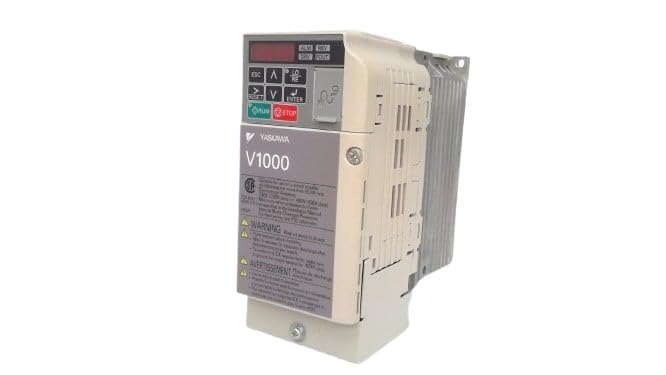
Малюнок 1: Спереду view of the Yaskawa V1000 AC Drive (Model CIMR-VU2A0006FAA). This image shows the drive's compact design, control panel with display and buttons, and ventilation fins on the side.
2. Інформація про безпеку
ПОПЕРЕДЖЕННЯ: Ризик ураження електричним струмом. Перед встановленням або технічним обслуговуванням переконайтеся, що живлення відключено.
Read this manual thoroughly before installing, operating, or performing maintenance on the V1000 AC Drive. Failure to follow these instructions may result in serious injury or equipment damage.
2.1 Загальні заходи безпеки
- Встановлювати, експлуатувати та обслуговувати це обладнання повинен лише кваліфікований персонал.
- Do not operate the drive with damaged cables or if the enclosure is open.
- Забезпечте належне заземлення відповідно до місцевих електротехнічних норм.
- Перевірте введений томtage відповідає специфікаціям накопичувача.
- Не торкайтеся внутрішніх компонентів одразу після вимкнення живлення, оскільки залишковий літійtage may be present. Wait for the charge lamp to extinguish.
2.2 Екологічні міркування
- Install the drive in a clean, dry, and well-ventilated area.
- Avoid direct sunlight, excessive dust, corrosive gases, and vibrations.
- Діапазон робочих температур: від 0°C до 50°C (від 32°F до 122°F).
3. Налаштування
Proper installation and wiring are crucial for the safe and reliable operation of the V1000 AC Drive.
3.1 Монтаж
Mount the drive vertically on a flat, stable surface. Ensure adequate clearance for ventilation around the drive (minimum 50mm above and below, 25mm on sides).
3.2 Електропроводка
Refer to the wiring diagram provided in the full product manual for detailed connections. Key connections include:
- Вхідна потужність (R/L1, S/L2, T/L3): Підключіть трифазне джерело живлення змінного струму 200-240 В.
- Вихідна потужність двигуна (U, V, W): Підключіть до клем двигуна.
- Заземлення (PE): Connect to a reliable earth ground.
- Термінали управління: For external control signals (e.g., run/stop, speed reference, fault output).
Always use appropriate wire gauges and circuit protection devices as specified in local electrical codes and the drive's technical specifications.
4. Operating the V1000 AC Drive
The V1000 drive can be operated via its integrated control panel or external control signals.
4.1 Панель керування надview
Панель керування оснащена цифровим дисплеєм та кількома кнопками:
- ESC: Кнопка Escape/Назад.
- Стрілки ВГОРУ/ВНИЗ: Navigate menus, adjust parameters.
- Стрілки ЛІВОРУЧ/ПРАВОРУЧ: Shift cursor, change digits.
- Введіть: Confirm selection, enter parameter edit mode.
- ЗАПУСК: Start motor operation.
- СТІЙ: Stop motor operation.
4.2 Основні кроки роботи
- Увімкнення: Apply power to the drive. The display will illuminate.
- Налаштування параметрів: Configure essential parameters such as motor data (voltage, current, frequency), acceleration/deceleration times, and control mode (V/f, vector control). Refer to the parameter list in the detailed manual.
- Start Command: Натисніть БІГАТИ button on the control panel or activate the external run command.
- Регулювання швидкості: Adjust the motor speed using the UP/DOWN arrows (if in local control mode) or via external speed reference.
- Stop Command: Натисніть СТІЙ button or deactivate the external stop command.
5. Технічне обслуговування
Regular maintenance ensures the longevity and optimal performance of your V1000 AC Drive.
5.1 Планові перевірки
- щоденно: Check for unusual noises, vibrations, or odors. Verify display for error codes.
- Щомісяця: Inspect cooling fans for proper operation and cleanliness. Clean dust from ventilation openings.
- Щорічно: Check terminal connections for tightness. Inspect wiring for signs of wear or damage. Measure input/output voltagес і течій.
5.2 Очищення
Use a soft, dry cloth to clean the exterior of the drive. For internal cleaning (only by qualified personnel with power disconnected), use compressed air to remove dust from heat sinks and circuit boards.
Always disconnect power and wait for the charge lamp to extinguish before performing any maintenance.
6. Вирішення проблем
This section provides common issues and their potential solutions. For complex problems, consult a qualified technician or Yaskawa support.
| проблема | Можлива причина | Рішення |
|---|---|---|
| Привід не вмикається. | No input power; Blown fuse. | Check power supply; Replace fuse (after identifying cause). |
| Мотор не працює. | No run command; Incorrect wiring; Motor fault. | Verify run command; Check motor and drive wiring; Inspect motor. |
| Overcurrent fault (OC). | Motor overload; Short circuit; Rapid acceleration. | Reduce load; Check motor/cables for shorts; Increase acceleration time. |
| Переволtage fault (OV). | Високий об'єм вхідного сигналуtage; Різке уповільнення. | Перевірити вхідний обсягtage; Increase deceleration time; Install braking resistor if needed. |
7. Технічні характеристики
Key technical specifications for the Yaskawa V1000 AC Drive (CIMR-VU2A0006FAA):
- модель: CIMR-VU2A0006FAA
- Серія: V1000 AC Drive
- Вхідний об'ємtage: 200-240V AC, 3-Phase
- Вихідний випtage: 240 В змінного струму
- Номінальний вихідний струм: 6.0A (Heavy Duty) / 5.0A (Normal Duty)
- Номінальна потужність двигуна: 1 к. с. (0.75 кВт)
- Виробник: YASKAWA ELECTRIC
- Дата першої доступності: 14 лютого 2025 р
8. Гарантія та підтримка
For detailed warranty information, please refer to the official Yaskawa warranty statement or contact your authorized Yaskawa distributor.
For technical support, service, or to obtain a full copy of the V1000 technical manual, please visit the official Yaskawa webсайту або зв’яжіться зі своїм відділом обслуговування клієнтів.
Yaskawa Electric Corporation
Webсайт: www.yaskawa.com


