1. Вступ
This manual provides detailed instructions for the setup, operation, and maintenance of your USARemote h-49308-4btn key fob keyless entry remote. This product is designed as a replacement or spare key fob for compatible Honda vehicles.
1.1 Сумісність продуктів
This key fob is compatible with the following Honda vehicle models:
- Honda Accord (Sedan Only): 2008, 2009, 2010, 2011, 2012
- Honda Pilot: 2009, 2010, 2011, 2012, 2013, 2014, 2015

Image: Visual representation of compatible Honda models for the USARemote key fob.
2. Вміст упаковки
Each package includes:
- Complete key fob with internal electronics.
- Pre-installed Lithium Ion battery.
- Uncut key blade.
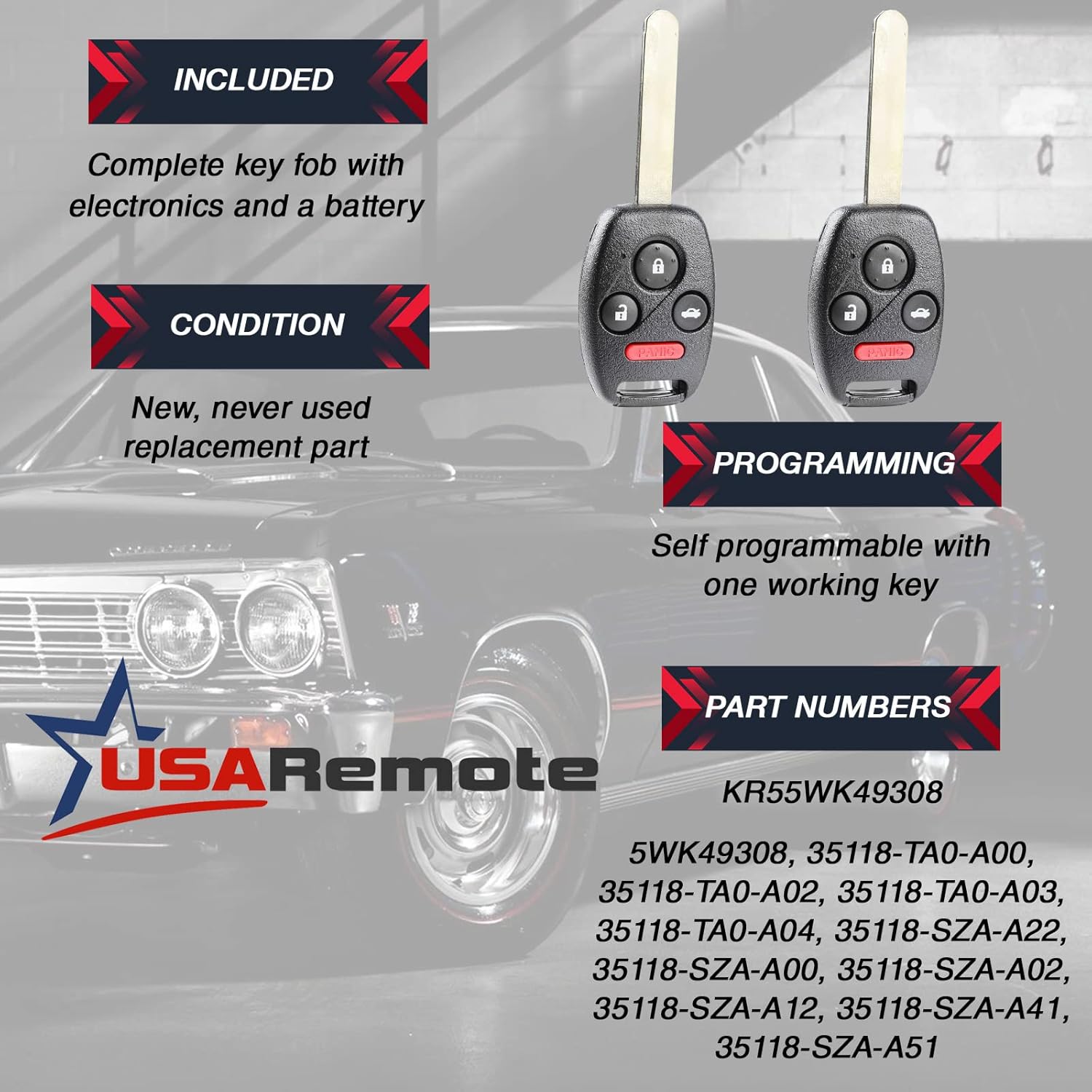
Image: Two USARemote key fobs, highlighting that they are new, include electronics and a battery, and are self-programmable with one working key.
3. Налаштування та програмування
The USARemote h-49308-4btn key fob requires two distinct programming steps for full functionality: remote function programming and immobilizer/ignition programming.
3.1 Remote Function Programming (Lock/Unlock/Panic/Trunk)
This key fob is self-programmable for remote functions (locking, unlocking, panic, trunk release) if you possess at least one currently working key fob for your vehicle. Follow the vehicle's owner's manual instructions for remote programming or consult an automotive locksmith.
General Self-Programming Steps (may vary by vehicle model and year):
- Увійдіть у автомобіль і закрийте всі двері.
- Insert an existing, working key into the ignition.
- Turn the ignition to the "ON" position (II) and then back to "OFF" (0) four times within 6 seconds.
- On the fourth "ON" turn, leave the ignition in the "ON" position. The door locks should cycle (lock and unlock) automatically, indicating the vehicle is in programming mode.
- Within 5 seconds, press the "Lock" button on the new key fob. The door locks should cycle again to confirm successful programming.
- If programming additional key fobs (including existing ones), press the "Lock" button on each additional fob within 5 seconds of the previous one. The door locks will cycle after each successful programming.
- Turn the ignition to "OFF" and remove the key. Test all programmed key fobs to ensure they function correctly.
Примітка: If you do not have a working key fob, or if these steps do not work, professional programming by a dealership or certified automotive locksmith may be required for remote functions.
3.2 Immobilizer/Ignition Programming and Key Cutting
For the key blade to physically turn the ignition and for the vehicle to start, two additional steps are necessary:
- Key Cutting: The uncut key blade must be professionally cut to match your vehicle's ignition and door locks. This typically requires a laser key cutter, available at Honda dealerships or specialized automotive locksmiths.
- Immobilizer Chip Programming: The key fob contains an immobilizer chip that must be programmed to your vehicle's engine control unit (ECU). This process requires specialized diagnostic equipment (scan tool) and cannot be performed through self-programming methods. A Honda dealership or a certified automotive locksmith can perform this service.
Важливо: Without proper immobilizer programming, the key fob will only operate the remote functions (lock/unlock) and will not start the vehicle, even if the key blade is cut correctly.
4. Інструкція з експлуатації
Your USARemote key fob features four buttons for convenient vehicle access and security:

Зображення: спереду view of the USARemote 4-button key fob.
- Кнопка блокування (🔒): Press once to lock all vehicle doors. Some vehicles may provide an audible confirmation (horn chirp) or visual confirmation (lights flash).
- Кнопка розблокування (🔓): Press once to unlock the driver's door. Press twice within a few seconds to unlock all vehicle doors.
- Trunk/Hatch Release Button (🚗): Press and hold for approximately 1-2 seconds to release the trunk or rear hatch. Note that for some models, this button may only open the glass hatch and not the entire trunk.
- Panic Button (PANIC): Press and hold for approximately 2-3 seconds to activate the vehicle's alarm system (horn and lights). Press any button on the key fob or insert the key into the ignition to deactivate the alarm.
5. Технічне обслуговування
5.1 Заміна батареї
Your key fob comes with a pre-installed Lithium Ion battery. When the remote's range decreases or it stops responding, the battery may need replacement.
Щоб замінити батарею:
- Carefully separate the two halves of the key fob casing using a small flat-head screwdriver or a coin in the designated notch.
- Зверніть увагу на орієнтацію існуючої батареї.
- Remove the old battery and insert a new CR1616 Lithium Ion battery, ensuring the positive (+) side faces the same direction as the old battery.
- Carefully snap the two halves of the key fob casing back together until secure.
- Test the key fob's functions.
Увага: Ensure proper battery polarity. Incorrect installation can damage the key fob. Dispose of old batteries responsibly.
5.2 Догляд та поводження
- Avoid dropping the key fob or exposing it to excessive impact.
- Keep the key fob dry and away from liquids, as moisture can damage internal electronics.
- Do not expose the key fob to extreme temperatures.
- За потреби очистіть зовнішню частину м’якою сухою тканиною.
6. Вирішення проблем
If your USARemote key fob is not functioning as expected, consider the following troubleshooting steps:
| проблема | Можлива причина | Рішення |
|---|---|---|
| Remote functions (lock/unlock) do not work. |
|
|
| Key fob does not start the vehicle. |
|
|
| Reduced remote range. |
|
|
If these steps do not resolve the issue, please contact USARemote customer support for further assistance.
7. Технічні характеристики
- Номер моделі: h-49308-4btn
- Кількість кнопок: 4 (Lock, Unlock, Trunk/Hatch, Panic)
- Номери деталей виробника оригінального обладнання: 35118-SZA-A12, 35118-SZA-A22, 35118-SZA-A30, 35118-SZA-A00, 35118-SZA-A31, 35118-SZA-A02, 35118-TA0-A03, 35118-SZA-A41, 35118-TA0-A00, 35118-TA0-A02, 35118-SZA-A51, 35118-TA0-A04
- Ідентифікатор FCC: KR55WK49308
- Тип батареї: 1 Lithium Ion battery (CR1616, included)
- матеріал: пластик
- колір: чорний
- Вага товару: 2.08 унції (приблизно 0.13 фунта)
- Розміри продукту: 1.25 x 0.5 x 2 дюймів
8. Гарантія та підтримка
USARemote offers a hassle-free return policy for products that do not function as expected. For returns, please refer to your order details.
For technical assistance or further inquiries, USARemote technical support is available to assist you.
Video: USARemote technical support message, emphasizing readiness to assist customers.


