вступ
This manual provides detailed instructions for the setup, operation, and maintenance of your Axess CKRD3803 Digital AM/FM Clock Radio. Please read this manual thoroughly before using the device to ensure proper function and to maximize your user experience.
Продукт закінченийview
The Axess CKRD3803 is a versatile clock radio featuring a 1.2-inch red LED display, digital AM/FM radio, dual alarm settings, and a calendar function. It includes an Aux input jack for external audio devices and a battery backup system to maintain settings during power interruptions.
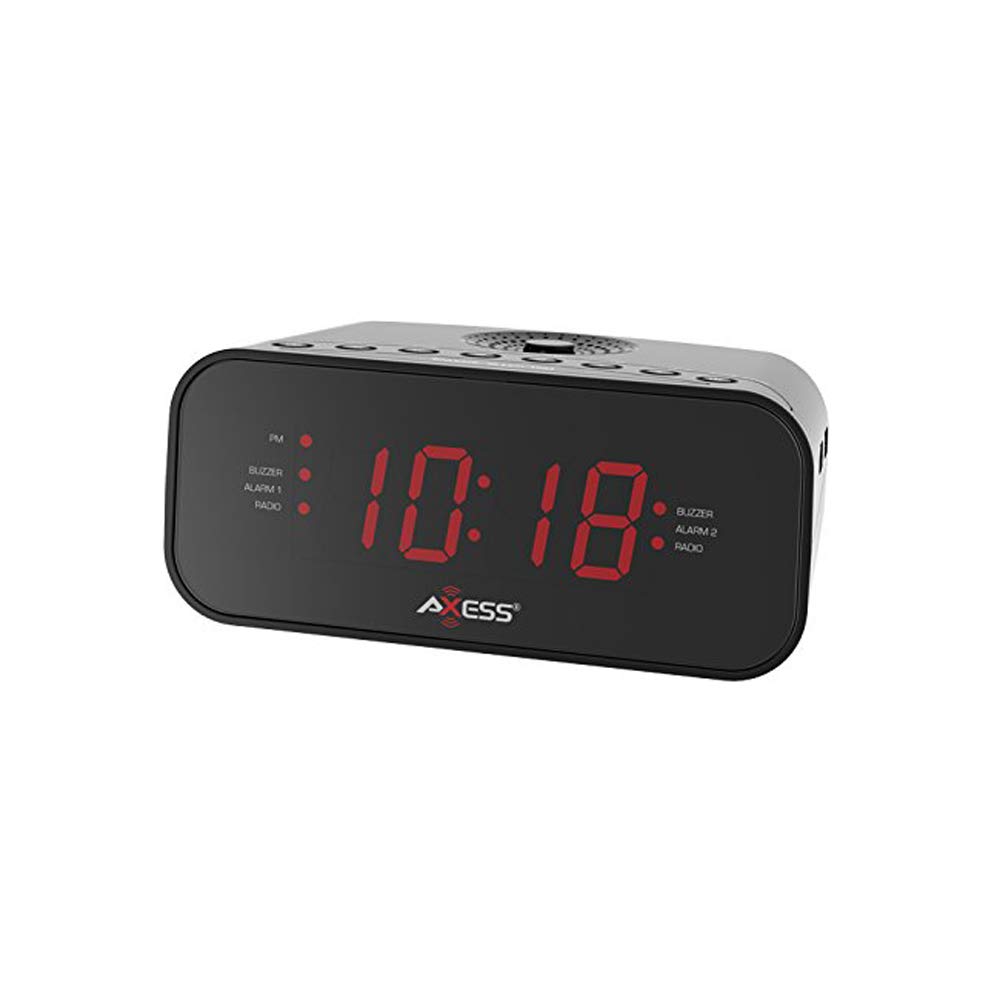
Зображення: спереду view of the Axess CKRD3803 Digital AM/FM Clock Radio. The device is black with a large red LED display showing '10:18'. Indicators for PM, Buzzer, Alarm 1, Radio, and Alarm 2 are visible on either side of the time display.
Ключові характеристики:
- Large 1.2-inch Red LED Display with two-step dimmer.
- Digital AM/FM Radio.
- Dual Alarm with Buzzer or Radio options.
- Sleep and Snooze Functions.
- Calendar Function.
- Auxiliary Input Jack.
- Battery Backup (2 x AAA batteries, not included) for power outagес.
Налаштування
Підключення живлення:
- Uncoil the built-in power cord (pigtail antenna).
- Plug the power cord into a standard AC wall outlet (120V, 60Hz).
- The LED display will light up, indicating the unit is receiving power.
Установка резервного акумулятора:
For uninterrupted timekeeping during power outages, install backup batteries.
- Знайдіть батарейний відсік на нижній панелі пристрою.
- Відкрийте кришку батарейного відсіку.
- Insert two (2) AAA batteries (not included), observing the correct polarity (+ and -) as indicated inside the compartment.
- Надійно закрийте кришку батарейного відсіку.
Note: Batteries are for backup only and will not power the display or radio functions during a power outage. They only preserve time and alarm settings.
Інструкція з експлуатації
Встановлення часу:
- Натисніть і утримуйте ВСТАНОВИТИ ЧАС кнопку, доки не почнуть блимати цифри годин.
- Натисніть ГОДИНА button repeatedly to adjust the hour. Observe the 'PM' indicator for correct AM/PM setting.
- Натисніть ХВИЛИНА кілька разів натисніть кнопку , щоб налаштувати хвилини.
- To switch between 12-hour and 24-hour (military) time format, press the 12/24 год button while the time is flashing.
- Натисніть ВСТАНОВИТИ ЧАС знову натисніть кнопку, щоб підтвердити та вийти з режиму налаштування часу.
Setting the Alarm (Alarm 1 and Alarm 2):
The CKRD3803 features two independent alarms.
- Натисніть і утримуйте БУДИЛЬНИК 1 НАБОР (або БУДИЛЬНИК 2 НАБОР) button until the alarm hour digits begin to flash.
- Натисніть ГОДИНА button to adjust the alarm hour. Observe the 'PM' indicator.
- Натисніть ХВИЛИНА кнопку для налаштування хвилин будильника.
- Натисніть БУДИЛЬНИК 1 НАБОР (або БУДИЛЬНИК 2 НАБОР) button again to confirm the time.
- Immediately after confirming the time, press the ALARM 1 MODE (або ALARM 2 MODE) button repeatedly to select the alarm source: ЗУНЬ or РАДІОВідповідний індикатор засвітиться.
- Щоб увімкнути або вимкнути будильник, натисніть кнопку БУДИЛЬНИК 1 УВІМК./ВИМК (або БУДИЛЬНИК 2 УВІМК./ВИМК) button. The alarm indicator will light up when active.
Радіооперація:
- Натисніть УВІМК./ВИМК. РАДІО кнопку, щоб увімкнути радіо.
- Натисніть AM/FM кнопку для перемикання між діапазонами AM та FM.
- Натисніть НАСТРОЙКА + or МЕЛОДІЯ - кнопки для ручного налаштування на потрібну частоту.
- Натисніть і утримуйте НАСТРОЙКА + or МЕЛОДІЯ - для автоматичного сканування станцій.
- Відрегулюйте гучність за допомогою ОБ'ЄМ + or ОБСЯГ - кнопки.
- To improve FM reception, extend the pigtail antenna fully. For AM reception, rotate the unit for best signal.
- Натисніть УВІМК./ВИМК. РАДІО button again to turn the radio off.
Функція затримки:
Коли лунає будильник, натисніть кнопку СНОЙЗ кнопку , щоб тимчасово вимкнути будильник приблизно на 9 хвилин. Будильник знову пролунає після цього періоду.
Функція сну:
To fall asleep to the radio, press the СПАТИ button while the radio is playing. Repeatedly press the СПАТИ button to cycle through sleep timer options (e.g., 90, 60, 30, 15 minutes, or OFF). The radio will automatically turn off after the selected time.
Диммер дисплея:
Натисніть ДИММЕР button to adjust the brightness of the LED display between two levels (bright and dim).
Допоміжний вхід:
Підключіть зовнішній аудіопристрій (наприклад, MP3-плеєр, смартфон) до AUX IN jack on the unit using a 3.5mm audio cable (not included). The audio from the external device will play through the clock radio's speaker.
Технічне обслуговування
To ensure the longevity and optimal performance of your Axess CKRD3803, follow these simple maintenance guidelines:
- Прибирання: Протріть пристрій м’якою сухою тканиною. Не використовуйте абразивні засоби для чищення, віск або розчинники, оскільки вони можуть пошкодити покриття.
- Шнур живлення: Regularly check the power cord for any signs of damage. If damaged, discontinue use and seek professional repair.
- Заміна батареї: Replace backup batteries annually or when the unit is stored for extended periods to prevent leakage.
- Розміщення: Уникайте розміщення пристрою під прямими сонячними променями, поблизу джерел тепла або в місцях з високою вологістю чи пилом.
Усунення несправностей
If you encounter issues with your Axess CKRD3803, please refer to the following common problems and solutions:
| проблема | Можлива причина | Рішення |
|---|---|---|
| Дисплей порожній. | No AC power; Dimmer set to lowest setting. | Ensure power cord is securely plugged in. Press the ДИММЕР кнопку для збільшення яскравості. |
| Не вдається встановити час/будильник. | Buttons not pressed correctly or in sequence. | Refer to the "Setting the Time" and "Setting the Alarm" sections for precise steps. Ensure you press and hold the SET button until digits flash. |
| Сигналізація не звучить. | Alarm not activated; Volume too low (for radio alarm). | Ensure the alarm is set and the alarm indicator light is on. For radio alarm, increase radio volume. |
| Поганий прийом радіо. | Antenna not positioned correctly; Weak signal. | Fully extend the pigtail antenna for FM. Rotate the unit for optimal AM reception. Try a different location. |
| Втрата часу/налаштувань після відключення живленняtage. | Резервні батареї не встановлені або розряджені. | Install fresh AAA batteries in the battery compartment. |
| Stuck in 24-hour (military) time. | 12/24H setting not adjusted during time setup. | Enter time setting mode (press and hold ВСТАНОВИТИ ЧАС). While digits are flashing, press the 12/24 год кнопка для перемикання між форматами. |
Технічні характеристики
- модель: CKRD3803
- Дисплей: 1.2-дюймовий червоний світлодіод
- Джерело живлення: Змінного струму 120 В ~ 60 Гц
- Резервний акумулятор: 2 батареї AAA (не входять в комплект)
- Радіо діапазони: AM/FM
- Розміри: 2.95 x 6.89 x 4.21 дюйма (В x Ш x Г)
- вага: 1 фунт
- матеріал: Акрилонітрил бутадієн стирол
- Особливості: Dual Alarm, Calendar Function, Aux-in, Sleep/Snooze, Dimmer
Гарантія та підтримка
For warranty information or technical support, please refer to the documentation included with your purchase or visit the official Axess webсайт. Зберігайте чек про покупку як підтвердження покупки для будь-яких гарантійних претензій.


