вступ
This manual provides detailed instructions for the setup, operation, and maintenance of your Hyperkin Knight Premium Controller. Designed for use with PlayStation 3 (PS3), PC, and Mac systems, this controller offers a versatile gaming experience with its ergonomic design and responsive controls. Please read this manual thoroughly before using the product to ensure optimal performance and longevity.
Особливості продукту
- Подвійні аналогові джойстики: Two wide-spectrum analog joysticks for precise control.
- Pressure-Sensitive D-Pad: An eight-way directional pad with pressure sensitivity.
- Кнопки, чутливі до тиску: Four shoulder buttons and four face buttons with pressure sensitivity for nuanced input.
- Примусовий зворотний зв'язок: Integrated force feedback for immersive gaming experiences.
- Кнопка "Додому: Dedicated button for system menu access.
- Довгий кабель: A 6-foot (1.8 meter) cable for flexible positioning.
- Мультиплатформна сумісність: Compatible with all PS3 models, as well as PC and Mac via USB.
Вміст упаковки
- Hyperkin Knight Premium Controller (White)
- Integrated USB Cable (6 ft.)
Інструкції з налаштування
Підключення до PlayStation 3 (PS3)
- Ensure your PS3 console is powered off or in standby mode.
- Locate an available USB port on your PS3 console.
- Plug the USB connector of the Hyperkin Knight Controller into the USB port on your PS3.
- Power on your PS3 console. The controller should be automatically recognized and assigned a player number.
- If the controller does not respond, try a different USB port or restart the console.
Підключення до ПК/Mac
- Знайдіть вільний USB-порт на вашому ПК або комп’ютері Mac.
- Plug the USB connector of the Hyperkin Knight Controller into the USB port.
- Ваша операційна система (Windows, macOS) повинна автоматично виявити та встановити необхідні драйвери. Цей процес може тривати кілька хвилин.
- Once installed, the controller will be ready for use with compatible games and applications. You may need to configure controller settings within individual games or system preferences.
- Примітка: Functionality may vary depending on the operating system and specific game titles.
Інструкція з експлуатації
The Hyperkin Knight Premium Controller features a standard layout for intuitive gameplay.
Макет контролера

Зображення: Верх view of the Hyperkin Knight Premium Controller, showing the D-pad, analog sticks, face buttons, and central buttons.
- D-Pad (клавіша напрямку): Розташована ліворуч, використовується для спрямованого введення.
- Лівий аналоговий стік: Below the D-Pad, for precise movement and camera control.
- Правий аналоговий стік: On the right side, typically for camera control or aiming.
- Кнопки на обличчі (трикутник, коло, хрест, квадрат): On the right, used for actions within games.
- Плечові ґудзики (L1, L2, R1, R2): Located on the top edge of the controller, used for various in-game functions.
- Кнопка ВИБІР: Typically used for menu access or specific game functions.
- Кнопка ПУСК: Зазвичай використовується для паузи в іграх або підтвердження вибору.
- Кнопка "Додому: Central button to access the PS3 XMB (CrossMediaBar) or system menus on PC/Mac.
Примусовий зворотний зв'язок
The controller features force feedback (rumble) functionality, which provides tactile sensations during gameplay, enhancing immersion. This feature is automatically enabled when supported by the game and system. If you wish to disable it, check your game's or system's controller settings.
Технічне обслуговування
- Прибирання: Використовуйте м’яку суху тканину для протирання контролера. Для стійкого бруду злегкаampпромийте тканину водою. Уникайте використання агресивних хімікатів або абразивних засобів для чищення.
- Зберігання: Зберігайте контролер у прохолодному, сухому місці, подалі від прямих сонячних променів та екстремальних температур. Уникайте занадто тугого намотування кабелю, щоб запобігти пошкодженню.
- Догляд за кабелем: Do not pull the controller by its cable. Always grasp the USB connector when plugging or unplugging.
Усунення несправностей
Контролер не відповідає
- Перевірити підключення: Переконайтеся, що USB-кабель надійно підключено як до контролера, так і до консолі/комп'ютера.
- Спробуйте інший USB-порт: Connect the controller to another USB port on your system.
- Перезапустити систему: Power cycle your PS3, PC, or Mac.
- Driver Check (PC/Mac): On PC, check Device Manager to see if the controller is recognized and if there are any driver issues. On Mac, check System Information > USB.
Incorrect Button Mapping or Limited Functionality
- Налаштування гри: Many games allow for custom controller mapping. Check the in-game settings for controller configuration.
- System Settings (PC/Mac): For PC, some games or emulators may require specific controller configurations or third-party software. For Mac, check System Preferences > Game Controllers (if available) or specific application settings.
- Сумісність з PS3: While compatible with all PS3 models, some older games or specific PS3 system software versions might have unique controller handling. Ensure your PS3 system software is up to date.
Force Feedback Not Working
- Підтримка гри: Verify that the game you are playing supports force feedback.
- Налаштування в грі: Check the game's options menu to ensure force feedback (rumble) is enabled.
- Налаштування системи: On PC, ensure rumble is enabled in your controller settings.
Технічні характеристики
| Номер моделі | M07213-WH |
| Сумісність | PlayStation 3, ПК, Mac (через USB) |
| Довжина кабелю | 6 футів (приблизно 1.8 метри) |
| Тип введення | Pressure-sensitive buttons and D-pad, dual analog joysticks |
| Зворотній зв'язок | Force Feedback (Rumble) |
| Розміри | 2.99 x 7.99 x 7.01 дюймів (приблизно 7.6 x 20.3 x 17.8 см) |
| вага | 12.5 унції (приблизно 354 грамів) |
| Виробник | Гіперкін Інк. |
Гарантія та підтримка
For warranty information and technical support, please refer to the official Hyperkin webсайт або зверніться безпосередньо до служби підтримки клієнтів. Зберігайте чек про покупку як підтвердження покупки для будь-яких гарантійних претензій.
Виробник: Гіперкін Інк.
Webсайт: www.hyperkin.com (Будь ласка, відвідайте офіційний website for the most current support information.)
Продукт закінченийview Зображення
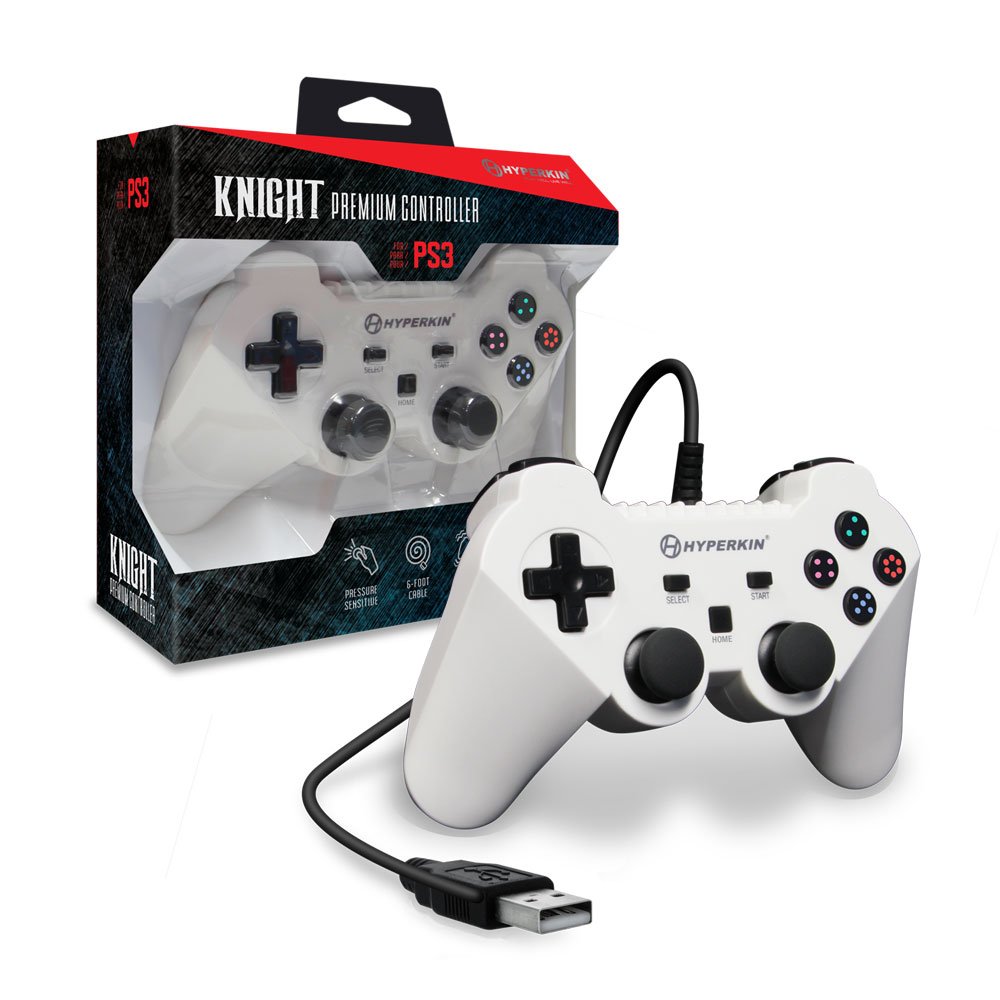
Image: The Hyperkin Knight Premium Controller displayed alongside its retail packaging, highlighting the product's design and branding.

Зображення: Крупний план view of the Hyperkin Knight Premium Controller's retail box, showcasinключові характеристики та елементи дизайну.

Зображення: Кутовий view of the Hyperkin Knight Premium Controller, emphasizing its ergonomic shape and button placement.


