вступ
This instruction manual provides essential information for the safe and efficient operation of your SONY CFD-S70 Portable CD Cassette Boombox. Please read this manual thoroughly before using the unit and retain it for future reference. This unit allows playback of CDs, CD-R/RW, MP3 CDs, cassette tapes, and features an FM/AM radio tuner.
Продукт закінченийview
The SONY CFD-S70 is a versatile portable audio system designed for various media playback. Below are images illustrating the unit's main components.
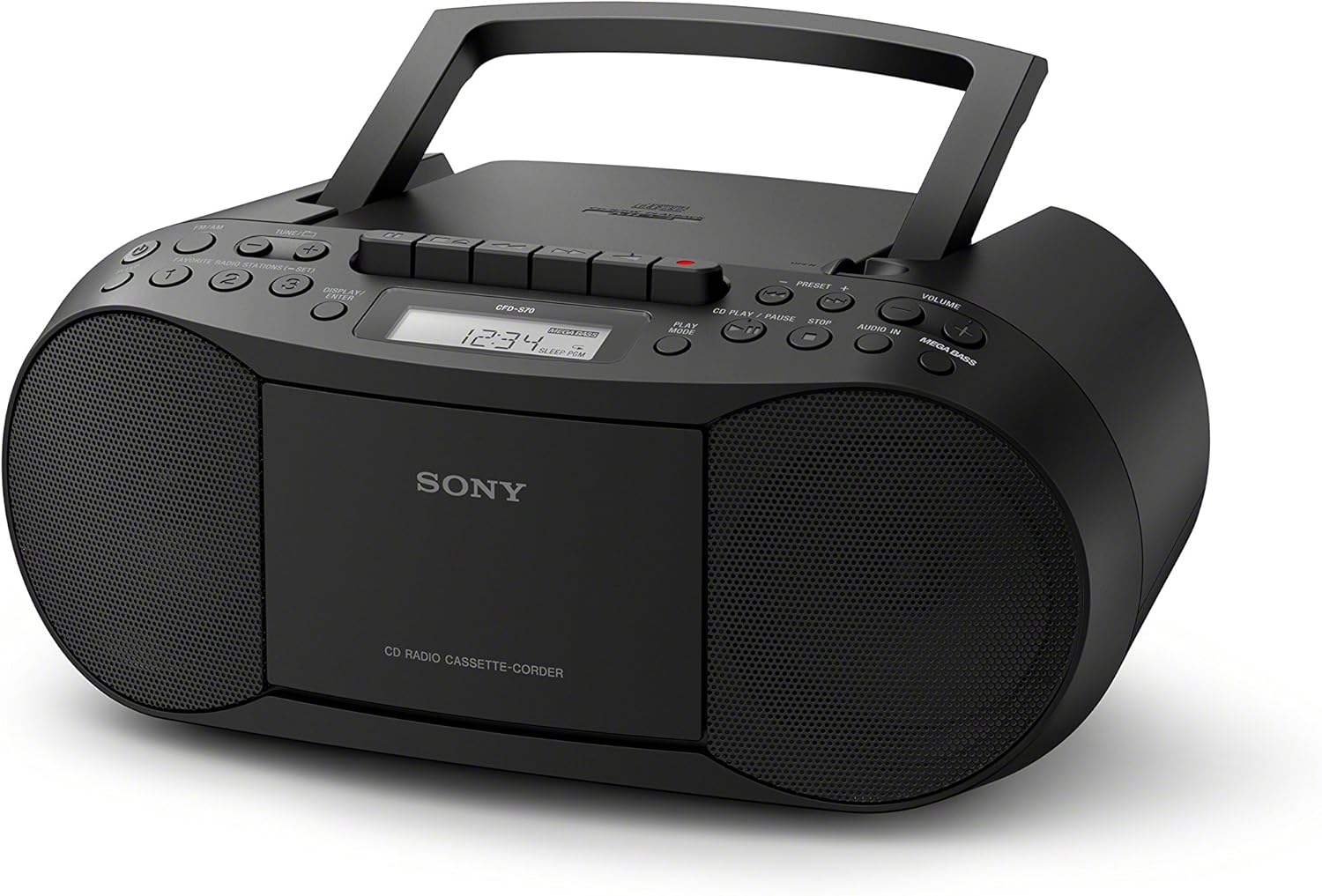
малюнок 1: Фронт view of the SONY CFD-S70 Portable CD Cassette Boombox with the handle in the upright position. This image shows the CD compartment, cassette deck controls, radio tuner, volume knob, and speakers.

малюнок 2: Фронт view of the SONY CFD-S70 Portable CD Cassette Boombox with the handle in the down position. This image provides a clear view of the control panel, including the display, function buttons, and speaker grilles.
Налаштування
1. Живлення блоку
The CFD-S70 can be powered using either AC power or batteries.
Підключення до мережі змінного струму:
- Переконайтеся, що пристрій вимкнено.
- Connect the supplied AC power cord to the AC IN jack on the unit.
- Підключіть інший кінець шнура живлення змінного струму до стандартної розетки.
Установка батареї:
The unit requires 6 C-size batteries (not supplied).
- Відкрийте кришку відсіку для батареї, розташовану внизу пристрою.
- Insert 6 C-size batteries, ensuring correct polarity (+/-) as indicated inside the compartment.
- Надійно закрийте кришку батарейного відсіку.
- Примітка: Вийміть батарейки, якщо пристрій не використовуватиметься протягом тривалого часу, щоб запобігти витіканню.
2. Регулювання антени
For optimal FM radio reception, extend the telescopic antenna. For AM reception, the unit has a built-in ferrite bar antenna; rotate the unit itself for best reception.
3. Connecting External Devices (AUX IN)
You can connect an external audio device (e.g., smartphone, MP3 player) to the unit using an audio cable (not supplied) with a 3.5mm stereo mini plug.
- Connect one end of the audio cable to the headphone jack or line-out jack of your external device.
- Connect the other end to the AUDIO IN jack on the CFD-S70.
- Select the AUDIO IN function on the boombox.
- Adjust the volume on both the boombox and the external device.
Інструкція з експлуатації
1. Відтворення компакт-диска
- Натисніть CD кнопку, щоб вибрати функцію компакт-диска.
- Відкрийте кришку відсіку для компакт-дисків, натиснувши ВІДКРИТИ/ЗАКРИТИ кнопку.
- Вставте компакт-диск у відсік етикеткою догори.
- Close the CD compartment cover. The total number of tracks will appear on the display.
- Натисніть ВІДТВОРЕННЯ/ПАУЗА button (►/⏸) to start playback.
- Щоб зробити паузу, натисніть ВІДТВОРЕННЯ/ПАУЗА знову. Натисніть ще раз, щоб відновити.
- Щоб зупинити відтворення, натисніть кнопку СТІЙ button (⏹).
- Щоб пропустити треки, натисніть кнопку ВПЕРЕД (⏵) or НАЗАД (⏶) buttons.
- Програма відтворення: While stopped, press the ПРОГРАМА button to select tracks in a desired order.
- Перемішування: Натисніть ПЕРЕМІСКУВАТИ кнопку для відтворення треків у випадковому порядку.
2. Cassette Playback and Recording
- Натисніть ЛИСТКА button to select the Cassette function.
- Відкрийте дверцята касетного відділення.
- Insert a cassette tape with the desired side facing forward.
- Закрийте дверцята відсіку для касети.
- Відтворення: Натисніть ГРАТИ button (►).
- Перемотування вперед/назад: Натисніть FFWD or REW кнопки. Натисніть СТОП/ВИЙМАТИ щоб зупинитися.
- Зупинити/Витягнути: Натисніть СТОП/ВИЙМАТИ button (⏹) to stop playback or eject the tape.
- Запис:
- Insert a blank cassette tape with the record-prevention tab intact.
- Виберіть потрібне джерело (CD, радіо або AUX IN).
- Натисніть ЗАПИС button (⏺). The ГРАТИ button will also engage automatically.
- Щоб припинити запис, натисніть кнопку СТОП/ВИЙМАТИ кнопку.
3. Робота радіо
- Натисніть РАДІО button to select the radio function.
- Натисніть БЕНД кнопку для перемикання між діапазонами FM та AM.
- Ручна настройка: Використовуйте НАСТРОЙКА + or МЕЛОДІЯ - кнопки для ручного налаштування станції.
- Автоматичне налаштування: Натисніть і утримуйте НАСТРОЙКА + or МЕЛОДІЯ - протягом кількох секунд, щоб автоматично просканувати наступну доступну станцію.
- Попередньо встановлені станції:
- To store a station: Tune to the desired station, then press and hold a numbered preset button (1-30) until the preset number flashes on the display.
- To recall a station: Press the corresponding numbered preset button briefly.
4. Регулювання звуку
- обсяг: Обертайте ОБ'ЄМ ручку, щоб збільшити або зменшити рівень звуку.
- МЕГА БАС: Натисніть МЕГА БАС button to activate or deactivate the bass boost feature.
Технічне обслуговування
1. Очищення пристрою
- Протріть зовнішню частину пристрою м’якою сухою тканиною.
- Для стійких плям використовуйте злегка протерту тканинуampened with a mild detergent solution, then wipe dry.
- Do not use abrasive pads, scouring powder, or solvents such as alcohol or benzene, as they may damage the finish.
2. CD and Cassette Care
- Тримайте компакт-диски за краї, щоб уникнути відбитків пальців на поверхні для відтворення.
- Зберігайте компакт-диски в їхніх футлярах, коли вони не використовуються.
- Keep cassette tapes away from strong magnetic fields and direct sunlight.
- Periodically clean the cassette deck's head and pinch rollers with a cotton swab lightly moistened with tape head cleaner.
3. Заміна батареї
When the unit's performance degrades or the display dims during battery operation, replace all six C-size batteries with new ones. Do not mix old and new batteries, or different types of batteries.
Усунення несправностей
If you experience problems with your boombox, refer to the following table for possible solutions.
| проблема | Можлива причина | Рішення |
|---|---|---|
| Немає живлення | Шнур живлення не підключено; батарейки розряджені або неправильно вставлені. | Переконайтеся, що шнур живлення надійно підключено. Замініть батарейки або перевірте полярність. |
| Компакт-диск не відтворюється або пропускає | CD is dirty, scratched, or inserted incorrectly; Unit is subject to vibration. | Clean the CD with a soft cloth. Insert CD with label side up. Place unit on a stable surface. |
| Поганий радіоприйом | Antenna not extended/adjusted; Interference from other devices. | Extend and adjust the FM telescopic antenna. Rotate the unit for AM reception. Move unit away from other electronic devices. |
| Cassette tape does not play or sounds distorted | Tape is tangled or damaged; Tape heads are dirty. | Check tape condition. Clean tape heads and pinch rollers. |
| Немає звуку з AUX IN | Cable not connected properly; Incorrect function selected; Volume too low. | Ensure audio cable is fully inserted. Select AUDIO IN function. Increase volume on both boombox and external device. |
Технічні характеристики
| Особливість | Деталь |
|---|---|
| Номер моделі | CFD-S70 |
| Бренд | Sony |
| Підтримується відтворення медіа | CD, CD-R/RW, MP3 CD, Cassette Tape |
| тюнер | FM/AM Digital Tuner with 30 Presets |
| Підключення | Auxiliary Audio Input (3.5mm stereo mini jack) |
| Тип динаміка | Подвійний динамік |
| Покращення звуку | MEGA BASS boost circuitry |
| Параметри живлення | AC Power, 6 x C-size Batteries (up to 19 hours battery life) |
| Розміри (Д x Ш x В) | 13.68 x 6.12 x 9 дюймів (прибл.) |
| вага | 2.5 фунта (приблизно) |
| Бездротовий пульт | немає |
Інформація про гарантію
This SONY CFD-S70 Portable CD Cassette Boombox comes with a 90-day limited warranty. For specific terms and conditions, please refer to the warranty documentation provided with your purchase or visit the official Sony support webсайт.
Підтримка клієнтів
Щоб отримати додаткову допомогу, технічну підтримку або звернутися до служби підтримки, відвідайте офіційний сайт підтримки Sony. website or contact their customer service hotline. Have your model number (CFD-S70) and purchase information ready when contacting support.
- Інтернет-підтримка: Відвідайте www.sony.com/electronics/support
- Підтримка по телефону: Refer to your product packaging or the Sony webсайт регіональних контактних телефонів.


