1. Вступ
This manual provides detailed instructions for the installation, operation, and maintenance of your StarTech.com Wireless USB WiFi Adapter. This adapter is designed to add external dual-band wireless connectivity to your laptop, tablet, or desktop computer, allowing access to both 2.4GHz and 5GHz Wi-Fi networks.
The compact form factor ensures minimal obstruction when plugged into your device, making it an ideal solution for upgrading or replacing existing wireless capabilities.
2. Особливості продукту
- Dual-Band Wireless Connectivity: Provides reliable access to both 2.4GHz and 5GHz Wi-Fi networks.
- Висока швидкість передачі даних: Supports up to 433 Mbps on the 5GHz band (802.11ac) and up to 150Mbps on the 2.4GHz band.
- Compact Nano Design: Small form factor for minimal obstruction, ideal for portability.
- Широка сумісність: Backward compatible with 802.11a/b/g/n networks and supports USB 2.0 for wide device compatibility.
- Безпечне з'єднання: IEEE 802.11a/b/g/n/ac compliant, supporting WEP, WPA, and WPA2 wireless security protocols.

Figure 2.1: The StarTech.com Wireless USB WiFi Adapter showcasing its key features including USB 2.0, Dual Band, AC600, 150Mbps (2.4GHz) / 433Mbps (5GHz), and Nano Design.
3. Вміст упаковки
- 1x StarTech.com Wireless USB WiFi Adapter (USB433ACD1X1)
- 1x CD з драйверами
- 1x Краткий посібник
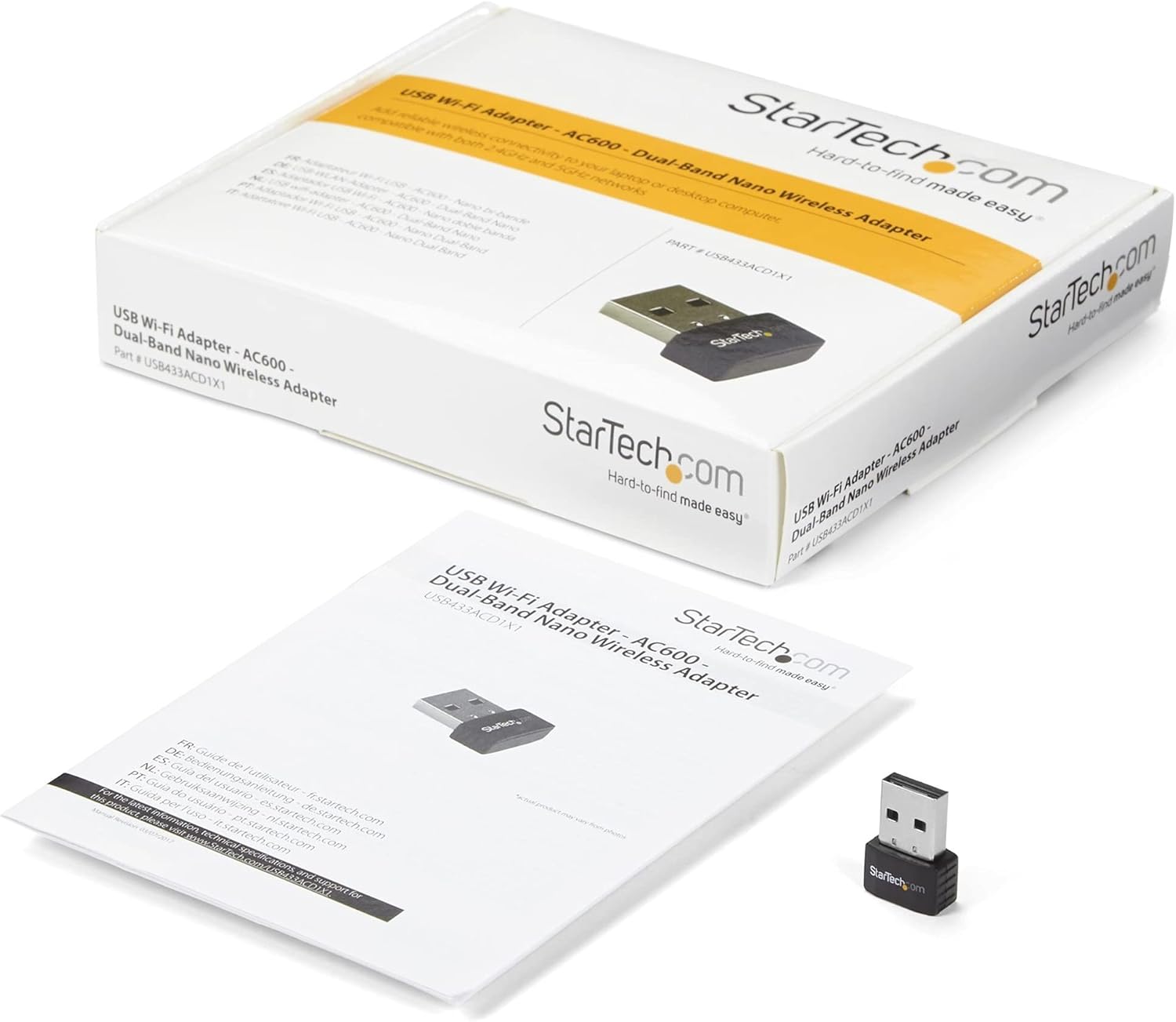
Figure 3.1: The StarTech.com Wireless USB WiFi Adapter, its driver CD, and quick-start guide as included in the package.
4. Налаштування
- Встановлення драйвера:
Before connecting the adapter, it is recommended to install the necessary drivers. Insert the provided Driver CD into your computer's optical drive. Follow the on-screen instructions to complete the driver installation. If your computer does not have an optical drive, or for the latest drivers, visit the official StarTech.com support website and search for model USB433ACD1X1.
- Підключіть адаптер:
Carefully insert the StarTech.com Wireless USB WiFi Adapter into an available USB 2.0 port on your laptop, tablet, or desktop computer. Ensure it is fully seated in the port.

Figure 4.1: The compact StarTech.com Wireless USB WiFi Adapter, ready for connection to a USB port.
- Розпізнавання системи:
Your operating system (Windows, macOS, Chrome OS) should automatically detect the adapter and complete the installation process. A notification may appear indicating that the device is ready for use.

Figure 4.2: The adapter is compatible with Apple macOS, Microsoft Windows, and Google Chrome OS.
5. Інструкція з експлуатації
- Accessing Wi-Fi Networks:
Once the adapter is installed, navigate to your computer's network settings or Wi-Fi icon in the system tray/menu bar. The adapter will display available wireless networks.
- Підключення до мережі:
Select your desired Wi-Fi network from the list. If prompted, enter the network's security key (password). The adapter will then establish a connection.
- Вибір двох діапазонів:
If your router supports both 2.4GHz and 5GHz bands, you may see two network names (SSIDs) – one for each band. For optimal performance and less interference, connect to the 5GHz network if available and within range. The 2.4GHz band offers wider coverage, while the 5GHz band provides faster speeds over shorter distances.

Figure 5.1: The adapter supports both 5GHz (433 Mbps) and 2.4GHz (150 Mbps) bands, offering secure dual-band technology with various network compliance and security features.
- Протоколи безпеки:
The adapter supports WEP, WPA, and WPA2 wireless security. Always connect to networks using WPA2 for the strongest encryption and security.
6. Технічне обслуговування
- Оновлюйте драйвери: Periodically check the StarTech.com webсайт для отримання останніх оновлень драйверів, щоб забезпечити оптимальну продуктивність та сумісність.
- Чистота: Keep the adapter's USB connector clean and free from dust or debris. Use a soft, dry cloth for cleaning.
- Фізичний захист: When not in use, store the adapter in a safe place to prevent physical damage. The compact size makes it easy to misplace or damage if not handled carefully.
- Уникайте екстремальних умов: Не піддавайте адаптер впливу екстремальних температур, вологості або прямих сонячних променів.
7. Вирішення проблем
- Problem: Adapter not detected or not working.
- рішення:
-
- Переконайтеся, що адаптер повністю вставлено в USB-порт.
- Спробуйте інший порт USB на комп’ютері.
- Verify that the drivers are correctly installed. Reinstall them if necessary.
- Перезавантажте комп'ютер.
- Check your computer's Device Manager (Windows) or System Information (macOS) to see if the adapter is listed without errors.
- Problem: Slow Wi-Fi speeds or frequent disconnections.
- рішення:
-
- Ensure you are connected to the 5GHz band if your router supports it and you are in close proximity.
- Reduce the distance between your computer and the wireless router.
- Мінімізуйте перешкоди від інших електронних пристроїв (наприклад, бездротових телефонів, мікрохвильових печей).
- Оновіть прошивку вашого маршрутизатора.
- Check for driver updates for the USB WiFi adapter.
- Problem: Cannot connect to a specific Wi-Fi network.
- рішення:
-
- Двічі перевірте пароль Wi-Fi (ключ безпеки).
- Переконайтеся, що мережа знаходиться в зоні дії та має сильний сигнал.
- Verify that the network's security type (WEP, WPA, WPA2) is supported by the adapter.
- Перезавантажте бездротовий маршрутизатор.
8. Технічні характеристики
| Атрибут | Значення |
|---|---|
| Номер моделі | USB433ACD1X1 |
| Бездротовий тип | 802.11ac, 802.11n, 802.11g, 802.11a, 802.11b |
| Швидкість передачі даних | 433 Мбіт/с (5 ГГц), 150 Мбіт/с (2.4 ГГц) |
| Апаратний інтерфейс | USB 2.0 |
| Сумісність операційної системи | Windows 10, Windows 8, Windows 7, Mac OS X El Capitan (10.11), macOS Mojave (10.14), macOS Sierra (10.12), Windows Server 2019, macOS High Sierra (10.13) |
| Розміри (ДxШxВ) | 0.7 x 0.9 x 0.3 дюйма (17.8 x 22.9 x 7.6 мм) |
| Вага товару | 0.07 унцій (2 г) |
| Колір | чорний |
| Протоколи безпеки | WEP, WPA, WPA2 |
9. Гарантія та підтримка
The StarTech.com Wireless USB WiFi Adapter (USB433ACD1X1) is backed by a StarTech.com warranty and free lifetime technical support. For detailed warranty information or to access technical support, please visit the official StarTech.com webсайт або зверніться до документації, що додається до вашого продукту.
For further assistance, you can also refer to the StarTech.com Store on Amazon.

Figure 9.1: StarTech.com's commitment to solving IT professionals' hardware connectivity challenges.


