1. Вступ
This manual provides essential instructions for the safe and effective use of your BestCH Global 5V 2A AC/DC Adapter. This power supply is designed to provide reliable power to compatible devices, such as the RCA 7 Mercury RCT6672W23 7-inch Tablet PC. It features a wide input voltage range (100-240VAC) and incorporates multiple protection mechanisms to ensure device safety.
2. Інформація про безпеку
- Прочитайте всі інструкції: Before using the adapter, carefully read and understand all instructions provided in this manual.
- Proper Voltage: Переконайтесь, що розетка розетки вимtage is within the adapter's specified input range (100-240VAC).
- Correct Device: Only use this adapter with devices that require 5VDC and a maximum of 2A current, and feature a compatible barrel connector. Using it with incompatible devices may cause damage.
- Уникайте вологи: Do not expose the adapter to water, rain, or excessive humidity. Use indoors only.
- Фізичні пошкодження: Do not use the adapter if the cord or plug is damaged. Avoid bending, twisting, or stretching the cable excessively.
- Вентиляція: Забезпечте належну вентиляцію навколо адаптера під час використання. Не накривайте його тканиною та не розміщуйте в закритих приміщеннях.
- діти: Зберігайте адаптер у недоступному для дітей місці.
- Відключити: Від’єднуйте адаптер від розетки, коли він не використовується або під час грози.
3. Налаштування
Виконайте такі кроки, щоб налаштувати адаптер змінного/постійного струму:
- Огляньте адаптер: Перед підключенням візуально перевірте адаптер та його кабель на наявність будь-яких пошкоджень. Не використовуйте, якщо вони пошкоджені.
- Підключення до пристрою: Carefully insert the barrel connector of the adapter cable into the power input port of your RCA 7 Mercury RCT6672W23 Tablet PC. Ensure a snug fit.
- Підключіть до розетки: Plug the adapter's AC prongs into a standard wall power outlet (100-240VAC).
- Перевірте підключення: Confirm that your tablet indicates it is receiving power or charging.
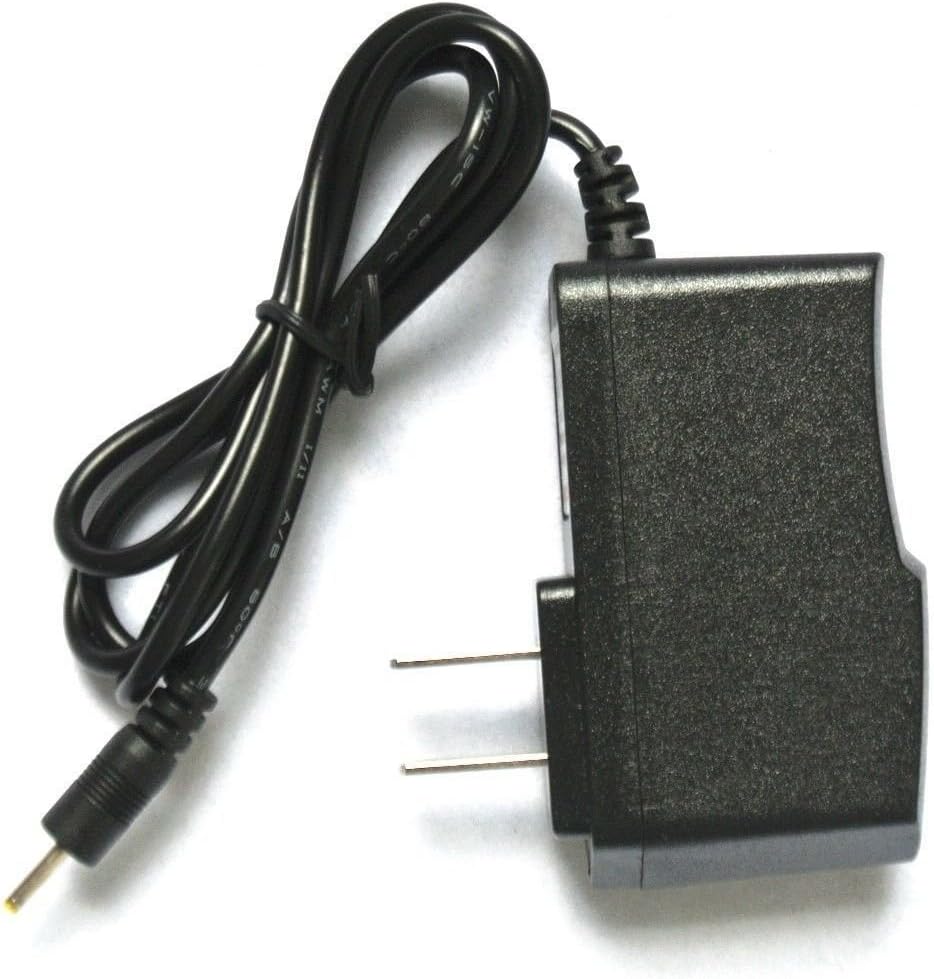
Image: The BestCH 5V 2A AC/DC Adapter, showing the main unit with US-style prongs and the attached cable terminating in a barrel connector. This image illustrates the complete adapter unit.
4. Інструкція з експлуатації
Once connected, the adapter will automatically begin supplying power to your tablet. No further user interaction is typically required for basic operation.
- Зарядка: When connected to a powered outlet and your tablet, the adapter will charge your tablet's battery. The tablet's screen or indicator light will typically show charging status.
- Пряма потужність: The adapter can also power your tablet directly, allowing you to use the device even if the battery is depleted or removed (if applicable to your tablet model).
- Відключення: To disconnect, first unplug the adapter from the wall outlet, then gently remove the barrel connector from your tablet.
5. Технічне обслуговування
Правильний догляд подовжить термін служби вашого адаптера:
- Прибирання: Від’єднайте адаптер від усіх джерел живлення перед чищенням. Використовуйте м’яку суху тканину для протирання зовнішньої поверхні. Не використовуйте рідкі засоби для чищення або розчинники.
- Зберігання: When not in use, store the adapter in a cool, dry place, away from direct sunlight and extreme temperatures. Avoid tightly winding the cable.
- Догляд за кабелем: Do not pull on the cable to unplug the adapter from the wall or the device. Always grasp the plug or connector directly.
6. Вирішення проблем
Якщо у вас виникли проблеми з адаптером, спробуйте ось що:
- Немає живлення/заряджання:
- Переконайтеся, що адаптер надійно підключено до робочої розетки. Перевірте розетку за допомогою іншого пристрою.
- Verify the barrel connector is fully inserted into your tablet's power port.
- Check the adapter cable and connector for any visible damage. If damaged, discontinue use.
- Адаптер теплий на дотик: It is normal for the adapter to feel slightly warm during operation. If it becomes excessively hot to the touch or emits a burning smell, immediately unplug it and discontinue use.
- Повільна зарядка: Ensure your tablet's power settings are not limiting charging speed. If the issue persists, the tablet's battery or charging circuit may be at fault, not the adapter.
If troubleshooting steps do not resolve the issue, contact customer support or consult a qualified technician.
7. Технічні характеристики
| Вхідний об'ємtage | 100-240 В змінного струму, 50/60 Гц |
| Вихідний випtage | 5 В постійного струму |
| Вихідний струм | 2 А (2000 мА) |
| Тип роз'єму | Роз'єм для стовбура |
| Особливості захисту | OVP (Over VoltagЗахист виходу (OCP), OCP (захист виходу від перевантаження по струму), SCP (захист виходу від короткого замикання) |
| Сумісні пристрої | RCA 7 Mercury RCT6672W23 7 Inch Tablet PC and other devices requiring 5VDC 2A with a compatible barrel connector. |

Зображення: Ще одне view of the BestCH 5V 2A AC/DC Adapter, highlighting the compact design and the barrel connector at the end of the cable.
8. Гарантія та підтримка
For warranty information and customer support, please refer to the product packaging or contact the retailer/manufacturer directly. Keep your purchase receipt as proof of purchase for any warranty claims.