1. Вступ і даліview
This manual provides detailed instructions for the setup, operation, and maintenance of your Xprinter XP-Q200 80mm Thermal Printer. The XP-Q200 is a high-speed thermal receipt printer designed for various operating systems including Windows, Android, and iOS. It offers versatile connectivity options such as USB, Bluetooth, and Ethernet, making it suitable for a wide range of business environments.

Малюнок 1.1: Спереду view of the Xprinter XP-Q200 Thermal Printer.
2. Інформація про безпеку
Please read the following safety precautions carefully before using the printer to ensure safe and proper operation:
- Do not touch the thermal print head immediately after printing, as it may be hot.
- Use only the power adapter supplied with the printer. Using an incorrect adapter may damage the printer or cause fire.
- Do not disassemble or modify the printer. Refer all servicing to qualified personnel.
- Тримайте принтер подалі від води, вологи та прямих сонячних променів.
- Переконайтеся, що принтер встановлено на стійкій, рівній поверхні.
3. Вміст упаковки
Перевірте, чи всі перелічені нижче елементи входять до комплекту поставки вашого принтера:
- Xprinter XP-Q200 Thermal Printer Unit
- Адаптер живлення
- USB кабель
- Thermal Paper Roll (initial)
- Посібник користувача
4. Особливості продукту
The Xprinter XP-Q200 offers a range of features designed for efficient and reliable thermal printing:
- Високошвидкісний друк: Achieves print speeds of up to 260mm/sec with an integrated auto cutter.
- Кілька інтерфейсів: Equipped with USB, Bluetooth, and Ethernet connectivity for flexible integration.
- Широка сумісність: Supports Windows, Linux, and Android operating systems.
- Logo and Barcode Support: Allows for downloading and printing of store logos (BMP file format) and various barcode types on thermal paper.
- Робота з папером: Designed to handle thermal paper rolls up to 80x80mm.
- International Language Support: Supports a variety of international languages and scripts.
- Сигнали про помилки: Features print job tips and error alarm functions for operational awareness.
- Black Mark Detection: Includes a black mark detection function for specific printing applications.
- Missing Orders Function: Incorporates a feature to help avoid "missing orders."
- Можливості моніторингу: Supports Ethernet and Serial port monitoring functions.
- NV Logo Storage: Provides 256K Bytes of NV Logo download storage.
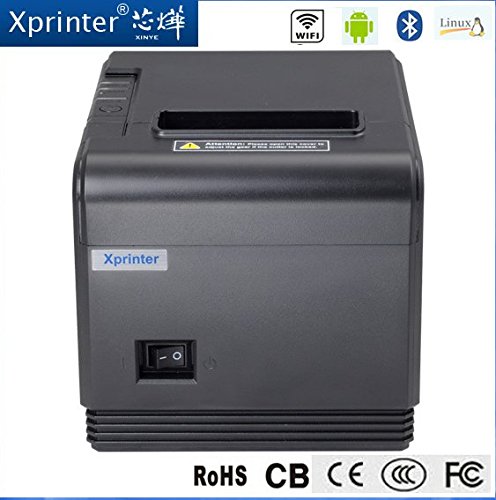
Малюнок 4.1: Спереду view highlighting connectivity options.
5. Налаштування
5.1 Фізичне налаштування
- Розпакуйте принтер та видаліть усі захисні пакувальні матеріали.
- Place the printer on a stable, flat surface near a power outlet and your host device.
- Connect the power adapter to the printer's power port and then plug it into a wall outlet.
5.2 Завантаження термопаперу
- Press the cover open button (usually located on the side or front) to open the printer's top cover.
- Insert the thermal paper roll into the paper compartment with the printing side facing the thermal print head. Ensure the roll unwinds from the bottom.
- Витягніть невеликий шматок паперу повз різак.
- Close the top cover firmly until it clicks into place. The printer will automatically feed the paper to the correct position.
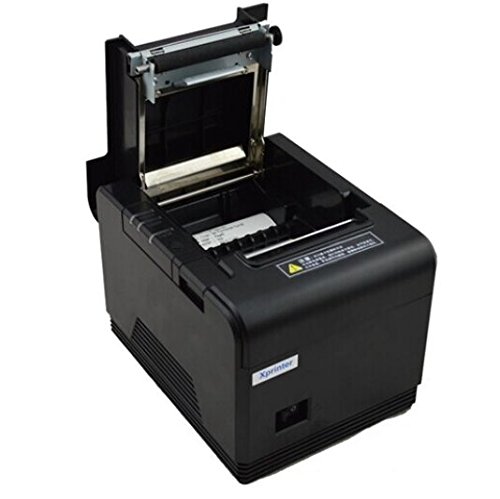
Figure 5.1: Loading thermal paper into the printer.
5.3 Підключення до пристрою
The XP-Q200 supports USB, Bluetooth, and Ethernet connections.

Малюнок 5.2: Задня частина view of the printer with connectivity ports.
5.3.1 Підключення USB
- Connect one end of the USB cable to the printer's USB port and the other end to your computer's USB port.
- The computer should detect the printer automatically.
5.3.2 Bluetooth Connection (for Android/iOS)
- Переконайтеся, що принтер увімкнено.
- On your Android or iOS device, go to Bluetooth settings and enable Bluetooth.
- шукати available devices. The printer should appear as "XP-Q200" or similar.
- Select the printer to pair. The default PIN is usually "0000" or "1234".
- Once paired, you can select the printer from your application's print settings.
5.3.3 Підключення Ethernet
- Підключіть кабель Ethernet від порту Ethernet принтера до мережевого маршрутизатора або комутатора.
- The printer will obtain an IP address automatically via DHCP. For static IP configuration, refer to the advanced settings utility provided with the printer drivers.
5.4 Встановлення драйвера
For Windows and Linux systems, you will need to install the appropriate printer drivers. Drivers are typically available on the Xprinter official website or on a CD included with the printer. Follow the on-screen instructions during installation.
6. Інструкція з експлуатації
6.1 Базовий друк
Once the printer is connected and drivers are installed (if applicable), you can send print jobs from your application. Ensure the printer is powered on and has paper loaded.
- From your application (e.g., POS software, web browser), select the print option.
- Choose "Xprinter XP-Q200" from the list of available printers.
- Adjust any print settings as needed (e.g., paper size, copies).
- Натисніть кнопку «Друк», щоб надіслати завдання на принтер.
6.2 Logo and Barcode Printing
The XP-Q200 supports custom logo and barcode printing. Refer to the printer's utility software (usually provided with drivers) for instructions on how to upload logos (BMP format) to the printer's NV memory and configure barcode printing settings.
7. Технічне обслуговування
7.1 Очищення принтера
Регулярне очищення допомагає підтримувати якість друку та подовжує термін служби принтера.
- Друкувальна головка: Використовуйте ватний тампон, злегка промокнітьampened with isopropyl alcohol to gently wipe the thermal print head. Allow it to dry completely before closing the cover. Clean the print head regularly, especially if print quality degrades.
- Плитий ролик: Clean the rubber platen roller with a soft cloth dampзмішаний ізопропіловим спиртом.
- Зовні: Протріть зовнішню частину принтера м’якою сухою тканиною. Не використовуйте абразивні засоби для чищення або розчинники.
7.2 Усунення застрягання паперу
Якщо сталося застрягання паперу:
- Вимкніть принтер.
- Відкрийте верхню кришку.
- Carefully remove any jammed paper. Ensure no small pieces of paper remain inside.
- Close the top cover firmly.
- Turn the printer back on.
8. Вирішення проблем
This section addresses common issues you might encounter with your XP-Q200 printer.
| проблема | Можлива причина | Рішення |
|---|---|---|
| Принтер не вмикається | Power cable loose; Power outlet faulty; Power adapter faulty | Check power connections; Try a different outlet; Contact support if adapter is faulty. |
| Немає виводу на друк | No paper; Paper loaded incorrectly; Printer offline; Driver issue | Load paper correctly; Check printer status; Reinstall drivers. |
| Погана якість друку | Print head dirty; Low quality paper; Print head worn out | Clean print head; Use recommended thermal paper; Contact support for service. |
| Зминання паперу | Paper loaded incorrectly; Foreign object inside | Refer to Section 7.2 for clearing jams. |
| Bluetooth/Ethernet connection fails | Incorrect pairing; Network issue; IP address conflict | Re-pair device; Check network cables/settings; Verify IP address. |
9. Технічні характеристики
| Особливість | Специфікація |
|---|---|
| Назва моделі | XP-Q200 |
| Технологія друку | Теплові |
| Швидкість друку | 260 мм/сек |
| Вихід на принтер | Монохромний |
| Технологія підключення | Bluetooth, USB, Ethernet |
| Розмір листа | Thermal (80mm) |
| Двосторонній друк | так |
| колір | чорний |
| Тип контролера | iOS, Android |
| Включені компоненти | Папір |
| Особливість | USB |
| Тип сканера | Портативний |


