1. Вступ
Дякуємо за покупкуasing the Sony Signature Series Audio Component Amplifier TA-ZH1ES. This high-resolution headphone amplifier is designed to deliver exceptional audio quality, featuring advanced technologies such as Sony's enhanced S-Master HX digital amplifier and DSD Remastering Engine. This manual provides essential information for the proper setup, operation, and maintenance of your device.
2. Інформація про безпеку
Please read all safety instructions carefully before using the amplifier. Збережіть цей посібник для подальшого використання.
- Джерело живлення: Connect the unit only to the AC power outlet specified in the specifications.
- Вентиляція: Забезпечте належну вентиляцію навколо пристрою, щоб запобігти перегріву. Не блокуйте вентиляційні отвори.
- вологість: Не піддавайте пристрій впливу дощу або вологи, щоб зменшити ризик пожежі або ураження електричним струмом.
- Сторонні предмети: Не вставляйте жодних предметів у отвори пристрою.
- Обслуговування: Звертайтеся до кваліфікованого сервісного персоналу для проведення всіх робіт з обслуговування. Не намагайтеся самостійно відкривати або ремонтувати пристрій.
- Розміщення: Place the unit on a stable, level surface away from direct sunlight, heat sources, and excessive dust or vibrations.
3. Продукт закінчивсяview
3.1 Передня панель
The front panel provides various headphone output connections and essential controls for operation.

Малюнок 3.1: Макет передньої панелі
This image displays the front panel of the TA-ZH1ES amplifier, highlighting the various headphone output jacks and the volume control knob. From left to right, you can see the XLR4 balanced output, multiple 4.4mm and 3.5mm balanced outputs, and 6.3mm and 3.5mm unbalanced outputs. The large rotary knob on the right is for volume control, and a Walkman/Xperia USB input is also visible.
- Кнопка живлення: Вмикає або вимикає пристрій.
- Селектор введення: Перемикає доступні джерела вхідного сигналу.
- Output Selector: Selects the desired output mode.
- Дисплей: Shows current settings and status.
- Кнопка меню/назад: Navigates menu options or returns to the previous screen.
- Кнопка введення: Підтверджує вибір.
- Gain Button: Adjusts the output gain for different headphone impedances.
- Регулятор гучності: Контролює вихідну гучність.
- Виходи для навушників:
- Balanced Connections: 4.4mm, 3.5mm x 2, XLR4
- Unbalanced Connections: 6.3mm, 3.5mm
- Walkman/Xperia USB Input: For connecting compatible portable devices.
3.2 Задня панель
The rear panel houses various input and output terminals for connecting to other audio components and the power supply.
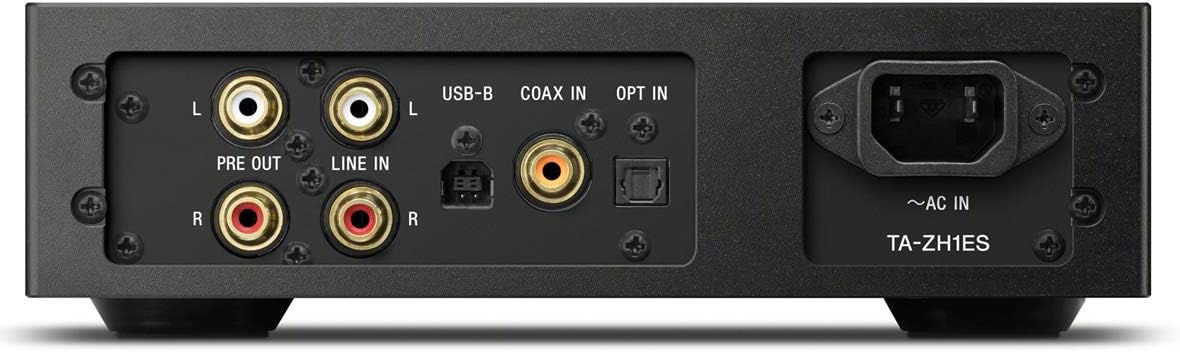
Малюнок 3.2: Розташування задньої панелі
This image illustrates the rear panel of the TA-ZH1ES amplifier, detailing the various connectivity options. Visible ports include RCA Line In (L/R), RCA Pre Out (L/R), USB-B input, Coaxial input, Optical input, and the AC power inlet. Each port is clearly labeled for easy identification.
- LINE IN (RCA L/R): Analog audio input for connecting external devices.
- PRE OUT (RCA L/R): Analog audio output for connecting to a power amplifier або активні колонки.
- Вхід USB-B: For connecting to a computer or other digital audio sources.
- COAX IN: Коаксіальний цифровий аудіовхід.
- ВИБРАТИ В: Оптичний цифровий аудіовхід.
- ~AC IN: Power input for the AC power cord.
4. Налаштування
Follow these steps to set up your TA-ZH1ES ampліфірник.
4.1 Розміщення
Розмістіть amplifier on a flat, stable surface with adequate space for ventilation. Avoid placing it near heat sources or in direct sunlight.

малюнок 4.1: Amplifier Розміщення
This image shows the Sony TA-ZH1ES amplifier positioned on a flat surface, demonstrating a typical setup environment. Ensure the unit has sufficient space around it for proper airflow.
4.2 Підключення аудіоджерел
Connect your audio sources to the appropriate input terminals on the rear panel.
- Digital Sources (Computer, CD Player, etc.):
- For a computer, connect a USB-B cable from your computer to the Вхід USB-B.
- For a CD player or other digital audio device, use a coaxial cable for the КОАКСАЛЬНИЙ ВХОД or an optical cable for the ВИБРАТИ В.
- Analog Sources (Turntable with pre-amp, etc.): Connect RCA cables from your analog source to the LINE IN (RCA L/R) термінали.
- Portable Devices (Walkman/Xperia): Connect compatible portable devices to the Walkman/Xperia USB Input on the front panel. This input also supports charging for Walkman devices.
4.3 Connecting Headphones or External Ampлібератор
- Навушники: Connect your headphones to the appropriate balanced (4.4mm, 3.5mm x 2, XLR4) or unbalanced (6.3mm, 3.5mm) output jacks on the front panel.
- Зовнішнє живлення AmpАктивні динаміки/акустичні системи: If using the TA-ZH1ES as a DAC or pre-amplifier, connect RCA cables from the PRE OUT (RCA L/R) terminals on the rear panel to your power amplifier або активні колонки.
4.4 Підключення живлення
Підключіть доданий шнур живлення змінного струму до ~ВХІД змінного струму terminal on the rear panel, then plug the other end into a wall outlet.
5. Інструкція з експлуатації
5.1 Основна операція
- Увімкнення: Натисніть кнопку живлення на передній панелі.
- Виберіть вхід: Use the Input Selector button to choose the desired audio source (e.g., USB-B, COAX, OPT, LINE IN).
- Підключити навушники: Plug your headphones into the appropriate jack.
- Регулювання гучності: Slowly turn the Volume knob clockwise to increase the volume to a comfortable listening level.

Рисунок 5.1: Елементи керування на верхній панелі
Це зображення забезпечує вид зверху вниз view of the TA-ZH1ES amplifier, clearly showing the power button, input/output selectors, display screen, menu navigation buttons (Menu/Back, Enter), and the Gain button. These controls are used for basic operation and feature adjustments.
5.2 DSD Remastering Engine
The DSD Remastering Engine converts all PCM audio sources to DSD 11.2MHz, aiming to provide a more natural and analog-like sound experience. This feature can be enabled or disabled through the unit's menu settings.
5.3 DSEE HX
DSEE HX (Digital Sound Enhancement Engine HX) upscales compressed audio files to near high-resolution quality. This feature is particularly effective for improving the sound of lower-resolution files, such as those from streaming services or older recordings. Access DSEE HX settings via the unit's menu.
5.4 Налаштування посилення
The amplifier features adjustable gain settings to optimize performance with various headphone impedances. Press the посилення button on the front panel to cycle through available gain levels (e.g., Low, Mid, High). Select the setting that provides sufficient volume without distortion for your specific headphones.
6. Технічне обслуговування
Proper care ensures the longevity and optimal performance of your ampліфірник.
- Прибирання: Wipe the unit with a soft, dry cloth. Do not use abrasive pads, scouring powder, or solvents such as alcohol or benzene.
- Вентиляція: Periodically check that the ventilation openings are free from dust and obstructions.
- Зберігання: If storing the unit for an extended period, disconnect it from the power outlet and store it in a clean, dry place.
7. Вирішення проблем
Якщо у вас виникли проблеми з вашим ampрятувальник, зверніться до наступних поширених проблем та рішень.
| проблема | Можлива причина / рішення |
|---|---|
| Немає живлення | Ensure the AC power cord is securely connected to both the unit and the wall outlet. Check if the power outlet is functional. |
| Ні звуку |
|
| Спотворений звук |
|
| Unit becomes hot | Ensure adequate ventilation around the unit. Do not block the ventilation openings. If overheating persists, discontinue use and contact service. |
If the problem persists after trying these solutions, please contact Sony customer support.
8. Технічні характеристики
| Особливість | Деталь |
|---|---|
| Номер моделі | TA-ZH1ES |
| Розміри виробу (Ш x В x Д) | 2.56 x 12.36 x 8.27 дюйма (приблизно 65 x 314 x 210 мм) |
| Вага товару | 1 фунта (приблизно 0.45 кг) |
| Опір навушників | 12-600 Ом |
| Виходи для навушників | Balanced: 4.4mm, 3.5mm x 2, XLR4 Unbalanced: 6.3mm, 3.5mm |
| Цифрові входи | USB-B, Coaxial, Optical, Walkman/Xperia USB |
| Аналогові входи | RCA Line In (L/R) |
| Аналогові виходи | RCA Pre Out (L/R) |
| Виробник | Sony |
| Дата першої доступності | 1 вересня 2016 р |
Примітка: Технічні характеристики можуть бути змінені без попередження.
9. Гарантія та підтримка
Щоб отримати детальну інформацію про гарантію, зверніться до гарантійного талона, що додається до вашого продукту, або відвідайте офіційну службу підтримки Sony. website for your region. For technical assistance, product registration, or service inquiries, please contact Sony customer support.
Підтримка Sony Webсайт: https://www.sony.com/electronics/support