1. Вступ
The Yamaha HS5I Studio Monitor is designed for accurate sound reproduction in mixing and music production environments. Following the design philosophy of sonic purity, this monitor aims to deliver a concise sound image, high resolution, and flat response without coloring or altering the original sound. This model includes mounting points and screws for installation, offering versatile placement options.
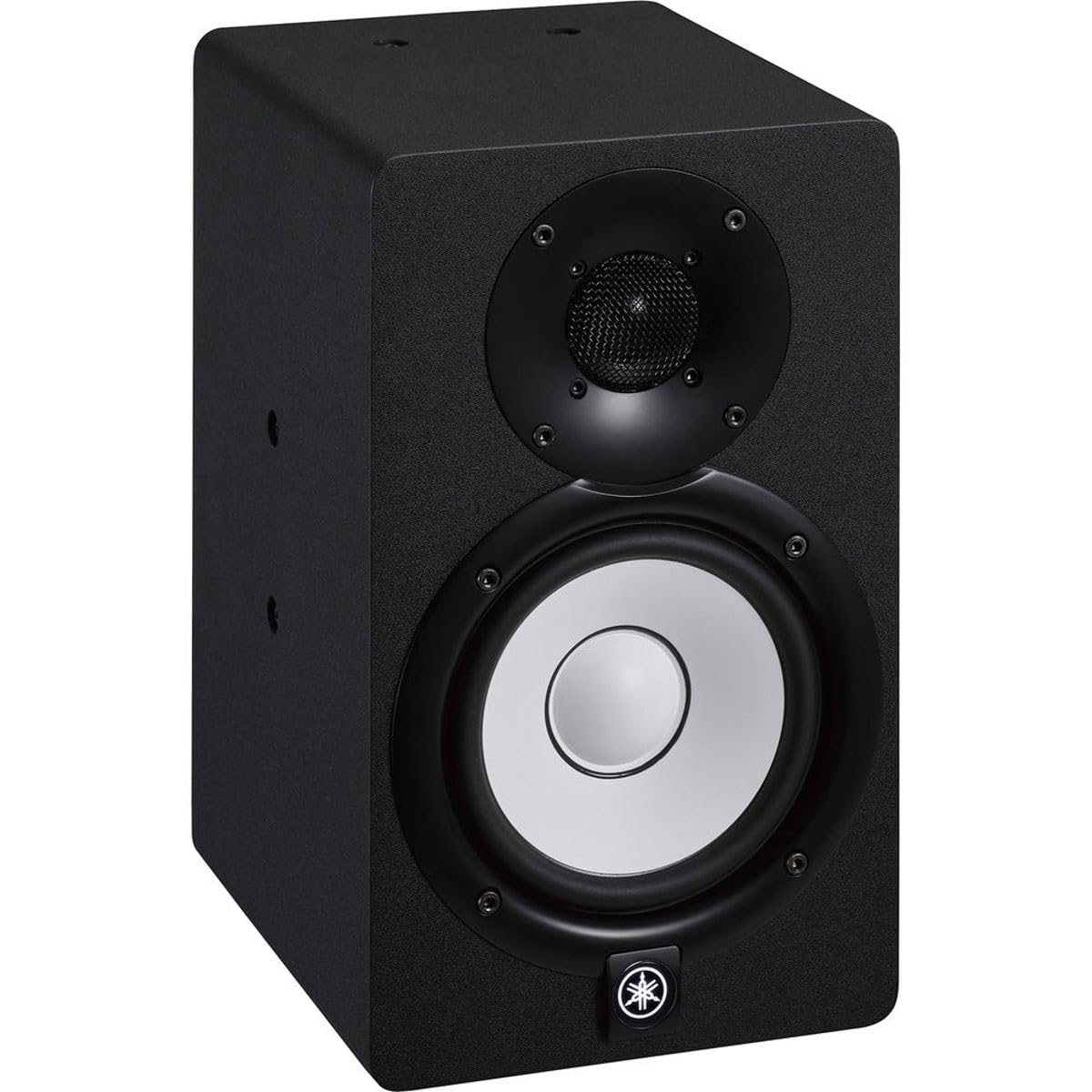
Малюнок 1: Спереду view of the Yamaha HS5I Studio Monitor, showcasing the 5-inch white cone woofer and 1-inch dome tweeter in a black enclosure.
2. Налаштування
2.1 Розпакування та компоненти
Carefully unpack your Yamaha HS5I Studio Monitor. The package includes the monitor unit and a power cable. Ensure all components are present and undamaged.
2.2 Фізичне розміщення та кріплення
The HS5I is designed with mounting points and includes screws for installation. It is compatible with various mounting solutions such as wall, ceiling, and baton brackets (sold separately). Choose a stable and appropriate location for your monitor to ensure optimal sound dispersion and safety.

Figure 2: Dimensions of the Yamaha HS5I Studio Monitor, showing a height of 11.25 inches, width of 6.69 inches, and depth of 8.75 inches.

Figure 3: Yamaha HS Series monitors shown mounted on a wall in a studio environment, demonstrating potential installation flexibility.
2.3 Підключення
Connect your audio source to the monitor using XLR or TRS cables. The monitor features both balanced and unbalanced inputs for flexible integration into your studio setup. Ensure secure connections to prevent signal loss or interference.
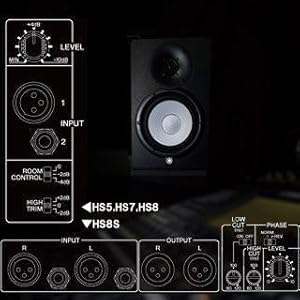
Figure 4: Diagram illustrating the rear panel of a Yamaha HS Series monitor, highlighting input options (XLR, TRS) and control knobs.
3. Експлуатація монітора
3.1 Увімкнення/вимкнення
Connect the provided power cable to the monitor and a suitable power outlet. Use the power switch located on the rear panel to turn the monitor on or off.
3.2 Adjusting Sound Characteristics
The HS5I features 'Room Control' and 'High Trim' switches on the rear panel. These controls allow you to adjust the monitor's frequency response to compensate for the acoustic characteristics of your room, ensuring a more accurate listening environment. Adjust the 'Level' knob to set the overall output volume.
3.3 Acoustic Design Features
The monitor incorporates a 2-way bass-reflex bi-amplified design with a 5-inch cone woofer and a 1-inch dome tweeter. Its low resonance enclosure design, achieved through a three-way mitered-joint technique, minimizes unwanted vibrations. Advanced noise reduction techniques, including controlling vortex at the speaker port, contribute to clear and accurate sound reproduction.
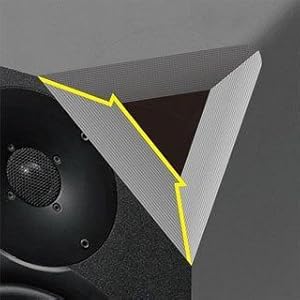
Figure 5: Illustration of the three-way mitered-joint technique used in the enclosure design to reduce resonance.
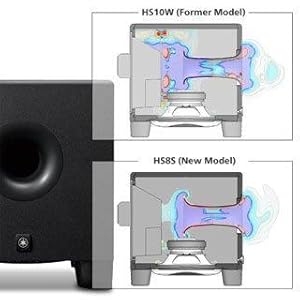
Figure 6: Diagram illustrating the cutting-edge noise reduction technique, specifically controlling vortex at the speaker port for cleaner bass.
3.4 продукт закінченоview відео
Для візуального оглядуview of the Yamaha HS Series monitors, including features and design philosophy, please watch the official product video below.
Video 1: Official Yamaha HS Monitor Speaker Overview. This video provides an in-depth look at the features and design principles of the Yamaha HS Series, including the HS5I model.
4. Технічне обслуговування
To ensure the longevity and optimal performance of your Yamaha HS5I Studio Monitor, keep it clean by wiping with a soft, dry cloth. Avoid using abrasive cleaners or solvents. Ensure proper ventilation around the monitor to prevent overheating. Do not expose the monitor to extreme temperatures or humidity.
5. Вирішення проблем
- Немає звуку: Check all cable connections (power, XLR/TRS) and ensure the monitor is powered on. Verify the audio source is active and outputting sound.
- Спотворений звук: Reduce the input level from your audio source or the monitor's 'Level' control. Check for damaged cables. Ensure the 'Room Control' and 'High Trim' settings are appropriate for your environment.
- Гудіння/дзижчання: Ensure all cables are securely connected. Try using balanced cables (XLR/TRS) if you are currently using unbalanced. Keep mobile phones and other wireless devices away from the monitors to prevent electromagnetic interference.
- Нерівний звук: Verify that both monitors are placed symmetrically in your listening environment and that 'Room Control' and 'High Trim' settings are identical for both units.
6. Технічні характеристики
| Особливість | Специфікація |
|---|---|
| Бренд | Yamaha |
| Номер моделі | HS5I |
| Тип динаміка | 2-Way Bass-Reflex Bi-Amplified Nearfield Studio Monitor |
| Діаметр НЧ-динаміка | 5 дюймів |
| Діаметр твітера | 1 дюймів |
| АЧХ | 54 Гц-30 кГц |
| Максимальна вихідна потужність динаміка | 70 Watts (45W LF + 25W HF) |
| Технологія підключення | XLR, TRS |
| Режим аудіовиходу | Стерео |
| Тип монтажу | Кріплення на стелю, кріплення на стіну |
| Матеріал корпусу | пластик |
| Колір | чорний |
| Розміри предмета (Д x Ш x В) | 8.75" Г x 6.69" Ш x 11.25" В |
| Що в коробці | Кабель живлення |
7. Гарантія та підтримка
7.1 Інформація про гарантію
The Yamaha HS5I Studio Monitor comes with a 1-year manufacturer warranty. Yamaha Corporation of America (Yamaha) ensures the quality and craftsmanship of its products. This limited warranty applies only to products purchased from an authorized Yamaha retailer in the fifty United States (including the District of Columbia) and used in this area. For complete details, please review the Yamaha Limited Warranty for this product on the official Yamaha webсайт.
7.2 Підтримка клієнтів
Для отримання додаткової допомоги, технічної підтримки або запитів щодо обслуговування, будь ласка, відвідайте офіційний веб-сайт Yamaha. website or contact their customer service department. Ensure you have your product model number (HS5I) and proof of purchase available when seeking support.


