1. Вступ
The Logitech Z625 THX Certified 2.1 Speaker System is designed to deliver a powerful audio experience for various entertainment needs, including gaming, movies, and music. This system features two satellite speakers and a subwoofer, providing 400 Watts Peak power for crisp sound and deep bass. It supports multiple input options, allowing connection to up to three compatible devices simultaneously.

Image 1.1: The Logitech Z625 THX Certified 2.1 Speaker System, showcasing the subwoofer and two satellite speakers.
2. Що в коробці
Carefully unpack the contents of your Logitech Z625 speaker system. The package should contain the following items:
- Сабвуфер
- Два сателітні динаміки
- Аудіокабель 3.5 мм
- Оптичний кабель
- Короткий посібник

Image 2.1: Contents of the Logitech Z625 package, showing the subwoofer, satellite speakers, and connection cables.
3. Інструкції з налаштування
Виконайте такі кроки, щоб налаштувати акустичну систему Logitech Z625:
- Розміщення: Position the subwoofer on the floor, ideally near a wall for enhanced bass. Place the two satellite speakers on either side of your monitor or television, ensuring they are equidistant from your listening position for optimal stereo imaging.
- Підключення сателітних динаміків: Підключіть кабелі від сателітних динаміків до відповідних портів на задній панелі сабвуфера. Переконайтеся в надійному з'єднанні.
- Підключення джерела аудіо: The Z625 system supports multiple input options. Choose the appropriate cable for your device:
- Вхід 3.5 мм: Use the included 3.5mm audio cable to connect your computer, smartphone, or other devices with a 3.5mm audio output to the AUX input on the right satellite speaker or the 3.5mm input on the subwoofer.
- Оптичний вхід: Use an optical cable (included) to connect your television, game console, or other devices with an optical audio output to the OPTICAL input on the subwoofer.
- Вхід RCA: Use an RCA cable (not included) to connect devices with RCA audio outputs to the RCA inputs on the subwoofer.
- Підключення живлення: Підключіть кабель живлення сабвуфера до розетки.
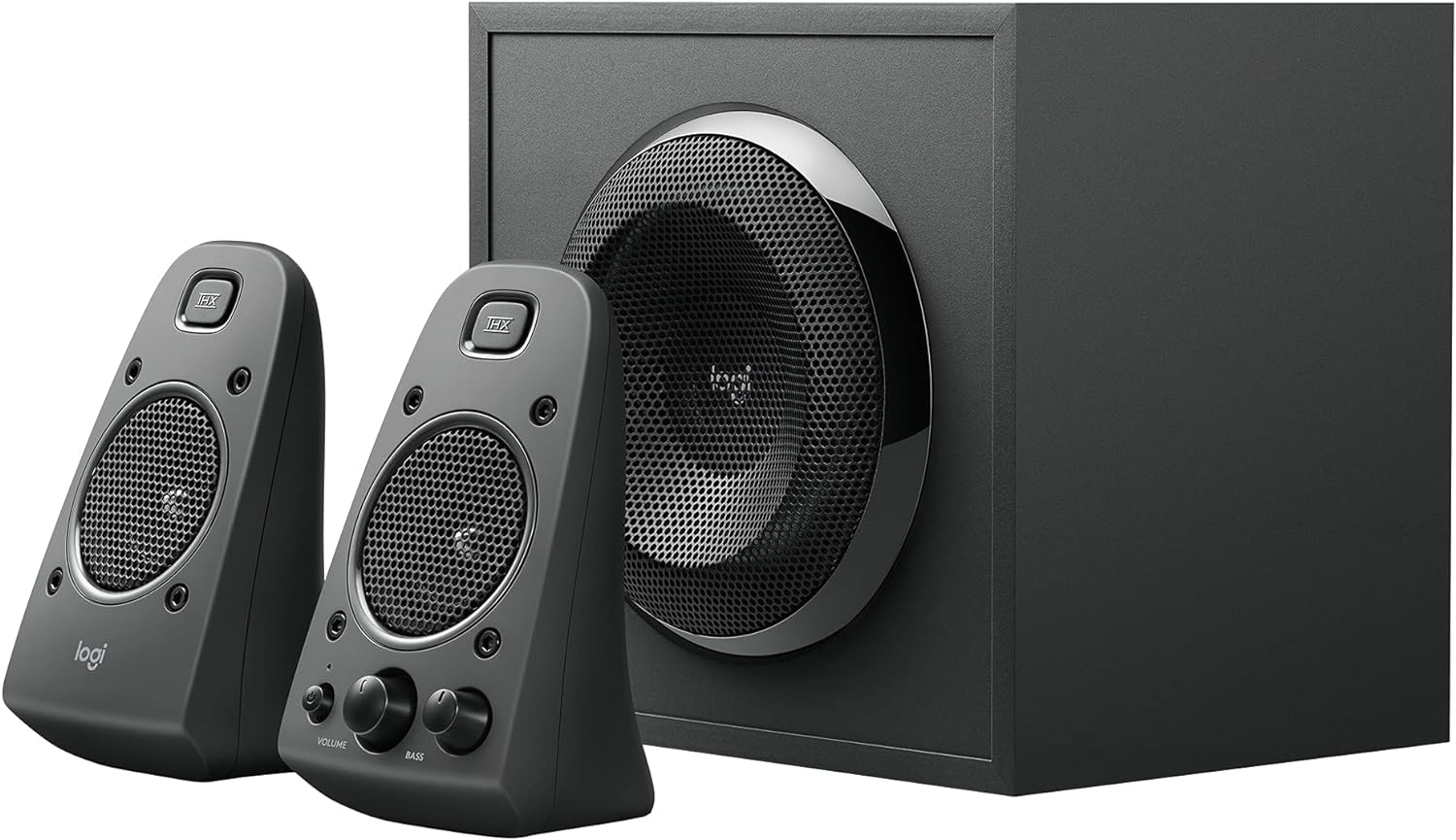
Image 3.1: Rear panel of the Z625 subwoofer, illustrating the various audio input options and satellite speaker connections.
4. Інструкція з експлуатації
All primary controls for the Logitech Z625 system are conveniently located on the right satellite speaker.
- Кнопка живлення: Press the power button to turn the speaker system on or off. An indicator light will confirm the power status.
- Регулювання гучності: Rotate the large volume knob to adjust the overall audio level.
- Регулювання басів: Rotate the bass knob to increase or decrease the subwoofer's output. Adjust this to your preference for optimal bass response.
- Роз'єм для навушників: Connect headphones to this 3.5mm jack for private listening. When headphones are connected, audio output from the speakers will be muted.
- Допоміжний вхід: This 3.5mm input allows for quick connection of portable audio devices.
The system supports simultaneous connection of up to three devices. To switch between audio sources, simply play audio from the desired connected device. The system will automatically prioritize the active input.

Image 4.1: Controls located on the right satellite speaker of the Z625 system.
5. Технічне обслуговування
To ensure the longevity and optimal performance of your Logitech Z625 speaker system, follow these maintenance guidelines:
- Прибирання: Використовуйте м’яку суху тканину для очищення поверхонь динаміків та сабвуфера. Уникайте використання рідких засобів для чищення або абразивних матеріалів, оскільки вони можуть пошкодити покриття або внутрішні компоненти.
- Вентиляція: Ensure that the subwoofer and satellite speakers have adequate ventilation. Do not block any vents, especially on the subwoofer, to prevent overheating.
- Середовище: Keep the speaker system away from direct sunlight, excessive heat, humidity, and dust. Avoid placing it near strong magnetic fields.
- Управління кабелем: Періодично перевіряйте всі кабельні з'єднання, щоб переконатися в їх надійності та відсутності пошкоджень. Уникайте різких згинів кабелів.
6. Вирішення проблем
If you encounter issues with your Logitech Z625 speaker system, refer to the following common troubleshooting steps:
- Немає живлення:
- Ensure the power cable is securely plugged into both the subwoofer and a working wall outlet.
- Verify that the power button on the right satellite speaker is pressed.
- Немає звуку:
- Check all audio cable connections (3.5mm, optical, RCA) between the speaker system and your audio source.
- Increase the volume on both the speaker system and your audio source device.
- Ensure no headphones are plugged into the headphone jack on the right satellite speaker.
- Confirm that the correct audio output is selected on your source device (e.g., PC sound settings, TV audio output).
- Спотворений або нечіткий звук:
- Reduce the volume on both the speaker system and your audio source.
- Adjust the bass control knob on the right satellite speaker.
- Test with a different audio source or cable to rule out source-specific issues.
- Переривчастий звук:
- Перевірте, чи не закріплені кабелі.
- Ensure the speaker system is not in standby mode. If it enters standby, power cycling the unit may resolve the issue.
For more detailed troubleshooting or persistent issues, please refer to the official Logitech support resources or the complete user guide PDF.
7. Технічні характеристики
| Особливість | Специфікація |
|---|---|
| Бренд | Logitech |
| Назва моделі | Z625 Powerful THX Sound |
| Номер моделі товару | 980-001258 |
| Тип динаміка | Monitor, Satellite |
| Конфігурація каналу об’ємного звуку | 2.1 |
| Технологія підключення | Auxiliary, Optical, RCA |
| Режим аудіовиходу | Стерео, об'ємний звук |
| Максимальна вихідна потужність динаміка | 400 Вт пік / 200 Вт середньоквадратичне значення |
| АЧХ | 35 Гц - 20 кГц |
| Вхідний об'ємtage | 120 вольт |
| Сумісні пристрої | Personal Computer, Phones, Television, Gaming Consoles |
| Спосіб контролю | Touch (on right satellite) |
| Розміри продукту | 10.4" Г x 11.9" Ш x 11.1" В |
| Вага товару | 18.1 фунта |
| матеріал | Пластик, Дерево |
| Колір | чорний |
8. Гарантія та підтримка
The Logitech Z625 THX Certified 2.1 Speaker System comes with a Обмежена гарантія. For specific terms and conditions of your warranty, please refer to the documentation included with your product or visit the official Logitech webсайт.
For further assistance, detailed product information, or to download the complete user guide, please visit the official Logitech support page:
Завантажити офіційний посібник користувача (PDF)
Ви також можете відвідати Магазин Logitech на Amazon для отримання додаткової інформації та продуктів.


