вступ
This manual provides comprehensive instructions for the installation, operation, and maintenance of your One For All Full Motion TV Bracket, model WM2251. This bracket is designed to securely mount televisions ranging from 13 to 40 inches, offering flexible viewing angles with its swivel and tilt capabilities.

Image: The One For All Full Motion TV Bracket, model WM2251, showcasinзавдяки своїй міцній конструкції та шарнірному важелю.
Інформація про безпеку
Будь ласка, уважно прочитайте всі попередження та інструкції з техніки безпеки перед встановленням та використанням. Недотримання цих вимог може призвести до пошкодження майна, серйозних травм або смерті.
- Ensure the mounting surface can safely support the combined weight of the bracket and the television.
- Use appropriate tools and follow all drilling and mounting instructions precisely.
- Do not exceed the maximum weight capacity of 30kgs (66 lbs).
- Verify VESA compatibility (75x75, 100x100, 200x100, 200x200) with your TV before installation.
- Тримайте дітей і домашніх тварин подалі під час встановлення.
- Якщо ви не впевнені щодо будь-якої частини встановлення, зверніться до кваліфікованого фахівця.
Вміст упаковки
Перед початком встановлення перевірте наявність усіх компонентів.
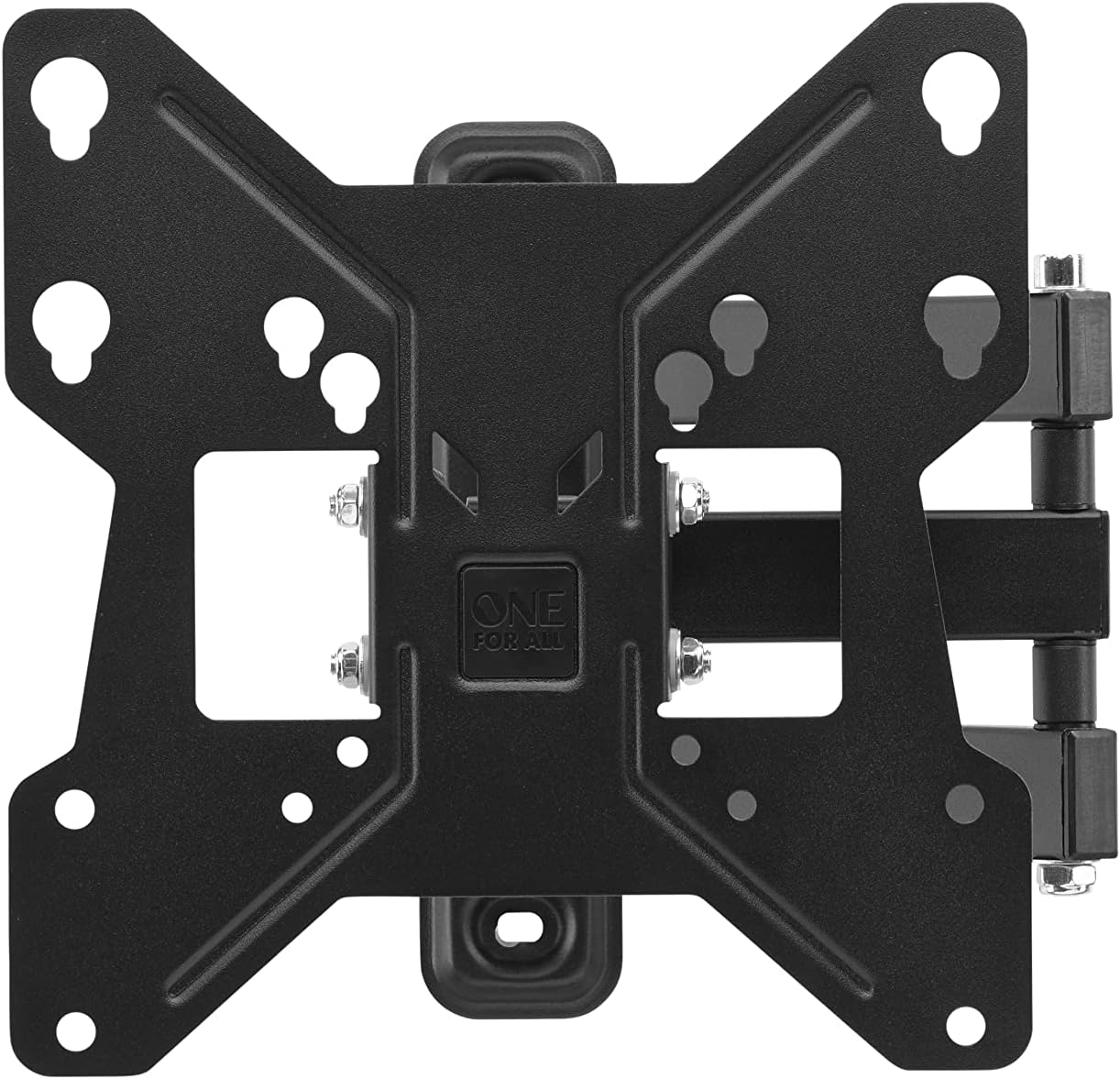
Зображення: Зверху вниз view of the One For All TV Bracket, showing the main mounting plate and articulating arm.
- Збірка настінного кронштейна для телевізора
- Mounting Hardware (screws, concrete anchors, spacers)
- Інструкція з експлуатації
Налаштування та встановлення
Контрольний список перед інсталяцією
- Confirm your TV's screen size is between 13 and 40 inches.
- Check your TV's VESA mounting pattern: 75x75, 100x100, 200x100, or 200x200.
- Ensure your TV's weight does not exceed 30kgs.
- Identify the type of wall (wood stud, concrete, brick) and use appropriate anchors.
Етапи встановлення
- Attach Bracket to TV: Secure the TV-side bracket components to the back of your television using the provided screws that match your TV's VESA pattern. Ensure a snug fit.
- Mark Wall Position: Determine the desired height for your TV. Hold the wall plate against the wall and mark the drilling points. Use a spirit level to ensure it is perfectly horizontal.
- Свердлити отвори: Drill pilot holes at the marked locations. For wood studs, drill directly. For concrete or brick, insert the provided concrete anchors.
- Настінна пластина для кріплення: Secure the wall plate to the wall using the appropriate screws. Ensure it is firmly attached and stable.
- Підвісьте телевізор: Carefully lift the TV with the attached bracket and hook it onto the wall plate. Ensure it is securely seated.
- Закріпіть телевізор для кріплення: Tighten any safety screws or locking mechanisms to prevent accidental dislodging of the TV from the mount.

Зображення: Колишній/колишняample of the TV bracket installed on a wall, demonstrating its discreet presence above a living space.
For additional assistance, you can download the One For All Toolbox app (available for iOS and Android), which includes tools like a spirit level and flashlight to aid installation.
Operating the TV Bracket
The One For All Full Motion TV Bracket allows for flexible adjustment of your television's viewкут.
- Swivel (180°): Gently push or pull the TV to rotate it horizontally up to 180 degrees (90 degrees left or right from center). This is ideal for viewз різних частин кімнати.
- Tilt (15°): Adjust the vertical angle of the TV up to 15 degrees (up or down). This feature helps reduce glare and optimize viewing from various heights.
- Управління кабелем: Utilize the integrated cable management system to route and conceal cables for a tidy appearance.
Технічне обслуговування
To ensure the longevity and proper function of your TV bracket:
- Періодично перевіряйте всі гвинти та болти, щоб переконатися, що вони міцно затягнуті.
- Clean the bracket with a soft, dry cloth. Avoid abrasive cleaners or solvents.
- Do not hang objects from the bracket or apply excessive force when adjusting the TV.
Усунення несправностей
| проблема | Можлива причина | Рішення |
|---|---|---|
| Телевізор не рівний | Wall plate not level during installation | Re-adjust wall plate using a spirit level. |
| Bracket feels loose | Screws are not tightened sufficiently or wall anchors are inadequate | Re-tighten all mounting screws. Ensure correct wall anchors were used for your wall type. |
| TV does not fit mount | Incorrect VESA size or TV size/weight | Verify your TV's VESA pattern and ensure it is within the 13-40 inch screen size and 30kg weight limit. |
Технічні характеристики
- модель: WM2251
- Сумісність з розміром екрана: 13-40 дюймів
- Максимальна вага: 30 кг (66 фунтів)
- Сумісність з VESA: 75x75, 100x100, 200x100, 200x200
- Кут повороту: До 180°
- Кут нахилу: До 15°
- колір: чорний
- матеріал: пластик
- Розміри продукту: 9.45 x 1.93 x 9.8 дюймів
Гарантія та підтримка
For warranty information and technical support, please refer to the official One For All webсайт або зверніться до служби підтримки клієнтів. Зберігайте чек про покупку як підтвердження покупки.
You can also visit the One For All Store on Amazon for more products and information: One For All Store.


