вступ
This manual provides detailed instructions for the proper use and maintenance of your ELECTRA RC7 Air Conditioner Remote Control. Please read this manual thoroughly before operating the device to ensure optimal performance and longevity. The RC7 remote control is designed for specific Airwell, Emailair, and Electra air conditioning units.
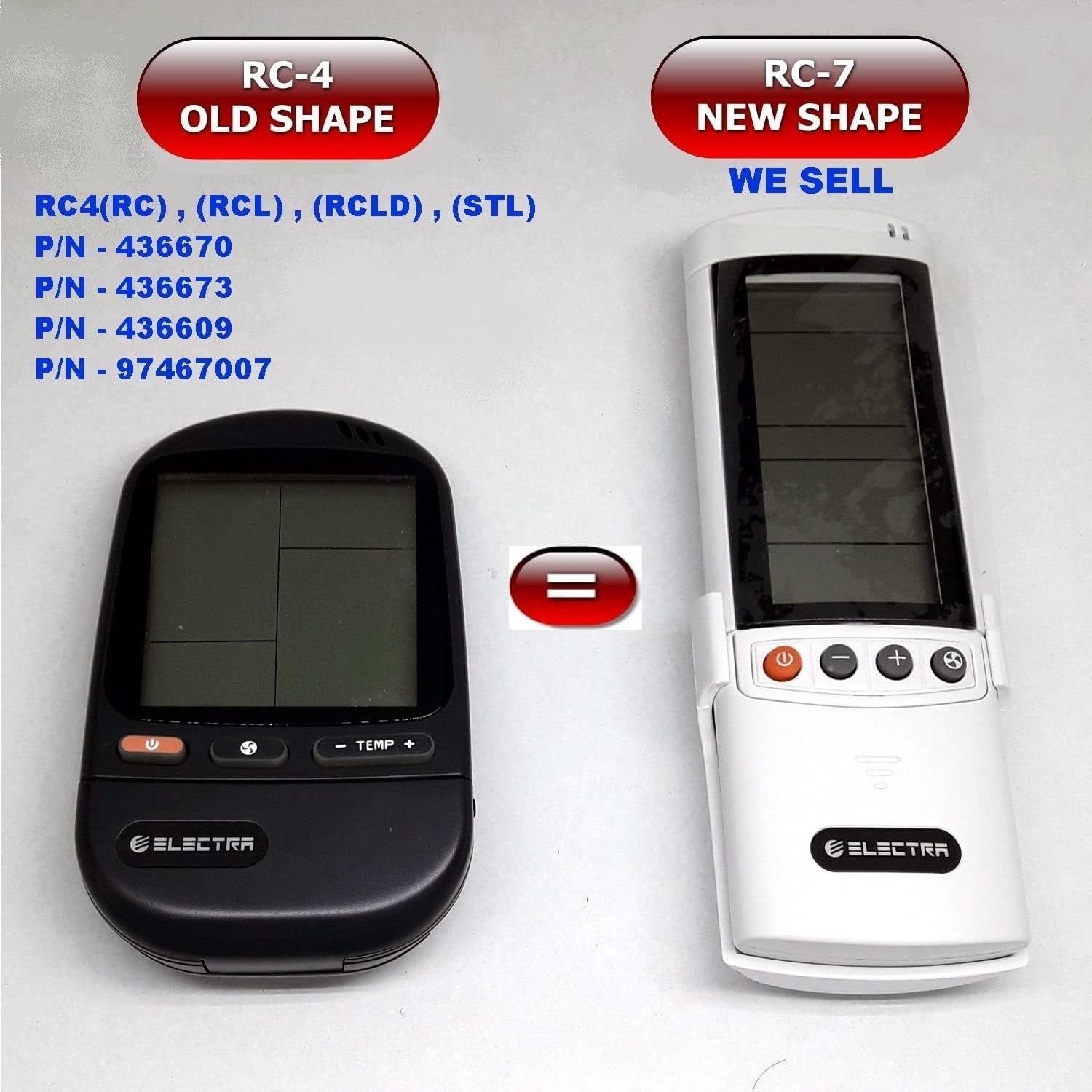
Image: Comparison of the older RC-4 model and the newer RC-7 model. This image helps users identify the correct remote control for their air conditioning unit.
Вміст упаковки
- 1 x ELECTRA RC7 Air Conditioner Remote Control
- 1 x Wall Mount Holder (optional, may vary by package)

Image: The ELECTRA RC7 remote control shown alongside its accompanying wall mount holder, illustrating the complete package contents.
Продукт закінченийview
The ELECTRA RC7 remote control features an ergonomic design with clearly labeled buttons and a digital display for easy operation. Familiarize yourself with the layout below.
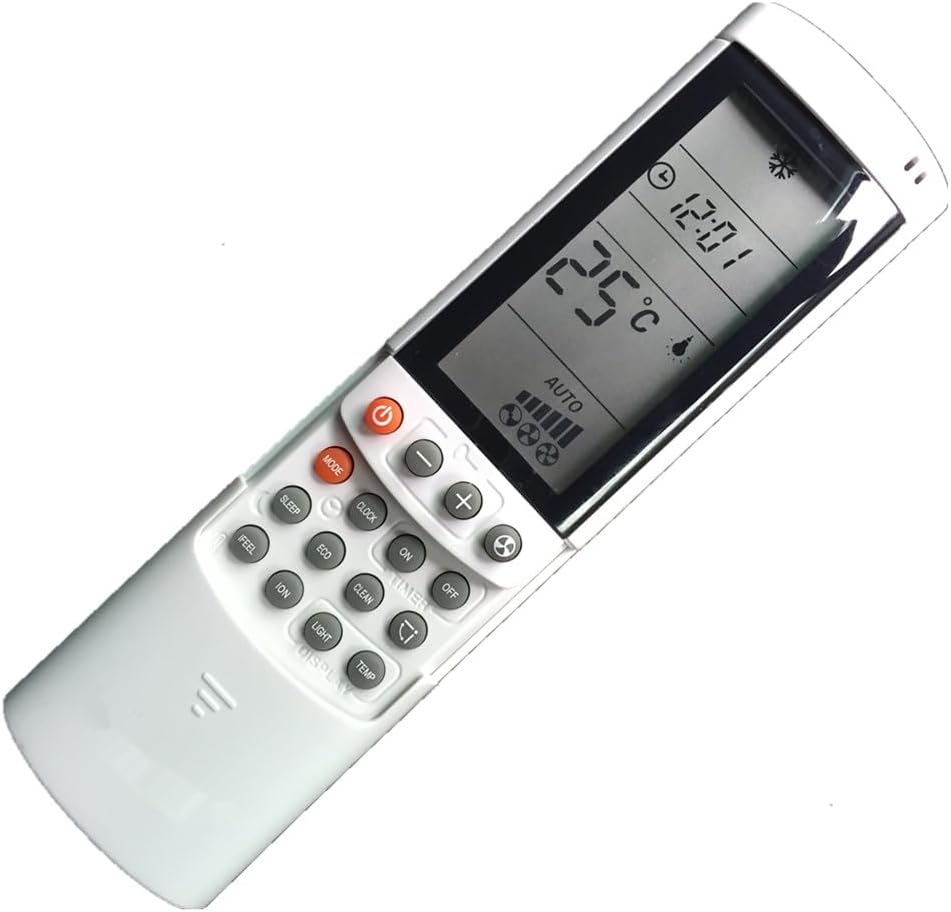
Зображення: Детальний view of the ELECTRA RC7 remote control, highlighting the digital display and various function buttons for air conditioner operation.
Функції кнопок:
- Потужність (⏻): Вмикає або вимикає кондиціонер.
- РЕЖИМ: Циклічне перемикання режимів роботи (наприклад, охолодження, обігрів, вентилятор, сушіння, автоматичний режим).
- НАБІР: Used for confirming settings or entering specific menus.
- Temperature Up (+) / Down (-): Adjusts the desired temperature.
- Fan Speed (☁): Регулювання швидкості вентилятора (наприклад, низька, середня, висока, автоматична).
- ТАЙМЕР: Sets the timer for automatic On/Off operation.
- СПАТИ: Activates or deactivates sleep mode for comfortable night operation.
- ЯСНО: Clears current settings or cancels a function.
- ВІДЧУВАТИ: Activates a specific comfort mode based on ambient conditions.
- КІМНАТА: Displays or sets the room temperature.
- СВІТЛО: Controls the display light on the indoor unit.
- ДИСПЛЕЙ: Toggles the remote's display backlight or unit's display.
- ЕКО: Activates energy-saving mode.
- ЧИСТИЙ: Initiates a self-cleaning function for the indoor unit.
- ION: Activates the ionizer function (if available on the AC unit).
- Гойдалки (⇄): Controls the louver swing direction.
Налаштування
Установка батареї:
- Знайдіть кришку батарейного відсіку на задній панелі пульта дистанційного керування.
- Посуньте кришку вниз або натисніть на засувку, щоб відкрити її.
- Insert two (2) AAA batteries, ensuring the positive (+) and negative (-) terminals match the markings inside the compartment.
- Встановіть кришку батарейного відсіку назад, переконавшись, що вона надійно зафіксувалася.
Примітка: Завжди використовуйте нові батарейки та замінюйте обидві батарейки одночасно. Не змішуйте старі та нові батарейки або батарейки різних типів.
Інструкція з експлуатації
Ensure the remote control is pointed directly at the air conditioner's receiver when sending commands.
Основна операція:
- Увімкнення/вимкнення живлення: Натисніть потужність один раз, щоб увімкнути пристрій. Натисніть її ще раз, щоб вимкнути пристрій.
- Вибір режиму: Натисніть РЕЖИМ button repeatedly to cycle through available operating modes (e.g., Auto, Cool, Dry, Fan, Heat). The selected mode will be displayed on the remote's screen.
- Регулювання температури: Використовуйте Temperature Up (+) or вниз (-) кнопки для встановлення бажаної температури.
- Регулювання швидкості вентилятора: Натисніть Швидкість вентилятора button to cycle through different fan speed settings (e.g., Auto, Low, Medium, High).
Розширені функції:
- Функція таймера: Натисніть ТАЙМЕР button to set a specific time for the unit to turn on or off. Follow the on-screen prompts to adjust the time using the temperature buttons and confirm with НАБІР.
- Режим сну: Натисніть СПАТИ button to activate sleep mode, which typically adjusts temperature and fan speed for quiet, comfortable sleep.
- Режим ECO: Натисніть ЕКО button to engage energy-saving operation, which optimizes settings to reduce power consumption.
- Функція гойдання: Натисніть гойдалка button to activate or adjust the automatic louver swing, distributing air evenly.
Технічне обслуговування
Очищення пульта дистанційного керування:
- Протріть поверхню пульта дистанційного керування м’якою сухою тканиною.
- Для стійких забруднень злегка dampпротріть тканину водою з м’яким мийним засобом, а потім негайно витріть насухо.
- Do not use abrasive cleaners, alcohol, or chemical solvents, as these can damage the remote's surface or internal components.
Заміна батареї:
Replace batteries when the remote's display becomes dim or the remote fails to operate the air conditioner from a normal distance. Refer to the "Battery Installation" section under Setup for detailed instructions.
Важливо: Вийміть батарейки, якщо пульт дистанційного керування не використовуватиметься протягом тривалого часу, щоб запобігти протіканню та пошкодженню.
Усунення несправностей
- Пульт не відповідає:
- Перевірте, чи правильно вставлені батарейки з дотриманням полярності.
- Замініть старі батарейки на нові.
- Переконайтеся, що між пультом дистанційного керування та приймачем кондиціонера немає перешкод.
- Переконайтеся, що пульт дистанційного керування спрямований безпосередньо на кондиціонер.
- Дисплей тьмяний або порожній:
- Можливо, батарейки розряджені. Замініть їх.
- Обмежений робочий діапазон:
- Batteries may be weak. Replace them.
- Ensure no strong light sources (e.g., direct sunlight) are interfering with the signal.
Технічні характеристики
- модель: RC7
- Бренд: ELECTRA (Compatible with Airwell, Emailair, Electra)
- Тип контролера: Кнопкове керування
- Особливість: Ергономічний дизайн
- колір: Білий
- Максимальна кількість підтримуваних пристроїв: 1 (на пульт дистанційного керування)
- Максимальний діапазон: Приблизно 10 метрів (33 фути)
- Джерело живлення: 2 батареї AAA (не входять в комплект)
Гарантія та підтримка
For warranty information or technical support, please refer to the documentation provided with your air conditioning unit or contact the original seller or manufacturer of the ELECTRA RC7 remote control. Keep your purchase receipt as proof of purchase.


