Важливі інструкції з безпеки
ПЕРЕД ВИКОРИСТАННЯМ УВАЖНО ПРОЧИТАЙТЕ ВСІ ІНСТРУКЦІЇ.
- Завжди відключайте вентилятор від розетки перед чищенням, обслуговуванням або переміщенням.
- Не вставляйте пальці чи будь-які інші предмети через решітку під час роботи вентилятора.
- Не використовуйте вентилятор із пошкодженим шнуром або вилкою. Викиньте вентилятор або поверніть його в авторизований сервісний центр для перевірки та/або ремонту.
- Не прокладайте шнур під килимовим покриттям. Не накривайте шнур килимками, доріжками або подібними покриттями. Розташуйте шнур подалі від зони руху, де за нього не можна буде спіткнутися.
- Не використовуйте вентилятор у вологих або damp locations such as bathrooms or laundry areas.
- Цей вентилятор призначений лише для використання в приміщенні. Не використовуйте його на вулиці.
- Тримайте вентилятор подалі від штор, портьєр або будь-яких предметів, які можуть потрапити в лопаті вентилятора.
- Наглядайте за дітьми під час використання вентилятора.
Продукт закінченийview
The Optimus 18-inch High Velocity Industrial Floor Fan is designed to provide powerful air circulation in various indoor environments. Its robust construction and high-velocity motor make it suitable for workshops, garages, and large rooms.
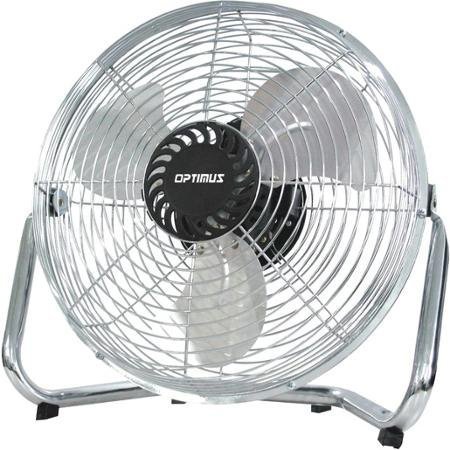
Image: Optimus 18-inch High Velocity Industrial Floor Fan. This image shows the fan with its silver metallic finish and sturdy floor stand.
Ключові характеристики:
- 18-inch diameter for wide air distribution.
- Industrial-grade high velocity airflow.
- Durable metallic finish.
- Floor standing design for stable placement.
- Multiple power levels for adjustable airflow.
Інструкції з налаштування
- Розпакуйте вентилятор: Carefully remove the fan and all components from the packaging. Retain packaging for future storage or transport.
- Зберіть підлогову підставку:
- Attach the fan head to the floor stand using the provided screws and tools. Ensure all connections are secure.
- Verify the fan head can pivot smoothly on the stand.
- Розміщення: Place the fan on a firm, level surface. Ensure there is adequate space around the fan for proper air circulation and to prevent obstruction of the air intake/output. Keep the fan at least 3 feet away from walls or furniture.
- Підключення живлення: Ensure the fan is in the "OFF" position before plugging it into a standard 120V AC electrical outlet.
Інструкція з експлуатації
This fan features push-button controls for easy operation. A remote control may also be included for convenience.
- Увімкнення/вимкнення живлення: Locate the power button on the control panel. Press the button once to turn the fan ON. Press it again to turn the fan OFF.
- Регулювання швидкості вентилятора: The fan has 4 power levels. After turning the fan ON, repeatedly press the speed control button to cycle through the available speed settings (Low, Medium, High, Max). The fan will operate at the selected speed.
- Регулювання напрямку потоку повітря: The fan head can be tilted manually to direct airflow upwards or downwards. Gently tilt the fan head to the desired angle. Do not force the fan head beyond its intended range of motion.
Технічне обслуговування
Регулярне очищення та технічне обслуговування забезпечать оптимальну продуктивність та продовжать термін служби вашого вентилятора.
- Очищення вентилятора:
- Завжди відключайте вентилятор від джерела живлення перед чищенням.
- Використовуйте м'який, damp cloth to wipe the exterior surfaces of the fan. Do not use abrasive cleaners or harsh chemicals, as these may damage the finish.
- To clean the fan blades, carefully remove the front grille (if detachable, refer to assembly instructions for details). Wipe the blades with a soft cloth. Ensure the grille is securely reattached before operating the fan.
- Перед тим, як знову підключити вентилятор, переконайтеся, що всі деталі повністю сухі.
- Зберігання: When not in use for extended periods, store the fan in a cool, dry place. It is recommended to store it in its original packaging to protect it from dust and damage.
Усунення несправностей
| проблема | Можлива причина | Рішення |
|---|---|---|
| Вентилятор не вмикається. | Not plugged in; power outlet not working; fan switch is off. | Ensure fan is securely plugged into a working outlet. Check household fuse/circuit breaker. Press the power button to turn the fan on. |
| Низький потік повітря. | Fan speed set too low; obstructed intake/output; dirty blades. | Increase fan speed. Clear any obstructions. Clean fan blades and grilles as per maintenance instructions. |
| Незвичайний шум або брязкіт. | Нещільно закріплені деталі; вентилятор не стоїть на рівній поверхні; сторонній предмет у лопатях. | Unplug the fan and check for any loose screws or components. Place the fan on a stable, level surface. Carefully inspect for and remove any foreign objects. |
Технічні характеристики
| Особливість | Деталь |
|---|---|
| Бренд | Оптимус |
| Назва моделі | Висока швидкість |
| Номер моделі товару | 306c1b92-f36b-4ccc-ac62-2ad33d5c9efb |
| Діаметр | 18 дюймів |
| Колір | Срібло |
| Стиль | Індустріальний |
| Джерело живлення | Провідний електричний |
| Кількість рівнів потужності | 4 |
| Спосіб контролю | Кнопкове керування |
| Використання в приміщенні/зовні | закритий |
| Включені компоненти | Floor Stand, Remote Control |
| Специфікація Met | OSHA |
Гарантія та підтримка
Optimus products are manufactured to high-quality standards. This product is covered by a limited warranty against defects in materials and workmanship from the date of purchase. Please refer to the warranty card included with your product for specific terms and conditions.
For technical support, troubleshooting assistance, or warranty claims, please contact Optimus customer service. Contact information can typically be found on the product packaging or the official Optimus webсайт.
Будь ласка, збережіть підтвердження покупки для гарантійних цілей.


