вступ
Дякуємо за покупкуasing the Yaheetech Mobile Computer Desk. This manual provides detailed instructions for assembly, operation, and maintenance to ensure safe and efficient use of your new desk. Please read this manual thoroughly before assembly and retain it for future reference.
Інформація про безпеку
Щоб запобігти травмуванню та пошкодженню виробу, дотримуйтесь наступних правил безпеки:
- Перед використанням переконайтеся в правильному складанні всіх компонентів.
- Do not exceed the maximum weight limits for each shelf:
- Top: 30 kg (66.1 lb)
- Drawer: 2 kg (4.4 lb)
- Middle Shelf: 20 kg (44.1 lb)
- Bottom Shelf: 10 kg (22 lb)
- Use the locks on the casters to stabilize the desk when it is in place.
- Тримайте дрібні деталі подалі від дітей під час збирання.
- Уникайте розміщення гарячих предметів безпосередньо на поверхні столу без захисту.
- Не стійте і не сидіть на столі.
Вміст упаковки
Please verify that all components listed in your product's included parts list are present before beginning assembly. If any parts are missing or damaged, please contact customer support.
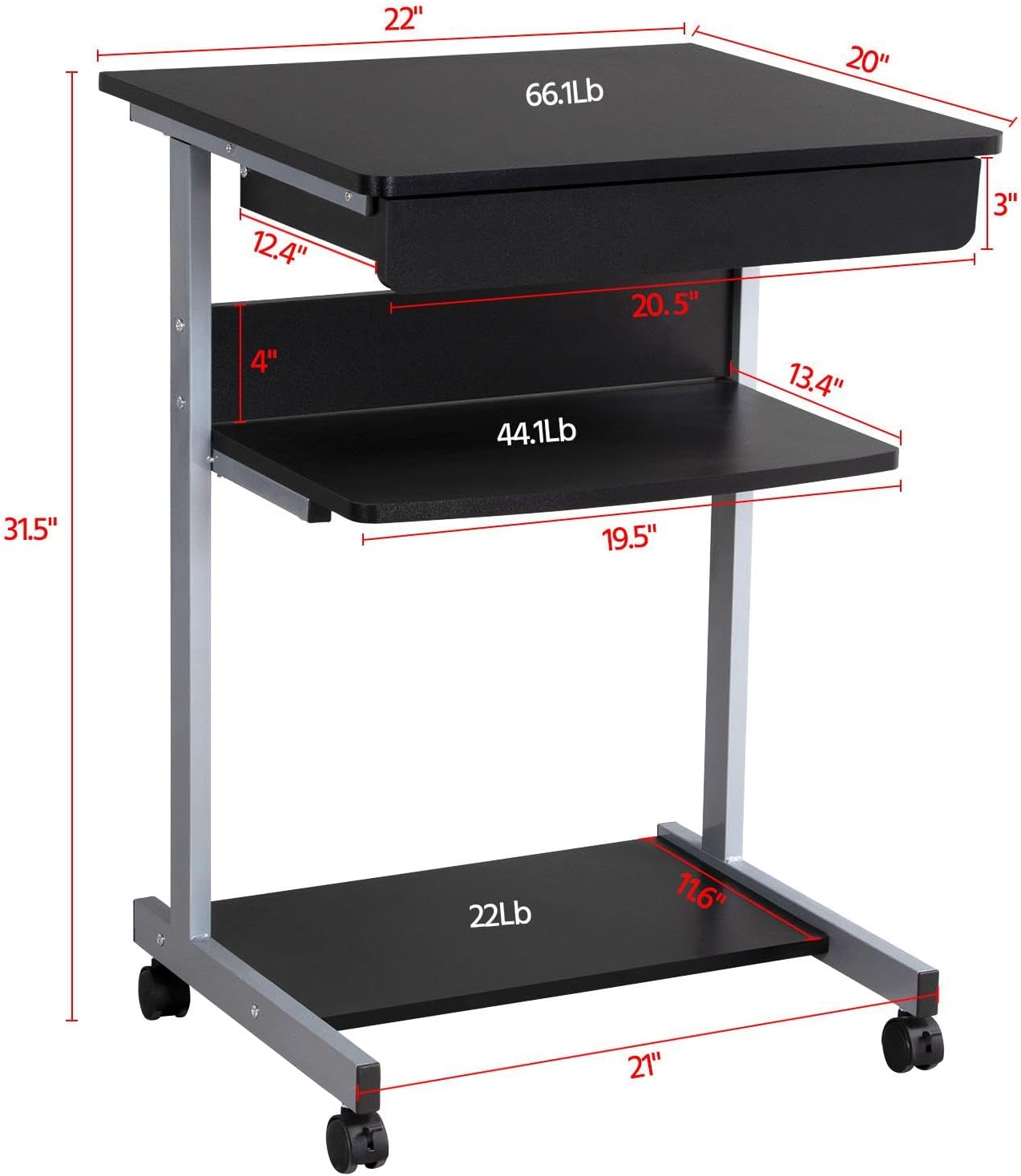
Image: Diagram showing the dimensions and weight capacities of the desk components.
Налаштування та збірка
Assembly is designed to be straightforward. It is recommended to have a clear, spacious area for assembly. All necessary tools are included.
Етапи складання:
- Attach the side frames: Secure the horizontal bars to the vertical support frames using the provided screws.
- Install casters: Screw the four rolling casters into the bottom of the desk frame. Ensure the two lockable casters are placed at the front for easy access.
- Mount the bottom shelf: Attach the bottom shelf to the lower section of the frame using the designated screws.
- Attach the middle shelf: Secure the middle shelf to the frame at the desired height.
- Install the keyboard tray slides: Attach the drawer slides to the desk frame. Ensure they are correctly oriented for smooth operation.
- Assemble the keyboard tray: Connect the sides and back of the keyboard tray, then slide the bottom panel into place. Attach the remaining drawer slides to the keyboard tray.
- Insert the keyboard tray: Carefully slide the assembled keyboard tray into the installed drawer slides on the desk frame.
- Attach the top desktop panel: Secure the main desktop panel to the top of the frame.
Video: Detailed installation instructions for the Yaheetech Mobile Computer Desk.

Зображення: Крупний план view highlighting the heavy MDF boards, thickened frame, smooth steel ball drawer, open middle shelf, open bottom shelf, and lockable casters.
Інструкція з експлуатації
Мобільність і стабільність:
- The desk is equipped with four rolling casters for easy movement.
- To secure the desk in place, engage the locks on the two front casters. Push the lever down to lock and up to unlock.
Using the Keyboard Tray:
- The keyboard tray slides smoothly on metal runners. Gently pull the tray outwards to extend it for use.
- Push the tray inwards until it is fully retracted when not in use to save space.
Полиці для зберігання:
- The top surface is suitable for a laptop or monitor, with a maximum load of 30 kg (66.1 lb).
- The middle shelf can hold items up to 20 kg (44.1 lb), such as books or accessories. The back plate helps prevent items from falling.
- The bottom shelf is designed for a printer or other larger items, with a maximum load of 10 kg (22 lb).
Video: Demonstration of the small rolling computer desk cart for home office use, highlighting mobility and storage.

Image: The desk in use with a laptop, showing its compact design and functionality.
Технічне обслуговування
To maintain the appearance and longevity of your Yaheetech Mobile Computer Desk:
- Прибирання: Протріть поверхні рекламоюamp тканиною. Уникайте агресивних хімікатів або абразивних засобів для чищення.
- Огляд: Періодично перевіряйте всі гвинти та з'єднання, щоб переконатися, що вони міцно затягнуті. За потреби підтягніть.
- Ролики: Тримайте ролики чистими від сміття, щоб забезпечити плавне кочення.
Усунення несправностей
If you encounter any issues with your desk, please refer to the following common solutions:
- Стіл хитається: Ensure all screws are securely tightened. Check that the desk is on a flat, even surface. Engage the locks on the casters.
- Keyboard tray not sliding smoothly: Check the drawer slides for any obstructions or debris. Ensure the slides are properly aligned and lubricated if necessary.
- Відсутні частини: Якщо після отримання відсутні будь-які деталі, негайно зверніться до служби підтримки клієнтів.
Якщо у вас виникли проблеми, не розглянуті тут, зверніться до служби підтримки клієнтів Yaheetech.
Технічні характеристики
| Бренд | Yaheetech |
| Номер моделі | YT-00009601 |
| Розміри продукту (Д x Ш x В) | 20 дюйма (Г) x 22 дюйма (Ш) x 31.1 дюйма (В) (56 x 51 x 79 см) |
| Вага товару | 24.3 фунта |
| Колір | чорний |
| Тип матеріалу | Engineered Wood (MDF), Metal (Iron) |
| Рекомендована максимальна вага (верхня) | 30 Kilograms (66.1 lb) |
| Рекомендована максимальна вага (шухляда) | 2 Kilograms (4.4 lb) |
| Maximum Weight Recommendation (Middle Shelf) | 20 Kilograms (44.1 lb) |
| Maximum Weight Recommendation (Bottom Shelf) | 10 Kilograms (22 lb) |
| Кількість ящиків | 1 |
| Кількість полиць | 2 (Відкриті полиці) |
| Особливість | Compact, Mobile with Lockable Casters |
| Необхідна збірка | так |
| Включає всі інструменти для складання | так |
Гарантія та підтримка
For warranty information, please refer to the documentation included with your purchase or contact Yaheetech directly. Yaheetech aims to provide quality products and customer satisfaction.
If you require further assistance, have questions about assembly, or need to report missing/damaged parts, please contact Yaheetech customer support through their official webсайт або роздрібний продавець, де було придбано товар.


