1. Вступ
The Makeblock mBot Ranger 3-in-1 Robotics Kit is an advanced-level educational robot designed for children aged 8-12. This versatile kit allows users to build and program three distinct robot forms: the Land Raider (a robot tank), the Nervous Bird (a self-balancing robot), and the Dashing Raptor (a three-wheeled racing car).
It integrates engineering and coding principles, fostering creativity, logical thinking, and problem-solving skills through hands-on construction and programming. The kit supports both Scratch and Arduino programming languages, providing a comprehensive learning experience from beginner to expert levels via the mBlock5 Programming App.

Малюнок 1: Закінченоview of the Makeblock mBot Ranger 3-in-1 Robotics Kit.

Figure 2: Key features and benefits of the mBot Ranger.
2. Налаштування та складання
The mBot Ranger kit is designed for easy and fun assembly, allowing children and parents to build together. Clear instructions are provided to guide the construction process for each of the three robot forms.
2.1 Building the Robot Forms
The kit offers three distinct robot configurations:
- Land Raider: A robust robot tank capable of navigating various terrains.
- Nervous Bird: A self-balancing robot that maintains stability through movement.
- Dashing Raptor: A fast, three-wheeled racing car.

Figure 3: The three-in-one educational robot kit configurations.
The kit features sturdy metal parts for durability and powerful engines for effective movement across different surfaces, including rugged terrain and smooth floors.

Figure 4: Easy and fun-filled assembly process.
2.2 Початкове ввімкнення та підключення
The robot kit requires 6 AA batteries or lithium batteries (not included). Ensure batteries are correctly installed in the battery holder before powering on the Me Auriga mainboard.
Once assembled, connect the robot to the Makeblock App via Bluetooth for control and programming. The app provides professional guidance for learning to program from beginner to expert levels.

Figure 5: Learning to code from beginner to pro with mBlock5.
3. Operating the mBot Ranger
The mBot Ranger can be controlled and programmed using the Makeblock App (mBlock5) on a smartphone or tablet. The app offers various preset programs and a block-based coding interface for custom programming.
3.1 Control Modes and Presets
The Makeblock App includes several preset control modes, allowing immediate interaction with the robot without prior programming. These modes include:
- Голосове керування
- Racing Car (for Dashing Raptor)
- Draw and Run
- Avoid Obstacle
- Line Following
- Drive (for general movement)
- Музикант
- Nervous Bird (for self-balancing mode)

Figure 6: Play to learn with various presets in the Makeblock App.
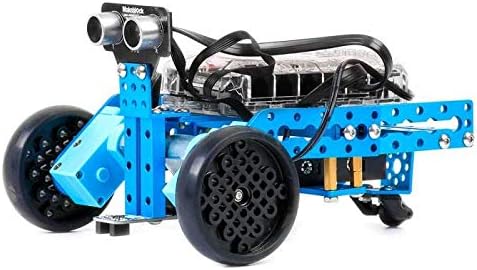
Figure 7: The Nervous Bird self-balancing robot configuration.
3.2 Programming with mBlock5
For advanced users, the mBlock5 Programming App allows for custom programming using a block-based visual interface (similar to Scratch) or text-based Arduino C. This enables users to create complex behaviors and interactions for their mBot Ranger.
The Me Auriga mainboard is equipped with various sensors and extension ports, enhancing programming possibilities:
- Ультразвуковий датчик
- Line-tracking sensor
- 2 light sensors
- Датчик гіроскопа
- 12 світлодіодів RGB
- звуковий сигнал
- Датчик температури
- модуль Bluetooth

Figure 8: Internal modules and sensors for enhanced functionality.
3.3 Офіційне відео продукту
Watch the official product video for a visual guide on the mBot Ranger's capabilities and transformations.
Video 1: Makeblock mBot Ranger 3-in-1 Robot Kit Overview. This video demonstrates the assembly, different robot forms (Land Raider, Dashing Raptor, Nervous Bird), and control via the Makeblock App.
4. Технічне обслуговування
To ensure the longevity and optimal performance of your Makeblock mBot Ranger, regular maintenance is recommended:
- Прибирання: Regularly wipe down the robot's exterior with a dry, soft cloth to remove dust and debris. Avoid using water or harsh chemicals.
- Догляд за акумулятором: Remove batteries if the robot will not be used for an extended period to prevent leakage. Use high-quality AA batteries or rechargeable lithium batteries.
- Перевірка компонентів: Periodically inspect all connections, screws, and moving parts (wheels, tracks) to ensure they are secure and free from obstruction. Tighten any loose screws.
- Зберігання: Store the robot and its components in a cool, dry place away from direct sunlight and extreme temperatures.
5. Вирішення проблем
If you encounter issues with your mBot Ranger, consider the following common troubleshooting steps:
- Робот не вмикається:
- Перевірте, чи правильно вставлені батарейки та чи достатньо вони заряджені.
- Ensure the power switch on the Me Auriga mainboard is in the ON position.
- Проблеми з підключенням Bluetooth:
- Ensure Bluetooth is enabled on your device (smartphone/tablet).
- Make sure the robot is within Bluetooth range.
- Restart both the robot and the Makeblock App.
- If issues persist, try updating the robot's firmware via the mBlock5 PC application (requires USB connection).
- Robot Not Moving/Responding:
- Verify all motor connections to the mainboard are secure.
- Check for any physical obstructions preventing movement (e.g., tangled wires, debris in tracks/wheels).
- Ensure the program loaded onto the robot is correct and running.
- Несправності датчика:
- Check sensor connections to the mainboard.
- Clean sensor surfaces if they are dirty or obstructed.
- Test sensors using the diagnostic tools within the mBlock5 App.
For more detailed troubleshooting or persistent issues, refer to the official Makeblock support resources or contact customer service.
6. Технічні характеристики
| Особливість | Деталь |
|---|---|
| Розміри продукту | 7.87 x 6.5 x 4.72 дюймів |
| Вага товару | 3.53 фунта |
| ASIN | B01DY3OTHO |
| Номер моделі товару | 90092FBA |
| Рекомендований виробником вік | 10 років і старше |
| Потрібні батареї | 6 батарейки АА (не входять в комплект) |
| материнська плата | Me Auriga |
| Підключення | Bluetooth |
| Мови програмування | Scratch, Arduino C |
| Датчики в комплекті | Ultrasonic sensor, Line-tracking sensor, 2 light sensors, Gyroscope sensor, Temperature sensor |
| Output Components | 12 RGB LEDs, Buzzer |
7. Що в коробці
The Makeblock mBot Ranger 3-in-1 Robotics Kit includes the following components:

Figure 9: All components included in the mBot Ranger kit.
- Beam0824-112 (2)
- Beam0824-48 (1)
- Plate0324 (2)
- Plate 135º (2)
- Plate for Battery Holder (1)
- Plate T-type (1)
- Bracket 3X3 (1)
- Bracket U1 (1)
- Universal Wheel (1)
- 62T Wheel Without Step (4)
- 62T Wheel (2)
- 90T Wheel (2)
- 90T Tyre (2)
- Доріжка (2)
- Plastic Spacer 4X7X10 (4)
- 180 encoder motor (2)
- Copper Bush 4X8X4mm (8)
- Brass Stud M4x30+6 (1)
- Battery Holder (1)
- Me Auriga (1)
8. Інформація про безпеку
УВАГА: This product contains small parts and is not suitable for children under 3 years of age due to choking hazards. Adult supervision is recommended during assembly and operation.
Ensure all electrical connections are secure and follow battery safety guidelines. Do not attempt to modify the robot's internal components beyond the intended assembly and programming.
9. Гарантія та підтримка
Makeblock provides a standard warranty for its products. For specific warranty terms and conditions, please refer to the official Makeblock webсайт або документацію, що додається до вашої покупки.
For technical support, product inquiries, or assistance with assembly and programming, please visit the official Makeblock support page or contact their customer service team. An additional User Guide (PDF) is available for download from the product's Amazon page for more detailed instructions.
Офіційний посібник користувача (PDF): Завантажити посібник користувача


