1. Вступ
The GAMDIAS Hermes GKB3000 is a mechanical gaming keyboard designed for enhanced durability and performance. It features GAMDIAS Certified Blue Switches with a 50 million actuation lifecycle, a 7-color spectrum backlight with 14 lighting effects, and various functional keys for an optimized gaming and typing experience. This manual provides instructions for setting up, operating, and maintaining your keyboard.
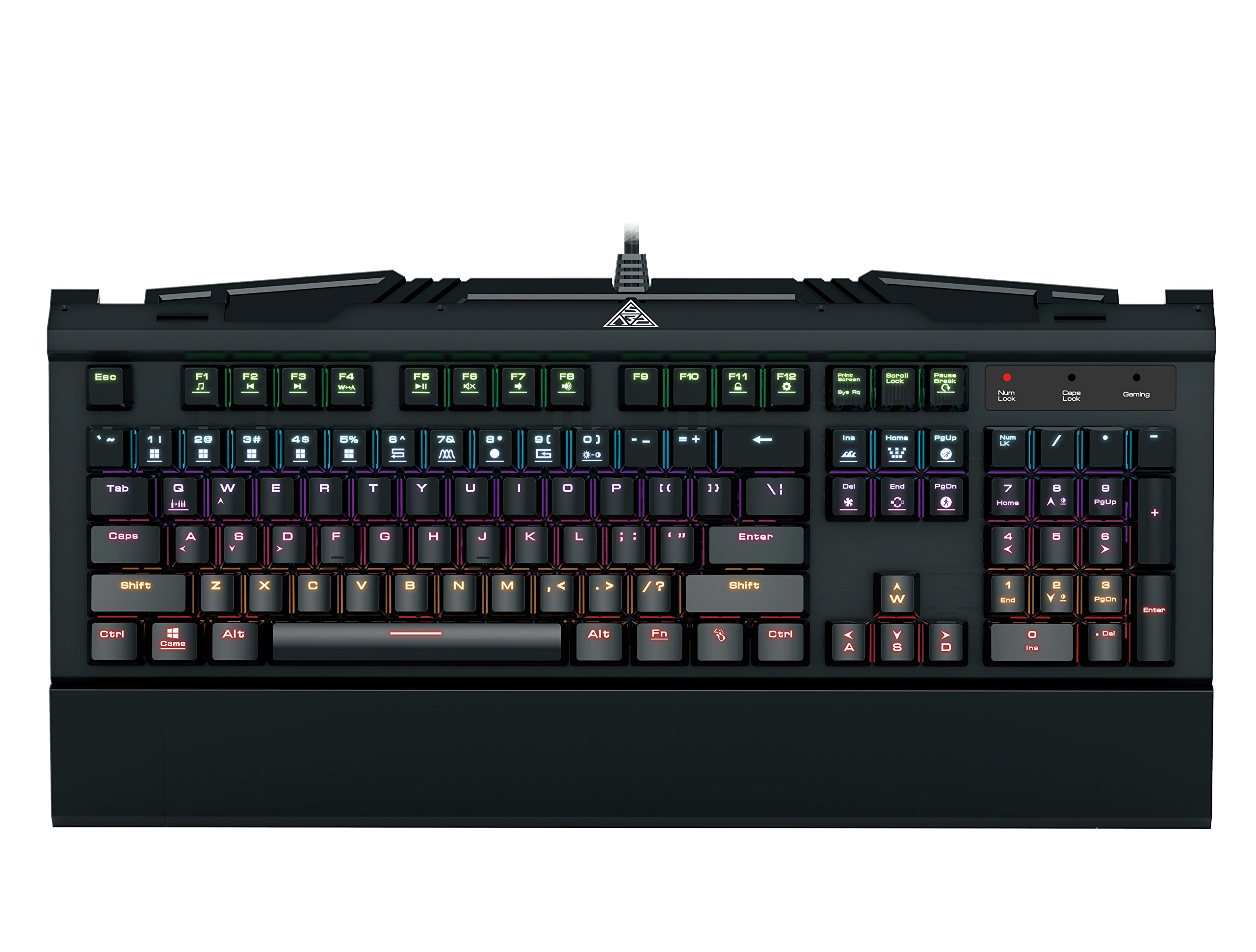
Image 1.1: The GAMDIAS Hermes GKB3000 Mechanical Gaming Keyboard. This image displays the full keyboard with its key layout and design, highlighting its compact yet robust build.
2. Вміст упаковки
Будь ласка, перевірте вміст упаковки після розпакування, щоб переконатися, що всі предмети є в наявності та не пошкоджені.
- GAMDIAS Hermes GKB3000 Mechanical Gaming Keyboard
- Посібник користувача (цей документ)
3. Налаштування
Follow these steps to set up your GAMDIAS Hermes GKB3000 keyboard:
- Розпакуйте клавіатуру: Обережно вийміть клавіатуру з упаковки.
- Підключення до комп'ютера: Підключіть роз'єм USB-A кабелю клавіатури до вільного порту USB на вашому комп'ютері.
- Встановлення драйвера: The keyboard is plug-and-play. Your operating system (e.g., Windows) will automatically detect and install the necessary drivers. No additional software installation is typically required for basic functionality.
- Розміщення: Place the keyboard on a stable, flat surface for comfortable use.
4. Інструкція з експлуатації
4.1. Світлові ефекти
The Hermes GKB3000 features a 7-color spectrum backlight with 14 sets of lighting effects. These include 9 preset effects and 5 customizable patterns.
- Ефекти перемикання: Use the dedicated function keys (often combined with the Fn key) to cycle through the preset lighting effects. Refer to the keyboard's keycap legends for specific combinations.
- Customizing Effects: The keyboard supports 5 customizable lighting patterns. Instructions for programming these patterns are typically found in the full software suite available for download from the GAMDIAS website, if applicable.
- Регулювання яскравості: Adjust backlight brightness using designated function key combinations.
4.2. Multimedia Control Keys
Access multimedia functions quickly using the dedicated multimedia control keys, often activated by holding the Fn клавішу в поєднанні з функціональними клавішами (F1-F12).
- Регулювання гучності: Increase, decrease, or mute audio.
- Відтворення мультимедіа: Play/pause, stop, previous track, next track.
- Інші функції: May include opening default browser, email client, or calculator.
4.3. Special Gaming Functions
- WASD-Arrow Key Swap: This feature allows you to swap the functionality of the WASD keys with the arrow keys. This is useful for certain games or user preferences. Activate this function using a specific Fn key combination (e.g., Fn + W).
- Consecutive Attack Mode: This mode enhances rapid key input for gaming. Refer to the keyboard's specific documentation or GAMDIAS software for activation and configuration details.
- Блокування клавіатури: Temporarily disable the keyboard input to prevent accidental presses. Activate using a Fn комбінація клавіш.
- Windows Key Disable: Prevent accidental presses of the Windows key during gaming, which can minimize your game. Activate using a Fn key combination (e.g., Fn + Win key).
- N-Key Rollover: The GKB3000 supports N-key rollover, meaning multiple keys can be pressed simultaneously without ghosting or missed inputs. This ensures accurate and responsive commands during intense gaming sessions.
5. Технічне обслуговування
Правильне обслуговування забезпечує довговічність та оптимальну роботу вашої клавіатури.
- Прибирання:
- Від’єднайте клавіатуру від комп’ютера перед чищенням.
- Злегка протріть м’якою тканиною без ворсу dampводою або м’яким миючим розчином для протирання поверхні.
- Для видалення пилу та сміття між клавішами використовуйте стиснене повітря.
- Уникайте використання агресивних хімікатів, абразивних засобів для чищення або розчинників.
- Зберігання: Зберігайте клавіатуру в прохолодному, сухому місці, подалі від прямих сонячних променів та екстремальних температур, якщо вона не використовується протягом тривалого часу.
- Обробка: Avoid dropping the keyboard or exposing it to excessive force, as this can damage the mechanical switches or internal components.
6. Вирішення проблем
If you encounter issues with your GAMDIAS Hermes GKB3000 keyboard, refer to the following common solutions:
| проблема | Можливе рішення |
|---|---|
| Клавіатура не реагує. |
|
| Підсвічування не працює або тьмяне. |
|
| Певні клавіші не працюють. |
|
| WASD keys are acting as arrow keys. |
|
If the problem persists after trying these solutions, please contact GAMDIAS customer support for further assistance.
7. Технічні характеристики
The following are the technical specifications for the GAMDIAS Hermes GKB3000 Mechanical Gaming Keyboard:
| Особливість | Деталь |
|---|---|
| Бренд | ГАМДІЯ |
| Номер моделі | GKB3000 |
| Тип перемикача | GAMDIAS Certified Mechanical Blue Switches |
| Actuation Lifecycle | 50 мільйонів натискань клавіш |
| Підсвічування | 7-Color Spectrum, 14 Lighting Effects (9 preset, 5 customizable) |
| Anti-Ghosting | N-Key Rollover |
| Підключення | USB-A |
| Операційна система | вікна |
| Вага товару | 2.42 фунта (приблизно 1.1 кг) |
| Розміри продукту (ДxШxВ) | 18.8 x 10.5 x 2 дюймів (приблизно 47.75 x 26.67 x 5.08 см) |
| матеріал | Plastic with Elegant Metal Plate Design |
8. Гарантія та підтримка
GAMDIAS products are manufactured to the highest quality standards. For information regarding warranty coverage, terms, and conditions, please refer to the warranty card included with your product or visit the official GAMDIAS webсайт.
For technical support, troubleshooting assistance, or any product-related inquiries, please contact GAMDIAS customer support through their official webсайт або контактну інформацію, зазначену на упаковці вашого продукту.
Офіційний представник GAMDIAS Webсайт: www.gamdias.com


