вступ
This manual provides essential information for the safe and efficient use of your Acer KA240H 24-inch Full HD Monitor. Please read this manual thoroughly before operating your monitor and retain it for future reference. This monitor is designed for general computing tasks, offering a 1920x1080 resolution display.
Інформація про безпеку
- Завжди ставте монітор на стійку, рівну поверхню, щоб запобігти його падінню.
- Не блокуйте вентиляційні отвори. Забезпечте достатній простір навколо монітора для належної циркуляції повітря.
- Use only the power adapter and cables supplied with the monitor or specified by Acer.
- Тримайте монітор подалі від води, вологи та екстремальних температур.
- If smoke, strange noises, or unusual odors occur, immediately unplug the monitor and contact qualified service personnel.
- Не намагайтеся обслуговувати монітор самостійно. Звертайтеся до кваліфікованого сервісного персоналу для всіх робіт з обслуговування.
Вміст упаковки
Перед розпакуванням переконайтеся, що всі предмети присутні та знаходяться у належному стані. Якщо якісь предмети відсутні або пошкоджені, зверніться до продавця.
- Acer KA240H Monitor Display Panel
- Підставка для монітора
- Підставка для монітора
- Шнур живлення
- Кабель HDMI (може відрізнятися залежно від регіону)
- Посібник користувача (цей документ)
Налаштування
1. Збірка підставки для монітора
- Carefully place the monitor display panel face down on a soft, clean cloth to prevent scratches.
- Attach the stand neck to the monitor display panel by aligning the tabs and pushing until it clicks into place.
- Прикріпіть основу підставки до шийки підставки. Закріпіть її за допомогою гвинта, розташованого на нижній стороні основи.

2. З’єднувальні кабелі
Перед будь-якими підключеннями переконайтеся, що монітор і комп'ютер вимкнені.
- Підключення живлення: Підключіть шнур живлення до входу живлення монітора, а потім до заземленої електричної розетки.
- Підключення відео:
- HDMI: Підключіть один кінець кабелю HDMI до порту HDMI на моніторі, а інший кінець – до порту HDMI на комп’ютері.
- VGA: Connect one end of the VGA cable to the VGA port on your monitor and the other end to the VGA port on your computer. Tighten the screws on the VGA connector.
- DVI: Connect one end of the DVI cable to the DVI port on your monitor and the other end to the DVI port on your computer.
Note: The monitor supports HDMI, VGA, and DVI inputs. Use only one video connection at a time.
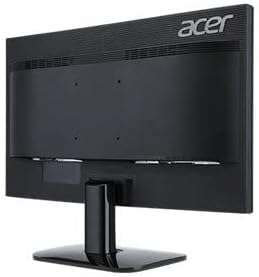
3. Початкове увімкнення
After connecting all cables, power on your computer, then press the power button on the monitor. The monitor should automatically detect the input signal. If no image appears, refer to the Troubleshooting section.
Експлуатація монітора
Power Button and OSD Controls
The power button and On-Screen Display (OSD) control buttons are typically located on the bottom right bezel of the monitor. Refer to the diagram below for button identification.

- Увімкнення/вимкнення живлення: Натисніть кнопку живлення, щоб увімкнути або вимкнути монітор.
- Екранне меню: Press any OSD button (usually indicated by icons) to bring up the On-Screen Display menu.
- Навігація: Use the arrow buttons to navigate through menu options.
- Вибір: Press the 'Menu' or 'Enter' button to select an option or confirm a setting.
- Вихід: Press the 'Exit' button to close the OSD menu.
Common OSD Settings
- зображення: Налаштуйте яскравість, контрастність, різкість та колірну температуру.
- колір: Fine-tune color settings, including gamma and color space.
- введення: Manually select the input source (HDMI, VGA, DVI) if auto-detection fails.
- OSD: Налаштуйте мову екранного меню, прозорість та час очікування.
- Управління: Access information about the monitor, reset settings to factory defaults.
Технічне обслуговування
Очищення монітора
- Завжди відключайте монітор від розетки перед чищенням.
- екран: Злегка протріть м’якою тканиною без ворсу dampened with water or a specialized screen cleaner. Do not spray cleaner directly onto the screen.
- Зовні: Використовуйте м’яку суху тканину для протирання монітора casing. Уникайте використання абразивних засобів для чищення або розчинників.
Зберігання
If storing the monitor for an extended period, unplug it, disconnect all cables, and store it in a cool, dry place, preferably in its original packaging.
Усунення несправностей
| проблема | Можливе рішення |
|---|---|
| На екрані немає зображення |
|
| Зображення розмите або спотворене |
|
| Мерехтіння монітора |
|
| Немає індикатора живлення |
|
Технічні характеристики
| Особливість | Деталь |
|---|---|
| Номер моделі | UM.FX0EE.005 |
| Розмір екрана | 24 дюйма (61 см) |
| роздільна здатність | FHD 1080p (1920 x 1080 пікселів) |
| Співвідношення сторін | 16:9 |
| Частота оновлення | 60 Гц |
| Час відгуку | 5 мілісекунд |
| Тип дисплея | LED |
| Технологія підключення | HDMI, VGA, DVI |
| Тип монтажу | Настінне кріплення (сумісне з VESA) |
| Колір | чорний |
| Розміри предмета (Д x Ш x В) | 18"D x 0.78"W x 12"H (approximate, without stand) |
| Вага товару | 3.74 кілограма |
| Виробник | Acer |
Інформація про гарантію
Your Acer KA240H monitor comes with a standard warranty. The warranty covers 1 рік запчастин і роботи from the date of purchase. Please retain your proof of purchase for warranty claims. For detailed terms and conditions, refer to the warranty card included with your product or visit the official Acer support webсайт.
This warranty does not cover damage caused by accident, misuse, abuse, improper installation or operation, natural disaster, or unauthorized modifications or repairs.
Підтримка
If you encounter issues that cannot be resolved using the troubleshooting guide, or if you require further assistance, please contact Acer customer support. You can typically find support contact information, FAQs, and driver downloads on the official Acer webсайт.
Щоб отримати найактуальніші ресурси підтримки, відвідайте: www.acer.com/support


