вступ
This manual provides essential instructions for the safe and efficient operation of your ICOM IC-7300 Direct Sampling Shortwave Radio. Please read this manual thoroughly before using the transceiver to ensure proper functionality and to prevent damage.
The ICOM IC-7300 is a high-performance HF/50MHz transceiver featuring RF direct sampling technology. It includes a 4.3-inch color touchscreen LCD, a real-time spectrum scope, and a built-in automatic antenna tuner. It supports various modes including SSB, CW, RTTY, AM, and FM, with a maximum output power of 100 Watts.
Інформація про безпеку
- Do not operate the transceiver in explosive atmospheres.
- Забезпечте належне заземлення, щоб запобігти ураженню електричним струмом.
- Avoid exposing the unit to direct sunlight, rain, or extreme temperatures.
- Використовуйте лише зазначене джерело живлення (13.8 В постійного струму).
- Do not open the transceiver casinг; зверніться до кваліфікованого персоналу для обслуговування.
Вміст упаковки
Перевірте наявність усіх елементів в упаковці:
- ICOM IC-7300 Radio Unit
- HM-219 Hand Microphone
- Кабель живлення постійного струму
- Інсталяційне обладнання
- Посібник користувача (цей документ)
Налаштування
1. Підключення джерела живлення
Connect the supplied DC power cable to the transceiver's DC IN connector and to a stable 13.8V DC power source. Ensure correct polarity (red to positive, black to negative) to prevent damage.
2. Підключення антени
Connect a suitable HF/50MHz antenna to the ANT connector on the rear panel. For optimal performance and to protect the transceiver, use an antenna designed for the operating frequencies and ensure it is properly matched.
3. Підключення мікрофона
Plug the HM-219 hand microphone into the MIC connector on the front panel.
4. Початкове увімкнення
Натисніть ПОТУЖНІСТЬ button to turn on the transceiver. The ICOM logo will appear on the display, followed by the operating screen.

Image: Front panel of the ICOM IC-7300, displaying the main operating screen with frequency, mode, and spectrum scope.
Інструкція з експлуатації
Основна операція
- Вибір частоти: Використовуйте великий МУЛЬТИ dial to change the operating frequency. You can also directly input frequencies using the touchscreen keypad.
- Вибір режиму: Tap the mode indicator on the touchscreen (e.g., USB, LSB) to cycle through available modes (SSB, CW, RTTY, AM, FM).
- Регулювання гучності: Використовуйте AF/RF/SQL ручку для регулювання рівня вихідного аудіо.
- Передача: Натисніть ПЕРЕДАЧА button or the PTT button on the microphone to transmit. Ensure your antenna is tuned before transmitting.
Використання сенсорного дисплея
The 4.3-inch color touchscreen provides intuitive access to various functions and settings.
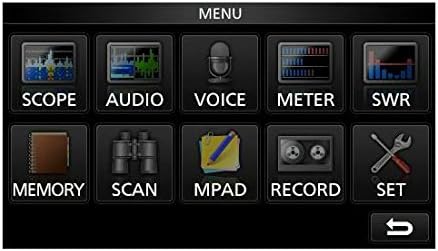
Image: The main menu screen of the IC-7300, accessible via the touchscreen, showing various function icons.
- Spectrum Scope: Торкніться СФЕРА ЗАСТОСУВАННЯ до view the real-time spectrum scope, which displays signal activity across a selected frequency range.
- Дисплей лічильника: Торкніться МЕТР до view various operational parameters such as output power, ALC, SWR, and voltage.
- Налаштування: Торкніться НАБІР to access detailed configuration options for the transceiver.
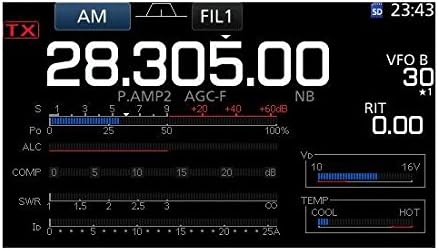
Зображення: Детальний view of the IC-7300's display in AM mode, showing frequency, filter settings, and various operational meters.
Built-in Auto Tuner
The IC-7300 includes an internal automatic antenna tuner. To activate, press the АВТОНАСТРОЙКА button. The tuner will automatically adjust to achieve the lowest possible SWR for your connected antenna. This function is effective for SWR values up to approximately 3:1.
Технічне обслуговування
- Прибирання: Use a soft, dry cloth to clean the exterior of the transceiver. Do not use abrasive cleaners or solvents.
- Вентиляція: Ensure the ventilation holes on the top and sides of the unit are not obstructed to prevent overheating.
- Зберігання: When not in use for extended periods, store the transceiver in a dry, dust-free environment.
Усунення несправностей
| проблема | Можлива причина | Рішення |
|---|---|---|
| Немає живлення | Кабель живлення відключено; неправильна гучністьtagе; перегорів запобіжник. | Check power cable connections; verify 13.8V DC supply; inspect and replace fuse if necessary. |
| Немає аудіовиходу | Volume too low; speaker/headphone disconnected; squelch set too high. | Adjust AF/RF/SQL knob; check speaker/headphone connection; reduce squelch level. |
| Неможливо передати | Antenna not connected; high SWR; PTT button not pressed. | Connect antenna; use auto tuner or external tuner to reduce SWR; ensure PTT is engaged. |
| Поганий прийом | Antenna issue; incorrect mode/frequency; high noise level. | Check antenna connection and type; verify operating mode and frequency; adjust noise reduction (NB, NR) settings. |
Технічні характеристики
| Особливість | Деталь |
|---|---|
| Номер моделі | IC-7300 |
| Діапазон частот (RX) | 0.030 - 74.800 МГц |
| Вихідна потужність | 100 W (SSB, CW, RTTY, FM); 25 W (AM) |
| Тип приймача | Прямий Сampлінг |
| Кількість каналів | 101 |
| Блок живлення випtage | 13.8 В постійного струму (±15%) |
| Розміри (Ш×В×Г) | 9.4 x 3.7 x 9.4 дюйма (240 × 94 × 238 мм) |
| вага | 8.4 фунта (3.8 кг) |
| Особливості | 4.3-inch Color Touchscreen LCD, Real-time Spectrum Scope, Built-in Auto Tuner |
Гарантія та підтримка
Щоб отримати інформацію про гарантію та технічну підтримку, зверніться до офіційного сервісу ICOM. website or contact your authorized ICOM dealer. Keep your purchase receipt as proof of purchase for warranty claims.
Online resources and additional support may be available at the ICOM America Store on Amazon.
Інформація про відповідність
Цей пристрій відповідає частині 15 правил FCC. Експлуатація підлягає наступним двом умовам: (1) Цей пристрій не може створювати шкідливих перешкод і (2) цей пристрій має приймати будь-які отримані перешкоди, включаючи перешкоди, які можуть спричинити небажану роботу.


