вступ
This manual provides instructions for the safe and efficient operation of your Axess MS3912 Mini Entertainment System. Please read this manual thoroughly before using the device and retain it for future reference.
Ключові характеристики:
- AM/FM радіо
- Касетний програвач і магнітофон
- CD плеєр
- USB-порт для відтворення MP3
- Допоміжний вхід
- Гніздо для навушників
- Portable/Detachable Speakers
- Пульт дистанційного керування
- AC/DC Power Operation
Інформація про безпеку
УВАГА:
Цей продукт містить хімічні речовини, які, як відомо штату Каліфорнія, спричиняють рак та вроджені дефекти або інші репродуктивні порушення.
Завжди дотримуйтесь основних запобіжних заходів під час використання електроприладів, щоб зменшити ризик пожежі, ураження електричним струмом та травмування.
- Не піддавайте цей прилад впливу дощу або вологи.
- Не блокуйте вентиляційні отвори.
- Забезпечте належний обсягtage supply (AC 120V/60Hz for US models, check local specifications).
- Не відкривайте кришку пристроюasing; звертайтеся до кваліфікованого персоналу з усіма видами обслуговування.
- Тримайте пристрій подалі від джерел тепла, прямих сонячних променів та сильних магнітних полів.
- Відключайте пристрій від мережі під час грози або якщо він не використовується протягом тривалого часу.
Вміст упаковки
Перевірте, чи всі перелічені нижче предмети входять до вашої упаковки:
- Axess MS3912 Main Unit
- Detachable Speakers (2)
- Пульт дистанційного керування
- Шнур живлення змінного струму
- Посібник користувача (цей документ)
Елементи керування та підключення
Familiarize yourself with the various controls and connection points on your MS3912 system.
Елементи керування передньої панелі
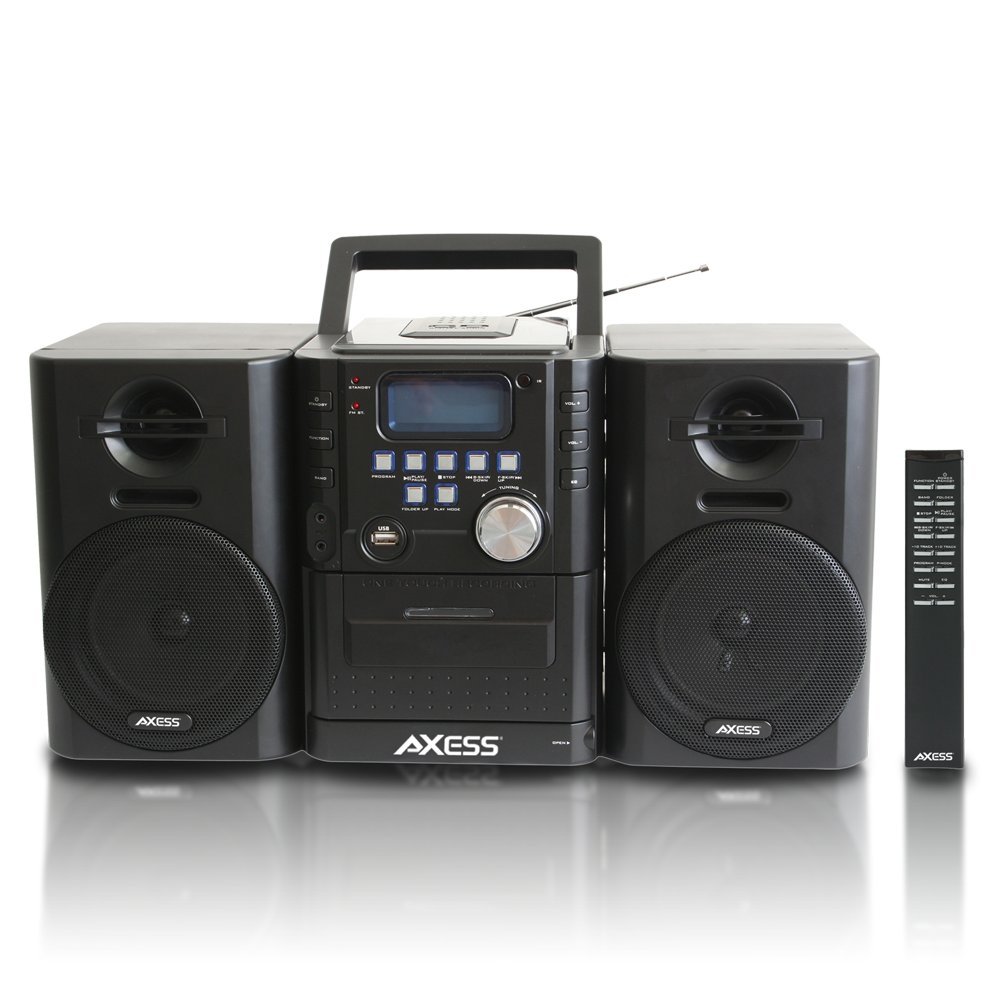
Зображення: спереду view of the Axess MS3912 Mini Entertainment System, showing the central unit with display, control buttons, USB port, CD tray, cassette deck, and two detachable speakers. A remote control is also visible on the right.
- Кнопка РЕЖИМУ ОЧІКУВАННЯ: Вмикає або вимикає пристрій.
- Кнопка FUNCTION: Selects between CD, USB, TAPE, AUX, and RADIO modes.
- Кнопка BAND: In Radio mode, switches between AM and FM bands.
- Кнопка PROGRAM: Used for programming CD/USB tracks.
- Кнопка PLAY/PAUSE: Starts or pauses playback for CD, USB, or Cassette.
- Кнопка СТОП: Зупинка відтворення.
- SKIP/SEARCH Buttons (<< / >>): Пропускає треки або перемотує вперед/назад.
- FOLDER UP / PLAY MODE Buttons: Navigates folders on USB or changes play mode.
- Регулятор гучності: Регулює вихідний рівень звуку.
- Порт USB: Connects USB flash drives for MP3 playback.
- PC/AUX IN Jack: Підключає зовнішні аудіопристрої.
- Роз'єм для навушників: Підключає навушники для прослуховування музики в приватному режимі.
- Відсік для компакт-дисків: CD-програвач із верхнім завантаженням.
- Касетна дека: Front-loading cassette player/recorder.
- Дисплей: Shows current function, track number, radio frequency, etc.
Підключення задньої панелі

Зображення: Задня частина view of the Axess MS3912 Mini Entertainment System, showing the FM antenna, battery compartment, AC power input, and speaker connection jacks.
- FM антена: Розтягніть для оптимального прийому FM.
- Гнізда для динаміків: Підключіть лівий та правий динаміки.
- Вхід живлення змінного струму: Підключіть шнур живлення змінного струму.
- Батарейний відсік: Holds batteries for portable operation.
Налаштування
1. Підключення динаміків
Connect the speaker wires from the detachable speakers to the corresponding speaker jacks on the rear of the main unit. Ensure the polarity (+/-) matches for optimal sound quality.
2. Живлення блоку
Робота від мережі змінного струму:
Insert the AC power cord into the AC power input jack on the rear of the unit, then plug the other end into a standard wall outlet (AC 120V/60Hz).
DC (Battery) Power Operation:
Open the battery compartment cover on the rear of the unit. Insert the required number of C-size batteries (not included), ensuring correct polarity. Close the battery compartment cover securely. The unit will automatically switch to battery power when AC power is disconnected.
3. Налаштування антени
For FM radio reception, fully extend the telescopic FM antenna. For AM reception, the unit has a built-in AM antenna, which may require rotating the unit for best reception.
Інструкція з експлуатації
1. Увімкнення/вимкнення живлення
Натисніть СТАНДАРТ кнопку на передній панелі або пульті дистанційного керування, щоб увімкнути або вимкнути пристрій.
2. Вибір функції
Натисніть ФУНКЦІЯ button repeatedly to cycle through the available modes: CD, USB, TAPE, AUX, and RADIO.
3. Робота CD-програвача
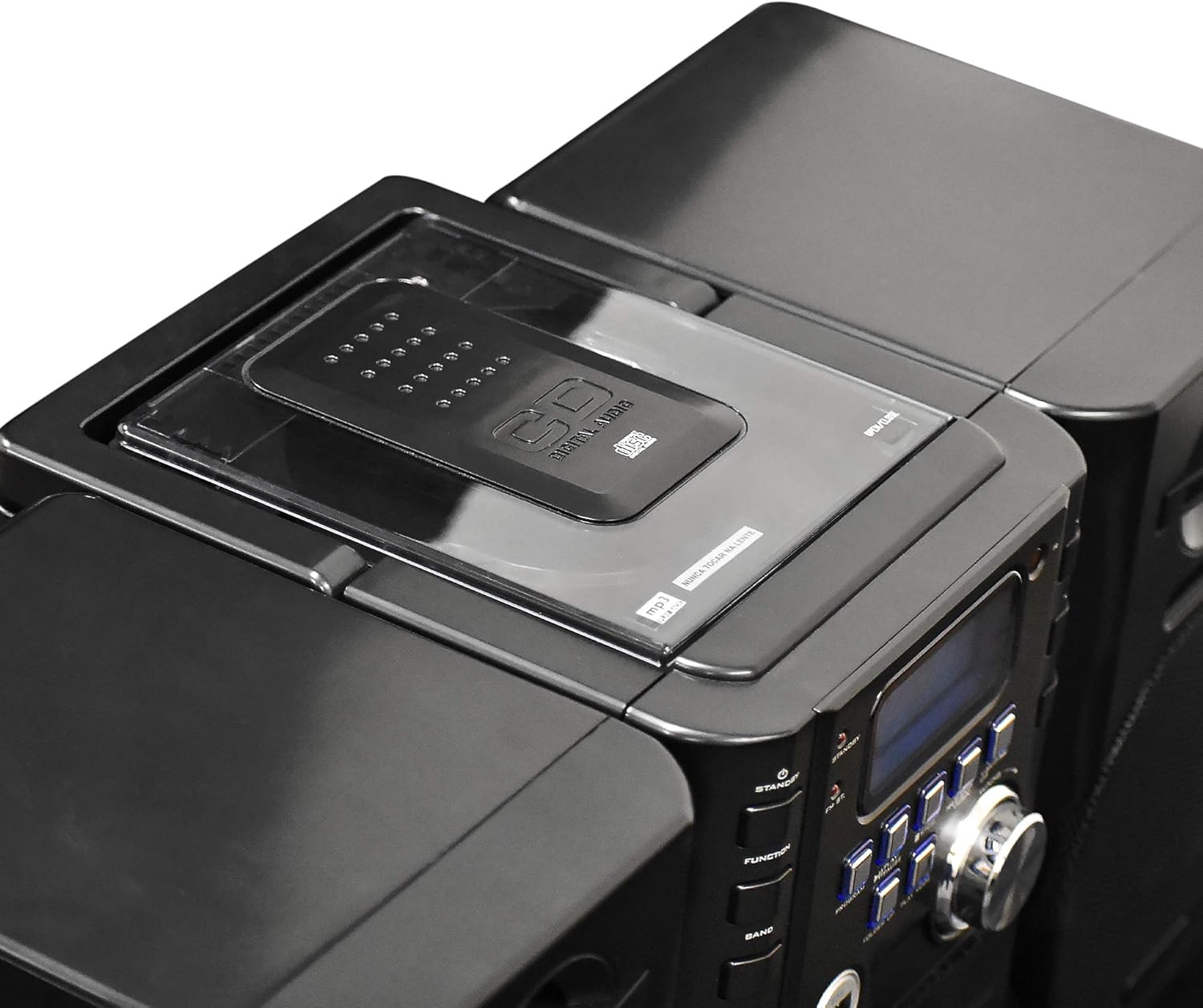
Зображення: Верх view of the Axess MS3912 Mini Entertainment System, showing the transparent lid of the top-loading CD compartment.
- Прес ФУНКЦІЯ щоб вибрати режим компакт-диска.
- Відкрийте кришку відсіку для компакт-дисків.
- Помістіть компакт-диск етикеткою догори.
- Close the CD compartment cover. The unit will read the disc.
- Прес ВІДТВОРЕННЯ/ПАУЗА щоб почати відтворення.
- Використовуйте ПРОПУСК / ПОШУК кнопки для навігації по треках.
- Прес СТІЙ щоб завершити відтворення.
4. Робота USB/MP3-плеєра

Зображення: Збоку view of the Axess MS3912 Mini Entertainment System, highlighting the USB port and PC/AUX IN jack on the central unit.
- Вставте флеш-накопичувач USB у порт USB.
- Прес ФУНКЦІЯ щоб вибрати режим USB.
- Пристрій автоматично почне відтворювати MP3 files з USB-накопичувача.
- використання ВІДТВОРЕННЯ/ПАУЗА, СТІЙ, і ПРОПУСК / ПОШУК кнопки для керування.
- використання СКАЧАТИ ВГОРУ to navigate between folders on the USB drive.
5. Робота касетного програвача/магнітофона
- Прес ФУНКЦІЯ to select TAPE mode.
- Open the cassette deck door and insert a cassette tape.
- Прес ВІДТВОРЕННЯ/ПАУЗА щоб почати відтворення.
- Використовуйте ШВИДКО ВПЕРЕД і НАЗАД buttons (often combined with SKIP/SEARCH buttons) to move through the tape.
- Прес СТІЙ щоб завершити відтворення.
- Запис: To record from CD, USB, or Radio, select the desired source, then press the ЗАПИС button on the cassette deck (if available, or a combination of PLAY and RECORD). Ensure a blank, recordable cassette is inserted.
6. Робота AM/FM радіо
- Прес ФУНКЦІЯ щоб вибрати режим RADIO.
- Прес БЕНД to select AM or FM.
- Використовуйте ТЮНІНГ ручка або ПРОПУСК / ПОШУК buttons to tune to your desired station.
- For FM, extend the telescopic antenna. For AM, rotate the unit for best reception.
- Попереднє налаштування станцій: Tune to a station, press ПРОГРАМА, потім використовуйте ПРОПУСК / ПОШУК щоб вибрати номер попереднього налаштування, і натисніть ПРОГРАМА знову, щоб зберегти.
7. Auxiliary Input (AUX) Use
Підключіть зовнішній аудіопристрій (наприклад, смартфон, MP3-плеєр) до PC/AUX IN jack using a 3.5mm audio cable (not included). Press ФУНКЦІЯ to select AUX mode. Audio from the external device will play through the MS3912 speakers.
8. Використання навушників
Plug standard 3.5mm headphones into the НАВУШНИКИ jack for private listening. The speakers will automatically mute when headphones are connected.
9. Пульт дистанційного керування
The included remote control allows for convenient operation of most functions from a distance. Ensure batteries are correctly inserted into the remote control.
Технічне обслуговування
Очищення агрегату
Wipe the exterior of the unit with a soft, dry cloth. Do not use abrasive cleaners, waxes, or solvents. For the CD lens, use a specialized CD lens cleaner disc. For the cassette deck, use a head cleaning cassette.
Зберігання
If storing the unit for an extended period, remove all batteries to prevent leakage. Store in a cool, dry place away from direct sunlight and extreme temperatures.
Усунення несправностей
| проблема | Можлива причина | Рішення |
|---|---|---|
| Немає живлення | AC cord not plugged in; Batteries depleted or incorrectly inserted. | Перевірте підключення шнура живлення; замініть батарейки або переконайтеся в правильній полярності. |
| Ні звуку | Volume too low; Headphones connected; Speakers not connected properly; Incorrect function selected. | Increase volume; Disconnect headphones; Check speaker connections; Select correct function (CD, USB, TAPE, AUX, RADIO). |
| Компакт-диск пропускає або не відтворюється | CD is dirty or scratched; CD inserted incorrectly; Unit is vibrating. | Clean CD with a soft cloth; Reinsert CD label side up; Place unit on a stable surface. |
| Поганий радіоприйом | FM antenna not extended; Unit position for AM is poor; Interference. | Fully extend FM antenna; Rotate unit for better AM reception; Move unit away from other electronic devices. |
| USB не відтворюється | USB-накопичувач неправильно відформатований; несумісний file types; USB drive not inserted fully. | Переконайтеся, що USB-накопичувач має формат FAT32; лише MP3 files are supported; Reinsert USB drive. |
| Cassette recording not working | Tape is write-protected; No blank tape inserted; Incorrect source selected. | Check tape's write-protect tab; Insert a blank, recordable tape; Select the desired audio source (CD, USB, Radio, AUX). |
Технічні характеристики
| Особливість | Специфікація |
|---|---|
| Номер моделі | MS3912 |
| Бренд | СОКИРА |
| Вихідна потужність | Колонки 12 Вт |
| Джерело живлення | AC 120V/60Hz or DC (C-size batteries, not included) |
| Радіочастоти | AM/FM |
| Підтримувані носії | CD, MP3 (via USB), Cassette Tape |
| Вхідні дані | USB Port, 3.5mm AUX Input |
| Виходи | Гніздо для навушників 3.5 мм |
| Розміри (Д x Ш x В) | 43.82 x 21.59 x 24.13 см (приблизно 17.25 x 8.5 x 9.5 дюйми) |
| вага | 3.88 кг (приблизно 8.55 фунта) |


