1. Вступ
This manual provides instructions for the safe and effective use of your Disney Frozen Bluetooth Speaker. This portable wireless speaker allows you to stream audio from Bluetooth-enabled devices or connect via a 3.5mm audio cable. It features a built-in microphone for speakerphone functionality and a rechargeable battery for portability.
2. Вміст упаковки
Будь ласка, переконайтеся, що всі предмети присутні в упаковці:
- Disney Frozen Bluetooth Speaker
- USB-кабель для зарядки
- Аудіокабель 3.5 мм
3. Особливості продукту
- Wireless audio streaming via Bluetooth
- Wired audio connection via 3.5mm headphone port
- Integrated microphone for speakerphone calls
- Вбудована акумуляторна батарея
- USB chargeable
4. Елементи керування та порти

Зображення 1: Фронт view of the speaker with control buttons on the top panel.
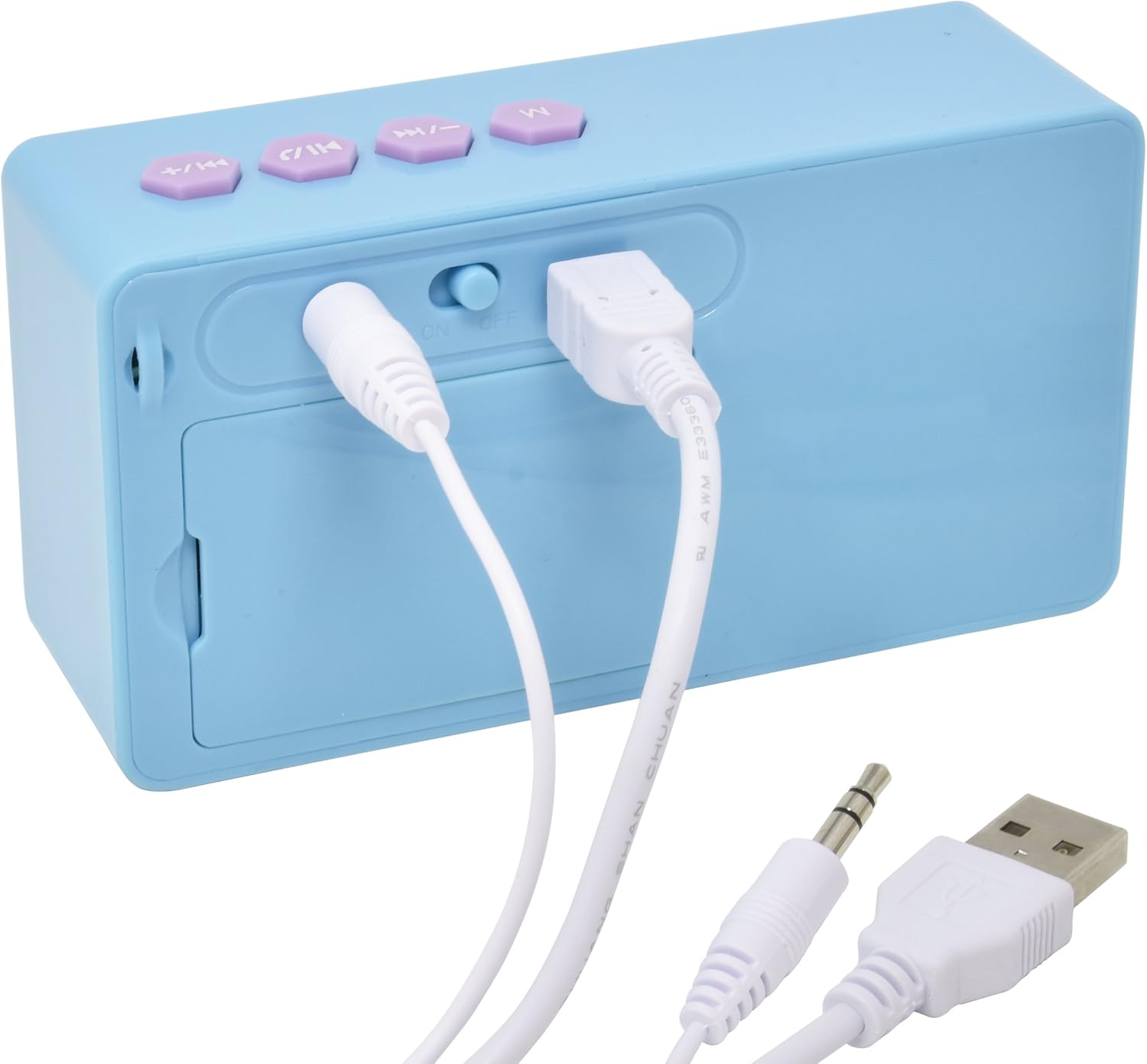
Зображення 2: Задня view of the speaker showing the power switch and connection ports.
Елементи керування верхньої панелі:
- Кнопка M: Mode selection (Bluetooth/AUX).
- Кнопка попереднього треку / зменшення гучності: Press once for previous track, press and hold to decrease volume.
- Кнопка відтворення/паузи/виклику: Press once to play/pause music, press to answer/end calls.
- Кнопка «Наступний трек» / «Збільшення гучності»: Press once for next track, press and hold to increase volume.
Порти на задній панелі:
- Перемикач ON/OFF: Вмикає або вимикає динамік.
- Порт заряджання USB: Connect the USB cable for charging.
- 3.5 мм вхід AUX: Connect the 3.5mm audio cable for wired playback.
5. Заряджання динаміка
Before first use, fully charge the speaker. The speaker charges quickly when connected to a USB port.
- Locate the USB Charging Port on the rear of the speaker (refer to Image 2).
- Connect the small end of the included USB charging cable to the speaker's USB port.
- Підключіть більший кінець USB-кабелю для заряджання до порту USB з живленням (наприклад, комп’ютера, USB-адаптера).
- The charging indicator light will illuminate. Once charging is complete, the light may change color or turn off.
Примітка: Do not use damaged cables or chargers. Ensure the charging port is dry before connecting the cable.
6. Підключення Bluetooth
Щоб бездротово підключити динамік до пристрою з підтримкою Bluetooth:
- Переконайтеся, що динамік заряджений.
- Посуньте Перемикач ON/OFF on the rear of the speaker to the 'ON' position. The speaker will power on and enter Bluetooth pairing mode, indicated by a flashing LED light and an audible prompt.
- On your Bluetooth-enabled device (smartphone, tablet, computer), go to the Bluetooth settings menu.
- шукати available devices. The speaker will appear as "Disney Frozen Speaker" or a similar name.
- Select the speaker from the list to pair. Once successfully paired, the LED indicator will stop flashing, and you will hear a confirmation tone.
- Тепер ви можете відтворювати аудіо з вашого пристрою через динамік.
Примітка: If prompted for a password, enter "0000". The speaker will automatically attempt to reconnect to the last paired device when powered on.
7. Дротове підключення (AUX)
To connect your speaker using the 3.5mm audio cable:
- Переконайтеся, що динамік увімкнено.
- Connect one end of the included 3.5mm audio cable to the 3.5 мм вхід AUX port on the rear of the speaker (refer to Image 2).
- Connect the other end of the 3.5mm audio cable to the headphone jack or AUX output of your audio device.
- Натисніть Кнопка M on the top panel to switch to AUX mode if the speaker does not automatically detect the wired connection.
- Відтворюйте аудіо з вашого пристрою.
Примітка: When using the AUX connection, playback controls (play/pause, track skip) on the speaker may not function, and you will need to control playback directly from your connected device.
8. Using as a Speakerphone
When connected via Bluetooth to a smartphone, the speaker can be used to handle phone calls.
- Відповідь на дзвінок: Коли надходить дзвінок, натисніть Play/Pause / Call Button один раз відповісти.
- Завершення дзвінка: Під час дзвінка натисніть Play/Pause / Call Button once to end the call.
- Відхилення дзвінка: Натисніть і утримуйте Play/Pause / Call Button приблизно 2 секунди, щоб відхилити вхідний дзвінок.
Audio will be routed through the speaker, and the built-in microphone will capture your voice.
9. Технічне обслуговування
- Протирайте динамік м’якою сухою тканиною. Не використовуйте абразивні засоби для чищення або розчинники.
- Тримайте динамік подалі від води, вологи та екстремальних температур.
- Не намагайтеся розбирати або ремонтувати динамік самостійно. Це призведе до анулювання гарантії.
- Зберігайте динамік у прохолодному, сухому місці, якщо він не використовується протягом тривалого часу.
10. Вирішення проблем
| проблема | Можливе рішення |
|---|---|
| Динамік не вмикається. | Ensure the speaker is charged. Connect to a power source using the USB cable. Check the ON/OFF switch. |
| Не вдається підключитися через Bluetooth. | Ensure the speaker is in pairing mode (flashing LED). Make sure Bluetooth is enabled on your device. Move the speaker closer to your device. Forget the device from your Bluetooth list and try pairing again. |
| Немає звуку або гучність низька. | Increase the volume on both the speaker and your connected device. Ensure the correct input mode (Bluetooth or AUX) is selected. Check if the audio cable is fully inserted for wired connections. |
| З'єднання Bluetooth часто обривається. | Ensure there are no obstructions between the speaker and your device. Move closer to the speaker. Avoid interference from other wireless devices. |
| Мікрофон не працює під час дзвінків. | Ensure the speaker is connected via Bluetooth and not AUX. Check your phone's audio output settings during a call to ensure it's routed to the Bluetooth speaker. |
11. Технічні характеристики
| Особливість | Деталь |
|---|---|
| Номер моделі | 057-00-3417 |
| Технологія підключення | Bluetooth, USB (для заряджання) |
| Особливість | Portable, Built-in Microphone |
| Джерело живлення | Живлення від батареї (перезаряджається) |
| Максимальна вихідна потужність динаміка | 3 Вт |
| Розміри продукту | 6.2 x 6.1 x 2.3 дюймів |
| Вага товару | 9.1 унції |
| UPC | 092298925264 |
12. Інформація про гарантію
Цей продукт поширюється на а 1 YEAR FACTORY WARRANTY. Please retain your proof of purchase for warranty claims. For support or warranty inquiries, please refer to the contact information provided with your purchase documentation.


