1. Вступ
The Muse M-192 CR is a versatile clock radio designed to provide reliable timekeeping, alarm functions, and FM radio reception. It features a large, easy-to-read digital display, dual alarms, and convenient functions such as snooze, sleep, and NAP. This manual provides detailed instructions for the proper setup, operation, and maintenance of your device.
2. Техніка безпеки
- Перед використанням пристрою уважно прочитайте всі інструкції.
- Тримайте пристрій подалі від води або вологи.
- Не блокуйте вентиляційні отвори. Забезпечте достатній простір навколо пристрою для належної циркуляції повітря.
- Use only the AC adapter supplied with the unit.
- Уникайте впливу на пристрій екстремальних температур, прямих сонячних променів або високої вологості.
- Не намагайтеся розбирати або модифікувати пристрій. Звертайтеся до кваліфікованого персоналу для проведення будь-яких технічних робіт.
3. Вміст упаковки
Будь ласка, перевірте упаковку на наявність наступних предметів:
- 1 x Muse M-192 CR Clock Radio
- 1 x адаптер змінного струму
- 1 x Інструкція з експлуатації (цей документ)
4. Продукт закінчивсяview
Familiarize yourself with the various parts and controls of your Muse M-192 CR Clock Radio.

Рисунок 1: Передній кут view of the Muse M-192 CR Clock Radio, showcasing its large digital display and control buttons.
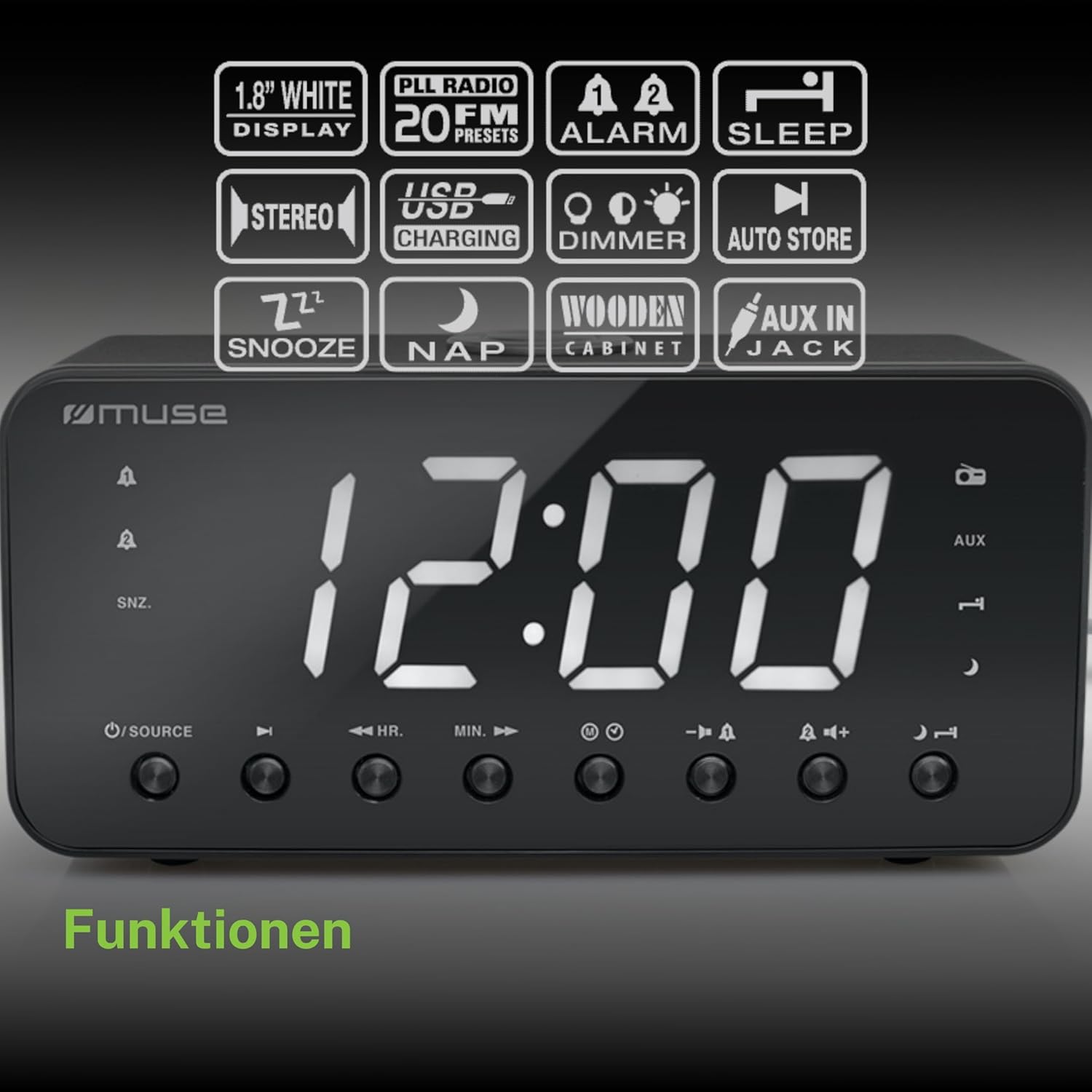
Figure 2: Diagram illustrating the key features and control buttons on the Muse M-192 CR Clock Radio, including the 1.8-inch white display, PLL FM radio with 20 presets, dual alarms, sleep, snooze, NAP functions, USB charging, dimmer, auto store, and AUX input jack.
Елементи керування передньої панелі:
- Дисплей: Large 1.8-inch white LED display for time and status.
- Кнопка SOURCE: Selects between FM radio and AUX input.
- HR (Hour) Button: Adjusts hour for time and alarm settings.
- MIN (Minute) Button: Adjusts minute for time and alarm settings.
- Кнопка СИГНАЛІЗАЦІЇ 1: Sets and activates/deactivates Alarm 1.
- Кнопка СИГНАЛІЗАЦІЇ 2: Sets and activates/deactivates Alarm 2.
- Кнопка SNOOZE/DIMMER: Activates snooze during an alarm; adjusts display brightness (High/Low/Off) when not alarming.
- Кнопка SLEEP: Sets the sleep timer for radio playback.
- Кнопка денного сну: Sets a short nap alarm.
- Кнопки збільшення / зменшення гучності: Регулює гучність звуку.
Підключення на задній панелі:
- AUX IN Джек: Підключає зовнішні аудіопристрої.
- Порт заряджання USB: Provides power to charge compatible devices.
- Гніздо DC IN: Connects the AC adapter for power.
- Батарейний відсік: Holds backup batteries.
5. Налаштування
5.1 Підключення живлення
- Insert the small plug of the supplied AC adapter into the DC IN jack on the rear of the clock radio.
- Plug the AC adapter into a standard wall outlet. The display will light up.
5.2 Встановлення резервного акумулятора
The clock radio requires 2 x 1.5V AAA batteries (not included) for backup power. These batteries maintain the time and alarm settings during a power outage.
- Відкрийте кришку батарейного відсіку на нижній панелі пристрою.
- Вставте дві батарейки типу AAA, дотримуючись правильної полярності (+ та -), як зазначено всередині відсіку.
- Надійно закрийте кришку батарейного відсіку.
Note: Battery backup only preserves settings; the display will not illuminate and alarms will not sound during a power outage if only running on battery backup.
6. Інструкція з експлуатації
6.1 Встановлення часу
- In standby mode (when the radio is off), press and hold the ВСТАНОВИТИ ЧАС button (if available, otherwise use HR/MIN directly or a dedicated time set button not explicitly listed but implied by HR/MIN). If no dedicated button, proceed to step 2.
- Натисніть HR кнопку для налаштування години.
- Натисніть ХВ кнопку для налаштування хвилин.
- Release the buttons to confirm the time. The time will automatically set after a few seconds of inactivity.
6.2 Налаштування будильників (Будильник 1 та Будильник 2)
The Muse M-192 CR features two independent alarms.
- Натисніть і утримуйте ТРИВОГА 1 кнопку, доки на дисплеї не почне блимати час будильника.
- Використовуйте HR і ХВ кнопки, щоб встановити потрібний час будильника.
- Натисніть ТРИВОГА 1 натисніть кнопку ще раз, щоб вибрати джерело будильника: звуковий сигнал or радіо.
- Натисніть ТРИВОГА 1 button a third time to confirm and activate Alarm 1. An alarm icon will appear on the display.
- Повторіть процес для ТРИВОГА 2 використовуючи ТРИВОГА 2 кнопку.
Щоб вимкнути будильник, натисніть відповідну ТРИВОГА button until its icon disappears from the display.
6.3 Функція відкладання
Коли лунає будильник, натисніть кнопку SNOOZE / DIMMER кнопку, щоб тимчасово вимкнути будильник. Будильник знову пролунає приблизно через 9 хвилин.
6.4 Функція сну
Функція сну дозволяє вам засинати під радіо, яке автоматично вимкнеться через встановлений період.
- Під час відтворення радіо натисніть кнопку СПАТИ button repeatedly to cycle through available sleep times (e.g., 90, 60, 30, 15 minutes, or OFF).
- Радіо гратиме протягом вибраного часу, а потім автоматично вимкнеться.
6.5 NAP Function
The NAP function sets a short alarm for a specified duration.
- Натисніть NAP button repeatedly to select a nap duration (e.g., 10, 20, 30, 60, 90, 120 minutes, or OFF).
- The alarm will sound after the selected duration.
6.6 Робота радіо (FM)
- Натисніть ДЖЕРЕЛО кнопку, щоб вибрати режим FM-радіо.
- Натисніть і утримуйте HR or ХВ button to automatically scan for the next available station. Briefly press to manually tune.
- Відрегулюйте гучність за допомогою Збільшення/зменшення гучності кнопки.
Налаштування попередніх налаштувань радіо:
The unit supports up to 20 FM radio presets.
- Tune to your desired FM station.
- Натисніть і утримуйте PRESET button (often combined with a number or memory button, if not explicitly labeled, refer to the full manual for specific button). If no dedicated PRESET button, the HR/MIN buttons might serve this function in radio mode.
- Використовуйте HR or ХВ buttons to select a preset number (P01-P20).
- Натисніть PRESET button again to save the station.
- Щоб викликати попередньо встановлений режим, коротко натисніть кнопку PRESET кнопку, а потім скористайтеся HR or ХВ щоб вибрати потрібний попередньо встановлений номер.
6.7 Вхід AUX
Connect an external audio device (e.g., MP3 player, smartphone) to the AUX IN jack on the rear of the unit using a 3.5mm audio cable (not included).
- Connect one end of the audio cable to your external device's headphone jack.
- Connect the other end to the AUX IN jack on the clock radio.
- Натисніть ДЖЕРЕЛО button to select AUX mode. The display will show "AUX".
- Play audio from your external device. Adjust volume using the clock radio's Збільшення/зменшення гучності buttons and your external device's volume control.
6.8 Зарядка через USB
The USB port on the rear of the unit can be used to charge compatible devices.

Figure 3: The Muse M-192 CR Clock Radio highlighting its jumbo white display and the USB charging port located on the rear of the unit.
- Connect your device's USB charging cable to the USB charging port on the clock radio.
- Ensure the clock radio is powered on.
- Your device should begin charging.
Note: The USB port is for charging only and does not support data transfer or audio playback.
6.9 Регулятор яскравості дисплея
Adjust the brightness of the display to suit your preference.
- У режимі очікування натисніть SNOOZE / DIMMER кнопку кілька разів.
- Cycle through the brightness levels: High, Low, and Off.
7. Технічне обслуговування
- Прибирання: Протріть пристрій м’якою сухою тканиною. Не використовуйте абразивні засоби для чищення, віск або розчинники.
- Вентиляція: Тримайте вентиляційні отвори чистими від пилу та сміття.
- Зберігання: If storing the unit for an extended period, disconnect it from the power outlet and remove the backup batteries.
8. Вирішення проблем
| проблема | Можлива причина | Рішення |
|---|---|---|
| Немає живлення / Дисплей вимкнений | Адаптер змінного струму не підключений або несправний. | Переконайтеся, що адаптер змінного струму надійно підключений до пристрою та до справної розетки. |
| Сигналізація не звучить | Сигналізація не активована або налаштована неправильно. | Verify alarm time and source are set correctly and the alarm icon is visible on the display. |
| Поганий прийом FM-радіо | Антена не висунута або є перешкоди. | Extend the FM wire antenna fully. Reposition the unit to improve reception. |
| Дисплей занадто яскравий/тьмяний | Потребує налаштування димера. | Натисніть SNOOZE / DIMMER кнопку для перемикання рівнів яскравості. |
9. Технічні характеристики

Figure 4: Technical drawing illustrating the dimensions of the Muse M-192 CR Clock Radio (226mm length, 86mm width, 108mm height).
- модель: М-192 КР
- Дисплей: 1.8-inch White Digital LED
- радіо: FM PLL Radio with 20 Presets
- Функції сигналізації: Dual Alarm, Snooze, Sleep, NAP
- Джерело тривоги: Radio or Buzzer
- Підключення: AUX-in, USB Charging Port
- Потужність: AC Power (Adapter Included), Battery Backup (2 x 1.5V AAA batteries, not included)
- Вихідна потужність: 2 Вт
- Розміри (Д x Ш x В): 22.6 х 8.6 х 10.8 см
- вага: 800 г
10. Гарантія та підтримка
For detailed warranty information and technical support, please refer to the documentation provided with your purchase or contact your retailer. Keep your proof of purchase for any warranty claims.


