вступ
This manual provides detailed instructions for the safe and effective use of the BSIDE ADM02 Auto Ranging Digital Multimeter. This handheld, battery-operated DMM offers multiple functions for various electrical measurements.
Designed to meet IEC61010-1 & CAT II 600V overvoltage category and double insulation standards, the ADM02 features a robust holster for enhanced drop resistance. It is an ideal general measurement tool for schools, laboratories, factories, and other professional or educational environments.

Малюнок 1: Спереду view of the BSIDE ADM02 Digital Multimeter with its display and function dial.
Інформація про безпеку
WARNING: To avoid electrical shock or personal injury, please read and understand all safety information before using this multimeter.
Загальні правила техніки безпеки
- Always ensure the test leads are properly connected and the function switch is set to the correct range before making any measurements.
- Не застосовуйте більше номінального об’ємуtage, як зазначено на лічильнику, між клемами або між будь-якою клемою та землею.
- Будьте особливо обережні при роботі з обtagвище 30 В змінного струму RMS, 42 В пікового значення або 60 В постійного струму. Ці значенняtagце небезпека ураження електричним струмом.
- Від’єднайте живлення кола та розрядіть усі високовольтні акумуляториtage конденсаторів перед перевіркою опору, провідності або діодів.
- Always remove the test leads from the circuit before changing the function switch position.
- Не використовуйте вимірювальний прилад, якщо він виглядає пошкодженим або якщо ізоляція вимірювальних дротів пошкоджена.
- Замініть батарейку, коли з'явиться індикатор низького заряду батареї, щоб забезпечити точність показань.
- To prevent fire, install fuse with amp/volt ratings shown on the back of the device.
Клас безпеки
This device complies with IEC 61010-1, CAT II 600V safety standards.
Особливості продукту
- 2000 counts Auto Ranging Digital Multimeter (DMM).
- 3 1/2 digit LCD display with backlight for clear readings.
- Full overload protection and dual insulation protection for enhanced safety.
- Capable of measuring DC/AC voltage, DC/AC current, resistance, temperature, and performing diode & continuity checks.
- Data Hold function to freeze the displayed reading.
- Max value hold function to capture the maximum measured value.
- Індикація низького заряду батареї для своєчасної заміни батареї.
- Функція автоматичного вимкнення для економії заряду батареї.
- Compact dimensions: 140 x 67 x 30mm.
- Operating Temperature: 0 ~ 40 ℃ (32 ~ 104 ℉) & <80% RH.
- Storage Temperature: -10 ~ 50 ℃ (14 ~ 122 ℉) & <70% RH.
Вміст упаковки
Будь ласка, перевірте упаковку на наявність наступних предметів:
- 1 x ADM02 Multimeter
- 1 x Test leads (one red, one black)
- 1 x K-type temperature probe
- 1 х Посібник користувача

Figure 2: The BSIDE ADM02 Multimeter shown with its test leads, temperature probe, and user manual.
Налаштування
Установка батареї
The ADM02 Multimeter requires one 9V battery (6F22 or 1604A Type).
- Переконайтеся, що мультиметр вимкнено.
- Знайдіть кришку відсіку для батарейок на задній панелі пристрою.
- Використовуйте викрутку, щоб відкрутити гвинт, що кріпить кришку батарейного відсіку.
- Gently lift the cover.
- Connect the 9V battery to the battery clip, observing correct polarity (+ and -).
- Помістіть акумулятор у відсік.
- Встановіть кришку акумулятора та закріпіть її гвинтом.

Малюнок 3: Задня частина view of the multimeter showing the battery compartment and stand.
Підключення тестових потенційних клієнтів
Insert the red test lead into the "VΩTemp mA" input jack and the black test lead into the "COM" (common) input jack for most voltage, resistance, temperature, and current measurements (up to 200mA).
For high current measurements (up to 10A), insert the red test lead into the "10A" input jack and the black test lead into the "COM" jack.

Figure 4: The multimeter with test leads properly connected to the input jacks.
Інструкція з експлуатації
Загальна операція
- Turn the rotary switch to the desired function (e.g., V~ for AC Voltage, V- для постійного струму Voltage, Ω for Resistance, A~ for AC Current, A- for DC Current, Temp for Temperature, Diode/Continuity).
- Підключіть вимірювальні щупи до кола або компонента, що перевіряється.
- Зчитайте значення вимірювання на РК-дисплеї.
Вимірювання DC/AC Voltage
- Встановіть поворотний перемикач на потрібний рівень гучності постійного струмуtage (V-) or AC Voltage (V~) range. The ADM02 is auto-ranging, so it will select the appropriate range automatically.
- Connect the red test lead to the positive side of the circuit and the black test lead to the negative side (for DC) or across the circuit (for AC).
- Прочитайте томtage значення.
Вимірювання постійного/змінного струму
- Set the rotary switch to the desired DC Current (A-) or AC Current (A~) range.
- For currents up to 200mA, ensure the red lead is in the "VΩTemp mA" jack. For currents up to 10A, move the red lead to the "10A" jack.
- Connect the multimeter in series with the circuit.
- Прочитайте поточне значення.
Вимірювання опору
- Set the rotary switch to the "Ω" range.
- Переконайтеся, що ланцюг знеструмлений, а всі конденсатори розряджені.
- Підключіть вимірювальні щупи до компонента, який потрібно виміряти.
- Зчитайте значення опору.
Вимірювання температури
- Set the rotary switch to the "Temp" range.
- Connect the K-type temperature probe to the "VΩTemp mA" and "COM" jacks, observing polarity.
- Розмістіть кінчик температурного зонда на об'єкті, температуру якого потрібно виміряти, або поблизу нього.
- Read the temperature value in Celsius or Fahrenheit.
Diode and Continuity Check
- Set the rotary switch to the "Diode/Continuity" range.
- For diode test: Connect the red lead to the anode and the black lead to the cathode of the diode. A forward voltagЗ’явиться падіння напруги. Поміняйте місцями дроти; має відображатися розірваний ланцюг (OL).
- For continuity test: Connect the test leads across the circuit or component. If continuity exists (resistance below approx. 50Ω), the buzzer will sound.
Функція зберігання даних
Натисніть кнопку «HOLD», щоб зафіксувати поточне значення на дисплеї. Натисніть її ще раз, щоб відпустити.
Max Value Hold Function
Press the "MAX" button to display and hold the maximum value measured since the function was activated. Press it again to exit.
Функція підсвічування
Press the backlight button (light bulb icon) to turn the display backlight ON or OFF.
Автоматичне вимкнення
The multimeter will automatically power off after approximately 15 minutes of inactivity to conserve battery life. To reactivate, turn the rotary switch to OFF and then back to the desired function, or press any button.
Технічне обслуговування
прибирання
Періодично протирайте корпус рекламоюamp тканини та м’якого миючого засобу. Не використовуйте абразиви або розчинники.
Заміна батареї
Коли на дисплеї з’явиться індикатор низького заряду батареї, замініть батарею 9 В, як описано в розділі «Встановлення батареї».
Заміна запобіжника
If the current measurement function does not work, the fuse may need replacement.
WARNING: To avoid electrical shock, remove test leads before opening the battery cover.
The fuses are located inside the meter. Refer to the specifications for the correct fuse ratings (e.g., F 250mA/250V and F 10A/250V). Fuse replacement should only be performed by qualified personnel.
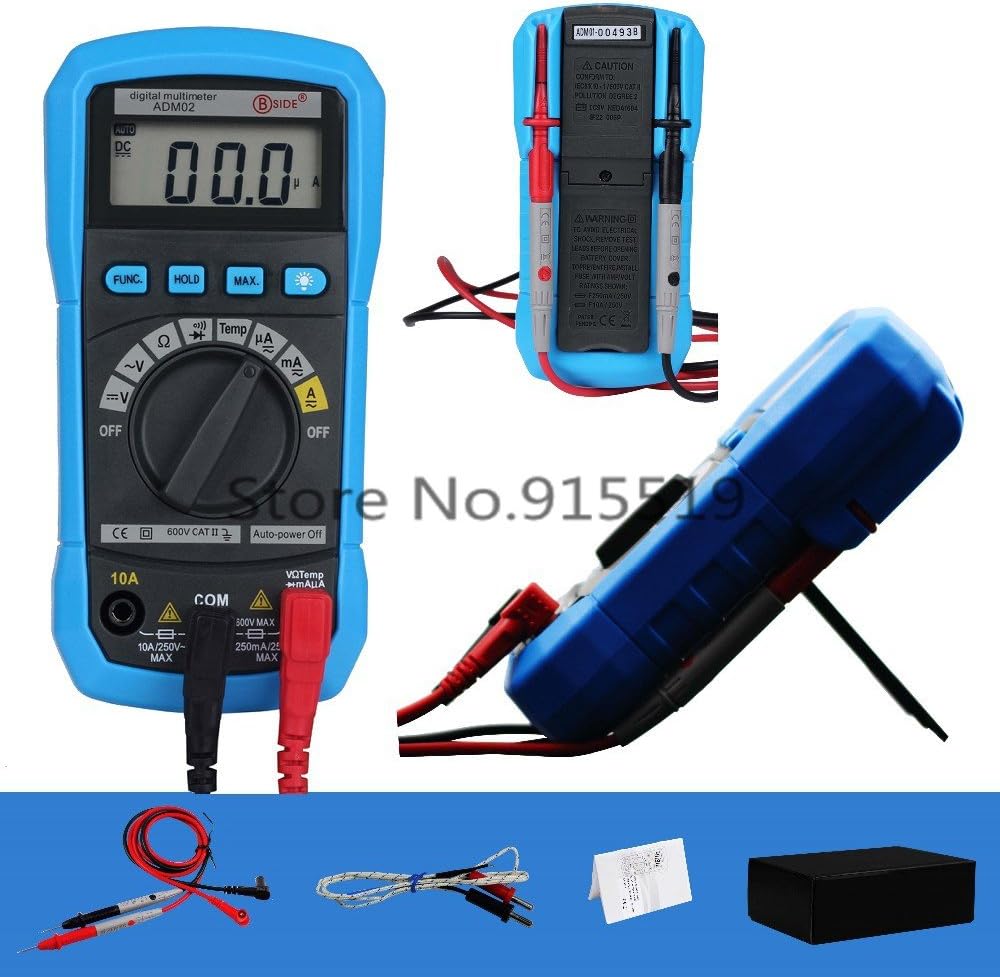
Малюнок 5: Задня частина view of the multimeter showing safety warnings and specifications.
Усунення несправностей
| проблема | Можлива причина | Рішення |
|---|---|---|
| Лічильник не вмикається. | Розряджений або неправильно встановлений акумулятор. | Check battery installation; replace battery if necessary. |
| Відображається "OL" (перевантаження). | Input value exceeds selected range; open circuit (for resistance/continuity). | Select a higher range (if applicable); check circuit connection. |
| Неточні показання. | Low battery; incorrect function/range selected; poor test lead connection. | Replace battery; verify function/range; ensure secure connections. |
| No current measurement. | Blown fuse; incorrect test lead connection for current. | Check fuse (replace if necessary by qualified personnel); ensure red lead is in correct current jack (mA or 10A). |
Якщо проблема не зникає після спроби цих рішень, зверніться до служби підтримки клієнтів.
Технічні характеристики
| Параметр | Діапазон | Точність |
|---|---|---|
| DC Voltage | 200 мВ/2 В/20 В/200 В | ±(0.5%+2) |
| DC Voltage | 600 В | ±(0.8%+2) |
| AC Voltage | 2В/20В/200В/600В | ±(1.0%+3) |
| Постійний струм | 200µA/2mA/20mA/200mA | ±(1.0%+3) |
| Постійний струм | 10А | ±(3.0%+3) |
| Змінного струму | 200µA/2mA/20mA/200mA | ±(1.2%+3) |
| Змінного струму | 10А | ±(3.0%+5) |
| опір | 200Ω/2kΩ/20kΩ/200kΩ/2MΩ | ±(0.8%+2) |
| опір | 20 МОм | ±(1.0%+2) |
| Температура (℃) | -20℃~1000℃ | ±(3.0%+3) |
| Температура (℉) | -0 ℉ ~ 1800 ℉ | ±(3.0%+3) |
Загальні характеристики
- Display: 2000 counts, 3 1/2 digit LCD with backlight
- Power Supply: 9V Battery (6F22 or 1604A Type) x 1pc (not included)
- Operating Temperature & Humidity: 0 ~ 40℃ (32 ~ 104℉) & <80% RH
- Storage Temperature & Humidity: -10 ~ 50℃ (14 ~ 122℉) & <70% RH
- Safety Class: IEC 61010-1, CAT II 600V
- Розміри (Д х Ш х В): 140 х 67 х 30 мм
- Weight: Approx. 140g (excluding battery)
Гарантія та підтримка
For warranty information and technical support, please refer to the contact details provided with your purchase or visit the official BSIDE webсайт. Зберігайте чек про покупку як підтвердження покупки.
Manufacturer: Bside
Date First Available: Dec 3 2016


