1. Вступ
The Monoprice USB 3.0 to SATA Converter Adapter (Model 114597) provides a convenient solution for connecting various SATA drives to a computer via a USB port. This adapter facilitates data transfer and access for 2.5-inch SATA hard drives (HDD) and solid-state drives (SSD), 3.5-inch SATA HDDs, and 5.25-inch optical drives (CD-ROM, DVD-RW, Blu-ray DVD).
This manual provides instructions for the proper setup, operation, and maintenance of your Monoprice USB 3.0 to SATA Converter Adapter.
2. Особливості продукту
- Supports USB 3.0 speeds up to 5 Gbps for fast data transfer.
- Enables easy and quick access to external storage devices.
- No external power required for 2.5-inch HDDs/SSDs.
- Includes a 12 VDC power adapter for 3.5-inch HDDs/SSDs and 5.25-inch optical drives.
- Compatible with 2.5"/3.5" SATA HDD/SSD, BLU-RAY DVD, CD-ROM, DVD-ROM, CD-RW, DVD-RW, and DVD+RW combo devices.
3. Вміст упаковки
Будь ласка, перевірте, чи містить ваша упаковка такі предмети:
- Monoprice USB 3.0 to SATA Converter Adapter (Model 114597)
- 12 VDC Power Adapter (for 3.5" drives and 5.25" optical drives)

Image: Monoprice USB 3.0 to SATA Converter Adapter with its 12VDC power adapter.
4. Інструкції з налаштування
4.1. Connecting a 2.5-inch SATA HDD/SSD
For 2.5-inch SATA hard drives or solid-state drives, no external power adapter is required as the device is bus-powered via USB.
- Connect the SATA connector of the adapter to the 2.5-inch SATA drive. Ensure a firm connection.
- Connect the USB 3.0 connector of the adapter to an available USB port on your computer. For optimal performance, use a USB 3.0 port.
- The drive should be recognized by your operating system.
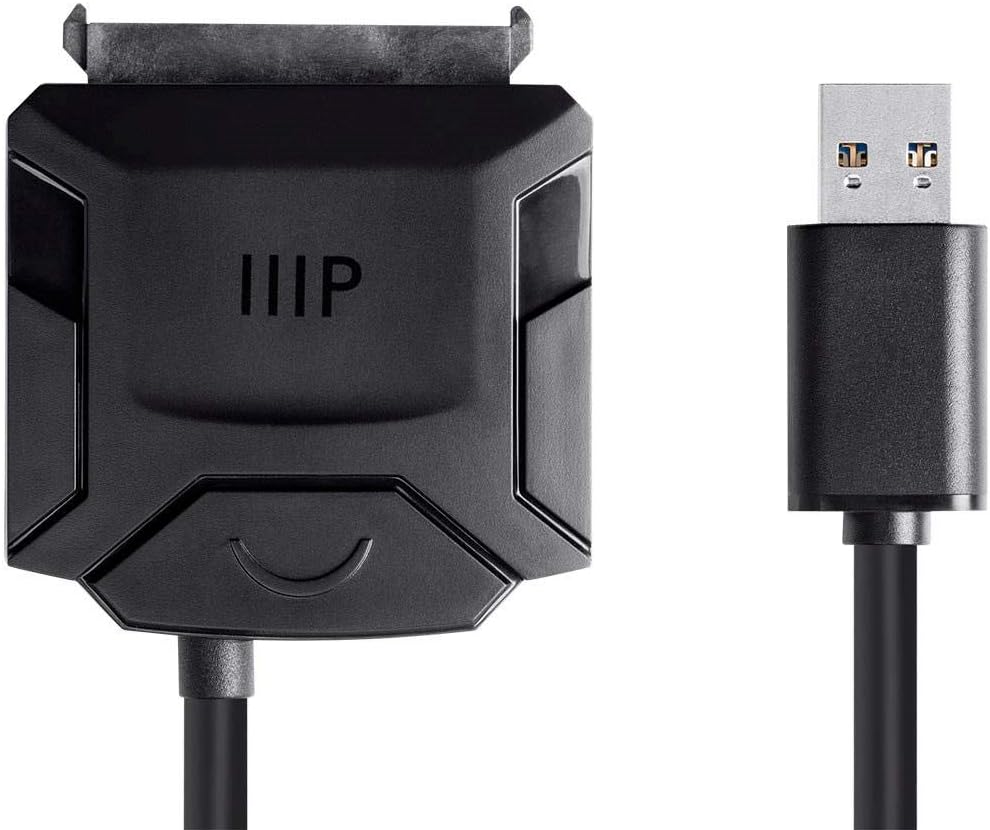
Зображення: Крупний план view of the adapter's SATA and USB connectors.
4.2. Connecting a 3.5-inch SATA HDD/SSD or 5.25-inch Optical Drive
For 3.5-inch SATA hard drives/SSDs or 5.25-inch optical drives, the included 12 VDC power adapter is required.
- Connect the SATA connector of the adapter to the 3.5-inch SATA drive or 5.25-inch optical drive. Ensure a firm connection.
- Connect the 12 VDC power adapter to the adapter's power input port.
- Plug the 12 VDC power adapter into a standard power outlet.
- Connect the USB 3.0 connector of the adapter to an available USB port on your computer. For optimal performance, use a USB 3.0 port.
- The drive should be recognized by your operating system.

Зображення: Верх view of the Monoprice USB 3.0 to SATA Converter Adapter.
5. Інструкція з експлуатації
Once the adapter and drive are properly connected, your computer's operating system should automatically detect the drive. It will appear as a removable storage device, similar to an external hard drive or USB flash drive.
- Доступ до даних: You can access, transfer, and manage files on the connected drive using your computer's file дослідник (наприклад, File Провідник у Windows, Finder у macOS).
- Нові диски: If connecting a brand new drive, it may need to be initialized and formatted before it can be used. Refer to your operating system's documentation for instructions on disk management.
- Безпечне видалення: Always safely eject the drive from your operating system before physically disconnecting the adapter or the drive. This prevents potential data corruption or loss.
6. Технічне обслуговування
To ensure the longevity and proper functioning of your Monoprice USB 3.0 to SATA Converter Adapter, follow these maintenance guidelines:
- Тримайте адаптер чистим і без пилу. Використовуйте м’яку суху тканину для очищення.
- Store the adapter in a dry environment, away from direct sunlight and extreme temperatures.
- Avoid bending or crimping the cables excessively, as this can damage internal wiring.
- Не піддавайте адаптер впливу рідин або високої вологості.
7. Вирішення проблем
7.1. Диск не розпізнано
- Ensure all connections (SATA, USB, and power adapter if applicable) are secure and fully inserted.
- For 3.5-inch drives or optical drives, confirm the 12 VDC power adapter is correctly connected to the adapter and plugged into a working power outlet.
- Спробуйте підключити адаптер до іншого USB-порту на вашому комп'ютері.
- Test the adapter with a different SATA drive, or test the drive with a different adapter/enclosure to determine if the issue lies with the adapter or the drive.
- Check your computer's Disk Management (Windows) or Disk Utility (macOS) to see if the drive is detected but unformatted or unallocated.
7.2. Низька швидкість передачі даних
- Ensure the adapter is connected to a USB 3.0 port on your computer for optimal speeds. USB 2.0 ports will operate at slower speeds.
- Verify that the connected drive itself supports USB 3.0 speeds.
- Close other applications that might be consuming significant system resources or disk I/O.
7.3. Power Issues with Optical Drives (e.g., Blu-ray)
- Some Blu-ray drives may require more power than this adapter can supply, even with the included 12 VDC power adapter. If you experience instability, read errors, or the drive repeatedly cycles on/off, consider an alternative power source or a different adapter designed for higher power optical drives.
8. Технічні характеристики
| Бренд | Моноціна |
| Номер моделі | 114597 |
| Тип роз'єму (хост) | USB 3.0 |
| Тип роз'єму (пристрій) | SATA (Data & Power) |
| Тип кабелю | USB |
| Сумісні пристрої | 2.5" / 3.5" SATA HDD/SSD, 5.25" Optical Drives (CD-ROM, DVD-RW, Blu-ray DVD) |
| Швидкість передачі даних | До 5 Гбіт/с (USB 3.0) |
| Вхідна потужність | USB bus-powered for 2.5" drives; 12 VDC power adapter for 3.5" drives and 5.25" optical drives |
| Розміри продукту (Д x Ш x В) | 14.73 х 13.97 х 6.35 см |
| Колір | Білий |
9. Гарантія та підтримка
For detailed warranty information, technical support, or to register your product, please visit the official Monoprice website or contact Monoprice customer service directly. Keep your purchase receipt for warranty claims.


