1. Вступ
This manual provides detailed instructions for the installation, operation, and maintenance of your JOOAN 770 HD 720P Wireless IP Camera. Please read this manual thoroughly before using the product to ensure proper functionality and to avoid damage. Keep this manual for future reference.
2. Продукт закінчивсяview
2.1 Вміст упаковки
Перевірте, чи всі перелічені нижче предмети входять до вашої упаковки. Якщо будь-які предмети відсутні або пошкоджені, зверніться до служби підтримки клієнтів.
- JOOAN 770 HD 720P Wireless IP Camera (Note: Some variants may be 1080P or have internal model JA-C9E-U)
- Адаптер живлення
- USB кабель для передачі даних
- Монтажний кронштейн
- Screw Pack (for mounting)
- Мережевий кабель (Ethernet)
- Посібник користувача (цей документ)

Image: Contents of the JOOAN 770 HD 720P Wireless IP Camera package, including the camera, power adapter, cables, and mounting hardware.
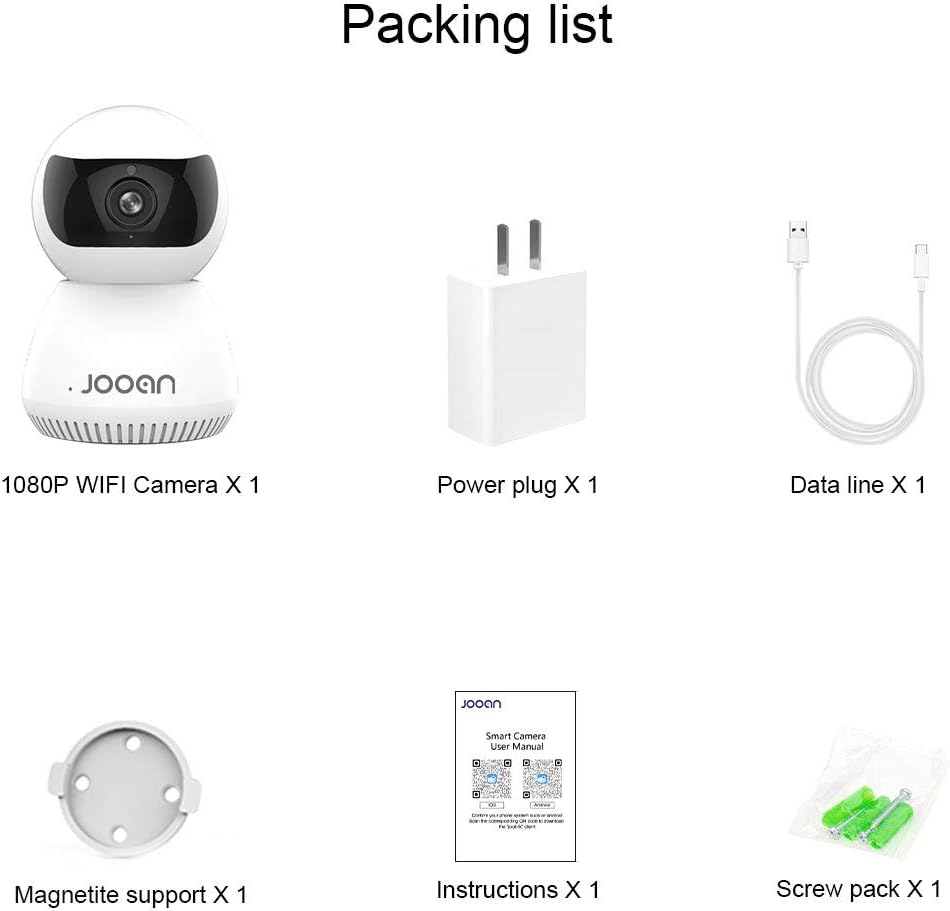
Зображення: Детальний view of the packing list for a JOOAN WiFi Camera, showing a 1080P camera, power plug, data line, magnetite support, instructions, and screw pack.
2.2 Основні характеристики
- HD Video Quality: Captures clear 720P high-definition video. (Note: Some models may support 1080P resolution).
- Бездротове підключення: Supports Wi-Fi for flexible placement and easy setup.
- Функціональність панорамування/нахилу: Пропонує широкий viewing angle with 355° horizontal rotation and 100° vertical tilt, controllable via the companion application.
- Двостороннє аудіо: Вбудований мікрофон і динамік дозволяють спілкуватися в режимі реального часу.
- Нічне бачення: Equipped with infrared LEDs for clear monitoring in low-light conditions, up to 35 feet.
- Виявлення руху: Alerts users to detected movement within the camera's field of view.
- Локальна пам'ять: Supports Micro SD cards up to 128GB for continuous or event-triggered recording.
- P2P Cloud Monitoring: Remote access and monitoring via smartphone (Android & iOS) and computer applications.
- Порт Ethernet: Provides an option for wired network connection when Wi-Fi signal is unstable.

Зображення: спереду view of the JOOAN 770 HD 720P Wireless IP Camera, showcasinйого купольну конструкцію та об'єктив.

Image: A JOOAN camera with speech bubbles indicating two-way audio functionality, allowing communication between the camera's location and a remote user via a smartphone.

Image: A JOOAN camera in a nursery setting, illustrating its infrared night vision capability with red LEDs visible, providing clear monitoring in darkness.
3. Інструкції з налаштування
3.1 Розпакування та початкове розміщення
- Акуратно вийміть усі компоненти з упаковки.
- Choose a suitable location for your camera. Ensure it is within range of your Wi-Fi network or close to an Ethernet port.
- For optimal performance, place the camera on a stable, flat surface or mount it using the provided bracket and screws.
3.2 Увімкнення
- Connect the USB data cable to the camera's power input port.
- Підключіть адаптер живлення до стандартної електричної розетки.
- The camera will power on, and an indicator light will illuminate, typically blinking to indicate readiness for setup.
3.3 Network Connection (Wi-Fi or Ethernet)
Your camera supports both wireless (Wi-Fi) and wired (Ethernet) connections.
Wi-Fi підключення:
- Ensure your smartphone is connected to the 2.4GHz Wi-Fi network you intend to use for the camera. (5GHz networks are generally not supported).
- Proceed to section 3.4 for app installation and pairing, which will guide you through the Wi-Fi setup process.
Підключення Ethernet:
- Connect one end of the provided network cable to the camera's Ethernet port.
- Connect the other end of the network cable to an available LAN port on your router or network switch.
- The camera will automatically attempt to establish a wired network connection.

Зображення: Задня частина view of the JOOAN camera, highlighting the Ethernet port for wired network connectivity.
3.4 Встановлення програми та сполучення пристроїв
- Download the official companion application for JOOAN cameras from your smartphone's app store (e.g., Apple App Store for iOS, Google Play Store for Android). Refer to the quick start guide included in your package for the specific app name or QR code.
- Відкрийте програму та створіть новий обліковий запис користувача або увійдіть, якщо у вас вже є обліковий запис.
- Follow the in-app instructions to add a new device. This typically involves scanning a QR code on the camera, or selecting your camera model and following prompts for Wi-Fi configuration (entering your Wi-Fi password).
- Once successfully paired, the camera's indicator light will usually turn solid, and you will see the live video feed in the app.
4. Інструкція з експлуатації
4.1 Живий View
After successful pairing, open the companion app and select your camera from the device list to view the live video feed. You can switch between standard and high-definition viewing modes if available.
4.2 Керування панорамуванням та нахилом
В прямому ефірі view screen within the app, use the directional controls (often a joystick-like interface or swipe gestures) to remotely adjust the camera's horizontal (pan) and vertical (tilt) angles. The camera supports 355° pan and 100° tilt.
4.3 Двосторонній аудіозв'язок
Щоб скористатися функцією двостороннього аудіо, торкніться значка мікрофона в режимі реального часу програми view interface. Hold the button to speak, and release to listen. Ensure your phone's microphone permissions are granted to the app.
4.4 Виявлення руху та сповіщення
- Перейдіть до налаштувань камери в додатку.
- Locate the "Motion Detection" or "Alarm Settings" option.
- Enable motion detection and configure sensitivity levels as desired.
- Set up alert notifications (e.g., push notifications to your phone, email alerts) to be informed when motion is detected.
4.5 Запис і зберігання
Запис на карту Micro SD:
- Insert a Micro SD card (up to 128GB, Class 10 or higher recommended) into the camera's SD card slot. Power off the camera before inserting or removing the card.
- In the app settings, format the SD card if prompted.
- Configure recording settings: continuous recording, motion-triggered recording, or scheduled recording.
- Записано footage може бути viewed and downloaded directly from the app.
Cloud Storage (Optional):
The camera may offer optional cloud storage services. Refer to the app for details on subscription plans and activation.
5. Технічне обслуговування
- Прибирання: Використовуйте м’яку суху тканину для очищення об’єктива та корпусу камери. Уникайте використання рідких засобів для чищення або абразивних матеріалів.
- Оновлення програмного забезпечення: Regularly check the companion app for firmware updates. Keeping the camera's firmware updated ensures optimal performance and security.
- Розміщення: Ensure the camera is not exposed to extreme temperatures, direct sunlight for prolonged periods, or excessive moisture.
- Цикл живлення: Якщо з камерою виникли проблеми, спробуйте відключити її від джерела живлення на 10 секунд, а потім знову підключити.
6. Вирішення проблем
У цьому розділі розглядаються поширені проблеми, з якими ви можете зіткнутися. У разі складніших проблем зверніться до служби підтримки клієнтів.
| проблема | Можлива причина | Рішення |
|---|---|---|
| Камера не може підключитися до Wi-Fi. | Incorrect Wi-Fi password; camera too far from router; 5GHz Wi-Fi network used; router firewall settings. | Verify Wi-Fi password. Move camera closer to router. Ensure you are using a 2.4GHz Wi-Fi network. Check router settings for any restrictions. |
| Немає прямої відеотрансляції. | Камера не в мережі; погане мережеве з’єднання; проблема з додатком. | Check camera's power and network connection. Restart camera and router. Close and reopen the app. Ensure stable internet connection. |
| Двосторонній аудіозв'язок не працює. | Microphone/speaker muted in app; app permissions not granted; network latency. | Check audio settings in the app. Ensure the app has microphone permissions on your phone. Verify network stability. |
| Сповіщення про виявлення руху не отримано. | Motion detection disabled; notification settings incorrect; app running in background. | Enable motion detection in app settings. Check app notification permissions on your phone. Ensure the app is allowed to run in the background. |
| SD-карта не записує або не розпізнається. | SD card not inserted correctly; card corrupted; unsupported card type/size; card not formatted. | Reinsert SD card. Try a different, compatible SD card (Max 128GB, Class 10). Format the SD card via the app. |
7. Технічні характеристики
The following are the technical specifications for the JOOAN 770 HD 720P Wireless IP Camera:
| Особливість | Деталь |
|---|---|
| Модель | 770 (Internal Model: JA-C9E-U) |
| Роздільна здатність відео | 720P HD (Some variants may support 1080P) |
| Підключення | Wi-Fi (2.4GHz), Ethernet |
| Діапазон повороту/нахилу | По горизонталі: 355°, по вертикалі: 100° |
| Джерело живлення | Corded Electric, 5 Volts |
| Зберігання | Карта Micro SD (макс. 128 ГБ) |
| Особливості | Motion Sensor, Two-Way Audio, Infrared Night Vision |
| Сумісні пристрої | Smartphone (Android & iOS), Tablet, Computer |
| матеріал | метал |
| Розміри | Приблизно 20 х 15.2 х 13.8 см |
| вага | Приблизно 679.99 г |

Image: The bottom of a JOOAN Smart Camera, displaying the model number JA-C9E-U and power specifications.
8. Гарантія та підтримка
JOOAN products are designed for reliability and performance. For warranty information, please refer to the warranty card included with your product or visit the official JOOAN website. If you encounter any issues or require technical assistance, please contact JOOAN customer support.
Контактна інформація:
- Skype: live:market_491
- Електронна пошта: wendy@qacctv.com


