вступ
Welcome to the user manual for your new Sunstech DEDALOIII MP3 Player. This compact and lightweight device is designed for portable audio enjoyment, featuring 4GB of storage, an FM radio, and a voice recorder. This manual provides essential information on setting up, operating, maintaining, and troubleshooting your device to ensure optimal performance and longevity.
1. Продукт закінчивсяview
Familiarize yourself with the components of your Sunstech DEDALOIII MP3 Player.

Малюнок 1.1: Спереду View of the Sunstech DEDALOIII MP3 Player with Earphones. This image displays the front of the black MP3 player, showing its 1.1-inch LCD screen, the circular navigation pad with 'M' (Menu), 'Play/Pause', 'Previous/Rewind', 'Next/Fast Forward', and 'VOL' (Volume) buttons. The included black earphones are visible to the left, connected to the player.

Малюнок 1.2: Задня частина View of the Sunstech DEDALOIII MP3 Player. This image shows the rear of the MP3 player, highlighting the integrated clip for easy attachment to clothing. Visible on the side are the 'ON/OFF' switch, the headphone jack, and the microphone input ('MIC'). Product details like "DEDALO III 4GB" and "FM frequency: 87.5-108MHz" are printed on the back.
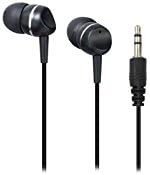
Figure 1.3: Included Earphones. Крупний план view of the black in-ear earphones that come with the DEDALOIII MP3 player. The 3.5mm audio jack is also visible, indicating standard connectivity.
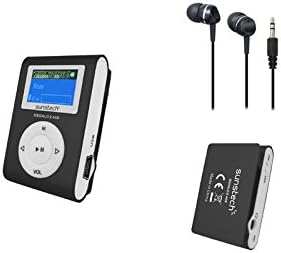
Figure 1.4: Complete Package Contents. This image displays the Sunstech DEDALOIII MP3 player, its included earphones, and a view of the player's back with the clip, illustrating the compact design and essential accessories.
Вміст упаковки:
- Sunstech DEDALOIII MP3 Player
- Чорні навушники
- USB Charging/Data Transfer Cable
- Посібник користувача (цей документ)
2. Початок роботи (налаштування)
2.1 Зарядка пристрою
Before first use, fully charge the MP3 player. Connect the included USB cable to the micro USB port on the player and the other end to a USB port on your computer or a compatible USB wall adapter. The battery indicator on the screen will show charging status. A full charge typically takes approximately 2-3 hours.
2.2 Connecting to a Computer and Transferring Files
- Переконайтеся, що MP3-плеєр увімкнено.
- Підключіть плеєр до комп’ютера за допомогою USB-кабелю, що постачається в комплекті.
- Плеєр відображатиметься на вашому комп’ютері як знімний дисковод.
- Drag and drop your MP3 or WMA audio files into the player's storage folder.
- Один раз file transfer is complete, safely eject the device from your computer before disconnecting the USB cable.
2.3 Початкове ввімкнення
Locate the 'ON/OFF' switch on the side of the device. Slide the switch to the 'ON' position to power on the MP3 player. The screen will illuminate, and the main menu will appear.
3. Основна операція
3.1 Увімкнення/вимкнення живлення
- Щоб увімкнути: Slide the 'ON/OFF' switch to the 'ON' position.
- Щоб вимкнути: Slide the 'ON/OFF' switch to the 'OFF' position.
3.2 Навігація та меню
Use the circular navigation pad to move through menus and control playback:
- Кнопка M (Меню): Press to enter the main menu or go back to the previous menu/screen.
- Кнопка відтворення/паузи (центральна): Press to play or pause audio. In menus, press to confirm selection.
- Стрілки вліво/вправо: Navigate left/right in menus, skip tracks during playback. Hold to fast forward/rewind.
- VOL (Volume) Button: Press to adjust volume. Use the left/right arrows to increase or decrease volume.
3.3 Playing Music (MP3/WMA)
- From the main menu, select "Music" or "Audio".
- Переглядайте свої папки та files за допомогою кнопок зі стрілками.
- Press the Play/Pause button to select and begin playback of a song.
- Use the Left/Right arrows to skip to the previous or next track.
- Press the VOL button to adjust volume, then use Left/Right arrows.
3.4 Використання FM-радіо
- У головному меню виберіть «FM-радіо».
- The player will automatically scan for available stations or display the last tuned station.
- Use the Left/Right arrows to manually tune or scan for the next/previous station.
- Press the M button to access radio options, such as auto-scan or saving presets.
3.5 Запис голосу
- From the main menu, select "Recorder" or "Voice".
- Press the Play/Pause button to start recording. The built-in microphone will capture audio.
- Press the Play/Pause button again to stop recording.
- Recordings are saved automatically and can be accessed from the "Recordings" folder.
3.6 ID3 Tag and Lyrics Display
When playing music, the DEDALOIII supports ID3 tag display, showing information such as song title, artist, and album. If lyrics are embedded in the audio file, they may also be displayed on the screen.
3.7 Режими вирівнювання
The player offers 6 equalization modes to customize your audio experience. Access these settings through the music playback menu. Options typically include Normal, Pop, Rock, Classical, Jazz, and Bass.
4. Технічне обслуговування
4.1 Очищення
Wipe the device with a soft, dry, lint-free cloth. Do not use abrasive cleaners, solvents, or spray directly onto the device. Keep the screen clean to ensure clear visibility.
4.2 Догляд за акумулятором
- Уникайте частого повного розряджання акумулятора.
- Регулярно заряджайте пристрій, навіть якщо він не використовується, щоб підтримувати справність акумулятора.
- Не піддавайте пристрій впливу екстремальних температур, оскільки це може погіршити продуктивність акумулятора.
4.3 Зберігання
When not in use for extended periods, store the MP3 player in a cool, dry place, away from direct sunlight and excessive dust. Ensure the battery has some charge before storing.
5. Вирішення проблем
| проблема | Можлива причина | Рішення |
|---|---|---|
| Пристрій не вмикається. | Акумулятор розрядився. | Повністю зарядіть пристрій за допомогою USB-кабелю, що входить до комплекту. |
| Неможливо передати files до пристрою. | Incorrect USB connection; device not recognized by computer. | Ensure the USB cable is securely connected. Try a different USB port or restart your computer. Ensure the device is powered on. |
| Немає звуку з навушників. | Volume is too low; earphones not properly connected; faulty earphones. | Increase the volume. Ensure earphones are fully plugged into the jack. Test with another pair of earphones. |
| Статичний шум або поганий прийом FM-радіо. | Слабкий сигнал; перешкоди. | Move to an area with better reception. The earphone cable acts as an antenna, ensure it is fully extended. |
| Пристрій зависає або перестає реагувати. | Збій програмного забезпечення. | Slide the 'ON/OFF' switch to 'OFF' and then back to 'ON' to perform a soft reset. |
6. Технічні характеристики
| Особливість | Деталь |
|---|---|
| Бренд | Sunstech |
| Модель | ДЕДАЛОІІІ |
| Ємність зберігання | 4 ГБ (4096 МБ) |
| Розмір екрана | 1.1 дюйми (РК-дисплей) |
| Підтримувані аудіоформати | MP3, WMA |
| Підтримувані радіодіапазони | FM |
| Тип батареї | Lithium Polymer (rechargeable via micro USB) |
| Розміри (Д x Ш x В) | 2 х 3 х 4.7 см |
| вага | 20 г |
| Особливості | Compact design with clip, voice recording, ID3 tag/lyrics display, 6 equalization modes. |
| Сумісні пристрої | Персональний комп'ютер |
7. Гарантія та підтримка
Your Sunstech DEDALOIII MP3 Player comes with a standard manufacturer's warranty. Please refer to the warranty card included in your package for specific terms and conditions. For technical support, service, or further inquiries, please contact Sunstech customer service through their official webсайт або контактну інформацію, надану у вашій документації щодо покупки.
Примітка: Зберігайте чек про покупку як підтвердження покупки для гарантійних претензій.