1. Вступ
This manual provides essential information for the safe and efficient operation of your NEC X555UNS 55-inch 1080p LED TV. Please read these instructions thoroughly before installation and use, and retain them for future reference.
The NEC X555UNS is designed for professional signage applications, particularly for building video walls, offering superior off-angle viewing and minimal color shift due to its S-IPS panel technology. It supports 24/7 operation with advanced heat management and localized dimming for improved brightness uniformity.

Image: The NEC X555UNS 55-inch LED TV displaying vibrant, colorful content, showcasinйого високоякісний візуальний вихід.
2. Інформація про безпеку
Завжди дотримуйтесь наступних запобіжних заходів, щоб запобігти пошкодженню виробу та забезпечити безпеку користувача:
- Переконайтеся, що виріб встановлено кваліфікованим персоналом.
- Не перекривайте вентиляційні отвори.
- Уникайте потрапляння пристрою під дощ або вологу.
- Use only the power cord supplied with the unit or a suitable replacement.
- Перед чищенням або обслуговуванням відключіть живлення.
- Не намагайтеся ремонтувати пристрій самостійно. Звертайтеся до кваліфікованого сервісного персоналу для всіх робіт з обслуговування.
3. Вміст упаковки
Перевірте наявність усіх елементів в упаковці:
- NEC X555UNS 55-inch LED TV Unit
- стенд
- Шнур живлення
- Пульт дистанційного керування
- Інструкція з експлуатації (цей документ)

Зображення: спереду view of the NEC X555UNS 55-inch LED TV, showing its sleek, dark display panel when powered off.
4. Налаштування та встановлення
4.1 Фізичне встановлення
The NEC X555UNS is designed for video wall applications. Ensure proper mounting hardware is used for secure installation. The unit weighs approximately 81 pounds (36.7 kg).
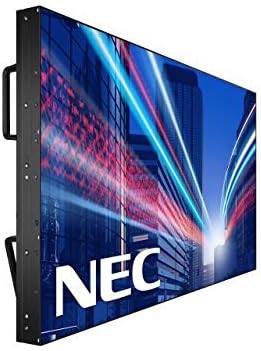
Зображення: Збоку view of the NEC X555UNS 55-inch LED TV, highlighting its robust construction and integrated handles for easier installation in video wall configurations.
4.2 Підключення
Connect your video sources and network cables to the appropriate ports on the display. The X555UNS offers various connectivity options:
- HDMI: Для вхідного відео та аудіо високої чіткості.
- DVI-D: For digital video input.
- LAN: For network control and content distribution.
- DisplayPort: Supports UHD pass-through for daisy-chaining multiple displays in a video wall setup.
- Слот OPS: Allows for integration of single board computers.
For video wall configurations, utilize the DisplayPort for UHD daisy-chaining to achieve a high-resolution display across the entire wall.
4.3 Початкове ввімкнення
- Connect the power cord to the display and a suitable power outlet.
- Натисніть кнопку живлення на дисплеї або пульті дистанційного керування.
- The display will power on and show the NEC logo.
- Use the on-screen menu to configure initial settings such as language, input source, and display mode.
The Auto ID feature can simplify installation time, especially in multi-display setups, by reducing configuration steps to a single button press.
5. Інструкція з експлуатації
5.1 Основна операція
Use the remote control or the buttons on the display to navigate the on-screen menu (OSD). Adjust settings such as brightness, contrast, color temperature, and input source.
5.2 Функції дисплея
- S-IPS Panel Technology: Provides excellent off-angle viewing and minimizes color shift, making it ideal for public viewing and video walls.
- Direct LED Backlighting with Localized Dimming: Enhances brightness uniformity and achieves a higher dynamic contrast ratio.
- Робота 24/7: Designed for continuous use with advanced thermal protection, internal temperature sensors, and fan-based cooling.
- Яскравість 700 кд/м²: Ensures clear visibility even in brightly lit environments.
6. Технічне обслуговування
6.1 Очищення дисплея
Щоб очистити екран, обережно протріть його м’якою тканиною без ворсу. Для видалення стійких плям, dampen the cloth slightly with water or a mild, non-abrasive screen cleaner. Do not spray liquid directly onto the screen.
6.2 Загальний догляд
- Зберігайте дисплей у добре провітрюваному місці, щоб запобігти перегріванню.
- Уникайте розміщення важких предметів на дисплеї.
- Регулярно перевіряйте кабельні з'єднання, щоб переконатися в їх надійності.
7. Вирішення проблем
If you encounter issues with your NEC X555UNS, refer to the following common problems and solutions:
| проблема | Можлива причина | Рішення |
|---|---|---|
| Немає живлення | Power cord disconnected; Power outlet faulty. | Перевірте підключення шнура живлення; протестуйте розетку за допомогою іншого пристрою. |
| Немає зображення | Неправильно вибрано джерело вхідного сигналу; відеокабель нещільно прикріплений або несправний. | Select correct input source; Check video cable connections. |
| Погана якість зображення | Resolution mismatch; Display settings incorrect. | Adjust resolution on source device; Calibrate display settings (brightness, contrast). |
If the problem persists, contact NEC customer support.
8. Технічні характеристики
| Особливість | Деталь |
|---|---|
| Назва моделі | X555UNS |
| Розмір екрана | 55 дюймів |
| Технологія дисплея | LED, S-IPS Panel |
| роздільна здатність | 1080p (повна HD) |
| Співвідношення сторін | 16:9 |
| Частота оновлення | 60 Гц |
| Яскравість | 700 кд/м² (ніт) |
| Підключення | HDMI, DVI-D, LAN, DisplayPort |
| Особливості | Flat, S-IPS Panel, Auto ID, UHD Daisy Chain, OPS Slot, 24/7 Operation, Advanced Thermal Protection |
| Розміри продукту | 54 x 12 x 34 дюймів (прибл.) |
| Вага товару | 81 фунта (приблизно) |
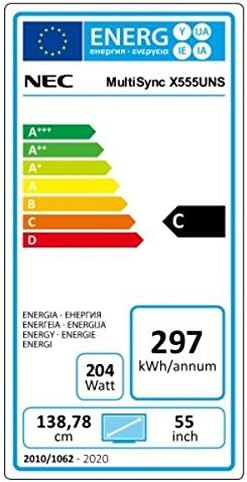
Image: Energy efficiency label for the NEC MultiSync X555UNS, showing energy consumption details and efficiency class.
9. Гарантія та підтримка
For warranty information and technical support, please refer to the official NEC website or contact your local NEC representative. Keep your purchase receipt as proof of purchase.
Інтернет-ресурси: Відвідайте www.necdisplay.com for product documentation, drivers, and support contact information.
Підтримка клієнтів: For direct assistance, please contact NEC customer service.


