1. Вступ
This manual provides comprehensive instructions for the setup, operation, and maintenance of the EDUP EP-3701 USB WiFi Disk. The EP-3701 is a portable wireless storage device designed to expand storage and facilitate data sharing for iOS and Android smartphones and tablets without the need for cables or a computer.
Будь ласка, уважно прочитайте цей посібник перед використанням пристрою, щоб забезпечити його належну роботу та запобігти пошкодженням.
2. Продукт закінчивсяview
The EDUP EP-3701 acts as a bridge between your USB storage devices (like USB flash drives or external hard drives) and your mobile devices via a Wi-Fi connection. It creates its own Wi-Fi hotspot, allowing multiple devices to connect and access stored files одночасно.
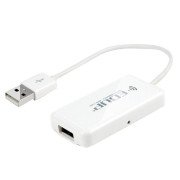
Зображення 2.1: спереду view of the EDUP EP-3701 USB WiFi Disk, showing the USB host port and the integrated USB cable.
3. Ключові характеристики
- Wireless Data Access: Доступ files on connected USB storage devices wirelessly from smartphones, tablets, and computers.
- Підтримка кількох користувачів: Allows multiple users to connect and stream/access data simultaneously.
- Портативний дизайн: Compact and lightweight, ideal for travel and on-the-go use.
- Джерело живлення: Powered via USB, can be connected to a USB wall adapter, power bank, or computer USB port.
- Контроль програми: Dedicated mobile application for easy file management and device configuration.
4. Вміст упаковки
Перевірте наявність усіх елементів в упаковці:
- EDUP EP-3701 USB WiFi Disk
- Короткий посібник (цей посібник)
5. Налаштування
5.1. Увімкнення пристрою
- Connect the integrated USB cable of the EP-3701 to a USB power source (e.g., a 5V/1A USB wall adapter, a power bank, or a computer's USB port).
- The power indicator light on the device will illuminate, indicating it is powered on.
5.2. Connecting USB Storage
- Insert your USB flash drive or external hard drive into the USB host port on the EP-3701.
- Ensure the USB storage device is properly seated.
5.3. Connecting Mobile Device
- На смартфоні або планшеті перейдіть до налаштувань Wi-Fi.
- Locate and connect to the Wi-Fi network named "EDUP_XXXXXX" (XXXXXX will be the last six digits of the device's MAC address).
- The default password is "12345678". It is recommended to change this password after initial setup.
- Download and install the "WiFi Disk" application from your device's app store (App Store for iOS, Google Play Store for Android).
- Open the "WiFi Disk" app. The app will automatically detect and connect to the EP-3701.
6. Інструкція з експлуатації
6.1. File управління
- переглядати Files: Within the "WiFi Disk" app, navigate through the folders and files on the connected USB storage.
- Завантажити Files: Трансфер files from your mobile device to the USB storage connected to the EP-3701.
- Завантажити Files: Трансфер files from the USB storage to your mobile device.
- Потокові медіа: Відтворюйте відео, музику та view photos directly from the USB storage without downloading.
6.2. Налаштування мережі
The "WiFi Disk" app allows you to configure network settings:
- Change Wi-Fi Name (SSID): Modify the name of the EP-3701's Wi-Fi network.
- Змінити пароль Wi-Fi: Update the password for the Wi-Fi network.
- Internet Passthrough (Bridge Mode): Connect the EP-3701 to an existing Wi-Fi network to provide internet access to connected devices while still allowing access to the USB storage.
7. Технічне обслуговування
- Прибирання: Використовуйте м’яку суху тканину для очищення зовнішньої частини пристрою. Не використовуйте рідкі засоби для чищення або аерозолі.
- Зберігання: Зберігайте пристрій у прохолодному, сухому місці, подалі від прямих сонячних променів та екстремальних температур.
- Оновлення прошивки: Periodically check the "WiFi Disk" app or the EDUP official webсайт для оновлень прошивки, щоб забезпечити оптимальну продуктивність і безпеку.
- Безпечне видалення: Always ensure data transfer is complete before disconnecting the USB storage device or powering off the EP-3701.
8. Вирішення проблем
8.1. Пристрій не вмикається
- Ensure the USB cable is securely connected to a working USB power source.
- Спробуйте інший порт USB або адаптер живлення.
8.2. Cannot Connect to Wi-Fi Network
- Verify you are selecting the correct "EDUP_XXXXXX" network.
- Double-check the Wi-Fi password (default is "12345678").
- Restart the EP-3701 device and your mobile device.
8.3. USB Storage Not Detected
- Ensure the USB storage device is properly inserted into the EP-3701's USB host port.
- Check if the USB storage device is formatted in a supported file system (FAT32, NTFS, exFAT).
- Some high-power consumption external hard drives may require an external power source.
- Try a different USB storage device to rule out a faulty drive.
8.4. App Not Functioning Correctly
- Ensure your mobile device is connected to the EP-3701's Wi-Fi network.
- Close and reopen the "WiFi Disk" app.
- Reinstall the "WiFi Disk" app.
- Перевірте наявність оновлень програм у магазині програм вашого пристрою.
9. Технічні характеристики
| Особливість | опис |
|---|---|
| Модель | EP-3701 |
| Інтерфейс | USB 2.0 (Host), USB 2.0 (Power Input) |
| Бездротовий стандарт | IEEE 802.11b/g/n |
| Діапазон частот | 2.4 ГГц |
| Безпека | WPA / WPA2, WPA-PSK / WPA2-PSK |
| Підтримується File Системи | FAT32, NTFS, exFAT |
| Вхідна потужність | DC 5V/1A (via USB) |
| Розміри | (Approximate, based on typical USB dongle size) 60mm x 25mm x 10mm |
| Робоча температура | 0°C до 40°C (32°F до 104°F) |
10. Гарантія та підтримка
EDUP products typically come with a limited warranty. Please refer to the warranty card included with your purchase or visit the official EDUP webсайт для отримання детальних гарантійних умов, що стосуються вашого регіону.
For technical support, product inquiries, or warranty claims, please contact EDUP customer service through their official webсайт або контактну інформацію, зазначену на упаковці вашого продукту.
Webсайт: www.szedup.com


