1. Вступ
Дякуємо за покупкуasing the eKids Li-B17 Millennium Falcon Bluetooth Speaker. This portable wireless speaker allows you to stream audio from your Bluetooth-enabled devices and enjoy hands-free calling. Its unique design, inspired by the iconic Millennium Falcon, includes light effects and plays the Star Wars theme. Please read this manual carefully to ensure proper use and maintenance of your speaker.
2. Інформація про безпеку
- Рекомендований вік: Підходить для дітей віком від 3 років.
- Не піддавайте пристрій впливу екстремальних температур, прямих сонячних променів або вологи.
- Не намагайтеся розбирати або модифікувати пристрій. Це призведе до анулювання гарантії.
- Використовуйте лише наданий зарядний кабель або його сертифікований еквівалент.
- Тримайте пристрій подалі від сильних магнітних полів.
3. Вміст упаковки
Переконайтеся, що всі предмети присутні в упаковці:
- eKids Li-B17 Millennium Falcon Bluetooth Speaker
- USB-кабель для зарядки

малюнок 1: eKids Li-B17 Millennium Falcon Bluetooth Speaker on its clear stand, showcasing its detailed design and illuminated blue engine lights.
4. Особливості продукту
- Bluetooth Wireless Audio: Stream music wirelessly from compatible devices.
- Функція Hands-Free: Answer and end calls directly from the speaker.
- світлові ефекти: Integrated lights illuminate during operation.
- Акумуляторна батарея: Вбудований літієвий акумулятор забезпечує до 6 годин відтворення.
- Star Wars Theme: Plays the iconic Star Wars main theme.
- Вхід AUX: Connect non-Bluetooth devices via the auxiliary port.

малюнок 2: The eKids Li-B17 Millennium Falcon Bluetooth Speaker with text indicating powerful sound performance and illuminated engine lights, alongside a smartphone displaying music playback.
5. Налаштування
5.1 Заряджання динаміка
- Connect the small end of the included USB charging cable to the USB charging port on the speaker.
- Підключіть більший кінець USB-кабелю для заряджання до порту USB з живленням (наприклад, комп’ютера, USB-адаптера).
- Індикатор заряджання засвітиться. Після повного заряджання індикатор може змінити колір або згаснути.
- Повний заряд забезпечує приблизно 6 годин відтворення.
5.2 Увімкнення/вимкнення
Locate the 3-position switch on the side of the speaker (refer to Figure 3).
- До влади ON in Bluetooth mode, slide the switch to the Символ Bluetooth положення.
- До влади ON in AUX mode, slide the switch to the ДОП положення.
- До влади ВИМКНЕНО, slide the switch to the ВИМКНЕНО (середня) позиція.
5.3 Створення пари Bluetooth
- Ensure the speaker is charged and powered ON in Bluetooth mode. The speaker will automatically enter pairing mode if no previously paired device is found.
- На пристрої з підтримкою Bluetooth (смартфоні, планшеті тощо) увімкніть Bluetooth і виконайте пошук доступних пристроїв.
- Виберіть "eKids Li-B17" (або подібну назву) зі списку пристроїв.
- Once paired, the speaker will indicate a successful connection (e.g., a tone or voice prompt).
- To pair a new device or re-enter pairing mode, press and hold the Bluetooth button on the top of the speaker.
5.4 З'єднання AUX
For devices without Bluetooth, you can use the AUX input:
- Slide the 3-position switch to the ДОП положення.
- Connect one end of a 3.5mm audio cable (not included) to your audio device's headphone jack.
- Connect the other end of the 3.5mm audio cable to the AUX port on the speaker (refer to Figure 3).
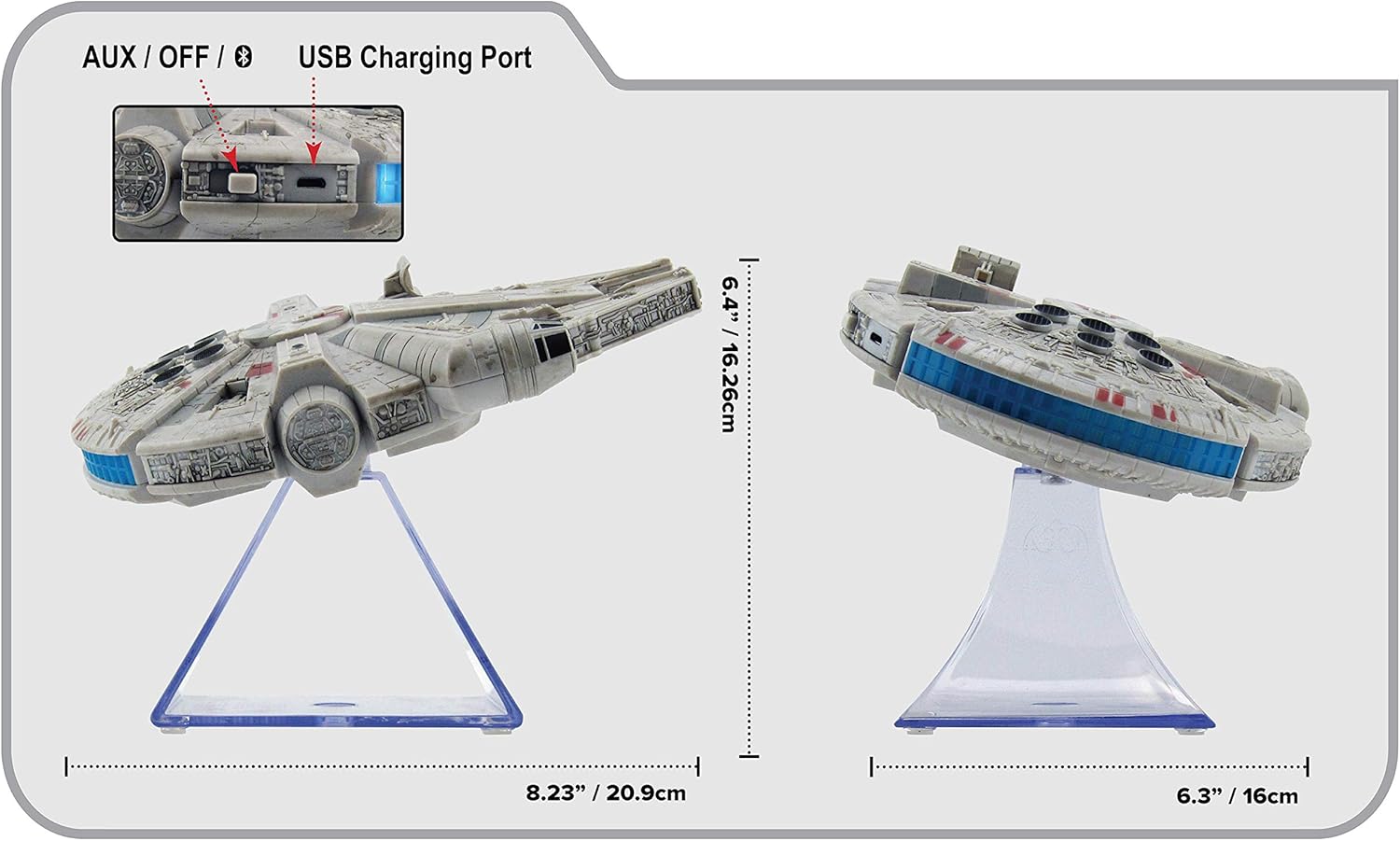
малюнок 3: сторона view of the eKids Li-B17 Millennium Falcon Bluetooth Speaker, highlighting the AUX/OFF/Bluetooth switch, USB charging port, and product dimensions.

малюнок 4: Image illustrating the eKids Li-B17 Millennium Falcon Bluetooth Speaker's compatibility with multiple devices including mobile phones, tablets, notebooks, smartwatches, game devices, and PCs.
6. Інструкція з експлуатації
6.1 Відтворення аудіо
- Once connected via Bluetooth or AUX, start playing audio from your source device.
- Adjust the volume using the controls on your connected device. The speaker itself does not have volume controls.
6.2 Дзвінки в режимі «вільні руки»
Під час підключення до смартфона через Bluetooth:
- Відповідь на дзвінок: Press the designated call button on the speaker (often integrated with the Bluetooth button or a separate small button near the main blaster area).
- Завершення дзвінка: Press the call button again.
- Здійснення дзвінка: Initiate the call from your smartphone; audio will route through the speaker.
6.3 Світлові ефекти
The speaker features integrated blue engine lights that illuminate when the speaker is powered on and in use, enhancing the visual experience.
6.4 Star Wars Theme Playback
Press the large button located on the top of the speaker (the top blaster area) to play the Star Wars main theme.
7. Технічне обслуговування
- Clean the speaker with a soft, dry cloth. Do not use liquid cleaners or abrasive materials.
- Зберігайте динамік у прохолодному сухому місці, коли він не використовується.
- Уникайте падіння динаміка та сильних ударів.
8. Вирішення проблем
| проблема | Можлива причина | Рішення |
|---|---|---|
| Динамік не вмикається. | Акумулятор розрядився. | Зарядіть динамік за допомогою USB-кабелю, що входить до комплекту. |
| Не вдається підключитися через Bluetooth. | Speaker is not in pairing mode or device's Bluetooth is off. | Ensure speaker is in Bluetooth mode and press the Bluetooth button to enter pairing. Turn Bluetooth on your device and search again. |
| Немає звуку з динаміка. | Volume too low, incorrect input mode, or device not playing. | Increase volume on your device. Ensure speaker is in correct mode (Bluetooth/AUX). Check if your device is playing audio. |
| Погана якість звуку. | Device too far from speaker, interference, or low battery. | Move device closer to speaker (within 30 feet). Avoid obstacles. Charge the speaker. |
9. Технічні характеристики
| Особливість | Специфікація |
|---|---|
| Номер моделі | Li-B17 |
| Технологія підключення | Bluetooth |
| Дальність бездротового зв'язку | До 30 футів (приблизно 9 метрів) |
| Джерело живлення | Lithium-Polymer Battery (rechargeable) |
| Термін служби батареї | До 6 годин |
| Максимальна вихідна потужність динаміка | 25 Вт |
| Режим аудіовиходу | Стерео |
| матеріал | пластик |
| Тип монтажу | Стільниця |
| Розміри (Д x Ш x В) | 18.29 x 26.42 x 24.13 см (7.2 x 10.4 x 9.5 дюйма) |
| Включені компоненти | Millennium Falcon Bluetooth Speaker, USB Charging Cable |
10. Гарантія та підтримка
Цей продукт поставляється з a Обмежена гарантія. For specific details regarding warranty coverage, duration, and how to obtain service, please refer to the warranty card included with your purchase or contact eKids customer support.
For technical support or further inquiries, please visit the official eKids webсайту або зв’яжіться зі своїм відділом обслуговування клієнтів.


