1. Початок роботи
1.1 Вміст упаковки
Verify that all items are present in your Ultimate Ears Boom 2 package:
- Ultimate Ears Boom 2 Bluetooth Speaker
- Зарядний кабель Micro-USB
- Адаптер живлення (може відрізнятися залежно від регіону)
1.2 Заряджання динаміка
Before initial use, fully charge your Ultimate Ears Boom 2 speaker. Connect the micro-USB cable to the charging port on the speaker and the other end to the power adapter, then plug into a wall outlet. The LED indicator will show charging status.

The Ultimate Ears Boom 2 speaker, ready for charging.
1.3 Створення пари Bluetooth
Щоб підключити динамік до пристрою з підтримкою Bluetooth:
- Press and hold the Power button on the top of the speaker until you hear a tone and the LED flashes white.
- На мобільному пристрої перейдіть до налаштувань Bluetooth.
- Select 'UE Boom 2' from the list of available devices.
- Once connected, you will hear a confirmation tone from the speaker.

Топ view of the speaker, highlighting the power and Bluetooth pairing buttons.
1.4 Ultimate Ears App
For enhanced control and additional features, download the Ultimate Ears app from your device's app store (iOS 9.0 or later required for Apple devices, Android compatible). The app allows for remote power control, equalizer adjustments, and PartyUp mode.
2. Speaker Operation
2.1 Увімкнення/вимкнення живлення
Press the Power button located on the top of the speaker to turn it on or off. A distinct sound will indicate the power status.
2.2 Регулювання гучності
Adjust the volume using the large '+' and '-' buttons located on the side of the speaker. You can also control the volume from your connected Bluetooth device.
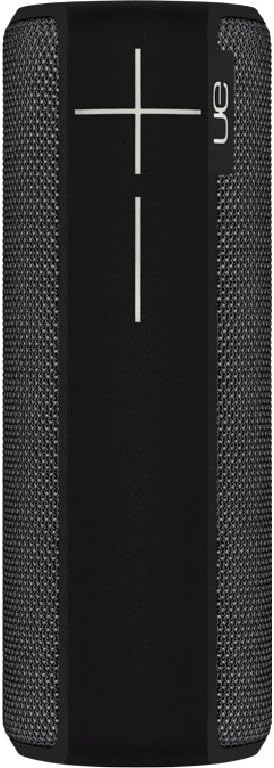
сторона view of the speaker, featuring the prominent volume control buttons.
2.3 Music Control (Tap Gestures)
The Boom 2 features tap controls for music playback:
- Однократне натискання: Tap the top of the speaker once to play or pause the current track.
- Двічі натисніть: Tap the top of the speaker twice to skip to the next track.
2.4 Стан акумулятора
To check the battery level, press both the '+' and '-' volume buttons simultaneously. The speaker will announce the remaining battery percentage.
2.5 Waterproof and Durability Features
The Ultimate Ears Boom 2 is designed to be waterproof (IPX7 rated) and shockproof. It can be immersed in water up to 1 meter for 30 minutes. Ensure the charging port cover is securely closed before exposing the speaker to water.

The speaker's waterproof design allows for use in various environments.

The Ultimate Ears Boom 2 demonstrating its water resistance.
2.6 PartyUp Mode (Connecting Multiple Speakers)
Use the Ultimate Ears app to connect multiple Boom speakers together for a more expansive sound experience. Follow the instructions within the app to activate PartyUp mode.
3. Догляд і технічне обслуговування
3.1 Інструкції з очищення
Для очищення динаміка використовуйте м’яку губкуamp cloth. Avoid using harsh chemicals or abrasive cleaners, as these can damage the speaker's finish or waterproof seals. Ensure the charging port is dry before charging.
3.2 Термін служби батареї
To maximize battery life, avoid fully discharging the speaker frequently. Charge the speaker regularly, and if storing for an extended period, ensure it has at least a 50% charge.
3.3 Зберігання
Store the speaker in a cool, dry place away from direct sunlight and extreme temperatures. Ensure the charging port cover is closed to prevent dust and debris from entering.
4. Посібник з усунення несправностей
4.1 Немає живлення
- Ensure the speaker is charged. Connect it to the power adapter and allow it to charge for at least 15 minutes before attempting to power on.
- Натисніть і міцно утримуйте кнопку живлення протягом кількох секунд.
4.2 Проблеми з підключенням Bluetooth
- Ensure the speaker is in pairing mode (flashing white LED).
- Вимкніть і ввімкніть Bluetooth на своєму мобільному пристрої.
- Forget 'UE Boom 2' from your device's Bluetooth list and attempt to re-pair.
- Move the speaker closer to your device; the maximum range is approximately 33 meters (100 feet).
4.3 Немає звуку або низька гучність
- Збільште гучність як на динаміку, так і на підключеному пристрої.
- Переконайтеся, що динамік правильно підключено через Bluetooth.
- Check if the audio source on your device is playing correctly.
4.4 Спотворення звуку
- Зменште гучність як на динаміку, так і на підключеному пристрої.
- Забезпечте аудіо file or streaming quality is not low.
- Відійдіть подалі від потенційних джерел перешкод (наприклад, Wi-Fi роутерів, інших пристроїв Bluetooth).
4.5 Проблеми з підключенням до програм
- Ensure your mobile device's operating system meets the app's requirements (iOS 9.0+).
- Перезапустіть програму або перевстановіть її.
- Ensure the speaker's firmware is up to date via the app.
5. Технічні характеристики
| Особливість | Специфікація |
|---|---|
| Назва моделі | Стріла 2 |
| Номер моделі | 984-000557 |
| ASIN | B0141208EA |
| Технологія підключення | Bluetooth, USB |
| Технологія бездротового зв'язку | Bluetooth |
| Сумісні пристрої | Computers, Smartphones (Android, iOS) |
| Термін служби батареї | До 15 годин |
| Рейтинг водонепроникності | IPX7 (до 1 метра протягом 30 хвилин) |
| Максимальна дальність | 33 метрів (100 фути) |
| Вихідна потужність динаміка | 25 Вт |
| Розміри продукту | 6.7D x 6.7W x 18H cm (approx. 15 x 5 x 5 cm; 0.54 grams) |
| Режим аудіовиходу | Об'ємний |
| Джерело живлення | Живлення від батареї (1 літій-полімерна батарея в комплекті) |
6. Гарантія та підтримка клієнтів
6.1 Обмежена гарантія
The Ultimate Ears Boom 2 comes with a Limited Warranty. For specific details regarding warranty coverage, terms, and conditions, please refer to the warranty documentation included with your product or visit the official Ultimate Ears webсайт.
6.2 Підтримка клієнтів
If you encounter any issues not covered in this manual or require further assistance, please contact Ultimate Ears customer support through their official website. For return policies or issues related to your purchase, consult the retailer's (e.g., Amazon.it) help pages.


