1. Вступ
This manual provides detailed instructions for the Sharp EL1750V EL-1750V Two-Color Printing Calculator. This device is designed for efficient financial and general calculations, featuring a two-color printing mechanism for clear record-keeping. It includes functions such as automatic tax keys, a change calculation feature, and a large display for enhanced usability.
Ключові особливості:
- Two-color printing (positive numbers in black, negative in red) at 2.2 lines per second.
- 12-digit LCD display for large calculations.
- Built-in antimicrobial protection.
- Change calculation feature.
- Automatic Tax Keys (TAX+, TAX-).
- Rounding and Decimal Switches.
- Grand Total (GT) function.
- 4-key memory.
- Cost, Sell, Margin (CSM) keys.
2. Продукт закінчивсяview
Familiarize yourself with the components and key features of your Sharp EL1750V calculator.

Малюнок 1: Спереду view of the Sharp EL1750V calculator, showing the display, keypad, and paper roll.

Малюнок 2: Закінченоview of key functions including Automatic Tax Keys, Rounding Switch, Decimal Switch, Grand Total Function, 4 Key Memory, Backspace Key, and Percent Key.
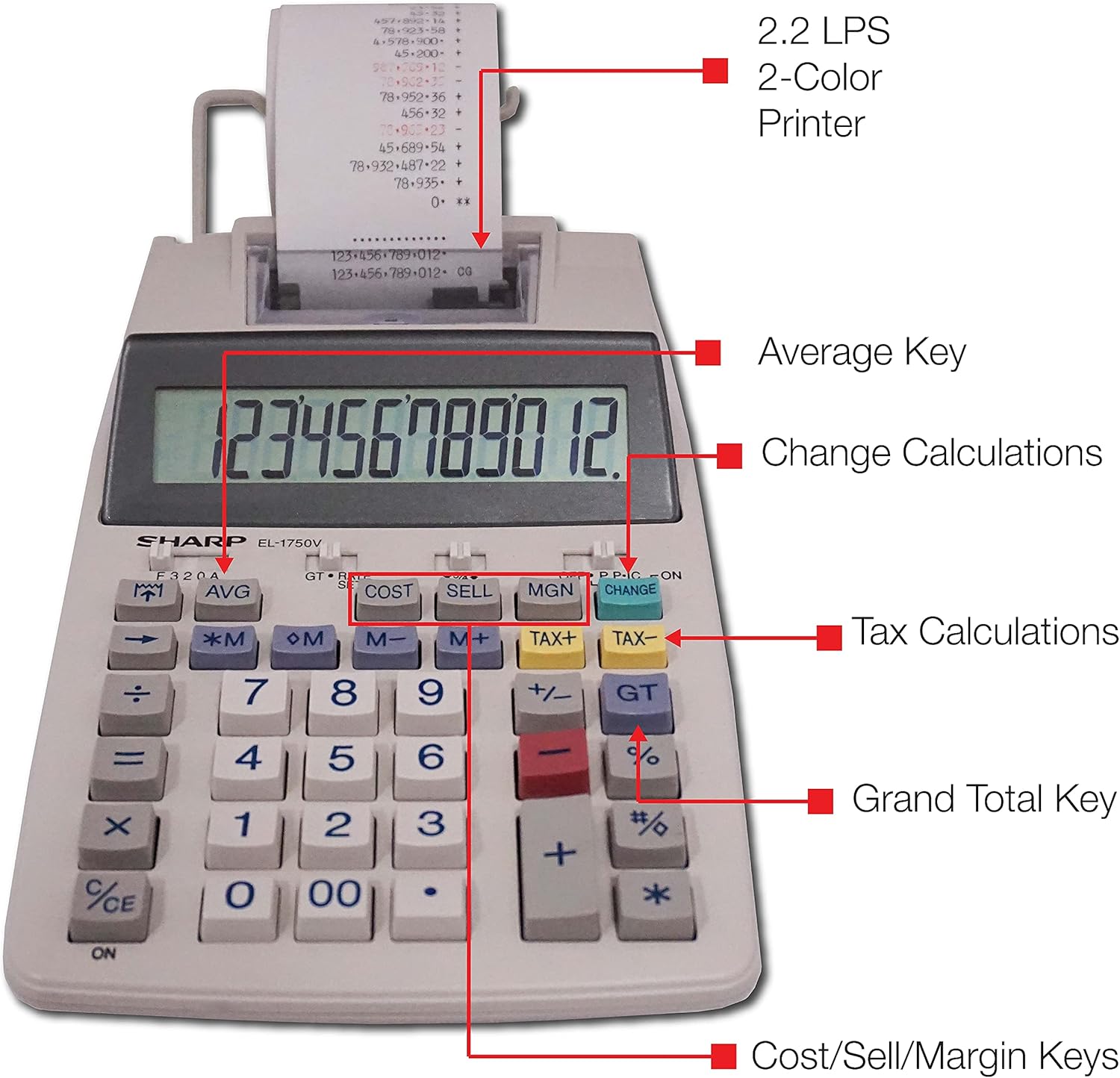
Малюнок 3: Детально view highlighting the 2.2 LPS 2-Color Printer, Average Key, Change Calculations, Tax Calculations, Grand Total Key, and Cost/Sell/Margin Keys.

Figure 4: Dimensions of the Sharp EL1750V calculator, showing a width of 5.9 inches, depth of 9.1 inches, and height of 2 inches, with a 0.75 inch 12-digit LCD display.
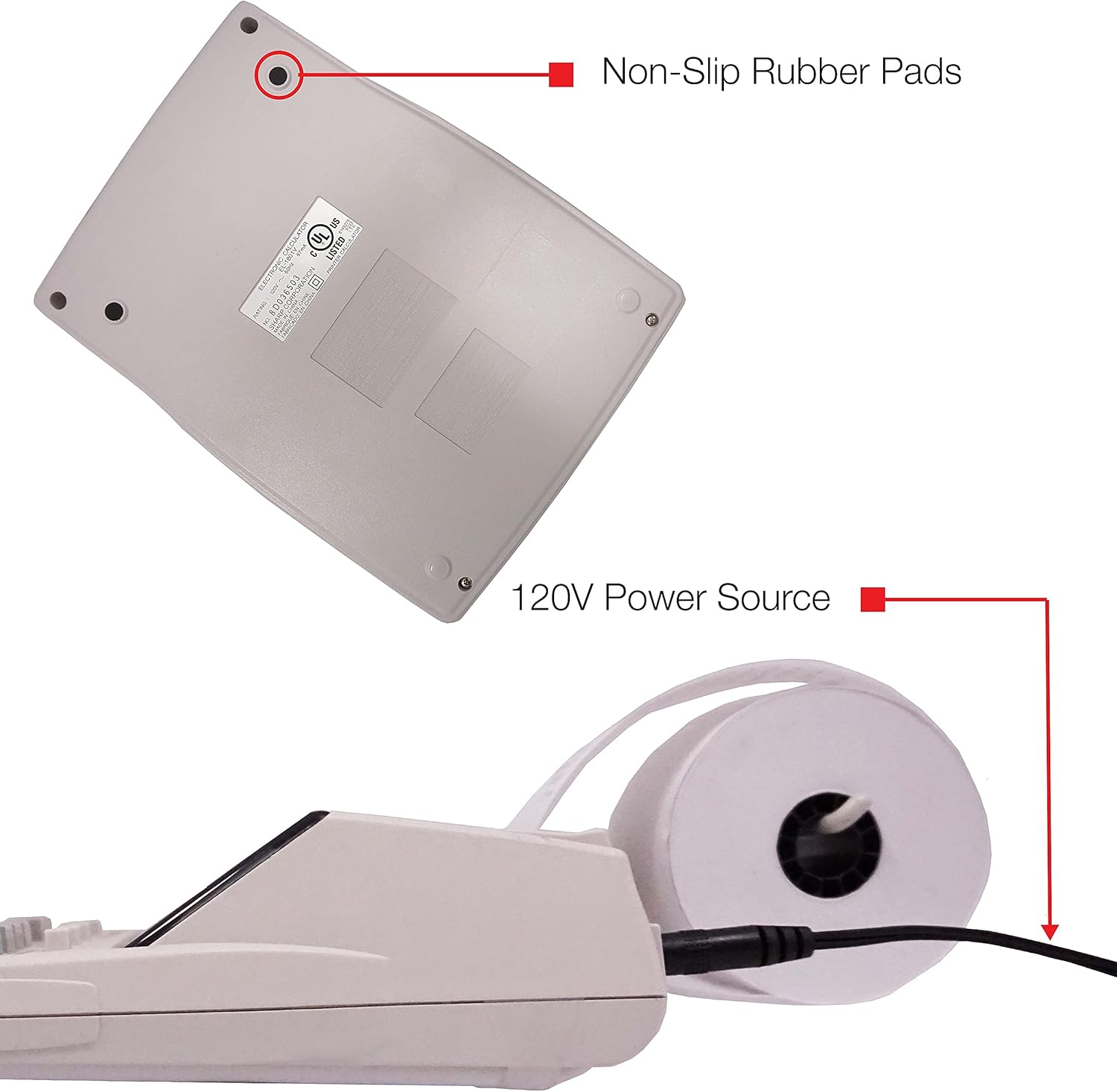
Малюнок 5: Нижня частина view of the calculator, illustrating the non-slip rubber pads and the 120V power source input.
3. Налаштування
3.1 Джерело живлення
The Sharp EL1750V can be powered by an AC adapter (120V) or batteries. Ensure the correct power source is connected before operation.
- Адаптер змінного струму: Connect the provided AC adapter to the power input port on the side of the calculator (refer to Figure 5) and plug it into a standard 120V electrical outlet.
- Акумулятори: If using batteries, open the battery compartment (typically on the underside) and insert the required batteries, observing correct polarity.
3.2 Installing the Paper Roll
- Lift the printer cover to expose the paper roll compartment.
- Вставте новий рулон паперу у відсік, переконавшись, що папір подається знизу рулону.
- Feed the leading edge of the paper into the printer mechanism slot until it emerges from the top.
- Закрийте кришку принтера.
- Press the paper feed key (often marked with an arrow pointing up) to advance the paper and ensure it is properly aligned.
4. Інструкція з експлуатації
4.1 Основні розрахунки
Perform standard arithmetic operations:
- Доповнення (+): Введіть першу цифру, натисніть +, введіть друге число, натисніть =.
- Віднімання (-): Введіть першу цифру, натисніть -, введіть друге число, натисніть =.
- Множення (x): Введіть першу цифру, натисніть x, введіть друге число, натисніть =.
- Ділення (÷): Введіть першу цифру, натисніть ÷, введіть друге число, натисніть =.
- Clear Entry (CE/C): Очищає останнє введене число.
- Все чисто (AC): Clears all entries and calculations.
4.2 Спеціальні функції
- Tax Calculation (TAX+, TAX-):
- Set the tax rate using the appropriate function (refer to the calculator's specific tax rate setting procedure, usually involving a dedicated key or mode).
- Введіть суму, а потім натисніть ПОДАТОК+ to add tax or ПОДАТОК- відняти податок.
- Change Calculation (CHANGE):
- Enter the total amount of the sale.
- Натисніть ЗМІНИТИ ключ.
- Enter the amount received from the customer.
- Прес = to display the change due.
- Загальна сума (GT): Прес GT to recall the grand total of all previous calculations.
- Memory Functions (M+, M-, RM/CM):
- M+Додає відображене значення до пам'яті.
- M-: Віднімає відображене значення з пам'яті.
- РМ/КМ: Recalls memory content (first press) or clears memory (second press).
- Cost, Sell, Margin (COST, SELL, MGN): These keys are used for profit margin calculations.
- Enter two of the three values (Cost, Selling Price, Margin Percentage) and press the key for the unknown value to calculate it.
- Rounding and Decimal Switches: Adjust these switches (typically located above the keypad) to control the number of decimal places and rounding method for calculations.
5. Технічне обслуговування
5.1 Очищення
To maintain the calculator's performance and appearance:
- Протріть зовні м’якою сухою тканиною.
- Для стійкого бруду злегкаampuk тканину змочіть водою або м’яким неабразивним миючим засобом.
- Do not use strong solvents or abrasive cleaners, as these can damage the surface or display.
- Avoid spraying liquids directly onto the calculator.
5.2 Заміна рулону паперу
Replace the paper roll when it runs out or the print becomes faint. Refer to Section 3.2 for installation instructions.
5.3 Заміна ролика з чорнилом
When the print becomes faint or incomplete, the ink roller needs to be replaced. Consult your calculator's specific instructions for ink roller replacement, as the procedure may vary slightly.
6. Вирішення проблем
| проблема | Можлива причина | Рішення |
|---|---|---|
| Калькулятор не вмикається. | No power, AC adapter not connected, or batteries depleted/incorrectly installed. | Ensure AC adapter is securely plugged in. If using batteries, check battery installation and replace if necessary. |
| Немає друку або блідий друк. | Paper roll empty or incorrectly installed; ink roller needs replacement. | Replace paper roll (Section 3.2). Replace ink roller (Section 5.3). |
| Display shows "E" or error message. | Calculation overflow, division by zero, or incorrect operation sequence. | Прес AC to clear the error. Re-enter the calculation carefully. |
| Застрягання паперу. | Paper roll not installed correctly or paper is creased. | Open printer cover, remove jammed paper, and re-install paper roll correctly (Section 3.2). |
7. Технічні характеристики
- модель: Sharp EL1750V
- Дисплей: РК-дисплей на 12 цифр
- Швидкість друку: 2.2 рядка в секунду
- Кольори друку: 2 (Black for positive, Red for negative)
- Джерело живлення: AC Adapter (120V) or Battery Powered
- Розміри (прибл.): 5.9 дюйма (Ш) x 9.1 дюйма (Г) x 2 дюйма (В)
- Вага (прибл.): 0.16 ounces (Note: This weight seems unusually low for a printing calculator, likely an error in source data. User should refer to product packaging for accurate weight.)
- матеріал: пластик
- Особливості: Antimicrobial protection, Change calculation, Tax functions, Cost/Sell/Margin functions, Grand Total, 4-key memory.
8. Гарантія та підтримка
Щоб отримати інформацію про гарантію та технічну підтримку, зверніться до документації, що додається до вашої покупки, або відвідайте офіційний веб-сайт Sharp. webсайт. Зберігайте чек про покупку як підтвердження покупки для гарантійних претензій.
Виробник: Гострий
Webсайт: www.sharpusa.com


