вступ
The DigiTech TRIO is an innovative electric guitar multi-effect pedal designed to be your personal band. It listens to your guitar playing and automatically generates accompanying bass and drum parts. This manual provides comprehensive instructions for setting up, operating, and maintaining your TRIO pedal, ensuring you get the most out of its unique features.
Ключові характеристики
- Seven Music Genres and Twelve Song Styles Per Genre to Choose From
- The TRIO can learn up to three different song parts that can be recalled on-the-fly
- Adjustable Tempo & Alternate Half Time/Double Time Variants Bass & Drum Level Controls
- Hands-Free Control Using a DigiTech FS3X Footswitch (optional)
- Amp & Mixer Outputs Headphone Output w/Level Control Power Supply Included
Посібник із налаштування
Follow these steps to set up your DigiTech TRIO pedal:
- Connect the included 9V DC power supply to the ПОТУЖНІСТЬ input on the pedal and plug it into a power outlet.
- Підключіть свою електрогітару до ГІТАРА В роз'єм за допомогою стандартного інструментального кабелю 1/4 дюйма.
- Підключіть AMP OUT гніздо для твоєї гітари ampвхідний сигнал охолодження за допомогою іншого інструментального кабелю 1/4 дюйма.
- For connecting to a mixer or PA system, use the ЗМІШАЛЬНИК Джек.
- For private practice, connect headphones to the НАВУШНИКИ Джек.
- Optionally, connect a DigiTech FS3X Footswitch to the КОНТРОЛЬ В jack for extended hands-free control.
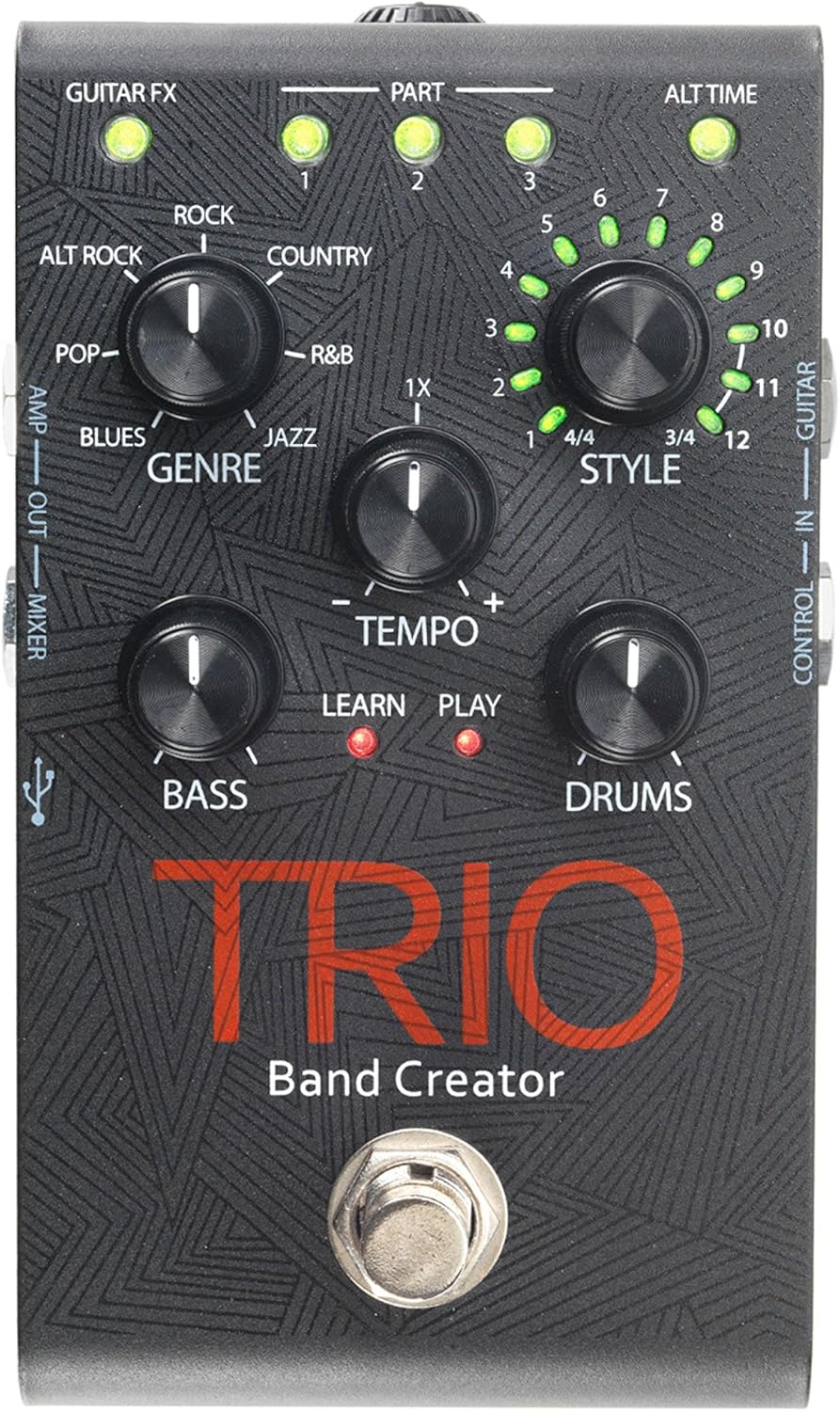
Малюнок 1: Верх view of the DigiTech TRIO pedal, showing the main controls and footswitch.
Інструкція з експлуатації
Basic Operation: Teaching the TRIO a Song
- Натисніть БЕНД footswitch once to enter 'Listen' mode. The НАВЧАЙТЕСЯ Засвітиться світлодіод.
- Play your desired chord progression and rhythm clearly. The TRIO will analyze your playing.
- Натисніть БЕНД footswitch again to stop 'Listen' mode. The ГРАТИ LED will illuminate, and the TRIO will immediately begin playing generated bass and drum parts.
- You can now play along with your virtual band.
Genre and Style Selection
- Використовуйте ЖАНР knob to select from Blues, Pop, Alternative Rock, Rock, Country, R&B, and Jazz. The genre affects the overall feel of the generated bass and drum parts.
- Використовуйте СТИЛЬ knob to choose from twelve different song styles available for each genre. This allows for further customization of the rhythm and feel.
- The ALT TIME button allows you to switch between 3/4 and 4/4 time signatures.
Looping and Song Parts
- The TRIO can learn up to 3 different song parts. To record a new part, select an empty ЧАСТИНА slot (1, 2, or 3) using the corresponding buttons.
- Follow the 'Basic Operation' steps to teach the TRIO the new song part.
- During playback, you can switch between learned song parts on-the-fly by pressing the corresponding ЧАСТИНА кнопку.
- The ЛУПЕР footswitch allows you to record and playback your own guitar loops. Press once to start recording, press again to stop recording and start playback, and press and hold to clear the loop.
Adjusting Levels and Tempo
- The ТЕМП knob adjusts the playback speed of the band and loops.
- The БАСС knob controls the volume level of the generated bass line.
- The БАРАБАНИ knob controls the volume level of the generated drum track.
- The ПЕТЛЯ knob controls the volume level of your recorded guitar loop.

Рисунок 2: Кутовий view of the DigiTech TRIO pedal, highlighting the control knobs and input/output jacks.
Елементи керування та підключення
The DigiTech TRIO pedal features a user-friendly layout with clearly labeled controls and versatile connection options:
Елементи керування передньої панелі:
- GUITAR FX: Activates built-in guitar effects tailored to the selected genre.
- PART 1, 2, 3: Buttons to select and recall different learned song parts.
- ALT TIME: Toggles between 3/4 and 4/4 time signatures.
- TEMPO Knob: Adjusts the overall playback speed.
- GENRE Knob: Selects the musical genre (Blues, Pop, Alt Rock, Rock, Country, R&B, Jazz).
- STYLE Knob: Selects one of twelve styles within the chosen genre.
- LOOP Knob: Controls the volume of your recorded guitar loop.
- Регулятор BASS: Controls the volume of the generated bass line.
- DRUMS Knob: Controls the volume of the generated drum track.
- Ножний перемикач LOOPER: Records/plays/clears guitar loops.
- Ножний перемикач BAND: Enters 'Listen' mode to learn chords/rhythm, or starts/stops band playback.
Side and Rear Panel Connections:
- ГІТАРА В: 1/4-inch input for your electric guitar.
- AMP ВИХІД: 1/4-inch output to your guitar ampліфірник.
- MIXER OUT: 1/4-inch output for connecting to a mixer or PA system.
- НАВУШНИК: 1/8-inch stereo output for headphones.
- КОНТРОЛЬ В: 1/4-inch input for optional DigiTech FS3X Footswitch.
- ПОТУЖНІСТЬ: 9V DC input for the included power supply.
- USB: Mini-USB port for firmware updates.

Малюнок 3: Задня частина view of the DigiTech TRIO pedal, showing the power input and headphone jack.
Технічні характеристики
| Особливість | Деталь |
|---|---|
| Вага товару | 10.6 унцій (0.3 кг) |
| Розміри продукту | 4.63 x 3.19 x 2.13 дюйми (11.76 x 8.10 x 5.41 см) |
| Номер моделі товару | TRIO |
| Акумулятори | 1 9V battery required (for internal use, not primary power) |
| Апаратний інтерфейс | 1/4-дюймовий аудіо |
| Формат сигналу | Аналоговий |
| Джерело живлення | Corded Electric (9V DC adapter included) |
| томtage | 9 вольт |
| Ampераж | 300 міліamps |
Технічне обслуговування
- Підтримуйте чистоту педалі, протираючи її м’якою сухою тканиною. Уникайте використання абразивних засобів для чищення або розчинників.
- Зберігайте педаль у прохолодному, сухому місці, подалі від прямих сонячних променів та екстремальних температур.
- Ensure all cables are securely connected to prevent signal loss or damage.
- Уникайте падіння педалі та сильних ударів.
Усунення несправностей
- Немає звуку: Перевірте всі кабельні з'єднання (гітара, amp, power). Ensure the pedal is powered on and the volume knobs are not set to zero.
- Погана якість звуку: Verify that your instrument and amplifier are functioning correctly. Check for damaged cables.
- Band Not Generating Correctly: Ensure you are playing clear, distinct chords during the 'Listen' phase. Try different genres and styles to see if a different setting better interprets your playing.
- Ножний перемикач не реагує: Disconnect and reconnect the power supply. If using an optional FS3X footswitch, ensure it is properly connected.
Гарантія та підтримка
Щоб отримати інформацію про гарантію та технічну підтримку, зверніться до офіційного представника DigiTech. webсайт або зверніться до служби підтримки клієнтів. Зберігайте чек про покупку для гарантійних випадків.


