вступ
The Logitech UE Boom is a 360-degree wireless Bluetooth speaker designed for portable audio. It features a durable, go-anywhere shape and is equipped with a water and stain resistant acoustic skin. This speaker allows for wireless music playback, phone calls, and can be paired with another UE Boom for stereo sound.

Зображення: спереду view of the Logitech UE Boom Wireless Bluetooth Speaker in Northern Light color.
Ключові характеристики
- 360-градусний звук: Delivers immersive audio in all directions.
- Портативний дизайн: Versatile, cylindrical shape for easy transport.
- Водостійкість та стійкість до плям: Features a colorful acoustic skin with plasma coating for durability against water and stains.
- Бездротове підключення: Connects via Bluetooth from up to 50 feet away. Easy pairing via NFC for compatible devices.
- Double Up Feature: Wirelessly connect two UE BOOM speakers in stereo using the UE BOOM app for enhanced sound.
- Тривалий термін служби батареї: Rechargeable battery provides up to 15 hours of playback.
- гучний зв'язок: Integrated crystal-clear speakerphone for calls.
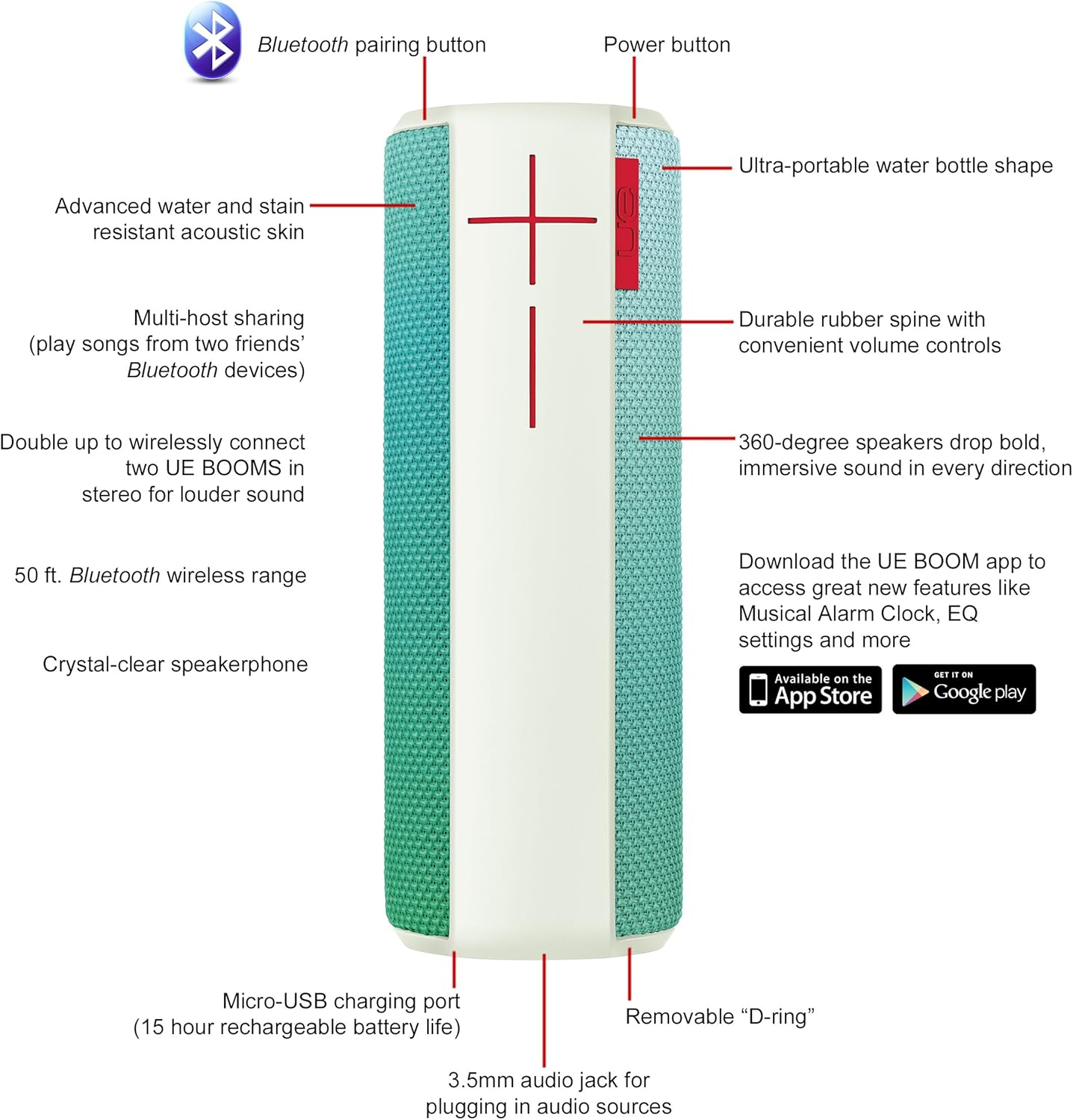
Image: Diagram highlighting key features and controls of the UE Boom speaker, including Bluetooth pairing button, power button, volume controls, micro-USB charging port, and 3.5mm audio jack.
Налаштування
Зарядка динаміка
Before initial use, fully charge your UE Boom speaker. Connect the provided micro-USB cable to the charging port located at the bottom of the speaker and plug the other end into a USB power source. The speaker's battery provides approximately 15 hours of playback on a full charge.
Bluetooth-парування
- Power on your UE Boom speaker by pressing the power button.
- Press and hold the Bluetooth pairing button (usually indicated by a Bluetooth icon) until you hear an audible tone and the LED indicator flashes rapidly.
- On your mobile device (smartphone or tablet), navigate to the Bluetooth settings.
- Select "UE Boom" from the list of available devices to pair.
- Once paired, you will hear a confirmation tone from the speaker.
For NFC-enabled devices, simply tap your device to the NFC area on the speaker for quick pairing.
Інструкція з експлуатації
Основні елементи керування
- Кнопка живлення: Located on the top of the speaker to turn it on or off.
- Регулятори гучності: Large '+' and '-' buttons on the side of the speaker adjust the volume.
- Кнопка Bluetooth: Ініціює режим сполучення Bluetooth.
Using the UE BOOM App
Download the official UE BOOM app from your device's app store (available on App Store and Google Play) to unlock additional features:
- Musical Alarm Clock: Wake up to your favorite music.
- Віддалена активація: Turn your speaker on/off from your device.
- Налаштування еквалайзера: Налаштуйте Sound Profile на ваші уподобання.
- Подвійний внесок: Connect two UE BOOM speakers for a stereo sound experience.
Функціональність гучного зв'язку
When connected to a smartphone, the UE Boom can be used as a speakerphone. Incoming calls will be routed through the speaker, allowing for hands-free communication.
Технічне обслуговування
The UE Boom speaker features a water and stain resistant acoustic skin. To clean, gently wipe the speaker with a damp cloth. Avoid using harsh chemicals or abrasive cleaners. Ensure all ports are dry before charging or connecting other devices.
Усунення несправностей
- Немає живлення: Ensure the speaker is charged. Connect it to a power source using the micro-USB cable.
- Не вдається з’єднати пристрій через Bluetooth:
- Переконайтеся, що динамік перебуває в режимі сполучення (світлодіод блимає).
- Перевірте, чи на вашому пристрої ввімкнено Bluetooth.
- Move your device closer to the speaker (within 50 feet).
- Спробуйте розірвати пару та знову підключити пристрій.
- Низька гучність або спотворений звук:
- Відрегулюйте гучність як на динаміку, так і на підключеному пристрої.
- Переконайтеся, що динамік повністю заряджено.
- Перевірте наявність будь-яких перешкод навколо динаміка.
- Додаток не підключається: Ensure the speaker is powered on and connected via Bluetooth to your device. Update the app to the latest version.
Технічні характеристики продукту
| Назва моделі | Logitech UE Boom Wireless Bluetooth Speaker |
| Номер моделі | 980-001023 |
| Бренд | Logitech |
| Колір | Northern Light |
| Тип динаміка | Відкритий |
| Технологія підключення | Bluetooth, бездротовий зв'язок |
| Дальність бездротового зв'язку | До 50 футів (15.24 метрів) |
| Джерело живлення | Живлення від батареї (1 літій-іонна батарея в комплекті) |
| Середній термін служби батареї | 15 години |
| Рівень водонепроникності | Водостійкий |
| Вага товару | 2.2 фунта |
| Розміри продукту (ДxШxВ) | 2.6 x 2.6 x 7.1 дюймів |
| матеріал | пластик |
| UPC | 097855112125 |
Офіційне відео продукту
Відео: Оверview of the Logitech UE Boom speaker's features, including 360-degree sound, water resistance, wireless connectivity, and the ability to pair two speakers for louder sound. This video demonstrates the speaker's durability and portability in various environments.
Гарантія та підтримка
The Logitech UE Boom Wireless Bluetooth Speaker comes with a Limited Warranty. For specific warranty details, please refer to the documentation included with your product or visit the official Logitech webсайт.
For technical support or customer service, you may contact Logitech at: 646-454-3200.


