1. Вступ
This manual provides detailed instructions for the VIZIO SB2920-C6 29-inch 2.0 Channel Sound Bar. This sound bar is designed to enhance your audio experience for television, music, and home theater content. It features two full-range stereo speakers and DTS audio technologies for improved sound quality. The compact and streamlined design allows for versatile placement options.
2. Що в коробці
Перш ніж продовжувати налаштування, перевірте наявність усіх компонентів.
- VIZIO SB2920-C6 29-дюймова 2.0-канальна звукова панель
- Пульт дистанційного керування
- 2 батарейки типу AAA (для пульта дистанційного керування)
- Оптичний аудіокабель
- Digital Coaxial Cable
- Стерео кабелі RCA
- Кабель живлення
3. Продукт закінчивсяview
3.1 Спереду View

Малюнок 1: Спереду view of the VIZIO SB2920-C6 Sound Bar, showcasinйого елегантний чорний дизайн.
3.2 Елементи керування на верхній панелі

Figure 2: Close-up of the top panel, showing buttons for Power, Input, Bluetooth Pairing, Volume Down, and Volume Up.
3.3 Підключення задньої панелі

Figure 3: Full rear view of the sound bar, illustrating all available input and output ports.

Figure 4: Close-up of the rear panel showing AUX (1) and AUX (2) input ports.
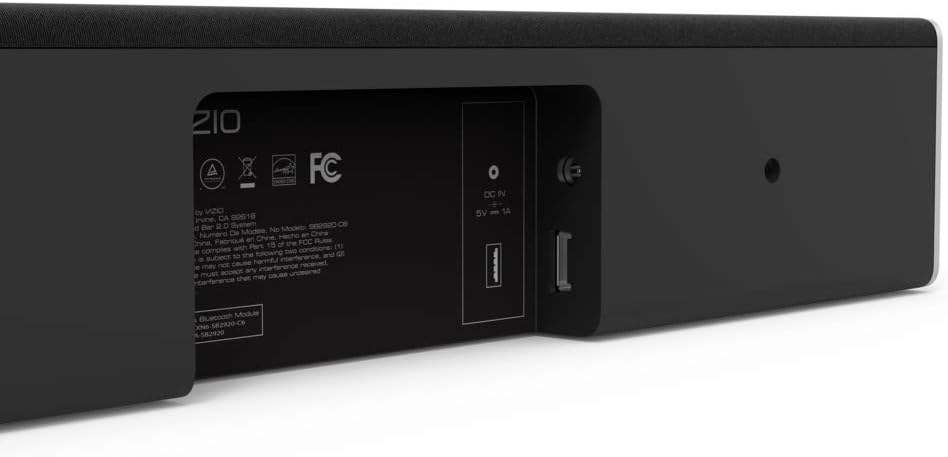
Figure 5: Close-up of the rear panel showing DIGITAL (Coaxial), OPTICAL, and SUB OUT ports.
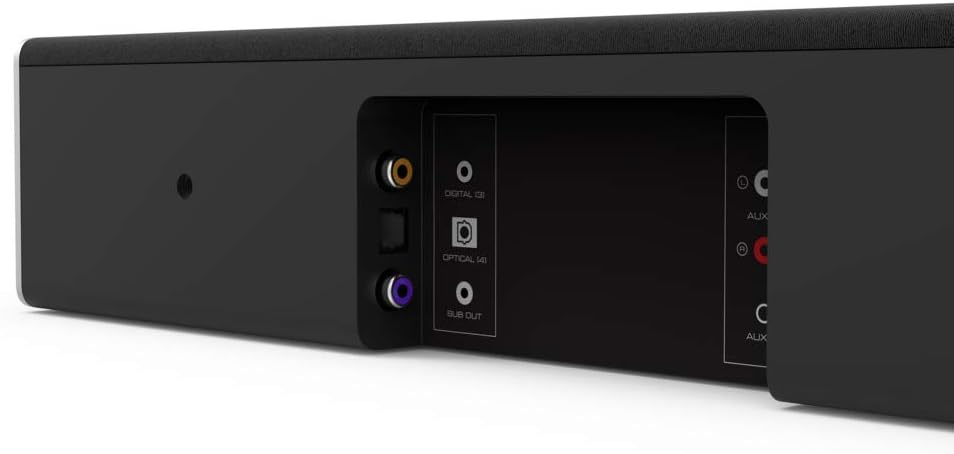
Figure 6: Close-up of the rear panel showing DC IN (power) and USB (Service Only) ports.
3.4 Розміри

Figure 7: Diagram illustrating the dimensions of the VIZIO SB2920-C6 Sound Bar: 3 inches Depth x 29 inches Width x 3 inches Height.
4. Налаштування
Follow these steps to set up your VIZIO SB2920-C6 Sound Bar.
4.1 Розміщення
- Place the sound bar on a flat surface below your TV or mount it on a wall. Ensure it is centered with your TV for optimal sound distribution.
- Keep the sound bar clear of obstructions that could block the sound.
4.2 Підключення до телевізора
Виберіть один із наступних способів підключення:
- Optical Cable (Recommended for best audio quality):
Connect one end of the optical cable to the OPTICAL port on the sound bar (Figure 5) and the other end to the Optical Digital Audio Out port on your TV. - Digital Coaxial Cable:
Connect one end of the digital coaxial cable to the DIGITAL port on the sound bar (Figure 5) and the other end to the Coaxial Digital Audio Out port on your TV. - RCA Stereo Cables:
Connect the red and white RCA cables to the AUX (1) ports on the sound bar (Figure 4) and the corresponding red and white Audio Out ports on your TV.
4.3 Підключення живлення
Connect the power cable to the DC IN port on the sound bar (Figure 6) and then plug the other end into a wall outlet.
4.4 Відеопосібник з налаштування
Video 1: Official VIZIO guide on how to set up your VIZIO Sound Bar, demonstrating connection and initial configuration.
5. Інструкція з експлуатації
5.1 Увімкнення/вимкнення живлення
- Натисніть потужність button on the sound bar (Figure 2) or the remote control to turn the unit on or off.
5.2 Регулювання гучності
- Використовуйте Збільшення гучності (+) і Зменшення гучності (-) buttons on the sound bar (Figure 2) or the remote control to adjust the sound level.
5.3 Вибір джерела вхідного сигналу
- Натисніть Введення button on the sound bar (Figure 2) or the remote control to cycle through available input sources (Optical, Digital, AUX 1, AUX 2, Bluetooth).
5.4 Створення пари Bluetooth
- Натисніть і утримуйте Bluetooth button on the sound bar (Figure 2) or the remote control for 3 seconds to enter pairing mode. The LED indicators on the sound bar will flash.
- On your mobile device, search for the VIZIO sound bar in the Bluetooth settings and select it to pair.
5.5 Покращення звуку
- The remote control includes buttons for Бас, EQ, і Високі частоти to customize your audio experience.
- DTS technologies such as DTS Studio Sound, DTS TruVolume, and DTS TruSurround are integrated to optimize sound quality. Refer to the full user manual for detailed adjustments.
6. Технічне обслуговування
To ensure the longevity and optimal performance of your VIZIO SB2920-C6 Sound Bar, follow these maintenance guidelines:
- Прибирання: Use a soft, dry cloth to clean the surface of the sound bar. Avoid using liquid cleaners or abrasive materials, as they may damage the finish.
- Вентиляція: Ensure that the sound bar's vents are not blocked to prevent overheating.
- Зберігання: Якщо саундбар зберігатиметься протягом тривалого часу, від’єднайте його від живлення та зберігайте в прохолодному сухому місці.
7. Вирішення проблем
If you encounter issues with your sound bar, refer to the following common solutions:
| проблема | Можливе рішення |
|---|---|
| Немає звуку із саундбара |
|
| Звук періодично припиняється |
|
| Пристрій Bluetooth не може бути підключений |
|
| Погана якість звуку |
|
8. Технічні характеристики
| Особливість | Деталь |
|---|---|
| Назва моделі | SB2920-C6 |
| Тип динаміка | Саундбар |
| Конфігурація каналу об’ємного звуку | 2.0 |
| Технологія підключення | Bluetooth |
| Технологія бездротового зв'язку | Bluetooth |
| Режим аудіовиходу | Стерео, об'ємний звук |
| Особливості | Bass Boost, Wireless |
| Сумісні пристрої | Personal Computer, Phones, Smartphone, Tablet, Television |
| Спосіб контролю | Дистанційний |
| Колір | чорний |
| Розміри продукту (Д x Ш x В) | 3 см x 29 см x 3 см |
| Вага товару | 4.5 фунта |
| Тип монтажу | Настінне кріплення |
| Потрібні батареї | 2 AAA (включено) |
9. Гарантія та підтримка
The VIZIO SB2920-C6 Sound Bar typically comes with a 12-month limited warranty. For specific warranty details, registration, and technical support, please refer to the official VIZIO website or contact VIZIO customer service directly. Keep your purchase receipt for warranty claims.
Інтернет-підтримка: Відвідайте www.vizio.com/support
Обслуговування клієнтів: Refer to your product packaging or the VIZIO support webсайт для отримання актуальної контактної інформації.


