1. Вступ
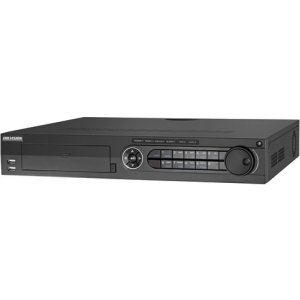
The Hikvision DS-7316HQHI-SH is a 16-channel Tribrid Digital Video Recorder (DVR) designed for advanced surveillance systems. This DVR supports Turbo HD, analog, and 1080P IP cameras, offering versatile compatibility for various security setups. It features H.264 video compression for efficient storage and supports auto-detection of camera types. This manual provides essential information for the proper installation, operation, and maintenance of your DVR system.
2. Техніка безпеки
Please read these safety instructions carefully before operating the device to prevent injury or damage.
- Переконайтеся, що блок живлення обtage is stable and meets the device's requirements.
- Do not place the device in direct sunlight, near heat sources, or in environments with high humidity or dust.
- Avoid placing heavy objects on top of the DVR.
- Use only Hikvision-approved accessories and power adapters.
- Від’єднайте живлення перед виконанням будь-яких процедур технічного обслуговування або встановлення.
- Properly ground the device to prevent electrical shock.
3. Вміст упаковки
Перевірте наявність усіх елементів в упаковці. Якщо якісь елементи відсутні або пошкоджені, зверніться до постачальника.
- Hikvision DS-7316HQHI-SH DVR Unit
- Адаптер живлення
- USB миша
- Кабелі SATA (для підключення жорсткого диска)
- Гвинти (для встановлення жорсткого диска)
- Короткий посібник
4. Продукт закінчивсяview
4.1 Передня панель

The front panel of the DVR provides access to essential controls and indicators. It typically includes:
- Порти USB: For connecting a mouse, USB flash drive, or external storage.
- Індикатори стану: LEDs for power, HDD activity, and network status.
- Кнопки управління: Navigation and selection buttons for menu operation.
- ІЧ-приймач: Для дистанційного керування (якщо застосовується).
4.2 Підключення задньої панелі
The rear panel houses all the necessary ports for connecting cameras, monitors, network, and power. Key connections include:
- Відео вхід: BNC connectors for 16 Turbo HD/Analog cameras.
- Відеовихід: HDMI and VGA ports for monitor connection.
- Аудіо вхід/вихід: RCA connectors for audio devices.
- Порт LAN: Порт Ethernet RJ45 для підключення до мережі.
- Порти USB: Додаткові USB-порти для периферійних пристроїв.
- Вхід/вихід тривоги: Terminal blocks for alarm input and output devices.
- Споживана потужність: Роз'єм живлення постійного струму 12 В.
5. Налаштування
5.1 Встановлення обладнання
- Hard Disk Drive (HDD) Installation:
- Відкрутіть та зніміть верхню кришку відеореєстратора.
- Підключіть кабель передачі даних SATA та кабель живлення до жорсткого диска.
- Align the HDD with the screw holes at the bottom of the DVR chassis and secure it with the provided screws.
- Встановіть верхню кришку на місце та закріпіть її гвинтами.
- Підключення камери: Connect your Turbo HD, analog, or IP cameras to the corresponding video input ports on the rear panel using BNC connectors. For IP cameras, ensure they are connected to the same network as the DVR.
- Підключення монітора: Connect a monitor to the HDMI or VGA output port on the rear panel.
- Підключення миші: Connect the USB mouse to a USB port on the front or rear panel.
- Підключення до мережі: Connect an Ethernet cable from your router/switch to the LAN port on the DVR.
- Підключення живлення: Connect the power adapter to the DVR's power input and then plug it into a power outlet.
5.2 Початкове ввімкнення та налаштування
After connecting all hardware, power on the DVR. The system will boot up, and you will be prompted to set up basic configurations.
- Create Admin Password: Follow the on-screen prompts to create a strong administrator password.
- Activate HDD: The newly installed HDD will need to be initialized or formatted by the DVR. Navigate to Menu > HDD > HDD Management щоб відформатувати диск.
- Налаштування мережі: Configure network parameters (IP address, subnet mask, gateway, DNS) to enable remote access and IP camera integration. You can use DHCP or static IP.
- Дата і час: Встановіть правильну дату, час і часовий пояс.
- Виявлення камери: The DVR will automatically detect connected Turbo HD and analog cameras. For IP cameras, you may need to add them manually via Menu > Camera > IP Camera.
6. Інструкція з експлуатації
6.1 Навігація в інтерфейсі користувача
Use the connected USB mouse to navigate the DVR's graphical user interface (GUI). Right-click to access the main menu, and left-click to select options.
- Жити View: Displays real-time video feeds from all connected cameras.
- Головне меню: Provides access to all system settings, recording, playback, and advanced features.
- Відтворення: Дозволяє повторноviewING записано footage.
- Резервне копіювання: For exporting recorded video to a USB device.
6.2 Конфігурація запису
To configure recording settings:
- Перейти до Main Menu > Record > Parameters.
- Select the desired camera and configure settings such as resolution, frame rate, and bit rate.
- Перейдіть до Головне меню > Запис > Розклад to set up continuous, motion-detection, or alarm-triggered recording schedules for each camera.
6.3 Відтворення
To play back recorded footage:
- З прямого ефіру view, клацніть правою кнопкою миші та виберіть Відтворення, або перейдіть до Головне меню > Відтворення.
- Select the camera(s) and the date/time range you wish to review.
- Use the timeline and control buttons (play, pause, fast forward, rewind) to navigate through the footage.
6.4 Віддалений доступ
To access your DVR remotely:
- Ensure the DVR is connected to the internet and network settings are correctly configured.
- Download and install the Hik-Connect app on your mobile device or the iVMS-4200 client software on your computer.
- Register an account and add your DVR using its serial number or QR code.
- Follow the app/software instructions to view live feeds, play back recordings, and manage settings remotely.
7. Технічне обслуговування
7.1 Керування жорсткими дисками
Regularly check the status of your hard drive to ensure optimal recording performance. Go to Main Menu > HDD > HDD Management до view disk status, remaining capacity, and perform formatting if necessary. It is recommended to format the HDD periodically (e.g., every 6-12 months) to maintain performance, after backing up any critical data.
7.2 оновлень мікропрограми
Keep your DVR's firmware updated to benefit from new features, security enhancements, and bug fixes. Download the latest firmware from the official Hikvision website. Update the firmware via USB or network through Main Menu > Maintenance > Upgrade.
7.3 Очищення
Periodically clean the exterior of the DVR with a soft, dry cloth. Ensure ventilation openings are free from dust to prevent overheating. Do not use liquid cleaners or aerosols directly on the device.
8. Вирішення проблем
| проблема | Можлива причина | Рішення |
|---|---|---|
| Немає відеовиходу на монітор | Loose HDMI/VGA cable; Incorrect monitor input; DVR not powered on. | Check cable connections; Select correct input on monitor; Verify DVR power. |
| Немає зображення камери | Camera not powered; Loose BNC cable; Incorrect camera type selected; IP camera not configured. | Check camera power and connections; Verify camera type in DVR settings; Add/configure IP camera. |
| Немає запису | HDD not initialized/formatted; Recording schedule not set; HDD full. | Initialize/format HDD; Configure recording schedule; Check HDD capacity. |
| Немає віддаленого доступу до відеореєстратора | Network cable disconnected; Incorrect network settings; Router firewall blocking ports. | Check network cable; Verify DVR network settings (IP, DNS); Configure port forwarding on router or enable UPnP. |
9. Технічні характеристики
| Особливість | Деталь |
|---|---|
| Номер моделі | DS-7316HQHI-SH-2TB |
| Відеовходи | 16 Channels (Turbo HD/Analog) + 2 IP Cameras (1080P) |
| Стиснення відео | H.264 |
| Відеовихід | HDMI, VGA |
| Аудіо вхід/вихід | так |
| Вхід/вихід тривоги | так |
| Мережевий інтерфейс | 1 інтерфейс Ethernet RJ45 10M/100M/1000M |
| Інтерфейс USB | 2 x USB 2.0 (спереду), 1 x USB 3.0 (ззаду) |
| Жорсткий диск | 2TB pre-installed (supports up to 2 SATA HDDs) |
| Джерело живлення | 12 В постійного струму |
| Розміри продукту | 390 x 445 x 70 inches (Note: This dimension appears unusually large and may be a unit conversion error in the source data. Please refer to official product documentation for accurate dimensions.) |
| Вага товару | 1 фунта |
10. Гарантія та підтримка
Hikvision products typically come with a limited warranty. For detailed warranty information, please refer to the warranty card included with your product or visit the official Hikvision website. For technical support, product registration, or service inquiries, please contact Hikvision customer support or your authorized dealer.
Офіційний Webсайт: www.hikvision.com


