1. Вступ
This manual provides detailed instructions for the installation, operation, and maintenance of your D-Link DCS-8350LH 2K QHD Indoor Wi-Fi Camera. Please read this manual thoroughly before using the product to ensure proper setup and functionality.
The D-Link DCS-8350LH is designed to provide precise and detailed surveillance for your home or small office. It features 2K QHD resolution, color night vision, AI-based detection, and two-way audio for comprehensive monitoring.
2. Інформація про безпеку
- Ensure the camera is installed in a stable location to prevent it from falling.
- Використовуйте лише адаптер живлення, що постачається з камерою.
- Do not expose the camera to water or moisture. This product is for indoor use only.
- Уникайте розміщення камери поблизу джерел тепла або під прямими сонячними променями.
- Не намагайтеся самостійно відкривати або ремонтувати камеру. Звертайтеся до кваліфікованого персоналу для проведення будь-яких робіт з обслуговування.
- Зберігайте камеру та її аксесуари у недоступному для дітей місці.
3. Продукт закінчивсяview
Familiarize yourself with the components of your D-Link DCS-8350LH camera.
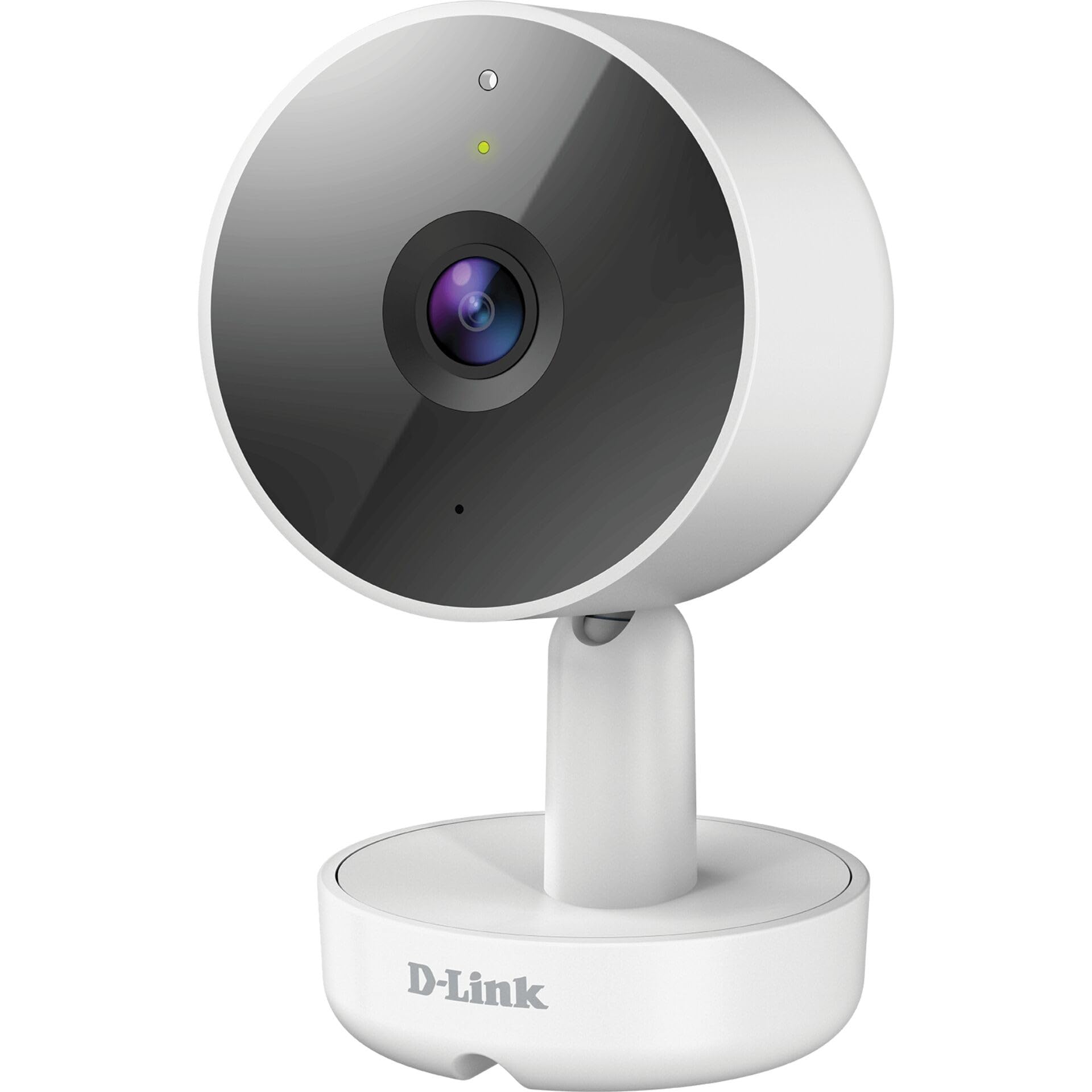
малюнок 3.1: Фронт View камери
- 1. Об'єктив: Знімає відео.
- 2. Індикатор стану: Показує стан камери (наприклад, живлення, підключення).
- 3. Мікрофон: Записує аудіо для двостороннього зв'язку.
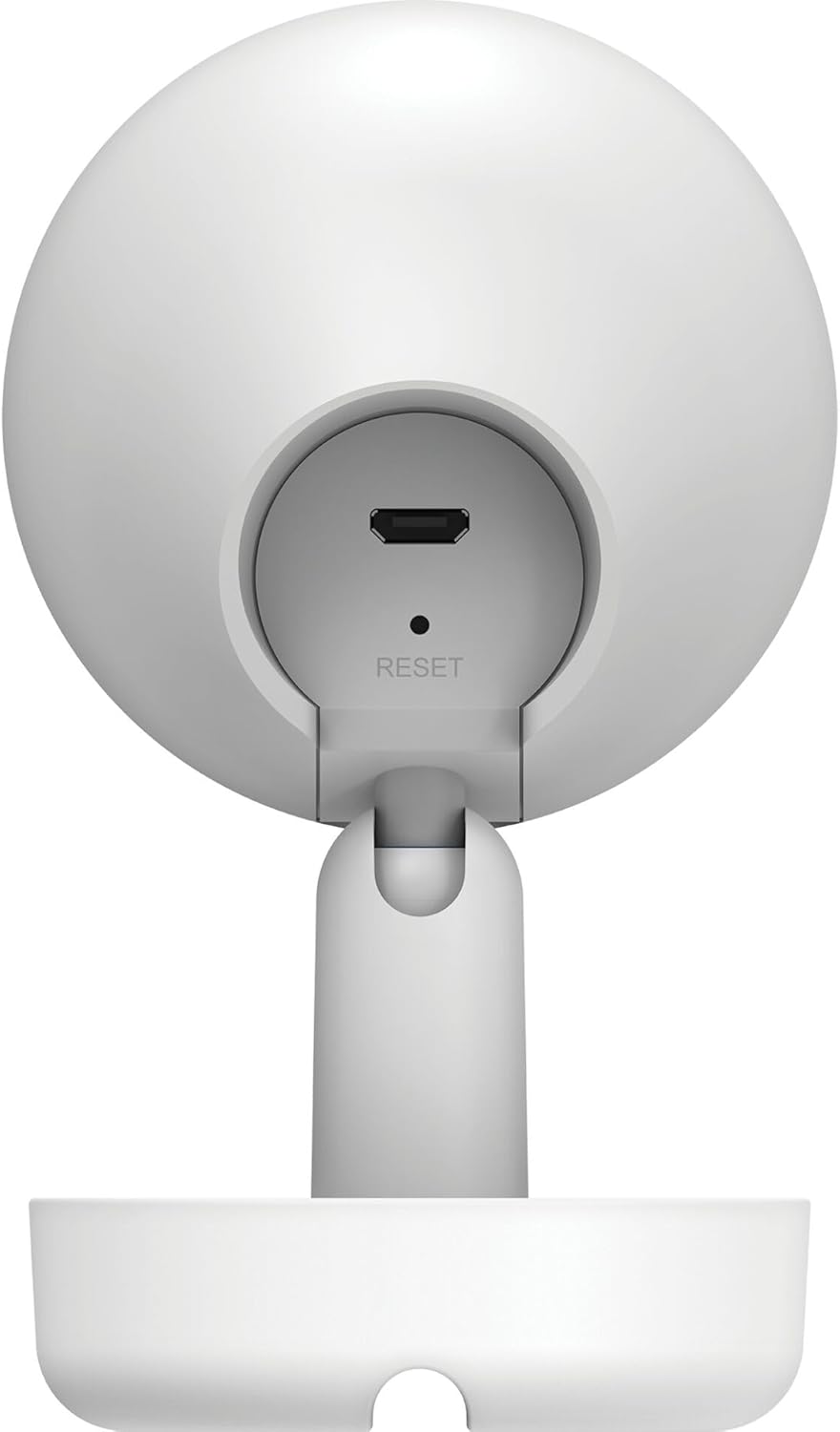
малюнок 3.2: Задня View камери
- 1. Micro USB Power Port: Підключається до адаптера живлення.
- 2. Кнопка скидання: Використовується для відновлення заводських налаштувань.
- 3. Доповідач: Outputs audio for two-way communication.
- 4. Слот для карти пам'яті MicroSD: For local video storage (located on the side or bottom, not visible in this specific image, but mentioned in features).
4. Налаштування
Виконайте такі кроки, щоб налаштувати камеру D-Link DCS-8350LH:
- Завантажте застосунок mydlink: шукати "mydlink" on the App Store (iOS) or Google Play (Android) and download the official mydlink app.
- Create a mydlink Account: Open the app and follow the on-screen instructions to create a new mydlink account or log in if you already have one.
- Увімкніть камеру: Connect the provided power adapter to the camera's Micro USB port and plug it into a power outlet. The status LED will begin to blink.
- Додати пристрій: In the mydlink app, tap the menu icon (usually three lines) and select "Add a Device". Scan the QR code located on the camera or its packaging.
- Підключіться до Wi-Fi: Follow the app's instructions to connect your camera to your home Wi-Fi network. Ensure your mobile device is connected to the same Wi-Fi network during setup.
- Розміщення: Position your camera in the desired indoor location.

малюнок 4.1: Camera and mydlink App Integration
5. Монтаж
The D-Link DCS-8350LH camera supports wall mounting for optimal placement.
- Виберіть місце розташування: Виберіть приміщення з чітким view області, яку ви хочете контролювати, та в межах дії вашої мережі Wi-Fi.
- Монтажна поверхня: Ensure the wall or surface is strong enough to support the camera.
- Захистіть базу: Use appropriate screws and anchors (not included) to secure the camera's base to the chosen surface.
- Відрегулювати кут: Once mounted, adjust the camera's angle to cover the desired viewing area. The camera has a 108-degree viewкут.
6. Інструкція з експлуатації
Once set up, you can access and control your camera using the mydlink app.
6.1. Жити View
Open the mydlink app and select your DCS-8350LH camera from the device list to view the live feed. The camera provides 2K QHD (1440p) resolution for clear images.
6.2. Кольорове нічне бачення
The camera automatically switches to color night vision in low-light conditions, allowing you to see detailed color video even when it's dark.
6.3. AI-based Event Detection
The camera features intelligent detection capabilities:
- Виявлення особи: Identifies human presence, reducing false alarms from pets or moving objects.
- Виявлення звуку: Alerts you to specific sounds, including carbon monoxide and smoke alarm sounds.
Configure detection zones and sensitivity settings within the mydlink app to customize alerts.
6.4. Двосторонній аудіозв'язок
Use the built-in microphone and speaker to communicate with people or pets near the camera. Tap the microphone icon in the live view within the mydlink app to speak.
6.5. Запис та зберігання відео
The DCS-8350LH offers multiple recording options:
- Картка MicroSD: Insert a microSD card (not included) into the camera's slot for local storage of recorded video clips.
- mydlink Cloud Recording: Utilize the mydlink Cloud service for secure off-site storage. Free and paid subscription plans are available.
- Запис на смартфон: Capture snapshots and video clips directly to your smartphone via the mydlink app.
7. Технічне обслуговування
7.1. прибирання
To clean the camera, gently wipe the lens and exterior surfaces with a soft, dry cloth. Do not use liquid cleaners or abrasive materials.
7.2. Оновлення мікропрограми
Regularly check for firmware updates through the mydlink app. Keeping your camera's firmware up-to-date ensures optimal performance, security, and access to new features.
8. Вирішення проблем
Якщо у вас виникли проблеми з камерою D-Link DCS-8350LH, зверніться до наступних поширених рішень:
- Camera Offline / Wi-Fi Disconnection:
- Переконайтеся, що камера знаходиться в зоні дії вашого Wi-Fi роутера.
- Check your Wi-Fi network status.
- Перезавантажте камеру, від’єднавши та знову підключивши адаптер живлення.
- If the issue persists, try resetting the camera to factory defaults (see below) and re-adding it to the mydlink app.
- Погана якість відео:
- Переконайтеся, що об’єктив камери чистий.
- Check your internet connection speed. A stable and fast connection is required for 2K QHD streaming.
- Adjust the camera's position to avoid glare or obstructions.
- Скидання камери:
To restore the camera to its factory default settings, use a paperclip or a thin object to press and hold the recessed Скинути button (refer to Figure 3.2) for approximately 10 seconds while the camera is powered on. The status LED will change, indicating a reset. You will then need to reconfigure the camera through the mydlink app.
9. Технічні характеристики
| Особливість | Деталь |
|---|---|
| Назва моделі | DCS-8350LH |
| Роздільна здатність запису відео | 1440p (2K QHD) |
| Viewкут нахилу | 108 градусів |
| Протокол підключення | Wi-Fi |
| Технологія бездротового зв'язку | Bluetooth (for initial setup) |
| Використання в приміщенні/зовні | закритий |
| Джерело живлення | Електричний шнур |
| Споживана потужність | 8 Вт |
| Форм-фактор | Купол |
| Тип монтажу | Настінне кріплення |
| матеріал | пластик |
| Розміри предмета (Д x Ш x В) | 6.67 х 6.57 х 11.14 см |
| вага | 320 грами |
| Включені компоненти | Внутрішня камера |
| Тип контролера | Amazon Alexa |
10. Гарантія та підтримка
For warranty information, technical support, and further assistance, please visit the official D-Link website or contact D-Link customer service. Keep your purchase receipt as proof of purchase.
You can find the latest support resources, FAQs, and contact details at www.dlink.com.


