1. Вступ
The Bogen 1126-BG-UTI1 is a single-zone paging controller designed to integrate a paging system with a telephone system. It provides a reliable interface for making announcements over a public address system from a telephone. This manual provides detailed instructions for the proper installation, operation, and maintenance of your Bogen paging controller.
2. Важлива інформація з безпеки
Будь ласка, прочитайте та зрозумійте всі інструкції з техніки безпеки перед використанням цього пристрою. Зберігайте цей посібник для подальшого використання.
- Джерело живлення: Підключайте пристрій лише до зазначеної мережі живлення.tage.
- вологість: Не піддавайте пристрій впливу дощу або вологи.
- Вентиляція: Забезпечте належну вентиляцію. Не блокуйте вентиляційні отвори.
- Обслуговування: Звертайтеся до кваліфікованого сервісного персоналу з усіх питань. Не намагайтеся обслуговувати цей виріб самостійно.
- Прибирання: Чистіть тільки сухою ганчіркою.
3. Вміст упаковки
Перевірте наявність усіх елементів в упаковці:
- Bogen 1126-BG-UTI1 Single Zone Paging Controller Unit
- Адаптер живлення
- Посібник користувача (цей документ)
- Монтажне обладнання (якщо застосовується)
4. Продукт закінчивсяview
The Bogen 1126-BG-UTI1 features various ports and indicators for seamless integration and operation. Familiarize yourself with the unit's components before installation.
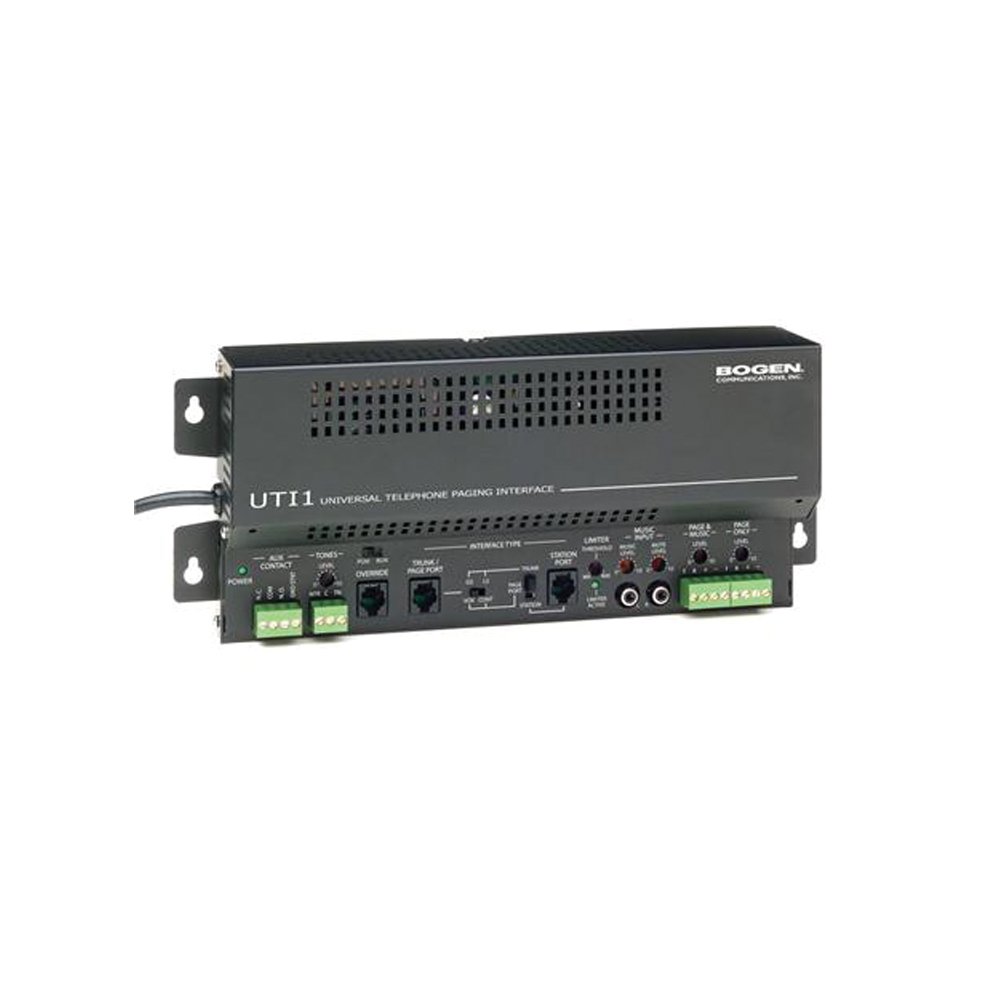
малюнок 1: Фронт view of the Bogen Single Zone Paging Controller. This image displays the main unit, highlighting its compact design and essential connection points for audio input and output, as well as power. The various ports and indicators are visible, crucial for understanding the device's functionality and connectivity.
4.1 Передня панель
- Світлодіод живлення: Вказує на стан живлення.
- Контроль рівня вхідного сигналу: Adjusts the audio input sensitivity.
- Контроль вихідного рівня: Регулює гучність аудіовиходу.
4.2 Задня панель
- Telephone Line Input: RJ-11 jack for connecting to the telephone system.
- Аудіовихід: RCA or screw terminal connections for connecting to an ampліфірник.
- Споживана потужність: Jack for connecting the power adapter.
- MOH Output: Music On Hold output (if applicable).
5. Налаштування та встановлення
Follow these steps to properly install your paging controller:
- Монтаж: Choose a suitable location for the controller, away from excessive heat or moisture. Secure the unit using appropriate mounting hardware if desired.
- Connect to Telephone System: Connect an RJ-11 cable from your telephone system's paging port or a suitable analog extension to the "Telephone Line Input" on the controller. Consult your telephone system's manual for specific paging port details.
- Підключитися до Ampліфтер: Connect the "Audio Output" of the paging controller to an available input on your paging amplifier. Ensure correct polarity if using screw terminals.
- Підключіть живлення: Plug the provided power adapter into the "Power Input" jack on the controller, then plug the adapter into a standard electrical outlet. The Power LED should illuminate.
- Initial Level Adjustment: Start with the Input Level and Output Level controls set to their minimum positions.
6. Інструкція з експлуатації
Once installed, the Bogen 1126-BG-UTI1 is ready for operation.
6.1 Making a Page
- From a telephone connected to the system, dial the designated paging access code or extension.
- Wait for the confirmation tone or voice prompt from the paging controller.
- Speak clearly into the telephone handset to make your announcement.
- Hang up the telephone when finished.
6.2 Регулювання рівнів гучності
- Вхідний рівень: Slowly increase the "Input Level Control" until the paging audio is clear and distortion-free. If the audio is too loud or distorted, decrease this level.
- Вихідний рівень: Adjust the "Output Level Control" to achieve the desired volume through the paging speakers. This should be done in conjunction with the ampрегулятор гучності lifier.
7. Технічне обслуговування
The Bogen 1126-BG-UTI1 is designed for reliable operation with minimal maintenance.
- Прибирання: Periodically wipe the unit with a soft, dry cloth. Do not use liquid cleaners or aerosols.
- Вентиляція: Ensure that ventilation openings remain clear of dust and debris.
- Підключення: Occasionally check all cable connections to ensure they are secure.
8. Вирішення проблем
Якщо у вас виникли проблеми, зверніться до наступного посібника з усунення несправностей:
| проблема | Можлива причина | Рішення |
|---|---|---|
| Немає індикатора живлення. | Power adapter not connected or faulty; no power at outlet. | Check power adapter connection. Verify outlet has power. Test with another adapter if available. |
| No paging audio. | Incorrect telephone system connection; amplifier off or muted; audio levels too low. | Verify telephone line and audio output connections. Ensure amplifier is on and not muted. Adjust Input and Output Level controls. |
| Paging audio is distorted. | Input or output levels set too high. | Reduce Input Level and/or Output Level controls. |
| Cannot access paging from telephone. | Incorrect paging access code; telephone system not configured correctly. | Confirm the correct paging access code with your telephone system administrator. Verify telephone system programming. |
If the problem persists after attempting these solutions, contact Bogen technical support.
9. Технічні характеристики
| Особливість | Деталь |
|---|---|
| Номер моделі | 1126-BG-UTI1 |
| Бренд | Боген |
| Розміри упаковки | 15 x 9 x 7 дюймів |
| Вага товару | 6.7 фунта |
| ASIN | B00P1AOL2C |
| Виробник | Боген |
| Paging Zones | Єдина зона |
| Сумісність | Telephone systems with analog paging port or extension |
10. Гарантія та підтримка
Bogen products are designed for durability and performance. For specific warranty information, please refer to the warranty card included with your product or visit the official Bogen website. Technical support is available to assist with any questions or issues you may encounter.
- Інтернет-підтримка: Відвідайте www.bogen.com/support for FAQs, documentation, and contact information.
- Контактна інформація: Refer to the Bogen website for current telephone numbers and email addresses for technical assistance.