1. Вступ
This manual provides comprehensive instructions for the Monoprice MS-WN513N2 Wireless N300 4-Port Broadband Router. This device is designed to provide a high-speed wireless network connection for your home or small office, offering reliable internet access and advanced security features. Please read this manual thoroughly before operating the device.
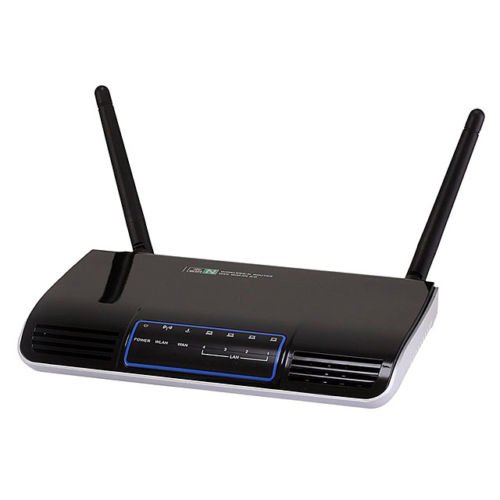
Зображення 1.1: спереду view of the Monoprice MS-WN513N2 Wireless N300 Router. The router is black with indicator lights on the front panel.
2. особливості
The Monoprice MS-WN513N2 router offers a range of features to enhance your network experience:
- Wireless N300 Performance: Complies with 802.11b/g/n standards, offering wireless transmission speeds up to 300 Mbps.
- 4-Port Broadband Router: Includes four (4) LAN ports for wired connections.
- Розширений захист: Supports 64-bit/128-bit WEP, WPA/WPA2, and WPA-PSK/WPA2-PSK authentication.
- Підтримка IPv6: Compatible with Internet Protocol Version 6.
- Якість обслуговування (QoS): Bandwidth control for prioritizing network traffic.
- WPS (Wi-Fi Protected Setup): Simplifies wireless security configuration.
- Кілька режимів роботи: Can be configured as a Gateway, Wireless Bridge, or Wireless ISP (WISP).
- Динамічний DNS (DDNS): Supports dynamic domain name system configuration.
- UPnP Support: Universal Plug and Play for easy device discovery.
- Брандмауер: Integrated firewall for network protection.
- Automatic MDI/MDIX: Automatic cable detection for Ethernet ports.
3. Вміст упаковки
Будь ласка, перевірте наявність усіх предметів у вашій упаковці:
- Monoprice MS-WN513N2 Wireless N300 Router
- Адаптер живлення (DC 5 В)
- Кабель Ethernet
- Короткий посібник з встановлення (якщо входить до комплекту)
4. Фізичний overview
4.1 Індикатори на передній панелі
На передній панелі є світлодіодні індикатори, які надають інформацію про стан:
- Світлодіод живлення: Показує, чи маршрутизатор увімкнено.
- Світлодіод WAN: Показує стан підключення до Інтернету.
- Світлодіоди локальної мережі (1-4): Indicate activity on the respective wired LAN ports.
- Індикатор WLAN: Показує активність бездротової мережі.
4.2 Порти та кнопки на задній панелі
The rear panel contains all physical connection points:
- Порт живлення DC 5 В: Підключається до адаптера живлення, що входить до комплекту.
- WAN порт: Підключається до вашого модему або мережі інтернет-провайдера.
- Порти LAN (1-4): Connect to wired devices such as computers, gaming consoles, or switches.
- Кнопка WPS: Ініціює налаштування захищеного Wi-Fi для легкого бездротового підключення.
- Отвір для скидання: Used to restore the router to factory default settings. Insert a paperclip and hold for 5-10 seconds.
- Антенні порти: Two (2) ports for connecting the external antennas.
5. Налаштування
5.1 Підключення обладнання
- Підключіть антени: Screw the two external antennas onto the antenna ports on the rear panel.
- Підключення модему: Connect one end of an Ethernet cable to your modem's LAN port and the other end to the WAN порт маршрутизатора.
- Підключіть живлення: Підключіть адаптер живлення до маршрутизатора Порт живлення постійного струму 5 В and plug the adapter into a power outlet.
- Увімкнення: Wait for the router to power on. The Power LED should illuminate. Allow a few minutes for the router to boot up and establish a connection.
- Підключення комп'ютера (необов'язково): For initial configuration, it is recommended to connect a computer directly to one of the router's LAN порти за допомогою кабелю Ethernet.
5.2 Початкова конфігурація (Web Інтерфейс)
- Маршрутизатор доступу: Відкрийте a web browser on a connected computer. In the address bar, type the router's default IP address (commonly
192.168.1.1or192.168.0.1) і натисніть Enter. Зверніться до етикетки на нижній частині маршрутизатора, щоб дізнатися точну IP-адресу та дані для входу за замовчуванням. - Логін: Введіть ім'я користувача та пароль за замовчуванням (наприклад,
adminдля обох). - Запустіть майстер налаштування: Маршрутизатора web interface will typically present a Quick Setup Wizard. Follow the on-screen prompts to configure your internet connection type (e.g., PPPoE, Dynamic IP, Static IP) and basic wireless settings (SSID, password).
- Змінити облікові дані за замовчуванням: For security, it is highly recommended to change the default login username and password for the router's web інтерфейс.
6. Операційна
6.1 Конфігурація бездротової мережі
To configure your wireless network:
- Перейдіть до Налаштування бездротового зв’язку розділ в web інтерфейс.
- Ідентифікатор SSID: Change the default Wireless Network Name (SSID) to a unique name.
- Режим безпеки: Виберіть WPA2-PSK as the recommended security mode.
- Пароль: Set a strong, unique password (at least 8 characters, including letters, numbers, and symbols).
- канал: The router can automatically select the best 2.4 GHz channel. You can also manually select a fixed channel (e.g., 1, 6, or 11) to avoid interference.
- Збережіть зміни.
6.2 Параметри безпеки
The router provides various security features:
- Брандмауер: The built-in firewall helps protect your network from external threats. Ensure it is enabled.
- Фільтр MAC: You can restrict network access to specific devices based on their MAC addresses.
- Батьківський контроль: Some routers offer features to block specific websites or limit internet access times for certain devices.
- WPS: Use the WPS button for quick, secure connections with WPS-compatible devices.
6.3 Додаткові функції
Explore the advanced settings in the web interface for more control:
- Якість обслуговування (QoS): Prioritize bandwidth for applications like gaming or video streaming.
- Перенаправлення портів: Configure specific ports to allow external access to devices on your local network (e.g., for gaming servers).
- Динамічний DNS (DDNS): If you have a dynamic public IP address, DDNS allows you to access your network using a consistent domain name.
- IPv6: Configure IPv6 settings if your ISP supports it.
- Режим роботи: Change the router's mode to Wireless Bridge or WISP if needed for specific network setups.
7. Технічне обслуговування
7.1 оновлень мікропрограми
Periodically check the Monoprice website for firmware updates. Firmware updates can improve performance, add new features, and fix security vulnerabilities. Follow the instructions provided with the firmware update carefully to avoid damaging the device.
7.2 Скидання налаштувань маршрутизатора
If you forget your login password or experience persistent issues, you can restore the router to its factory default settings:
- Увімкнувши маршрутизатор, знайдіть Скиньте отвір на задній панелі.
- Use a paperclip or a thin, pointed object to press and hold the reset button inside the hole for approximately 5-10 seconds.
- Release the button when the router's LEDs flash or restart.
- The router will reboot with factory default settings. You will need to reconfigure it using the web інтерфейс.
8. Вирішення проблем
Ось рішення поширених проблем:
- Без доступу до Інтернету:
- Check if the WAN LED is lit. If not, ensure the Ethernet cable from the modem is securely connected to the router's WAN port.
- Перезапустіть модем і маршрутизатор.
- Перевірте налаштування інтернет-з’єднання в налаштуваннях роутера web інтерфейс.
- Немає доступу Web Інтерфейс:
- Переконайтеся, що ваш комп'ютер підключено до маршрутизатора через Ethernet або Wi-Fi.
- Verify the router's IP address. Try
192.168.1.1or192.168.0.1. - Очистіть кеш браузера або спробуйте інший браузер.
- If you forgot the password, perform a factory reset.
- Низька швидкість бездротового зв'язку:
- Ensure your devices support 802.11n for optimal speeds.
- Check for interference from other 2.4 GHz devices (cordless phones, microwaves). Try changing the wireless channel.
- Переконайтеся, що маршрутизатор розташований по центру та нічим не загороджений.
- Оновіть драйвери бездротового адаптера вашого пристрою.
- Перебої з бездротовим з'єднанням:
- Check for signal strength and interference.
- Переконайтеся, що прошивка маршрутизатора оновлена.
- Verify that the wireless security settings are correctly configured.
9. Технічні характеристики
| Особливість | Специфікація |
|---|---|
| Модель | MS-WN513N2 |
| Бездротові стандарти | IEEE 802.11n (Draft 2.0), IEEE 802.11g, IEEE 802.11b |
| Wireless Signal Rates (802.11n) | Up to 300 Mbps (270, 243, 216, 162, 135, 130, 108, 81, 65, 54, 40.5, 27, 13.5 Mbps) |
| Wireless Signal Rates (802.11g) | 54, 48, 36, 24, 18, 12, 9, 6 Мбіт/с |
| Wireless Signal Rates (802.11b) | 11, 5.5, 2, 1 Мбіт / с |
| Діапазон частот | 2.4 - 2.4835 ГГц |
| Бездротова потужність передачі | До 20 дБм |
| Технологія модуляції | DBPSK, DQPSK, CCK, OFDM, 16-QAM, 64-QAM |
| Порти | 4x LAN Ports, 1x WAN Port, 2x Antenna Ports, 1x DC 5V Power Port |
| кнопки | WPS Button, Reset Hole |
| Безпека | 64/128-бітний WEP, WPA/WPA2, WPA-PSK/WPA2-PSK |
| Джерело живлення | 5 В постійного струму |
| Підтримувані протоколи | IPv6, PPPoE |
10. Гарантія та підтримка
For warranty information and technical support, please refer to the official Monoprice website or contact Monoprice customer service directly. Keep your purchase receipt for warranty claims.
Моноціна Webсайт: www.monoprice.com