вступ
The TC Electronic T2 Reverb effects pedal provides a diverse range of reverb effects for guitar and other instruments. This manual details the pedal's features, setup procedures, operational guidelines, maintenance tips, troubleshooting steps, and technical specifications to ensure optimal performance.
Продукт закінченийview
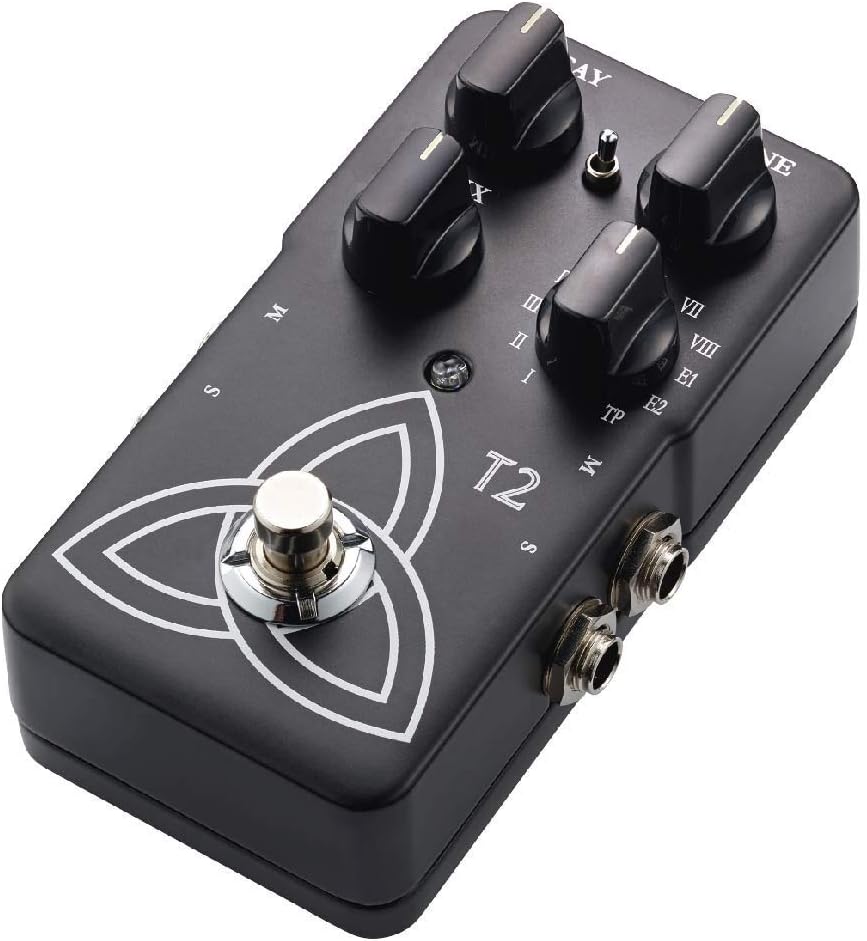
The T2 Reverb pedal features intuitive controls for shaping your sound and a robust design for reliable use. Familiarize yourself with the pedal's components:
- Ручка DECAY: Controls the length of the reverb tail.
- Регулятор TONE: Adjusts the brightness or darkness of the reverb.
- Ручка MIX: Balances the ratio between the dry (unaffected) signal and the wet (effected) signal.
- Reverb Type Selector: A rotary switch to select from various reverb algorithms (I-VIII, E1, E2, TP).
- Ножний перемикач: Вмикає або обходить ефект.
- Вхідні / вихідні роз'єми: For connecting your instrument and ampліфірник.
- Споживана потужність: For connecting a 9V DC power supply.

Налаштування
- Підключення живлення: Connect a 9V DC power adapter (center negative, not included) to the power input jack. Alternatively, the pedal can be powered by a 9V battery (not included) by opening the battery compartment.
- Підключення приладу: Connect your instrument (e.g., guitar) to the input jack on the right side of the pedal using a standard 1/4-inch instrument cable.
- AmpПідключення lifier: Підключіть вихідний гніздо на лівій стороні педалі до вашого ampвхід охолоджувача за допомогою стандартного інструментального кабелю 1/4 дюйма.
- Stereo Operation (Optional): For stereo output, connect the second output jack to a second ampнасичувач або стереовхідний пристрій.
Переконайтеся, що всі з'єднання надійно закріплені, перш ніж увімкнути amplifier and pedal.
Інструкція з експлуатації
Основна операція
- Увімкнення: Once connected, press the footswitch to engage the effect. The LED indicator will illuminate. Press again to bypass the effect.
- Selecting Reverb Type: Rotate the Reverb Type Selector knob to choose from the available reverb algorithms (I through VIII, E1, E2). Each setting offers a distinct reverb character.
- Adjusting Reverb Parameters:
- Використовуйте ГНИННЯ knob to control the duration of the reverb.
- Використовуйте ТОН knob to adjust the frequency content of the reverb, making it brighter or darker.
- Використовуйте МІКС knob to blend the dry signal with the reverb effect. A higher setting increases the effect's prominence.
TonePrint Feature
The "TP" setting on the Reverb Type Selector activates the TonePrint feature. TonePrint allows you to upload custom-tuned reverb sounds created by artists or design your own using the TC Electronic TonePrint app. Connect your pedal to a computer via USB (cable not included) or beam TonePrints wirelessly from your smartphone to the pedal's pickup.
Технічне обслуговування
- Прибирання: Використовуйте м’яку суху тканину для очищення зовнішньої поверхні педалі. Уникайте абразивних засобів для чищення або розчинників.
- Заміна батареї: If using battery power, replace the 9V battery when the LED indicator dims or the effect performance degrades. To replace, open the battery compartment on the underside of the pedal.
- Зберігання: Store the pedal in a dry environment, away from extreme temperatures and direct sunlight, when not in use. Disconnect power and remove the battery if storing for extended periods.
Усунення несправностей
| проблема | Можлива причина | Рішення |
|---|---|---|
| Немає звуку або слабкий сигнал | Incorrect cable connections, dead battery, faulty power supply, volume knobs on instrument/amp вимкнений. | Check all cable connections. Replace battery or verify power supply. Ensure instrument and amplifier volumes are set appropriately. |
| Небажаний шум або гул | Ground loop, faulty cables, interference from other electronics, improper power supply. | Use shielded cables. Try a different power outlet or isolated power supply. Move pedal away from other electronic devices. |
| Effect not engaging (LED off) | Немає живлення, несправний ножний перемикач. | Verify power connection and battery status. If problem persists, contact support. |
| TonePrint not loading | Incorrect app usage, connection issues. | Ensure the TonePrint app is updated and the pedal is correctly connected (USB or beaming). Refer to the TonePrint app's instructions for detailed guidance. |
Технічні характеристики
- модель: T2
- Вага товару: 1 pound (approximately 454 grams)
- Розміри продукту: 4.61 x 2.48 x 2.91 дюйми (11.7 x 6.3 x 7.4 см)
- Джерело живлення: Адаптер живлення 9 В постійного струму (центральний негативний полюс) або батарейка 9 В
- томtage: 9 вольт
- Формат сигналу: Аналоговий
- Апаратний інтерфейс: HP-HSC
Гарантія та підтримка
TC Electronic products are covered by a limited warranty. For detailed warranty information, product support, or service inquiries, please visit the official TC Electronic webсайт або зверніться безпосередньо до служби підтримки клієнтів. Зберігайте підтвердження покупки для гарантійних випадків.
Офіційний Webсайт: www.tcelectronic.com


