1. Вступ
The Mastech MS6612 is a digital luxmeter designed for measuring illuminance. It features a large LCD display with backlight and a bar graph for easy reading. This device offers automatic and manual range switching, data hold, peak value measurement, relative value measurement, and zero calibration functions. It is capable of measuring up to 200,000 Lux or 20,000 Foot-Candles (Fc).
2. Інформація про безпеку
Будь ласка, прочитайте та зрозумійте всі інструкції з техніки безпеки перед використанням пристрою. Недотримання цих інструкцій може призвести до травмування або пошкодження глюкометра.
- Do not operate the meter in environments with explosive gas, vapor, or dust.
- Avoid exposing the meter to extreme temperatures or high humidity.
- Виймайте батарейки, якщо глюкометр не використовується протягом тривалого часу, щоб запобігти витіканню.
- Do not attempt to repair or modify the meter. Refer all servicing to qualified personnel.
- Тримайте лічильник чистим і сухим.
3. Продукт закінчивсяview
The Mastech MS6612 Digital Luxmeter consists of a main unit with an LCD display and control buttons, and a silicon photoelectric diode sensor for light detection.
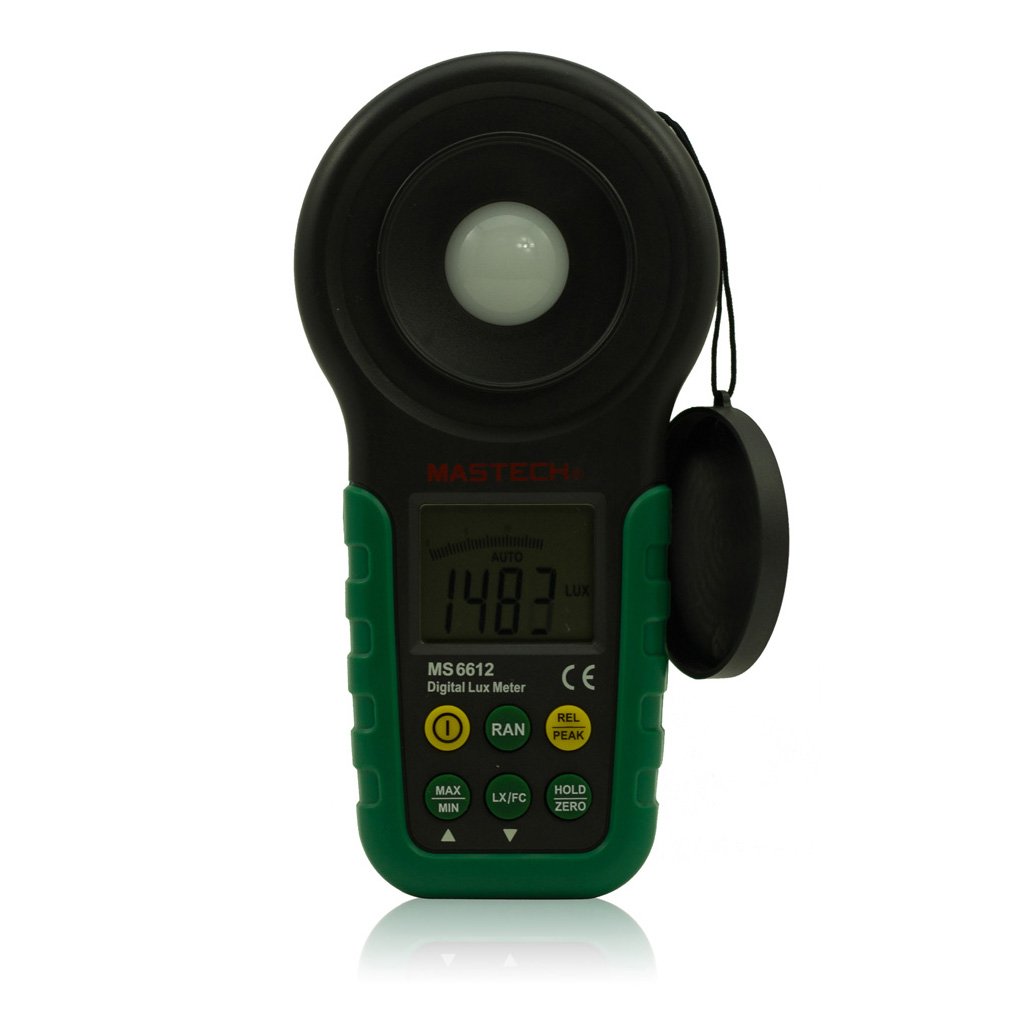
малюнок 1: Фронт view of the Mastech MS6612 Digital Luxmeter. This image shows the main body of the device, including the large LCD screen, control buttons, and the light sensor located at the top.
Ключові компоненти:
- РК-дисплей: 3½ digits with analog bar display for clear readings.
- Кнопки управління: For various functions such as power, range, hold, peak, relative, zero, unit conversion, and mute.
- Датчик світла: Silicon photoelectric diode for accurate light measurement.
- Батарейний відсік: Located at the rear for a 9V battery.
4. Налаштування
4.1 Встановлення батареї
- Знайдіть кришку відсіку для батарейок на задній панелі глюкометра.
- Використайте викрутку (за потреби), щоб відкрити батарейний відсік.
- Insert one 9V (IEC 6LR61) battery, observing the correct polarity (+/-).
- Встановіть на місце кришку батарейного відсіку та закріпіть її.
Примітка: Індикатор низького заряду батареї з’явиться на дисплеї, коли батарею потрібно замінити.
5. Інструкція з експлуатації
5.1 Увімкнення/вимкнення живлення
- Натисніть ПОТУЖНІСТЬ для включення лічильника.
- Натисніть ПОТУЖНІСТЬ button again to turn the meter off.
- The meter features an automatic power-off function, which will turn off the device if no keys are operated for more than 10 minutes.
5.2 Основні вимірювання
- Увімкніть лічильник.
- Point the light sensor towards the light source to be measured.
- The illuminance value will be displayed on the LCD. The meter automatically selects the appropriate range.
5.3 Range Switching (Auto/Manual)
The MS6612 supports both automatic and manual range switching.
- In auto-ranging mode, the meter automatically selects the best measurement range.
- Натисніть RANGE button to switch between auto and manual ranging modes. In manual mode, you can cycle through available ranges.
- If the measured value exceeds the current range in manual mode, the LCD will display "OL" (Overload).
5.4 Функція утримання даних
Щоб зафіксувати поточне значення на дисплеї:
- Натисніть ТРИМАТИ button. The "HOLD" indicator will appear on the display.
- Натисніть ТРИМАТИ знову натисніть кнопку, щоб скасувати блокування даних і відновити вимірювання в реальному часі.
5.5 Maximum/Minimum Value Measurement
до view the maximum or minimum illuminance recorded during a measurement session:
- Натисніть МАКС/МІН button. The display will show the maximum recorded value.
- Прес МАКС/МІН again to cycle to the minimum recorded value.
- Прес МАКС/МІН a third time to exit this mode and return to live measurement.
5.6 Peak Value Measurement
This function captures the highest instantaneous illuminance value.
- Натисніть ПІК button to activate peak measurement. The "PEAK" indicator will appear.
- The display will show the highest illuminance detected since activating the function.
- Прес ПІК знову, щоб вийти з цього режиму.
5.7 Relative Value Measurement
This function allows you to set a reference point and measure the difference from that point.
- In a stable light environment, press the ВІДНОС button. The current reading becomes the reference, and the display will show "0".
- Subsequent measurements will show the difference (positive or negative) from this reference value.
- Прес ВІДНОС again to exit relative measurement mode.
5.8 Zero Calibration Function
To ensure accuracy, especially in low light conditions, perform a zero calibration.
- Place the light sensor in a completely dark environment (e.g., cover it with an opaque cap).
- Натисніть НУЛЬ button. The display should read "0.00".
- This calibrates the meter to account for any residual sensor output in darkness.
5.9 Unit Conversion (Fc/Lux)
The meter can display measurements in Lux or Foot-Candles (Fc).
- Натисніть ОДИНИЦЯ button to toggle between Lux and Fc units.
- The selected unit will be indicated on the LCD.
- Перетворення: 1 Fc = 10.764 Lux; 1 Lux = 0.09290 Fc.
5.10 Touch Tone and Mute Function
The meter may emit a touch tone when buttons are pressed. This can be muted.
- Refer to the specific button on your device for muting the touch tone.
6. Технічне обслуговування
6.1 Очищення
- Протріть скло лічильникаasing з м'яким, damp тканина. Не використовуйте абразивні засоби чи розчинники.
- Keep the light sensor clean and free from dust or smudges to ensure accurate readings. Use a soft, lint-free cloth.
6.2 Заміна батареї
Replace the 9V battery when the low battery indicator appears on the display. Follow the steps in Section 4.1 for battery installation.
6.3 Зберігання
- If storing the meter for an extended period, remove the battery to prevent leakage and potential damage.
- Зберігайте глюкометр у прохолодному, сухому місці, подалі від прямих сонячних променів та екстремальних температур.
7. Вирішення проблем
| проблема | Можлива причина | Рішення |
|---|---|---|
| Лічильник не вмикається. | Розряджений або неправильно встановлений акумулятор. | Перевірте полярність батареї, замініть батарею. |
| На екрані відображається «OL». | Measurement value exceeds current range (manual mode). | Switch to a higher range or enable auto-ranging. |
| Неточні показання. | Dirty sensor, uncalibrated zero, or incorrect range. | Clean sensor, perform zero calibration, ensure correct range. |
| Індикатор низького заряду батареї. | Низький заряд батареї. | Замініть акумулятор 9 В. |
8. Технічні характеристики
| Параметр | Значення |
|---|---|
| Діапазони вимірювання | 20, 200, 2000, 20000, 200000 люкс 20, 200, 2000, 20000 Fc |
| Дисплей | 3½ digits, max reading of 1999, with analog bar display |
| датчик | Silicon photoelectric diode |
| Measured Spectral Range | 320~730 нм |
| Sampлінг -курс | ≥2 times/s |
| Робоча температура | -10~50 °C, max 80% RH (Non-Condensed) |
| Температура зберігання | -10~50 °C, max 80% RH (Non-Condensed, removing batteries) |
| Операційне середовище | Використання в приміщенні |
| Висота | 2000m highest |
| Джерело живлення | 1 x 9V, IEC 6LR61 battery |
| Термін служби батареї | прибл. 200 години |
| Розміри (ВxШxГ) | 190 мм x 89 мм x 42.5 мм (7.48 x 3.50 x 1.67 дюйма) |
| Вага (без батарей) | Прибл. 360 г (12.7 унції) |
| Вага (з батареями) | Прибл. 420 г (14.8 унції) |
Illuminance Unit Conversion:
- 1 Foot-Candle (Fc) = 10.764 Lux
- 1 Lux = 0.09290 Foot-Candle (Fc)
9. Гарантія та підтримка
Mastech products are designed for reliability and performance. For specific warranty information, please refer to the warranty card included with your purchase or visit the official Mastech website. For technical support or service inquiries, please contact Mastech customer service through their official channels.
Будь ласка, збережіть чек про покупку як підтвердження покупки для гарантійних претензій.


