вступ
The Quick CHC1202M Windlass Control Panel with Chain Counter is an advanced instrument designed for precise control of your boat's windlass and accurate monitoring of the deployed anchor chain. It features a user-friendly interface and a graphic LCD display for clear information presentation.
Інформація про безпеку
Always ensure the windlass area is clear before operation. Read all instructions carefully before installation and use. Disconnect power before performing any maintenance or installation procedures. This device is designed for marine environments; however, protect it from extreme conditions and direct water spray where possible. Ensure proper electrical connections to prevent damage to the unit or vessel systems.
Налаштування та встановлення
Proper installation is crucial for the optimal performance of your CHC1202M control panel. It is recommended that installation be performed by a qualified marine technician.
Монтаж панелі
Select a suitable location on your vessel's dashboard or control console that is easily accessible and visible to the operator. Ensure there is sufficient space behind the panel for wiring connections. Drill the necessary holes according to the provided template (not included in this manual, refer to packaging). Secure the panel using appropriate marine-grade fasteners.
Електричні з'єднання
The CHC1202M operates on a universal power supply (12/24Vdc). Connect the power supply wires to the designated terminals, ensuring correct polarity. Connect the CAN BUS interface for data transfer to compatible devices. Refer to the detailed wiring diagram provided with your product for specific connections to the windlass motor and chain sensor.
Важливо: Always use appropriate circuit protection (fuses/breakers) for the power supply lines to the control panel and windlass.
Інструкція з експлуатації
The CHC1202M features a graphic LCD display and backlit function keys for intuitive operation.
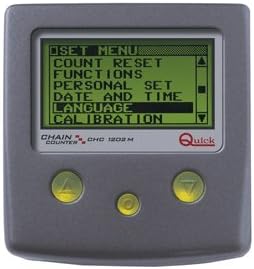
Малюнок 1: Спереду view of the CHC1202M control panel displaying the main menu. The screen shows options such as 'SET MENU', 'COUNT RESET', 'FUNCTIONS', 'PERSONAL SET', 'DATE AND TIME', 'LANGUAGE', and 'CALIBRATION'. Below the screen are three control buttons: two triangular buttons (up/down) and a central circular button.
Основна операція
- Увімкнення/вимкнення живлення: The unit powers on automatically when the vessel's main power is supplied.
- Windlass Control: Use the designated UP and DOWN buttons (typically the triangular buttons) to raise or lower the anchor.
- Chain Counter: The LCD display will show the length of chain lowered in meters or feet.
Menu Navigation (Refer to Figure 1)
Use the triangular UP and DOWN buttons to navigate through menu options. Press the central circular button (often labeled 'OK' or 'Enter') to select an option.
- ВСТАНОВЛЕНЕ МЕНЮ: Access various settings for the device.
- COUNT RESET: Reset the chain counter to zero. This is typically done after the anchor is fully retrieved.
- ФУНКЦІЇ: Configure specific operational functions such as automatic lowering or up alarm.
- PERSONAL SET: Customize user preferences.
- ДАТА І ЧАС: Set the internal clock and calendar.
- МОВА: Select the display language (information displayed in 5 different languages).
- калібрування: Calibrate the chain counter for accurate length measurement. This is crucial for precise operation and should be performed according to the detailed instructions in the full product manual.
Розширені функції
- Automatic Lowering Function: Allows the windlass to lower the chain to a preset depth automatically.
- Up Alarm Function: Alerts the user when the anchor is nearing retrieval or a preset 'up' position.
- Locked Keys Function: Prevents accidental operation of the windlass.
- Windlass Management with Auto Free Fall: Integrates with windlass systems that support automatic free fall.
- Chain Speed Displayed: Shows the rate at which the chain is being deployed or retrieved.
- Depth of Chain Lowered: Can be shown in meters or feet.
- Налаштування дисплею: Backlight display screen with 8 brightness levels. 8 different display contrast levels can be set. Automatic display contrast compensation according to environmental temperature.
For detailed instructions on configuring and using these advanced features, please refer to the comprehensive manual provided with your CHC1202M unit.
Технічне обслуговування
The CHC1202M is designed for durability in marine environments. Regular maintenance is minimal but important for longevity.
- Прибирання: Wipe the display and panel surface with a soft, damp тканиною. Уникайте абразивних засобів для чищення або розчинників.
- Підключення: Periodically check all electrical connections for corrosion or looseness. Ensure they are clean and secure.
- Захист навколишнього середовища: While the unit has a degree of protection IP67 (except for electric contact area), it is advisable to protect it from prolonged direct exposure to harsh weather conditions when not in use, if possible.
Усередині пристрою немає деталей, які може обслуговувати користувач. Не намагайтеся відкрити кришку.asing.
Усунення несправностей
If you encounter issues with your CHC1202M, consider the following common solutions:
- Немає живлення/вимкнення дисплея: Check the vessel's main power supply and the unit's circuit breaker or fuse. Ensure all power connections are secure.
- Incorrect Chain Count: The chain counter may require recalibration. Refer to the 'CALIBRATION' option in the menu and follow the detailed calibration procedure in your full manual. Ensure the chain sensor is clean and properly installed.
- Windlass Not Responding: Verify that the windlass motor is receiving power and that its own circuit protection is intact. Check the CAN BUS connection for data transfer issues. Ensure the 'Locked Keys' function is not active.
- Display Readability Issues: Adjust the backlight brightness and contrast levels through the display settings menu. The unit also features automatic contrast compensation based on environmental temperature.
If the problem persists after attempting these steps, contact qualified marine electronics service personnel or Quick customer support.
Технічні характеристики
| Особливість | Деталь |
|---|---|
| Номер моделі | FNCHC1202M00C00 |
| Бренд | швидко |
| Джерело живлення | 12/24Vdc (Universal) |
| Current Absorption (max) | 35 мА |
| Тип дисплея | Графічний LCD |
| Display Backlight Levels | 8 |
| Display Contrast Levels | 8 (with auto compensation) |
| Інтерфейс | МОЖЕ АВТОБУС |
| Ступінь захисту | IP67 (except for electric contact area) |
| Робоча температура | Wide range (specifics not provided in source) |
| Дата першої доступності | 1 травня 2014 р |
Гарантія та підтримка
Specific warranty details for the Quick CHC1202M Windlass Control Panel are not provided in this document. Please refer to the warranty card included with your product packaging or visit the official Quick Marine Accessories website for comprehensive warranty information and customer support contacts.
For technical assistance, spare parts, or service, please contact your authorized Quick dealer or distributor.