вступ
This user manual provides comprehensive instructions for the setup, operation, and maintenance of your Reloop RP-8000 Advanced Hybrid Torque Turntable. The RP-8000 combines traditional direct-drive turntable functionality with advanced digital control features, making it a versatile tool for DJs and audio enthusiasts.
Please read this manual thoroughly before operating the device to ensure proper use and to maximize its performance and longevity.
Інструкції з техніки безпеки
- Переконайтеся, що джерело живлення відповідає об’ємуtagвимоги, зазначені на пристрої.
- Не піддавайте пристрій впливу дощу, вологи або екстремальних температур.
- Уникайте розміщення пристрою поблизу джерел тепла або під прямими сонячними променями.
- Не відкривайте casing; звертайтеся до кваліфікованого персоналу з усіма видами обслуговування.
- Always disconnect the power cable before cleaning or moving the unit.
- Зберігати в недоступному для дітей місці.
Вміст упаковки
Перевірте наявність усіх елементів в упаковці:
- Основний блок поворотного столу
- Кабель живлення
- USB кабель
- RCA Cable (with ground wire)
- Сліпмат
- Противага
- Headshell (cartridge not included)
- Посібник користувача (цей документ)
Продукт закінченийview
Familiarize yourself with the various components of your Reloop RP-8000 turntable.
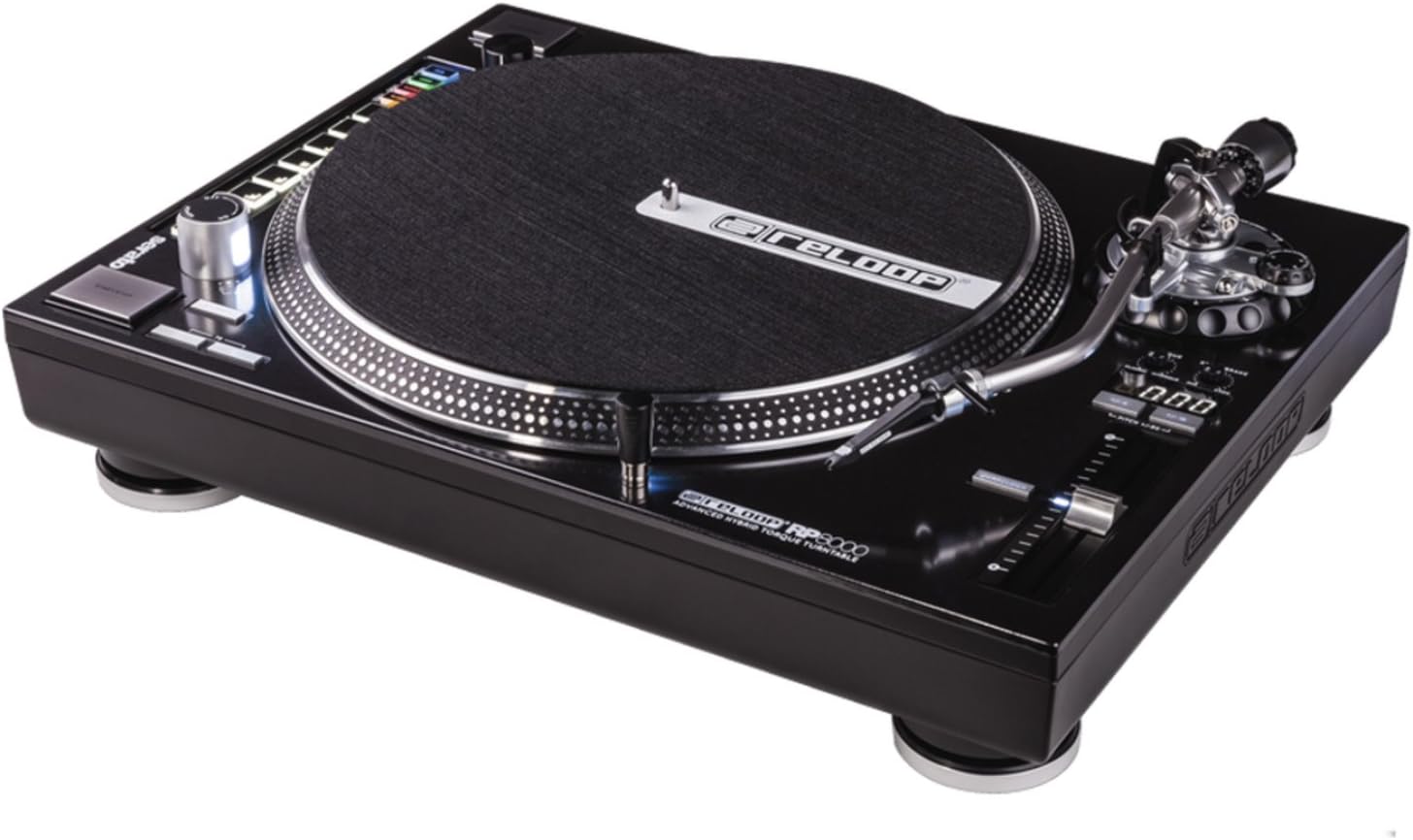
малюнок 1: З верху до низу view of the Reloop RP-8000 turntable, showcasing the platter, tone arm, pitch fader, and MIDI control section with performance pads.

малюнок 2: Під кутом view of the Reloop RP-8000, highlighting the robust construction, the illuminated platter edge, and the integrated MIDI controls on the left side.

малюнок 3: Rear panel of the Reloop RP-8000, showing the audio output (Phono/Line), USB ports (USB A and TT Link), power input, and power switch. Note the additional start/stop button for vertical setup.
Ключові компоненти:
- Блюдо: Обертова поверхня, на яку розміщуються платівки.
- Тонарм: Holds the cartridge and stylus, tracking the record's grooves.
- Висота тону: Adjusts the playback speed (BPM).
- Кнопки «Пуск/Стоп»: Controls platter rotation. An additional button is provided for battle setup.
- MIDI Control Section: Features a Trax encoder, 8 backlit drum pads, and mode selection buttons for software control.
- Phono/Line Output: RCA jacks for audio output, with a switch to select between phono (turntable level) and line (mixer/amp level) output.
- Порти USB: For connecting to a computer and linking multiple turntables.
Налаштування
1. Розпакування та розміщення
- Обережно вийміть програвач з упаковки.
- Place the unit on a stable, level surface away from direct vibrations.
- Забезпечте належну вентиляцію навколо пристрою.
2. Tone Arm and Cartridge Assembly
- Attach your preferred headshell and cartridge (sold separately) to the tone arm.
- Install the counterweight onto the rear of the tone arm.
- Adjust the counterweight to balance the tone arm horizontally. Refer to your cartridge's instructions for recommended tracking force.
- Set the anti-skate dial to match the tracking force.
3. Зв'язки
- Аудіоз'єднання: Connect the RCA cables from the turntable's PHONO/LINE output to your mixer or ampліфірник.
- If connecting to a PHONO input on your mixer/amp, set the turntable's PHONO/LINE switch to ТЕЛЕФОН.
- If connecting to a LINE input, set the turntable's PHONO/LINE switch to ЛІНІЯ.
- Connect the ground wire to the ground terminal on your mixer/amp to reduce hum.
- Підключення USB: Connect the USB cable from the turntable's USB port to your computer for MIDI control and DVS (Digital Vinyl System) functionality.
- Turntable Link (TT Link): For linking multiple RP-8000 units, connect them in series using standard USB cables. Only one turntable needs to be connected to the computer.
- Підключення живлення: Connect the power cable to the turntable and then to a suitable power outlet.
Інструкція з експлуатації
1. Базове відтворення
- Place a record on the platter and put the slipmat on top.
- Select the desired speed (33, 45, or 78 RPM) using the speed selection buttons.
- Натисніть кнопку START/STOP, щоб розпочати обертання диска.
- Carefully lower the tone arm onto the record using the cue lever.
- Adjust the pitch using the pitch fader as needed.
2. Контроль висоти
- The pitch fader allows for precise adjustment of playback speed.
- Use the Pitch Range buttons (+/-8%, +/-16%, +/-50%) to select the desired pitch adjustment range.
- The LCD display shows the current pitch percentage.
- Press the Quartz Lock button to return the pitch to 0% (nominal speed).
3. MIDI Control and Performance Modes
The RP-8000 features an integrated MIDI control section for seamless integration with DJ software.
- Trax Encoder: Use this large encoder to browse through playlists and load tracks in your DJ software.
- Ефективні накладки: The 8 backlit drum pads offer various performance modes:
- Режим гарячої метки: Trigger up to 8 hot cue points.
- Режим циклу: Set and trigger loops.
- Sampрежим: Access and play sampлес.
- Режим користувача: Freely assign MIDI functions to the pads and other control elements.
- Dual Performance Mode: Activate two modes simultaneously (e.g., Hot Cue and Loop) by pressing their respective buttons. The pads will be split to control both functions.
- Turntable Link Mode: Connect up to four RP-8000 turntables via USB. The units automatically assign themselves to available decks in your DJ software, requiring only one USB connection to your computer.
- Кнопка реверсу: Instantly reverses platter rotation.
- Adjustable Start/Stop Time: Use the dedicated dials to fine-tune the platter's start and brake times for customized performance.
Технічне обслуговування
- Прибирання: Використовуйте м’яку суху тканину для протирання пристрою. Для стійкого бруду злегкаamp cloth can be used, but ensure no liquid enters the unit. Avoid abrasive cleaners.
- Догляд за стилусом: Regularly clean your stylus with a soft brush designed for this purpose. Replace the stylus when it shows signs of wear to prevent damage to your records.
- Пилозахисний чохол: Use a dust cover (if available) when the turntable is not in use to protect it from dust and debris.
Усунення несправностей
| проблема | Можлива причина | Рішення |
|---|---|---|
| Ні звуку, ні низької гучності | Incorrect PHONO/LINE switch setting; loose RCA cables; faulty cartridge/stylus. | Ensure PHONO/LINE switch matches input; check cable connections; inspect/replace cartridge/stylus. |
| Гудіння | Ground wire not connected; interference from other electronics. | Connect ground wire to mixer/amp; move turntable away from other electronic devices. |
| Тарілка не обертається | Power not connected; power switch off; START/STOP button not pressed. | Check power cable; ensure power switch is ON; press START/STOP button. |
| MIDI controls not responding | USB cable not connected; incorrect software settings; outdated firmware. | Ensure USB cable is connected; check DJ software MIDI settings; update turntable firmware if available. |
If the problem persists after attempting these solutions, please contact Reloop customer support.
Технічні характеристики
| Особливість | Деталь |
|---|---|
| Назва моделі | RP-8000 MK2 (AMS-RP-8000) |
| Тип двигуна | AC Motor, Quartz-driven Direct Drive |
| Вага товару | 22 фунта (приблизно 9.98 кг) |
| Розміри продукту (Д x Ш x В) | 20.66 x 16.53 x 7.48 дюймів (приблизно 52.5 x 42 x 19 см) |
| Технологія підключення | Wired (RCA, USB 2.0) |
| Джерело живлення | Провідний електричний |
| томtage | 220 Volts (Note: Check specific unit for local voltagсумісність) |
| Апаратний інтерфейс | USB 2.0 |
| Сумісні пристрої | Персональний комп'ютер |
| Формат сигналу | цифровий |
Гарантія та підтримка
For information regarding warranty coverage, please refer to the warranty card included with your product or visit the official Reloop website. Reloop offers various protection plans for extended coverage, which may be purchased separately.
For technical support, troubleshooting assistance beyond this manual, or spare parts, please contact Reloop customer service through their official webсайту або уповноважених дистриб'юторів. Зберігайте чек про покупку як підтвердження покупки для гарантійних претензій.
Примітка: The user manual (PDF) is also available for download at https://manuals.plus/m/8eb0b60ccb1c6d10ac93577b129a938bfbac889fdb461902d354afc8d19b78dd.


