1. Вступ
This manual provides essential information for the safe and efficient installation, operation, and maintenance of your Delta DPS-750EB A D20850-006 750 Watt Power Supply. This power supply unit (PSU) is designed for server applications, offering reliable power delivery with a 750-watt output capacity.
2. Інформація про безпеку
WARNING: Improper installation or use can result in electric shock, fire, or damage to the equipment. Always follow these safety guidelines.
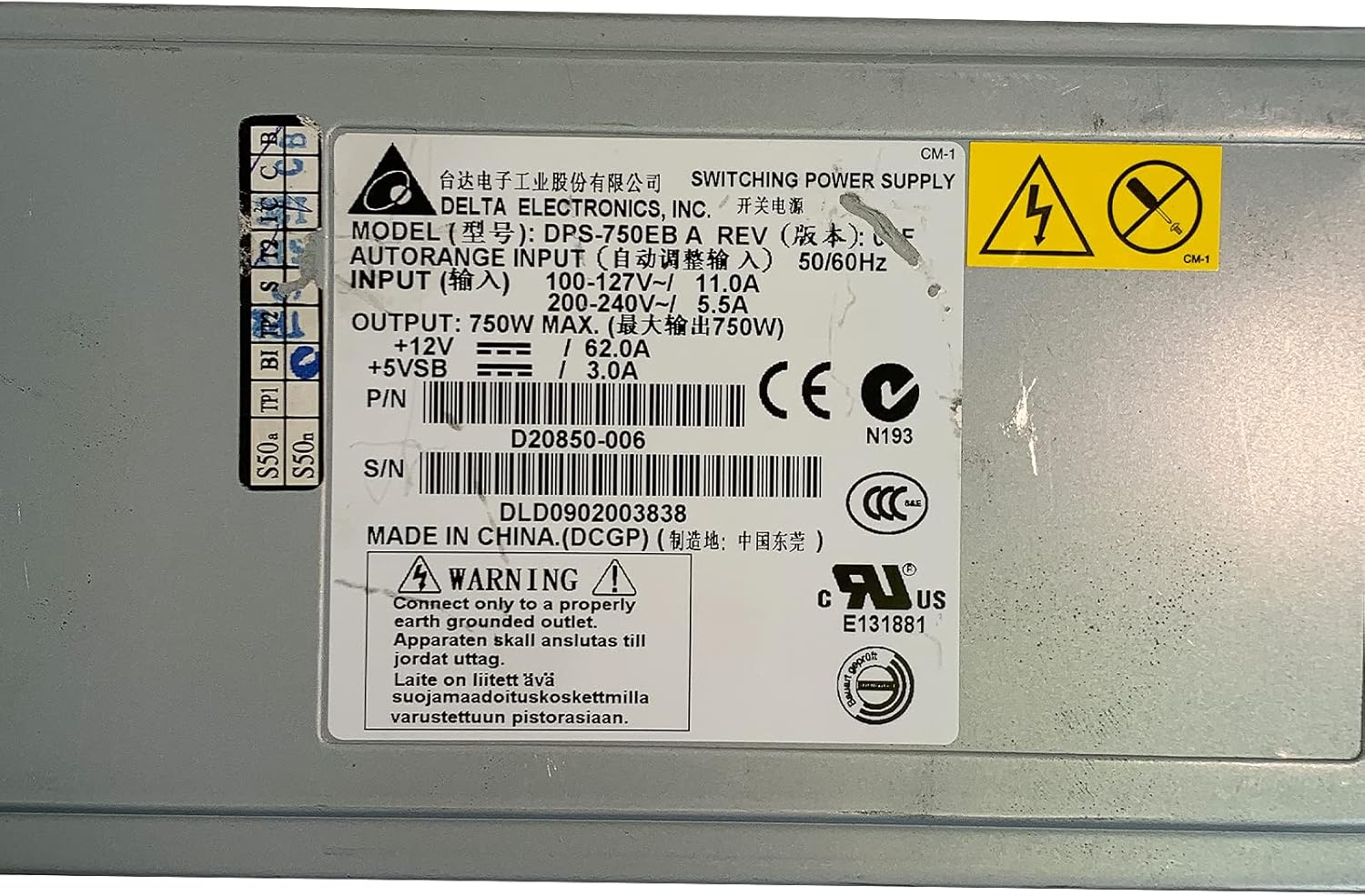
- Заземлення: Connect only to a properly earth grounded outlet. The apparatus must be connected to a mains socket outlet with a protective earthing connection.
- томtage: Переконайтеся, що вхід обtage matches the specifications on the power supply label (100-127V~ or 200-240V~).
- Професійна установка: Монтаж повинен виконувати кваліфікований персонал.
- Вентиляція: Не блокуйте вентиляційні отвори. Забезпечте достатній потік повітря навколо пристрою, щоб запобігти перегріву.
- вологість: Do not expose the power supply to moisture or liquids.
- Обслуговування: Не відкривайте блок живлення casing. Усередині немає деталей, які може обслуговувати користувач. Звертайтеся до кваліфікованого сервісного персоналу з усіх питань щодо обслуговування.

Зображення 2.1: Product label showing input voltagе, вихідний ватtage, and safety warnings. Note the grounding requirement: "Connect only to a properly earth grounded outlet."
3. Продукт закінчивсяview
The Delta DPS-750EB A is a robust 750-watt power supply designed for server environments. It features a semi-modular design, allowing for flexible cable management. The unit includes active cooling with integrated fans to maintain optimal operating temperatures.
Зображення 3.1: Фронт view of the Delta DPS-750EB A power supply, showcasinйого компактний форм-фактор.

Зображення 3.2: Задня view of the power supply, showing the dual cooling fans and the AC power input connector.
4. Налаштування та встановлення
- Розпакування: Carefully remove the power supply from its packaging. Inspect for any visible damage.
- Приготування: Ensure the server system is powered off and disconnected from the main power outlet.
- Монтаж: Install the power supply into the designated bay within your server chassis. Secure it using the appropriate screws.
- Кабельні з'єднання: Connect the necessary power cables (e.g., motherboard, CPU, peripherals) from the power supply to the corresponding components. The semi-modular design allows you to connect only the cables you need.
- Підключення до мережі змінного струму: Connect the AC power cord to the power supply's input port and then to a properly grounded wall outlet.
5. Інструкція з експлуатації
- Початкове увімкнення: After all connections are secure, power on your server system.
- Перевірка системи: Verify that all components are receiving power and functioning correctly. Listen for normal fan operation from the power supply.
- Нормальна робота: The power supply will operate continuously as long as the server system is powered on. The internal fans will adjust speed based on temperature and load to maintain optimal cooling.
6. Технічне обслуговування
- Видалення пилу: Periodically inspect the power supply's fan vents for dust accumulation. Use compressed air to gently clean the vents and fan blades to ensure unrestricted airflow. Perform this with the system powered off and unplugged.
- Перевірка кабелю: Regularly check all power cables for signs of wear, fraying, or loose connections. Replace any damaged cables immediately.
- Середовище: Ensure the server operates in a clean, dry, and well-ventilated environment to prevent dust buildup and overheating.
7. Вирішення проблем
| проблема | Можлива причина | Рішення |
|---|---|---|
| Система не вмикається. | Loose power cable, faulty outlet, power supply failure. | Check all power connections. Test the outlet with another device. If issues persist, consult a technician. |
| System powers on but is unstable/shuts down. | Overheating, insufficient power, component failure. | Ensure proper ventilation. Verify power supply wattage meets system requirements. Check for component errors. |
| Гучний шум вентилятора від блоку живлення. | Dust accumulation, high load, fan malfunction. | Clean fan vents. Ensure system is not under excessive load. If noise is abnormal, consider professional inspection. |
8. Технічні характеристики
| Особливість | Специфікація |
|---|---|
| Назва моделі | DPS-750EB A |
| Бренд | Дельта |
| Сумісні пристрої | Сервер |
| Вихідна ватtage | 750 Вт |
| Форм-фактор | ATX |
| Спосіб охолодження | Повітря (1 вентилятор) |
| Конструкція джерела живлення | Напівмодульний |
| Мінімальна вхідна гучністьtage | 100 вольт (перемінний струм) |
| Максимальний вхідний об'ємtage | 230 вольт (перемінний струм) |
| Верхня температура | 50 градусів Цельсія |
| Вага товару | 5 фунта |
| P/N | D20850-006 |
| S/N | DLD0902003838 |
9. Гарантія та підтримка
For warranty information and technical support, please refer to the documentation provided with your purchase or contact Delta Electronics directly. Keep your purchase receipt and product serial number (DLD0902003838) readily available when contacting support.


