вступ
Welcome to the user manual for your Alcatel Sigma 260 DECT Cordless Phone. This guide provides detailed instructions on how to set up, operate, maintain, and troubleshoot your new phone. Please read this manual carefully to ensure optimal performance and longevity of your device.
The Alcatel Sigma 260 is a reliable DECT cordless phone featuring a 50-entry phonebook, hands-free function, and caller ID, designed for clear communication and ease of use.
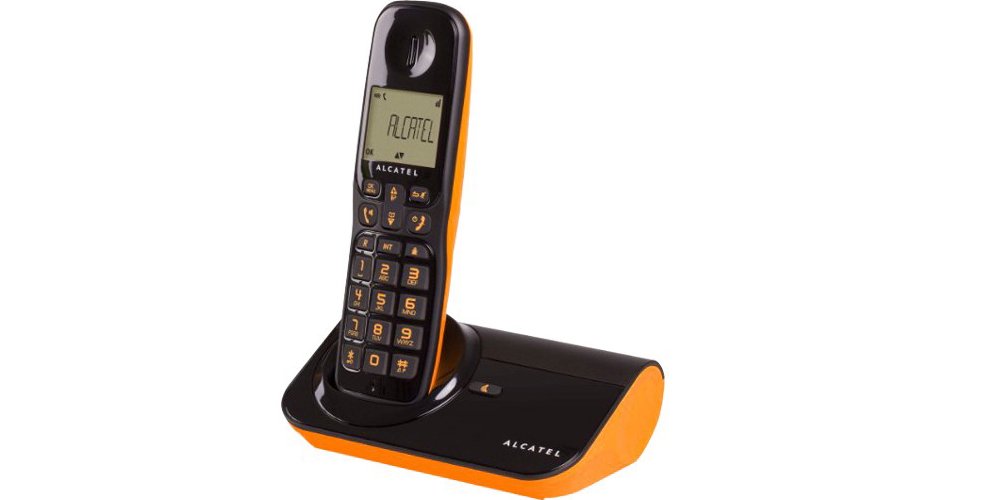
малюнок 1: Alcatel Sigma 260 DECT Cordless Phone Handset and Base Station.
1. Налаштування
Follow these steps to set up your Alcatel Sigma 260 phone.
1.1 Розпакування та вміст упаковки
Ретельно розпакуйте всі предмети та переконайтеся, що у вас є такі компоненти:
- Alcatel Sigma 260 Handset
- Alcatel Sigma 260 Base Station
- Адаптер живлення для базової станції
- Шнур телефонної лінії
- Rechargeable AAA Batteries (typically 2x)
- Посібник користувача (цей документ)
1.2 Встановлення батареї
- Знайдіть кришку відсіку для батареї на задній панелі телефону.
- Зсуньте або підніміть кришку, щоб відкрити відсік.
- Insert the rechargeable AAA batteries, observing the correct polarity (+ and -) as indicated inside the compartment.
- Встановіть кришку батарейного відсіку назад, переконавшись, що вона надійно зафіксувалася.
Важливо: Only use the supplied rechargeable batteries or equivalent approved replacements. Non-rechargeable batteries may damage the device.
1.3 Підключення базової станції
- Connect one end of the telephone line cord to the TEL socket on the base station.
- Підключіть інший кінець телефонного шнура до телефонної розетки.
- Plug the power adapter into the DC IN socket on the base station.
- Підключіть адаптер живлення до відповідної електричної розетки.
- Place the handset on the base station to charge the batteries. Allow at least 12-15 hours for the initial charge.
Примітка: Position the base station away from other electrical appliances to avoid interference.
1.4 Handset Registration (for additional handsets or re-registration)
Your primary handset is usually pre-registered. If you have additional handsets (up to 4 connectable handsets are supported) or need to re-register a handset, follow these general steps:
- On the base station, press and hold the registration button (often marked with a signal icon or "PAGE") for approximately 5 seconds until an indicator light on the base starts flashing.
- On the handset, access the menu, navigate to "Registration" or "Register Handset" (refer to the handset display for exact menu options).
- Enter the system PIN (default is usually 0000 or 1234).
- The handset will search for the base station and register. A confirmation message will appear on the handset display once successful.
Порада: If registration fails, ensure the handset is close to the base station and try again.
2. Керування телефоном
This section covers the basic functions of your Alcatel Sigma 260.
2.1 Здійснення дзвінків
- Прямий набір номера: Візьміть слухавку або натисніть ПОГОВОРИТИ button. Enter the phone number using the keypad. The call will connect automatically.
- З телефонної книги: Натисніть ТЕЛЕФОННА КНИГА button (or navigate via menu). Use the arrow keys to scroll through entries. Press ПОГОВОРИТИ щоб набрати вибраний номер.
- Повторний набір: Натисніть ПОВТОРЕНИЙ кнопку до view a list of recently dialed numbers. Use arrow keys to select, then press ПОГОВОРИТИ.
2.2 Прийом дзвінків
- Коли телефон дзвонить, натисніть кнопку ПОГОВОРИТИ кнопку, щоб відповісти на дзвінок.
- Щоб завершити дзвінок, натисніть КІНЕЦЬ кнопку або покладіть трубку назад на базу.
2.3 Телефонна книга (50 записів)
Your phone can store up to 50 names and numbers.
- Додавання контакту: Access the menu, select "Phonebook", then "Add New Entry". Enter the name and number using the keypad. Save the entry.
- Редагування контакту: Access the phonebook, select the contact, then "Edit". Make changes and save.
- Видалення контакту: Access the phonebook, select the contact, then "Delete". Confirm deletion.
2.4 Функція «вільні руки»
Щоб увімкнути гучний зв'язок у режимі "вільні руки" під час розмови, натисніть СПІКЕР button (often marked with a speaker icon). Press it again to switch back to handset mode.
2.5 Ідентифікатор абонента
If you subscribe to Caller ID service from your telephone provider, the caller's number (and name, if available in your phonebook or provided by the service) will be displayed on the handset screen before you answer the call.
3. Технічне обслуговування
Proper care ensures the longevity of your Alcatel Sigma 260.
3.1 Очищення
Протріть трубку та базову станцію м’якою ганчіркоюamp cloth. Do not use abrasive cleaners, solvents, or strong chemicals, as these can damage the surfaces. Ensure no liquid enters the device openings.
3.2 Догляд за акумулятором
- Always return the handset to the base station when not in use to ensure it remains charged.
- Якщо телефон не використовуватиметься протягом тривалого часу, вийміть батарейки, щоб запобігти витіканню.
- Replace batteries when their performance significantly degrades. Use only approved rechargeable AAA batteries.
4. Вирішення проблем
If you encounter issues with your phone, try the following solutions before seeking professional assistance.
| проблема | Можлива причина / рішення |
|---|---|
| Немає гудка |
|
| Не вдається здійснювати або приймати дзвінки |
|
| Погана якість звуку / Статичні перешкоди |
|
| Телефон не заряджається |
|
| Дисплей порожній або нечитабельний |
|
5. Технічні характеристики
Below are the key technical specifications for the Alcatel Sigma 260 DECT Cordless Phone:
| Бренд | Alcatel |
| Номер моделі | Сигма 260 |
| Тип телефону | DECT бездротовий телефон |
| Джерело живлення | Battery Powered (Rechargeable AAA) |
| Тип клавіатури | Одна клавіатура |
| Ідентифікатор абонента | так |
| Ємність телефонної книги | 50 записи |
| Функція «вільні руки» | так |
| Connectable Handsets | До 4 |
| Тип дисплея | Буквено-цифрові |
| Автовідповідач | немає |
6. Гарантія та підтримка
For information regarding warranty terms and conditions, please refer to the warranty card included with your product or contact your retailer. Specific warranty details are not provided in this manual.
Для отримання технічної підтримки або запитів ви можете зв’язатися з продавцем безпосередньо електронною поштою:
Електронна пошта: tecnotorba.amazon@gmail.com
Please provide your product model (Alcatel Sigma 260) and a detailed description of your issue when contacting support.