1. Вступ
Thank you for choosing the Antec HCG-850M 850W Power Supply. This manual provides essential information for the safe and efficient installation, operation, and maintenance of your power supply unit. Please read this manual thoroughly before installation and retain it for future reference.
2. Інформація про безпеку
Завжди дотримуйтесь наступних запобіжних заходів, щоб запобігти травмуванню або пошкодженню вашої системи:
- не треба open the power supply casinг. Високий об'ємtages are present inside, even when the unit is unplugged.
- не треба insert any objects into the power supply's ventilation openings.
- Ensure the power supply is installed in a well-ventilated area.
- Use only the modular cables provided with this power supply. Using incompatible cables can cause damage.
- Disconnect the AC power cord from the wall outlet before installing or removing the power supply.
- This product is designed for use in personal computers only.
3. Вміст упаковки
Перевірте наявність усіх предметів у вашій упаковці:
- Antec HCG-850M 850W Power Supply
- Modular Cable Set (PCI-E, SATA, Peripheral, CPU)
- Шнур живлення змінного струму
- Монтажні гвинти
- Посібник користувача (цей документ)
4. Продукт закінчивсяview
The Antec HCG-850M is an 850-watt, 80 PLUS Bronze certified, semi-modular power supply designed for high-performance personal computers. It features a quiet 135mm fan for efficient cooling and robust protection circuits to ensure stable power delivery.
4.1 Основні характеристики
- 850 Watts Continuous Power
- 80 PLUS Bronze Certified Efficiency
- Semi-Modular Cable Management
- Безшумний вентилятор 135 мм
- Форм-фактор ATX
- Multiple Protection Circuits (OCP, OVP, UVP, SCP, OPP, OTP)
4.2 Блок живлення
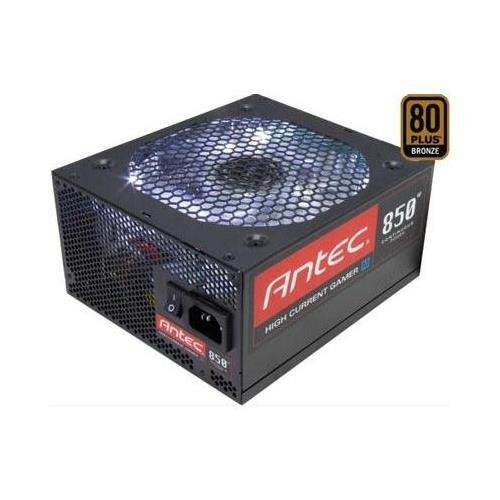
Зображення 1: спереду view of the Antec HCG-850M 850W Power Supply, showing the fan grille and modular cable connectors. This unit provides stable power to your computer components.
5. Налаштування та встановлення
Follow these steps to install your Antec HCG-850M power supply:
- Підготуйте свою систему: Переконайтеся, що ваш комп'ютер повністю вимкнено та від'єднано від розетки. Відкрийте корпус комп'ютера.
- Видаліть старий блок живлення (якщо є): Від’єднайте всі кабелі від старого блоку живлення. Відкрутіть гвинти та вийміть старий блок живлення з корпусу.
- Встановлення нового блоку живлення: Carefully place the Antec HCG-850M into the power supply bay of your computer case. Secure it with the provided mounting screws. Ensure the fan is oriented correctly for optimal airflow (typically facing down if there's a bottom vent, or up if not).
- Підключення основних кабелів:
- Підключіть 24-контактний кабель живлення материнської плати ATX.
- Connect the 4+4-pin or 8-pin EPS/CPU power cable to your motherboard.
- Підключення модульних кабелів: Attach the necessary modular cables for your components (e.g., PCI-E for graphics cards, SATA for hard drives/SSDs, Peripheral for fans/accessories). Connect them securely to both the power supply and the respective components.
- Управління кабелем: Акуратно прокладіть кабелі для покращення потоку повітря та естетики.
- Закрийте корпус та увімкніть живлення: Close your computer case. Connect the AC power cord to the power supply and then to a wall outlet. Flip the power switch on the PSU to the 'ON' position. Power on your computer.
6. Інструкція з експлуатації
Once installed, the Antec HCG-850M operates automatically. Here are some general operating guidelines:
- Увімкнення/вимкнення живлення: Use your computer's power button to turn the system on or off. The switch on the power supply itself should generally remain in the 'ON' position during normal operation.
- Стабільність системи: Ensure your system is stable. If you experience unexpected shutdowns or reboots, refer to the troubleshooting section.
- Вентиляція: Maintain good airflow around your computer case to prevent overheating of components, including the power supply.
7. Технічне обслуговування
Правильне обслуговування може подовжити термін служби вашого блоку живлення:
- Очищення від пилу: Periodically clean dust from the power supply's fan grille and the interior of your computer case using compressed air. Завжди від’єднуйте шнур живлення змінного струму перед чищенням.
- Перевірка кабелю: Occasionally check that all power cables are securely connected to the power supply and components.
- Середовище: Operate the power supply in a clean, dry environment with stable temperatures.
8. Вирішення проблем
If you encounter issues with your power supply, try the following steps:
8.1 Немає живлення системи
- Ensure the AC power cord is securely plugged into both the wall outlet and the power supply.
- Check that the power supply's ON/OFF switch is in the 'ON' position.
- Verify all internal power cables (24-pin ATX, CPU, PCI-E) are correctly and firmly connected.
- Перевірте розетку за допомогою іншого пристрою, щоб переконатися, що вона має живлення.
- If possible, test the power supply in another known working system or with a PSU tester.
8.2 Нестабільність системи або випадкові вимкнення
- Переконайтеся, що вимоги до живлення вашої системи не перевищують потужність блоку живлення 850 Вт.
- Check for overheating components. Ensure proper case ventilation and clean any dust buildup.
- Verify all power connections are secure. Loose connections can cause intermittent power delivery.
- If the issue persists, it may indicate a fault with the power supply or another component. Consider professional diagnosis.
9. Технічні характеристики
| Особливість | Деталь |
|---|---|
| Номер моделі | HCG-850M |
| Вихідна ватtage | 850 Вт |
| Сертифікація ефективності | 80PLUS бронзи |
| Форм-фактор | ATX |
| Спосіб охолодження | Air (135mm Fan) |
| Модульний тип | Напівмодульний |
| Сумісні пристрої | Персональний комп'ютер |
| Вага товару | 9 фунта (приблизно 4.08 кг) |
| ASIN | B00ESAI3M0 |
10. Гарантія та підтримка
На продукцію Antec надається гарантія виробника. Щоб дізнатися про конкретні гарантійні умови, зверніться до гарантійного талона, що додається до вашого продукту, або відвідайте офіційний веб-сайт Antec. website. For technical support or customer service, please contact Antec directly through their official support channels.
Офіційний Antec Webсайт: www.antec.com


