вступ
The Hyperkin RetroN 5 is a high-definition gaming console designed to play cartridges from multiple retro gaming systems. This manual provides essential information for setting up, operating, and maintaining your RetroN 5 console.
Supported systems include NES, SNES, Super Famicom, Genesis, Mega Drive, Famicom, Game Boy, Game Boy Color, and Game Boy Advance. Master System games can also be played with the use of a Power Base Converter (sold separately).
Вміст упаковки
- RetroN 5 HD Gaming Console
- Бездротовий Bluetooth-контролер
- Кабель HDMI
- Адаптер змінного струму зі змінними штекерами
- USB-кабель для зарядки контролера
Продукт закінченийview
The RetroN 5 console features multiple cartridge slots and controller ports to accommodate various retro gaming hardware.
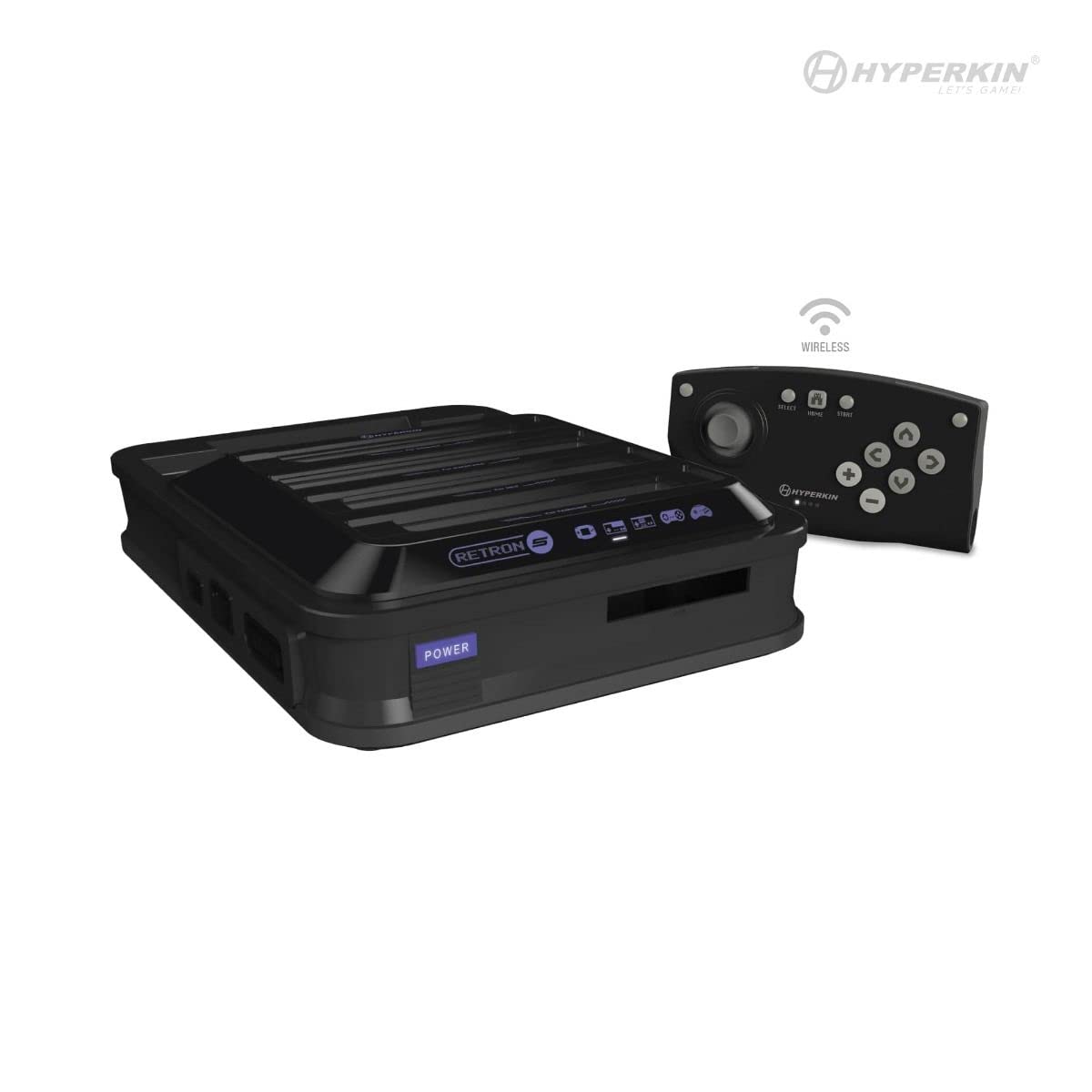
Зображення: спереду view of the Hyperkin RetroN 5 console and its included wireless controller. The console features multiple cartridge slots on top and front.
Front and Top Panel
- Cartridge Slots: Dedicated slots for NES, SNES, Super Famicom, Genesis, Mega Drive, Famicom, Game Boy, Game Boy Color, and Game Boy Advance cartridges.
- Кнопка живлення: To turn the console on or off.
Задня панель

Зображення: Задня частина view of the Hyperkin RetroN 5 console, displaying the HDMI output, AC power input, USB port, and SD card slot.
- Вихід HDMI: Connects to your television or display for high-definition video and audio.
- Вхід змінного струму: Для підключення адаптера живлення.
- Порт USB: For various accessories or future updates.
- Слот для SD-карти: For saving game states, backups, and system updates.
Бічні панелі
- Controller Ports: Dedicated ports for original NES, SNES, and Genesis controllers.
Налаштування
- Підключення до дисплея: Connect one end of the HDMI cable to the HDMI Output port on the back of the RetroN 5 and the other end to an HDMI input on your television or monitor.
- Підключіть живлення: Insert the appropriate regional plug into the AC power adapter. Connect the power adapter to the AC Input port on the back of the RetroN 5, then plug the adapter into a wall outlet.
- Charge/Pair Controller: Connect the included wireless controller to the console using the USB charging cable. The controller will charge and automatically pair with the console. Once charged, it can be used wirelessly.
- Вставте ігровий картридж: Carefully insert a compatible game cartridge into its corresponding slot on the console. Ensure the cartridge is fully seated.
- Увімкнення: Press the Power button on the front of the console. Select the correct HDMI input on your television.
Інструкція з експлуатації
Гра в ігри
- After powering on, the console will detect the inserted cartridge and display the game's information on screen.
- Select 'Play Game' from the on-screen menu to begin.
- The RetroN 5 allows for various video and audio enhancements, which can be adjusted through the system's settings menu.
Saving Game Progress
The RetroN 5 supports multiple methods for saving game progress:
- Збереження в грі: Utilize the game's original save functionality, which will save directly to the cartridge.
- Зберегти штати: The console can create save states at any point during gameplay, stored on the system's internal memory or an inserted SD card.
- Save Backups: You can back up save files from a cartridge to the system memory or an SD card, and transfer save files from an SD card back to a cartridge.
Видалення картриджа
To prevent damage to cartridges or the console, always remove cartridges by holding the console firmly with your right hand and gently pulling the cartridge from the top right side with your left hand. Avoid forcing the cartridge out.
Using Original Controllers
Original NES, SNES, and Genesis controllers can be connected to their respective ports on the side of the console for an authentic gaming experience.
Технічне обслуговування
- Картриджі для чищення: Ensure game cartridge contacts are clean before insertion to prevent reading errors. Use a cotton swab with isopropyl alcohol if necessary.
- Cleaning Console Slots: Periodically inspect and gently clean the console's cartridge slots with compressed air or a specialized cleaning kit.
- Оновлення програмного забезпечення: Check the Hyperkin official website for any available firmware updates. Updates can be installed via an SD card.
- Генеральне прибирання: Wipe the console's exterior with a soft, dry cloth. Avoid using harsh chemicals or abrasive materials.
Усунення несправностей
- Консоль не вмикається: Ensure the AC power adapter is securely connected to both the console and a working wall outlet.
- Немає відео/аудіовиходу: Verify the HDMI cable is correctly connected to both the console and the display. Ensure your television is set to the correct HDMI input.
- Game Cartridge Not Reading: Remove and reinsert the cartridge. Ensure the cartridge contacts are clean. Try a different cartridge to rule out a cartridge-specific issue.
- Wireless Controller Not Responding: Ensure the controller is charged. Reconnect it via USB to re-pair if necessary.
- Tight Cartridge Removal: This is a known characteristic. Refer to the 'Cartridge Removal' section under Operating Instructions for the recommended method.
Технічні характеристики
| Номер моделі | М01688-БК |
| Розміри продукту | 13 x 3 x 14 дюймів |
| Вага товару | 4.01 фунта |
| Сумісність | NES, SNES, Super Famicom, Genesis, Mega Drive, Famicom, Game Boy, Game Boy Color, GBA (Master System with Power Base Converter) |
| Вихід | HDMI |
| Джерело живлення | Адаптер змінного струму |
| Контролер | Wireless Bluetooth (1 Lithium Ion battery required) |
Інформація про гарантію
For detailed warranty information, please refer to the official Hyperkin webсайт або гарантійний талон, що додається до вашого продукту. Гарантійні умови можуть відрізнятися залежно від регіону.
Підтримка
Для отримання додаткової допомоги, технічної підтримки або view frequently asked questions, please visit the official Hyperkin support website or contact their customer service department. Contact information can typically be found on the Hyperkin webсайт або упаковка продукту.


